


Len225
Members
-
Joined
-
Last visited
-
Came across these older posts and just adding my 10 cents since I have the same issue with my Growatt 5000HVM-P connected to 4x Dyness B4850 batteries.. no stable communication on Li setting possible and been going back and forth between Growatt and Dyness for a year without being resolved (at least Dyness goes to real trouble to try and assist). Spoke to a new dealer who assured me the issue is with the Growatt and not the batteries - suggested LuxPower inverter as the cheapest replacement that actually works so will look at that now - or leave the Growatt on USER setting with manual parameters set which seems to work fine albeit defeating the object
-
I’m selling my brand new Growatt SPF5000HVM-P inverter (supports parallel units) with WIFI module included for R10,500. Bought this new for R13,000 in Jan 2020 and never installed it (it has not even been taken out of the box). I’m based in Ballito (KzN) but will facilitate courier delivery anywhere in SA at buyers cost
-
 Th3stig reacted to a post in a topic:
New RCT Axpert VMIII / Dyness B4850 communication error (fault code 61)
Th3stig reacted to a post in a topic:
New RCT Axpert VMIII / Dyness B4850 communication error (fault code 61)
-
Coulomb reacted to a post in a topic:
New RCT Axpert VMIII / Dyness B4850 communication error (fault code 61)
-
I no longer have my VM3 but long story short, my comms issues back in January with the VM3/Dyness B4850 were caused by the battery software and not the VM3 as I assumed. I replaced the VM3 at the time but still had some comms issues with the new Growatt I replaced with until Dyness arranged for the battery software to be updated which sorted it all out. I believe there were also circuit board issues with some of the late 2019 B4850 batteries and that Dyness have since replaced boards in these batteries. From my understanding of what caused the issues I had and what Dyness has changed since, you should not have the same issues
-
Shadders reacted to a post in a topic:
New RCT Axpert VMIII / Dyness B4850 communication error (fault code 61)
-
Coulomb reacted to a post in a topic:
New RCT Axpert VMIII / Dyness B4850 communication error (fault code 61)
-
Hi guys just wanted to close the loop on this issue - the final conclusion after many hours of troubleshooting is somewhat inconclusive but it seems that the Axpert VM3 is not protocol / communication compatible with the Dyness B4850 battery (yet) - Dyness have taken note and will no doubt be looking into this in due course. Dyness confirmed that the Axpert King and Synapse version of the same have been Specifically tested and are compatible. I must pay a big complement to both Nico and Anton at Solar Panel Energy in Vanderbijlpark (where I bought my Dyness batteries) who, since opening after the holidays have spared no trouble in trying to assist with this query. This week Dyness themselves also got involved and were very helpful with a ‘no trouble is too much attitude’ - will happily support both these businesses in future. Bottom line - I have now ordered a Growatt inverter to replace the VM3 and the latter is for sale if anyone is interested - (apart from the specific comms issue with Dyness it seems a pretty decent piece of kit for the money 😊) Thanks to all who took the time to give advice and input!
-
Hi Wilfred I’m attaching the cable pins - I found the Axpert pin positions on a Pylontech summary which I also attach. Ive put my cable on a cable tester and it shows that Inverter PIN 1 runs to battery PIN 5 - all else is standard ie 2=2 , 3=3 etc - To me this seems correct for 485 communication? thanks
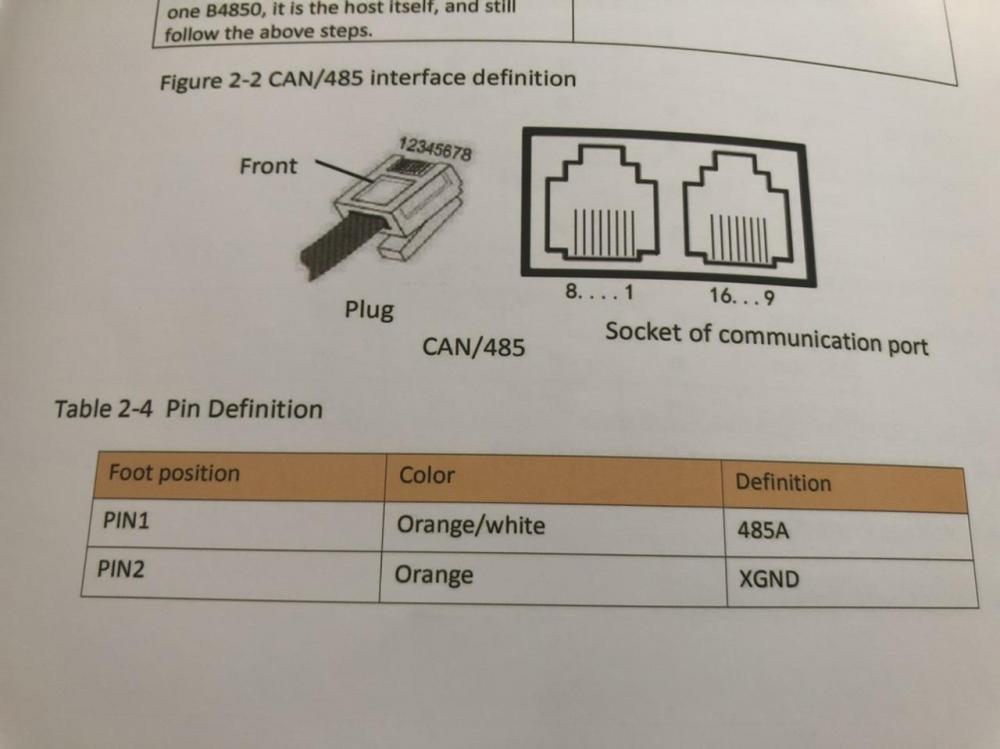


-
Here you go

-
Thanks guys - no response from Dyness yet but will be sure to update if/when I do get this sorted out! Apologies Coulomb - I see my last response to you went Awol - but that red push button is only the sleep/wake switch. Wilfred, I will try to attach a copy of the page in the Dyness manual dealing with the pin setting.. cheersThanks again My inverter’s date of manufacture is 09/2019 so I’ll be pretty disappointed if it cannot function reliably without a further firmware update? If that be the case it’s going back to the supplier! Noticed something interesting in the Dyness battery manual - it notes that the battery can communicate via CAN or RS485 but that the factory default is CAN. The Axpert only communicates via RS485 - does this imply that one should / could adjust the battery from CAN to RS485? I assumed that this would be automatic and cannot see any obvious way such an adjustment can be made? (On the Dyness both CAN / RS485 share the same comms port).Thanks, have tried these new settings (27 now at 51.5V) but the batteries still go into protection mode as soon as they show fully charged. Have switched off utility power and allowed the batteries to drain for 2min at which point they exit protection mode/ alarm lights go out again. So looks like they are still being overcharged forcing the BMS to kick in? I can only conclude that these batteries need the RS485 communication to function?Thanks Coulomb So I’m reading that those settings should change to 26 = 52.2V (or perhaps lower still?) 27 = 52.2V (or lower than 26?) 29 = 45.5V (= 2.5V below setting 12) All else to stay as is. Happy to try this if I’ve got it right? ThanksThanks DaveSA I’ve given it a try but no joy - the Dyness manual is also quite adamant that the DIP be set as per the manual even if only a single battery is used (Pin 3 on master/single for Voltronic inverters). Appreciate all the input -This issue has become very annoying and as per my above post I’ve now reached out to Dyness directly so let’s see what they say.. Thanks againHi Wilfred Have changed those settings as suggested but still have the batteries going into alarm/protection mode. Have now contacted Dyness via their website as suggested and will update if/when I receive their feedback. Thanks for the advice!The dealer who sold the batteries indicated that I must set the inverter to PYL. I’ve tried setting it to USE and using the following settings (as suggested elsewhere on the forum) 02 = 20A 12 = 48V 13 = 51V 26 = 53.2V 27 = 53.2V and 29 = 47V when using the above everything seemed to work fine for about two hours but then both batteries’ alarm lights came on (both master and slave) which seemed to suggest that they were being over- charged? (The inverter panel indicated that the batteries were only 50% charged but the batteries showed full charge). As it stands I’ve disconnected the batteries and the inverter is just bypassing utility power until I can resolve thisHi Coulomb / Wilfred The Dyness manual doesn’t specify inverter settings - it lists the Various inverter brands it is compatible with (Voltronic being one) and then indicates ‘for the following inverter brands the battery DIP setting should be X and for these other brands Y’ etc


