


Rclegg
-
Joined
-
Last visited
Posts posted by Rclegg
-
-
-
15 minutes ago, francois said:
Awesome! Glad it's working.
It was.

It switched to battery now
Any ideas @wolfandy ?

-
-
Edited by Rclegg
11 minutes ago, wolfandy said:Thanks. A few questions/comments:
- For 'Charger Source Priority', did you press the 'Set' button after you've changed it to the current selection? And did ICC respond with 'OK' in the white box next to it (as it does for 'Output Source Priority')?
- You should set 'Max PV Charging Current' to 30A (submit any changes on this tab always with the 'Set' button next to the relevant field)
- You should set 'Max AC Charging Current' to 30A
- I would set 'Back to Grid Voltage' to 47V (so that the Axpert's own settings do not interfere with ICC)
- I would set 'Back to Discharge Voltage' to 54V or higher (so that the Axpert's own settings do not interfere with ICC)
- On the Battery tab, did you press the 'Save' Button at the bottom right after you have made changes? ICC does not act on any changes unless they have been saved
- Yep
- Done
- Done
- Done
- Done
- Yeah I did now
Now its working, But lets see how long it stays in this mode. Holding thumbs!


-
6 minutes ago, wolfandy said:
Let us first confirm that all your settings are correct. Your PV does work when used to charge batteries and the inverter is in Utility mode - but drops when it goes into SBU. I would still guess it is a settings problem (maybe even conflicting settings between ICC and the inverter)
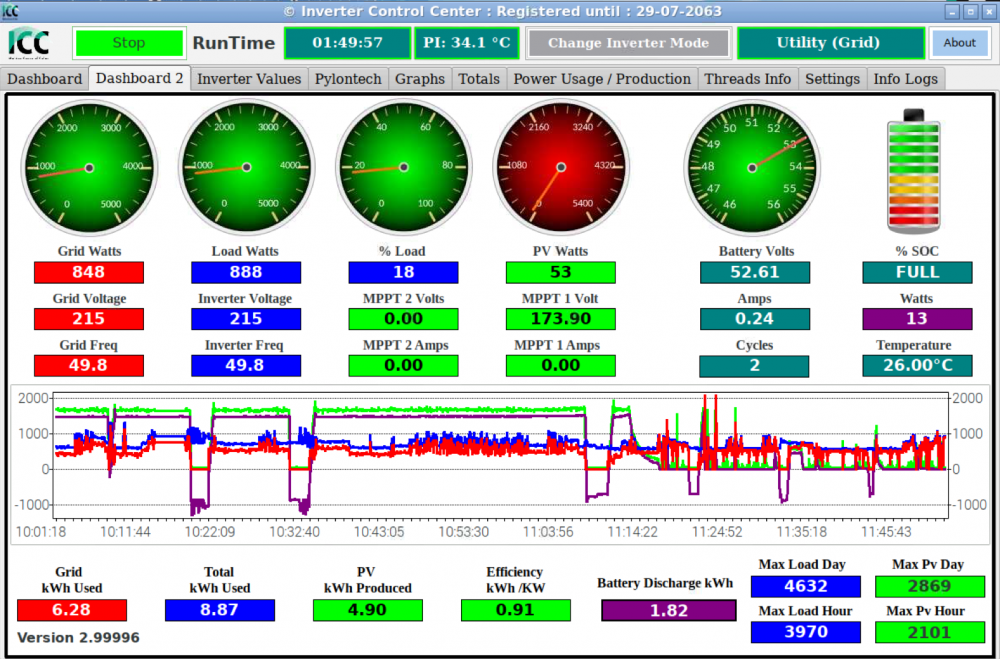
If I read this graph correctly, it looks like PV tries to pick up the load, but won't.

-
-
Just now, wolfandy said:
Let us first confirm that all your settings are correct. Your PV does work when used to charge batteries and the inverter is in Utility mode - but drops when it goes into SBU. I would still guess it is a settings problem (maybe even conflicting settings between ICC and the inverter)
I really hope its a config.
Here are current settings as of 5 mins ago.


-
1 minute ago, wolfandy said:
Hmm. Something weird happened. Can you please post screenshots both of your current Battery and Inverter Settings tabs?
Looking at your chart above, it seems that just before 07h30 ICC switched you back to SBU (at which point your PV also seemed to be higher than your load). However, then you switched on a significant load, which put a lot of strain on your Pylon (a single Pylon does not like to drive more than 1800W of load, which you exceeded by quite a bit at that point) and your system switched back to Utility (I cannot tell if this was due to the SOC reaching your set point or if the Pylon BMS kicked in to protect itself). At around 07h40 it switched back to SBU - however for some reason then did not use PV to power the loads but instead only the batteries
So right now, my load is 800w - battery is fully charged, I switch to SBU and it just starts draining the battery. Wont use PV for the load.
-
-
8 hours ago, wolfandy said:
Correct. SBU means Solar -> Battery -> Utility. It will use PV (if necessary supplemented by battery) while available, then battery until the SOC drops down to the level you have set, at which point it will switch back to Utility
Yes. For some reason the Axpert is built that even if it is running on Utility, it will power it's own consumption from the batteries
Correct. (Unless we are in heavy loadshedding) I drain my Pylons every night. If the SOC drops to 24% during the night, ICC will switch over to Utility - but the Axpert's self-consumption will drop the SOC a bit further (you have to play around a bit to figure out what value the best for you is so that your SOC never drops below 20%). Once PV production starts, it will start charging the batteries (while the loads might still be powered by Utility). Once the battery gets up to 26%, ICC will switch the Axpert back to SBU mode and the loads will be powered by Solar (if you set this point too low than your Solar might not yet be sufficient to power your loads, which means the inverter will start drawing on the batteries again to supply the difference and your SOC will drop again)
Thanks @wolfandy - really appreciate the info. Makes a lot of sense.
So this morning, the SOC was at 21% and then battery started charging. Got to 26% and inverter went to SBU mode as ICC sets. However, then battery started draining and I figured it was due to not enough PV available.
However, when it went back to grid at 24% - this happened: - There is enough PV for the house + battery?

-
27 minutes ago, wolfandy said:
Ok - then this is weird. Then I do not understand why your load is higher than your AC consumption (even though it might then just be an ICC reporting problem where the excess PV gets added to the load. I remember having a similar problem at one point - maybe drop Manie an email and ask him to look into it?)
Yeah, I am not sure of that. I will keep logging and checking throughout the week and test some more - my understanding is that load cannot be higher AC consumption in this use case. If I don't come right, I will message him and check.
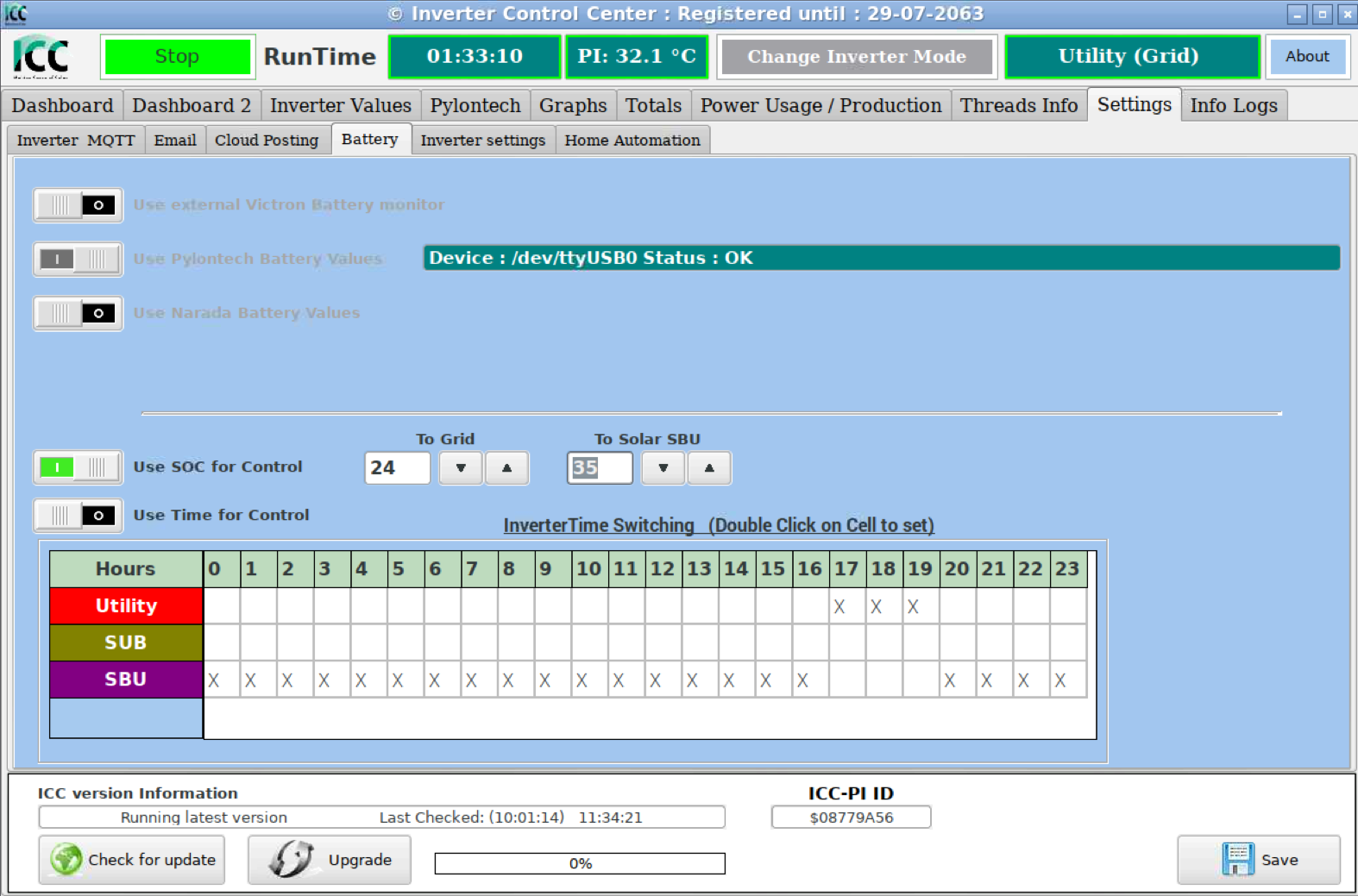
29 minutes ago, wolfandy said:If you enable 'Use SOC for Control' it will change based on the actual SOC reported by your Pylon's BMS. The values you can set are based on %SOC. The values in my earlier screenshot mean that ICC switches the inverter to Grid when the battery has been drained to 24% SOC and will switch back to SBU once the battery has been recharged to 26%. You will need to play around and see what values work best for you.
Okay, yeah that makes a lot more sense now. So it will stay in SBU mode as long as the battery is above 26% of SOC? - but if PV is available, it should be using that, correct?
30 minutes ago, wolfandy said:Keep in mind that even while running on Grid, your inverter will draw somewhere around 40W from the battery for self-consumption - which means that during the night your battery SOC will drop a bit even while running on Grid
This was going to be my next question; I noticed that too. So that's completely normal?
31 minutes ago, wolfandy said:In the morning, even though I am starting to produce the first bit of PV, my system will still run on Grid and the PV will be used to start charging the battery. Once the SOC has increased to my 26%, ICC will then switch the inverter back SBU (that is around the value at which my PV production equals my load)
For your SOC to be lower than 26% in the morning, I assume you are using the batteries in the night and then charge them up using the PV in the morning - and once they get to 26% SOC - the inverter goes to SBU mode (Due to ICC setting) and continues to charge them + give you PV for the house?
27 minutes ago, wolfandy said:I would recommend the last one 'No AC charge. Solar power load first then charge battery'. This means that PV will be used to power the loads and any excess energy will be used to charge your batteries
Thanks, I have made this change too.
Appreciate the help @wolfandy - will report back tomorrow and see what the system does.
-
36 minutes ago, wolfandy said:
If @Rclegg has enabled the 'Use SOC for Control' on the Settings/Battery tab, then these voltages should be at 46V or 47V for 'Back to Grid' and 58V for 'Back to Discharge' - to ensure that the Axpert's own settings do not interfere with ICC switching the inverter
Your 'Charger Source Priority' is set to 'No AC Charge. Solar Charge Battery first then power Loads'. You can see that your PV (green line) was slightly higher than your Battery (purple), which means you were producing slightly more than your set battery charging current. The surplus was used to power the loads, supplemented by AC (your blue Loads line is slightly higher than your red AC line). I do not know what other settings you have available for 'Charger Source Priority', but there should be something like 'No AC Charge. Solar power Loads first, then charge Battery' (I do not know your model that well)
Then just make sure that you have the settings above in place and the 'Use SOC for Control' enabled with SOC settings of your choice
Okay, that sounds reasonable.
This model of inverter does not blend AC and PV - I know it blends PV and Battery for loads.
I do not have SOC for Control in the settings tab enabled. I will give that a go and see what happens. I will set it to time based or SOC based? Did see a screenshot where one was "To grid: 24" and to to Solar SBU" 26" However I was not sure what that actually meant. Is that 24 volts or ??
As for the charger source priority I have the following available.

Let me try what you recommend and I will report back during the day tomorrow when there is some PV power available.
Appreciate the feedback and help.
-
32 minutes ago, wimsza said:
Agree, although you can buy the Raspberry Pi from the PiShop for a lot cheaper.
Manie sent me his banking details and the rest was easy.
Be aware that if you go my route and download the ICC software from Manie, it will not connect to your inverter until you have entered the key that he will supply once you have installed the software on the Pi. So, order your Raspberry Pi, download (and pay for) your ICC software, install it on the Pi (you do need a 16GB microSD card - don't forget the adapter for your PC as well as Win32Disk Imager (download it from web) mail Manie the ICC-PI id and he will send you the unlock key.
I'm wondering if I can move the software to a VM on my server instead - would be more convenient for me. I will check with Manie on this.
-
-
14 minutes ago, francois said:
I doubt it.
Are you able to post the settings from the inverter menu and post them here?
Maybe it will help with troubleshooting.
Sure, here is every setting on the inverter - not sure what is related -
- Program 1: SOL
- Program 2: 30A
- Program 3: APL
- Program 4: SDS
- Program 5: USE
- Program 6: Disabled
- Program 7: Disabled
- Program 8: 230v
- Program 9: 50Hz
- Program 11: 30a
- Program 12: 48v
- Program 13: 50v
- Program 16: OSO
- Program 26: 52.5
- Program 27: 51.8
- Program 29: 42.0
- Program 30: ONE - can't see this in manual?
- Program 31: SBE
- Program 32: Auto
- Program 33: Disabled
- Program 34: 58.4v
-
-
-
-
Okay with @Ridiq's changes - the inverter went to charge batteries:

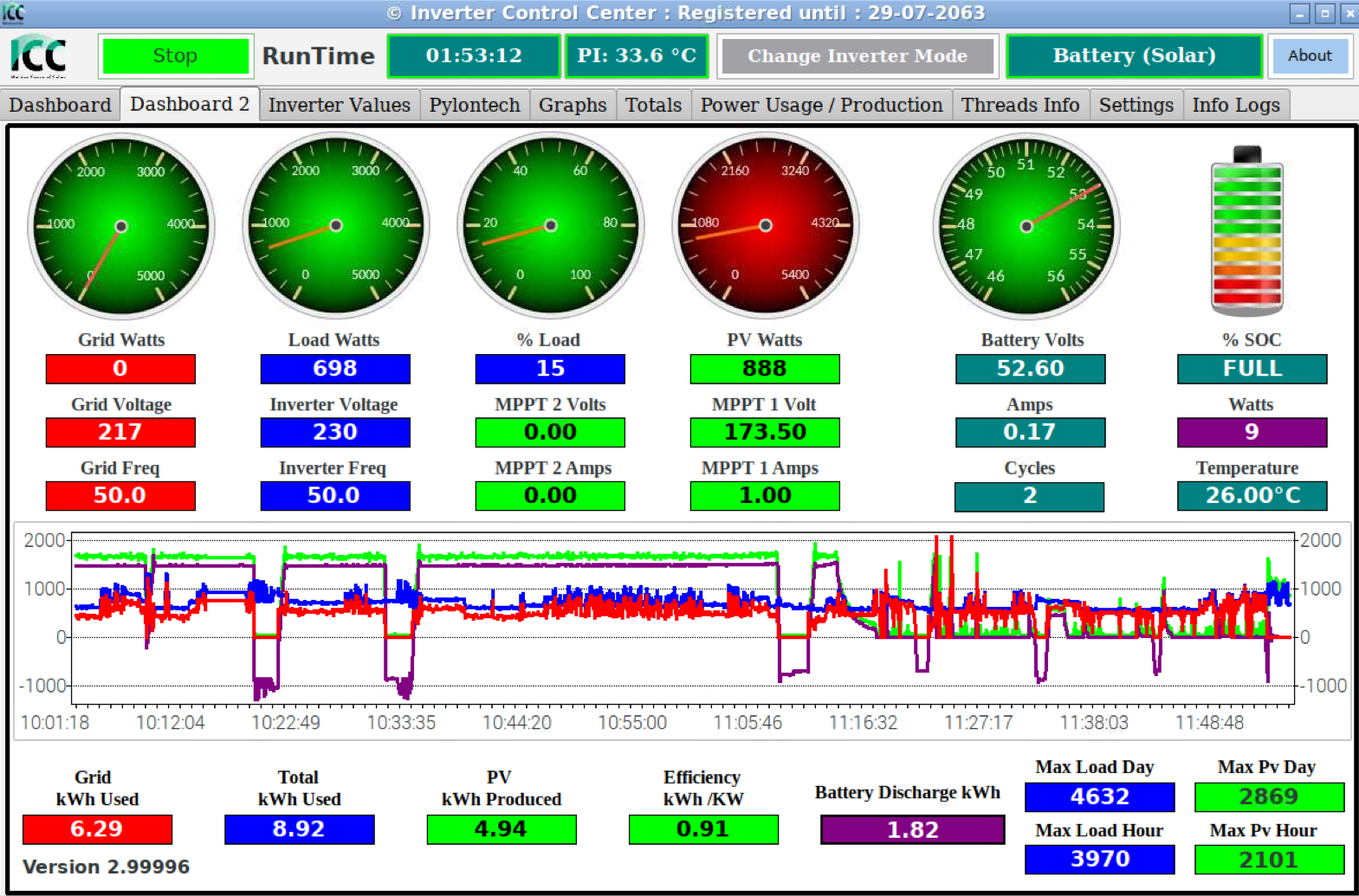
My question is this: Why is it not powering the house with that much PV available?
-
3 minutes ago, Ridiq said:
I would also drop the PV charging amps to 30A
Recommend Charge/Discharge Current (A) 37 Max.
Charge/Discharge Current (A) 74
Peak Charge/Discharge Current (A) 100A@15sec
Thanks. I have made the following changes:

The Inverter has now switched to battery. When I expect it to be on utility if there is not enough PV. I must be missing something.
-
Edited by Rclegg
51 minutes ago, wolfandy said:I trust that you have changed your charging voltages to Bulk 52.5V and Float 51.8V as per the thread that @francois linked?
On your Settings / Battery tab you need to enable 'Use SOC for Control' and adjust the values for switching to Grid and SUB/SBU (see mine below as example). ICC will then take the SOC from your Pylon's BMS and switch your inverter between Grid and SUB/SBU (whichever you have set) accordingly

Also, please keep in mind that your single Pylon does not like more than 1800W of load (other than short peaks) if running purely on battery
Thanks for this. I have the float and bulk voltages set as per the thread title linked.
At the moment, I am having issues where the PV will not run the house. It will charge the battery, not a problem at 1900watts - but as a test, I turned off the battery and grid to see how the inverter would respond - forcing it to use PV. It dropped all loads and gave me a warning of low PV (Error 15) on the display. But I am sure I have enough PV to keep the 800w load I had at the time on.
For about 10 mins today, the Inverter did use solar to power the house:

Then later it stopped and switched to battery charging from solar. Once that was done it looks like it tries to switch to house power, from the graph below, it appears to me that the inverter tries to power the house but PV but keeps dropping.

-
3 minutes ago, francois said:
Yeah if your load is only 800w and the Battery is full the panels will only deliver 800w.
Yes ICC can send MQTT to Home Assistant.
You can configure your HA broker settings in ICC under the inverter MQTT tab.
Then you can scan for available topics using MQTT FX.
You're welcome, I'm hoping other members with more experience on how to configure your inverter for optimal performance will respond soon.
Very neat install by the way! I watched the time lapse video on YouTube.
Thanks for that - much appreciated. I will check out the MQTT stuff during the week.
Yeah, the install was done very well by there guys. I did some wiring myself in the combiner box with the help of @Gielie - but the rest was mostly down to him shouting at us and eating the food lol - That MyBB thread was updated just now with those photos.
-
5 minutes ago, francois said:
Here is my graph for the day.

Same graph looks a bit better in Home Assistant

Okay, so if the house is only drawing 800w for instance, then PV will show 800w only or there above (if its not charging the battery?
My PV graph (from the first post) does not look anything like yours. it fluctuated a lot. Only stayed at a constant 3kw when I was charging the battery with it.
For oyur HA - are you sending MQTT messages to HA (or your broker) from ICC?
Thanks for sharing and the feedback, I really do appreciate it
-
1 hour ago, francois said:
Hi Robert I'm no expert with the inverter type you have, but from the first image you posted it looks like you're running in battery mode. Top right of the image. I think @wolfandymight be able to advise best.
Edit:
I think the charge voltages for the Pylontech are too high.
See here:
Thanks, I will give that thread a read now.
What I am struggling to find is, how can I see how much PV generation is available? I see some people post graphs of the amount of PV they have during the day - would be nice to see that.






New install. Need help with settings and understanding
in Starting In Solar? Feel free to introduce yourself
That's by design. Not much you can do about that.