


Digital Clouds
Members
-
Joined
-
Last visited
Everything posted by Digital Clouds
-
I can give my experience with Dyness. I have two powerbox 9,6KW. Whatever small tweaks were required to get them working with my previous Growatts, (previous, because they are really not great inverters), Andy from Aspergo (one of the distributors), is next level when it comes to assistance. He flew down twice to Cape Town to assist with my batteries, uploaded firmware, swapped cables if required, swapped out to the latest BMS cards (I purchased the two powerbox's at different times, so the one had older cards in). Andy really is next level when it comes to service and wanting the best for the brand. What makes it even more impressive is that originally the batteries didn't even come via his company, so where other distributors gave me the run around, Andy sorted me out. The two units are working perfectly in parallel, the BMS works well, they look good, and they are doing a fantastic job, connected to a SunSynk inverter. I wouldn't hesitate buying Dyness again, when spending this sort of cash on batteries, you want to know that you have support and someone who actually has your best interests at heart. If you are going to buy, I highly recommend contacting Andy to ensure you use the channels that connect you with him. Cheers all
-
Perhaps there are subtle differences in the actual inverters? Newer stock with perhaps some tweaks, which could explain the slight difference in FW version and the fact that neither of my two or a friends two growatts accepted the 2nd FW. These were all installed first week of March. ???
-
@Tsa how do I find FW version on the inverter itself?
-
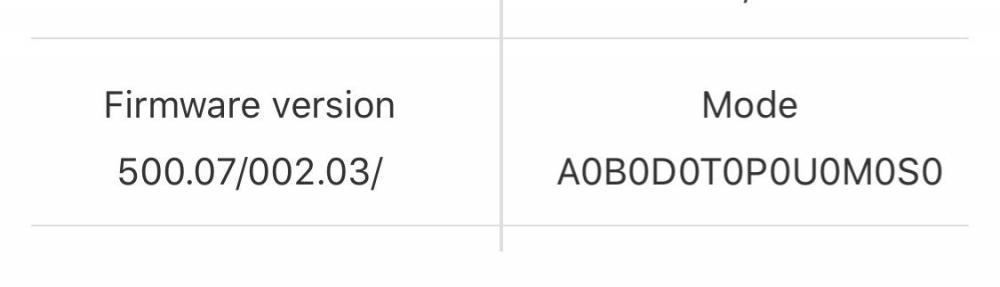
Yes indeed, spoke to you on the phone ! If I can ask, my firmware version is attached does this match yours? Wondering since I only successfully installed the first FW upgrade. Also correct on the charge rates, it fluctuates all day.
-
Apologies, some auto corrects in the one paragraph above. Andy did mention that for all the battery modules to calibrate correctly with the Dyness and FW, the battery needs to charge to 100 percent, then begin a discharge, then charge to 100% again, after which all should be calibrated.
-
Hi all, reading the posts here has been very useful. I can confirm and agree with Tsa. After many dead ends, Andy, an official dyness importer (Aspergo) visited my house this morning in Bellville. Did a FW update on my one Dyness powerbox (my second powerbox is the newer model and already had later FW on it). We then also realized the comms cable between the master dyness and growatt hub (as I have two 5kw growatts) was incorrect, and needed to be a 2 pin crossed lead. Once this was done, the growatt took the li 01 setting perfectly and all is working great so far. Just some additional notes, my growatts would not load both firmwares, only the first one loaded, the second one just didn’t ever kick off. One slight concern, the Battery charge rate often drops to 5amps, which is pretty low. Not sure why this is, even when running from Eskom. Andy did mention that for all the battery modules to calibrate correctly with the dunes a FW, the battery needs to charge to 100 percent, then behind a discharge, then charge to 100% again, after which all should be calibrated. I’ll say again, Andy was next level helpful and genuine. Excellent service.

