


Rooney Hat
Members
-
Joined
-
Last visited
Everything posted by Rooney Hat
-
The fan should be running when the unit on, but not at 100%. It should be just audible when there is no load, but sound like a jet when there is current going in or out over 2kw.
-
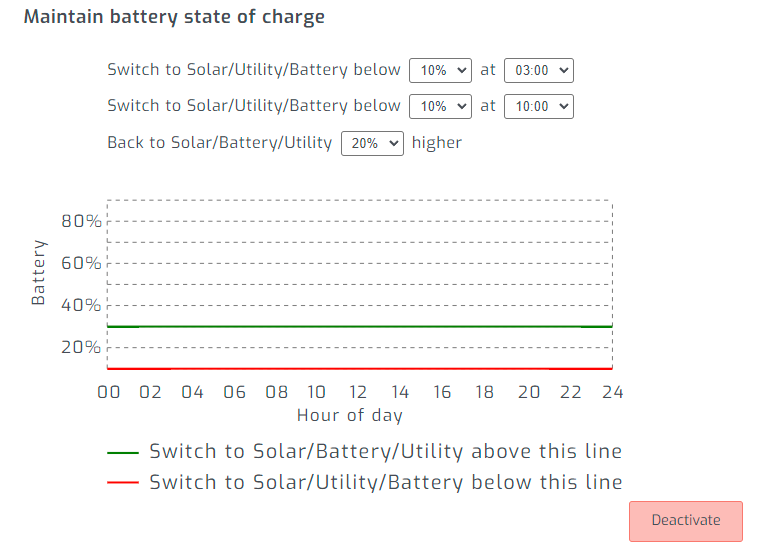
Correct, I set it down to 48v, as it was the minimum. I have not used the Inverter settings on their own, so not sure if it's possible to get it to switch back to SBU earlier. I use Solar Assistant to manage the inverter via a Raspberry PI that I got from them directly. Works very well. https://solar-assistant.io/
-
And here we go, 2.4 for US3000c. No idea what the change log is though. us_c_v2.4_Crc (1).bin
-
Many thanks, I'll sent a request and upload if he supplies it!
-
Hi Guys, anyone know where to get the latest firmware version? Got a new US3000c today and it's on 2.4, while my older two are on 2.2. Would rather they all be at the same FW version
-
Thanks Bud! Yup, was taking for granted that certain settings did not dynamically change like my old Growatt. But so far I am really impressed and think this baby is going to last
-
Hey 87! Came back to report on the issue, Thanks for the reply! Late last night I discovered that the setting for "back to battery voltage" was the at 53v and was the cause of the inverter going to grid mode, even with the grid cut off, it would return to grid until batteries hit the right voltage. I assumed this was ignored like with my old Growatt, guess not. So i've set it down to 47 so my Solar Assistant can take care of the switching. Yes, I am using the BMS cable with Pylon as the mode. And yup, that does dynamically change my option 2, so it appears ok. Not sure I'll need a firmware update if it's working well
-
Hi Guys, Recently upgraded to the Mecer 8kw MAX in running with 2x US3000c Pylontech batteries using BMS in SBU mode. Everything seems to be working well, except every few days the inverter appears to be dropping the max charge current (Option 2) down to 20A for some reason and it keeps setting it back to 20 if I try change it. (I have a wild feeling the BMS feeding that info?), and it is also switching to grid mode, even though batteries are high and load is low. If I cut the grid, it switches and runs off batteries with no issues. If I turn mains back on, it switches back to grid. Then randomly it fixes itself later. I have got a PI with Solar Assistant connected, but I don't think it's causing this issue. I was thinking that the inverter likely needs a firmware upgrade, it's currently at version 46.05. But I am struggling to find any place to get the latest firmware. Anyone know where I could get the latest firmware updates for the 8KW Max? I've found lots of posts about the KING, but nothing on the MAX. I'm also not sure if the Mecer (or the other clones) are compatible with Standard Axpert firmware? Any help appreciated!
-
I think you might be running into a similar issue that I have. I'm using Pylontech LI Batteries with BMS enabled, and it will fully charge to 100% then turn off solar completely and discharge batteries till 94% then charge again. This has been reported as the normal for the TL model, I think it's damn stupid. As a work around, once this happens, I have a ugly method to get it working properly, but it's manual process currently: 1) When batteries hit 100% and the solar turns off, I let it drop to 99%, then I set the inverter from SBU to Utility, then switch it back to SBU again a few seconds later... This enables the solar again. 2) As I have PylonTech and can connect to them via console, Enable admin mode and disable charging for both my batteries. This keeps the solar incoming to power the house but does not charge the batteries anymore. Then once the sun is down, I enable charging again on my batteries. It's really an ugly way of doing it, but until I get a new inverter or they release a firmware that fixes it, that's how it goes.
-
Hey @PurePower Could you perhaps PM the Admin password? I'm trying to see if I can find a solution to stop charge current when the batteries are at 99% capacity so that my Growatt inverter doesn't disable PV power when they hit 100% during the day. Many thanks!
-
I'm pretty sure the firmware for the TL and ES are very different as they are totally different types. TL can be found here: https://drive.google.com/drive/folders/12ttv9oCoC2rowUPDdsjfs0P4fz9DuSVt
-
Damn, that's pretty interesting. Would not expected the parallel to work as it should mix the temps, but I guess that you're halving the drain, so it will be essentially like having a 350L geyser. The circulation pump idea should also do a great job in summer and will likely eliminate the need to run the electric geyser, especially at temps that high. I was using the my 150L as my main with a 3kw element and the unpowered 200L 4kw as the feed, but was running out of hot water too quickly during the first bit of winter. So I decided to try changing my solar timings and temps, I turn on the 4KW element at 12 till 1pm at 60 degrees, then have my 3kw on from 1pm to 3pm at and again from 4am to 6am with the thermostat set to 50 degrees. It made a massive difference immediately. I only have 7kwh of battery power at night, and people need hot water in the morning, but after this change there is hot water nearly all the time, and the geyser only takes about 15mins to heat to 50 degrees at 4am, saving me battery power. I had to get an extra 2 panels to accommodate the extra load during the day, as I also have a 100L 2kw geyser in the cottage that I power from 10:30 to 12. So I am maximizing my solar currently and have ordered another 2 panels just so I can also get my batteries up to 100% before 5pm.
-
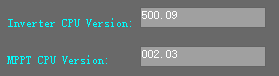
Anyone know if there have been any newer firmware releases for the 5000TL? I still have the google link, but that specifies that its 500.09 I'm really hoping they release a firmware update that addresses the 100% BMS Solar shut off till 94%. Makes zero sense that it operates like that.
-
Hi Everyone, Maybe someone has some insight on this issue. I have 2x US3000c Batteries on a Growatt 5000TL inverter using BMS. But the SOC falls out of sync between the two batteries while draining/charging. Seen it go as high as 12% difference. However the voltages are near identical. When the one hits 95%+, it slows the charging on the higher SOC battery and it just hangs till they both rapidly "Jump" to 100%. I'm on firmware 2.1, and one is month old than the other (Due to getting a faulty one replaced). I was hoping they would fall into sync with each other over time, but it's been a few weeks now. Anyone have any ideas or have a similar issue?

-
With the 5000TL, yes you should be able to connect 2s3p without any problem at all. I have 2s7p. 12 330w and 2 365w. The important thing is the voltage/amps and how many you have in a string. 5000TL recommends lower than 115v, so if the panels are around 50v each, that's why you should have max 2 in series. For efficiency sakes, If the voltages and amps are different on the newer panels, you'll always get the lowest value. So for example: If the old panels are 47v and the new panels are 48v, it will drop the new panels to 47v. Same for Amps, that's why its possible to mix and match, but it's not always efficient. But it shouldn't be an issue. I just added 2x 365w panels to my 12x 330w system because it's hard to find 330w panels anymore, and I have no issues, but I am losing a bit.
-
Nice guide, straight forward. I remember doing the trolling through this post to get all that info I think though that your replacement inverter might be on the new firmware already though, because I believe that was required to get the Li Protocol 04. But I could be wrong.
-
Just depends on what you're trying to achieve really. Low as possible is 5% with 6000 cycles on the US3000C. But will take longer to charge up during the day. If you want to use as little of Eskom as possible, you'll want to deplete your batteries as low as you can, factoring in if you want to have a little bit in reserve in case of late night load shedding. Then, Depending on daytime load and panels, you can set your inverter to go back to solar/battery as soon as the panels can handle the load and charge your batteries. Finding out what SOC level that is will just take testing.
-
Nope, nevermind. I'm still stumped. Last night I dropped to 11% SOC early, it stayed at 11% for 4 hours, then started to drop till 5% and Auto AC charge kicked in. However I am seeing the battery voltage and SOC are oddly off.


-
Thanks for the incite! I have tested and found that the Inverter does move the usage back over to grid in bypass when it's low enough, and for me, that is 11% SOC with my single battery atm. To test this, I dropped my back to grid at 15% and it dropped to 11% and remained there. Then last night I set the back to grid to 11% and when it went to bypass, it stayed at 11%. And with it being a US3000C, that is exactly where I want to cut back. But I can see how the A and B models wouldn't be able to do that. My 2nd battery that is in for warranty now was at around 10%-15% lower SOC than the working battery and must have dropped below the safe level causing a low voltage shutoff.
-
@SiliconKid Found this post while looking around for battery discharge on AC bypass, seem to be following in your footsteps I know about the 100% to 95%, but do you still have the issue of a slow drain on the batteries while in AC bypass? I've picked up a 0.8amp drain using battery view.
-
So I have disconnected the faulty battery and have left a single US300c connected. I noticed that once in bypass, the batteries continued to discharge at around 50w, I thought this was due to the faulty battery, but even now with just the working one connected, it still appears to be discharging at 0.8 amps according to battery view. It looks like that is what was causing the Inverter to turn off overnight because it was getting to the low voltage cutoff. Anyone else know what could be causing that or have the same issue? I have the custom BMS and custom Console cable connected, but I doubt that could be causing the drain. Though I'll try testing.
-
Apologies, I just saw the manual, and it states the charging voltage is 13.6-13.8v, that's pretty much the same as my old AGMs... seems odd, but ok, but it doesn't indicate float voltage. I assume that should be the same as charge v, and that is higher in AGM standard settings. So it might still be best to have it as USE setting with float and charging at the same. So with two of them, it should be 27.2v - 27.6v. But I am in no way an expert, so I would get an expert opinion.
-
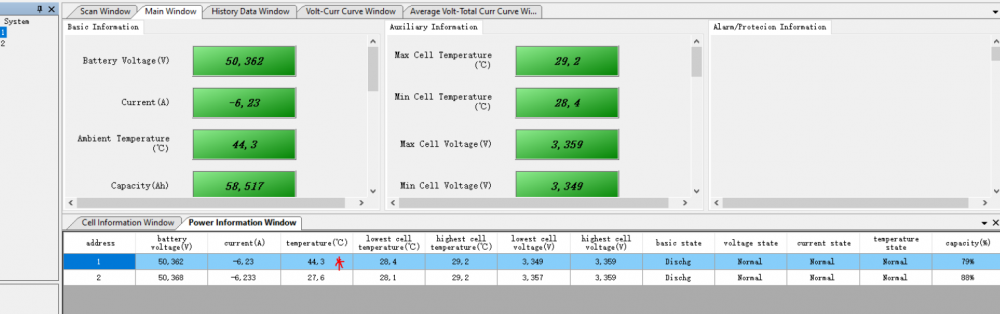
So looks like it's a faulty BMS on the battery, I'll be sending it back. Had to manually crimp a RS232 cable to connect to console on the battery. And I found the 1 battery only gets to around 90% charged before it appears to do nothing while the other one charges. Another thing I spotted was the temperature increases much higher than the other battery while charging.
-
Late to the party, not sure if anyone has replied on this. But you should not be using AGM settings for these batteries. AGMs charging and float voltages are way higher than Lithium. I believe the max you should be using is 53.2v float and charge. So it will likely be USE setting.
-
Hmmm, My 21 is set to 5% and my switch back was set at 10%... But I can try some testing over the weekend to double check... As it is, I have had my my switch back at 20% and the logs are telling me it drops to 15% before switching back to mains, so maybe it at 10% it still dropped past that to 5% then did the cutoff. I'm on the latest GW firmware, so not sure why it's doing that. Maybe I should re-crimp another cable that has 12345678 -> 876456321, as it is I cut the other pins except 12 and 3 (ground).


