


JuanH
Members
-
Joined
-
Last visited
Everything posted by JuanH
-
Yes, it works. The only issue I ran into was that I wasn't aware of the diffirence between DIN and Samite. The P1 being DIN, and my DB being Samite, it was a bit of an issue getting it to fit, but there are adapters available foer this.
-
They are in Pretoria
-
From what I understood from the developers of Solar Assistant, they plan to integrate with Home Assistant. Using HA, you'd be able to set up that sort of automations. I'm currently automating a lot of my home based on available PV output, but I'm using the DIY solution in this thread to integrage with Home Assistant.
-
This is probably what you are looking for then: https://solar-assistant.io/explore/sunsynk#hero
-
Hi Riaan, Modbus works via polling. In other words, by connecting to the port, you won't just start receiving the data. You need to send a polling command to the Modbus port (done via Node Red in the examples in this thread), including a register number, and the Modbus port will respond with that corresponding value. The flows in this thread use the Modbus register addresses as supplied by SunSynk, but I'm not sure if they will be the saem addresses for Deye. Perhaps you can reach out to the person you spoke to at Deye and request the Modbus address document from them, specific to your device? From there we can help you modify the Node Red flows to work with your device.
-
Hey Sc00bs, Can you share the link to the Sonoff Plugin for HA? I've just order one of these P1 devices, and looking to integrate it with HA. Thanks!
-
Don't think it matters, as on the PCB both As and Bs are on the same channels.


-
No difference, just A and B. Although, worth noting that you do not need both sets of wires. I only have one set going to the HAT.
-
Yeah, your CT coil is showing Zero. It's either faulty, or not wired correctly. This is what it should look like:
-
If you tap the bar chart to get to the power "flow" screen, does it show the CT coil in the bottom right above the utiliity icon?
-
You are correct with grid_gridbuy_day, but you will need a CT coil for this to show up. I'm not sure about "dayactive registers". Active power vs Reactive power is a bit beyond my comprehension and understanding of electricty. I can, however, tell you my system has a value in active, but not reactive.
-
Sorry, I realise now you mean total PV Power, not daily PV power. I'm only using PV 1, but I think @Sc00bsjust added PV1 and PV2 in the update he made to the Node Red flow earlier today. So combine the two values, and put the total out as a new value. Don't have access to my Node Red setup to confirm if this is how he did it, but that is how I would have done it.
-
It's 108: "Day PV PowerWh"
-
It's a MODBUS Register value that the inverter provides.
-
Definitly possible to use ESP32 device, if you add a MAX485 module to it. (https://gist.github.com/LosantGists/322736c80fed99dcd9695179424ab1bb) However, the low cost (R250) of the RPi Zero W (almost comparible to the cost of a ESP32 device such as NodeMCU), and also considering that there are probably more on this forum comfortable with RPi than with ESP32, it made sense to me to go with the Pi instead.
-
https://www.robotics.org.za/W14882 I also took the opportunity to switch from using my Pi 4 (which is overkill as a RS485 - MQTT intermediary, unless you are running your whol HA system on it as well) to using a Pi Zero W. Much smaller footprint, and looks much neater.
-
I've replaced this converter with an alternative RS485 device, and no longer having a time-out issue.
-
I've used @jacauc's examples, and added solar nodes to it, as well as changed/removed the calculated nodes for those who have both essential and non-essential loads on their inverters. For anyone who is interested: https://github.com/juanhaywood/sunsynk-modbus-nodered-flows
-
I'm noticing your CT coil never has a reading, even when power is clearly coming from Eskom?
-
I'm new myself, only had my system a week, so not sure of the "why" but this is how my installer set my system up, and it works as expected: With the above, excess solar is pushed into my battery. When there is not enough PV to cover consumption, the battery is used to top up from first, followed by Eskom after that. Once battery drops to 40% it no longer suplements consumption (that 40% is then reserved for when there is no Eskom, i.e. loadshedding).

-
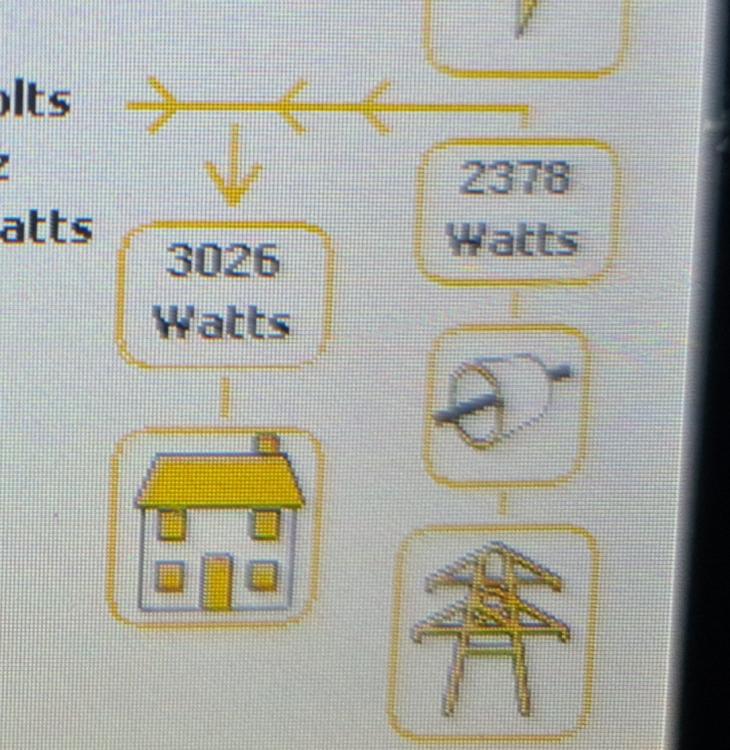
Coming back to this, there is definitely a discrepency with my setup and @Bloubul7's flows. I'm not saying his flows are set up wrong. It's more than likely that it's my Inverter that is configured incorrectly. Based on my setup, this is how my inverter readings compare to the flows. Can anyone else confirm if it is correct on their side: With the above, Grid_Total_Load_Calc is calculating my non-essential load (3026 W) twice. BTW, thank you @Bloubul7 for all the hard work and sharing it with us!


-
Thanks! I'm new to Node Red, but your example seems like a good one to unpack and learn from.
-
Thanks for sharing! What is the pallete name for "cycle"? Getting an error importing the flow.
-
@Bloubul7hoping you can provide some clarity on the below: This is a photo of my SS8's Panel for reference From what my installer explained to me, the house icon next to the grid icon in the bottom right (showing 32watts) is my non-essential usage. From your flows, I understand this to be "Grid Load". And the UPS icon is my essential usage, from your flows understood to be "Grid Inverter Load". In your Node Red flows, however, you sum "Grid CT" and "Grid Load" to give "Grid Total Load". Isn't that taking "Grid Load" into account twice, as that load is already included in Grid CT? I noticed this earlier today, when I spotted "Grid Total Load" was giving a value in excess of 11000 W. Not sure if I am misunderstanding something, or if my system is configured incorrectly.
-
The majority of the error messages are caused by the attempt to reconnect after timeout. By disabling "Reconnect on timeout", I no longer get the "Error: Client Not Ready To Read At State" messages, and only get the below every few seconds. It seems if I can find the cause of the timeout, the issue will be resolved entirely: These are my current settings:


