


JayBee
Members
-
Joined
-
Last visited
-
-
-
-
-
-
Sunsynk 8kW 6420W solar 10kW battery Everything is electric in our house so when a few things are on the stove I sometimes get spikes above 8kW and use a bit of grid, the rest of the grid usage is from cloudy days when I can't cut down usage any more.

-
-
That sounds way too small for that pool size. If you're not running it constantly I'm not sure you'll even keep up with the natural heat loss from overnight temps. It takes a lot of energy to heat a pool and if you're only going to be running it for a few hours a day I think skipping swimming in the colder months and using it to get the pool warmer when temps increase a bit would be the most optimal otherwise you'd need to oversize the heat pump.
-
-
I have a heat pump connected. I didn't have any issues connecting but did notice that the heat pump seemed to be using 802.11b according to my network dashboard which is old and slow and possibly disabled on your network? Might be worth taking a look.
-
-
-
-
I don't believe there is, and rather sadly there's very little data to be seen on their own dashboard. Personally I think you'd be way better off with solar assistant if data is what you're after.
-
-
This probably isn't what you had in mind but you could, assuming they will fit behind the plug points, use two of these behind the existing plug points: https://www.robofactory.co.za/smart-switches/178-shelly-1pm.html
-
-
-
-
-
-
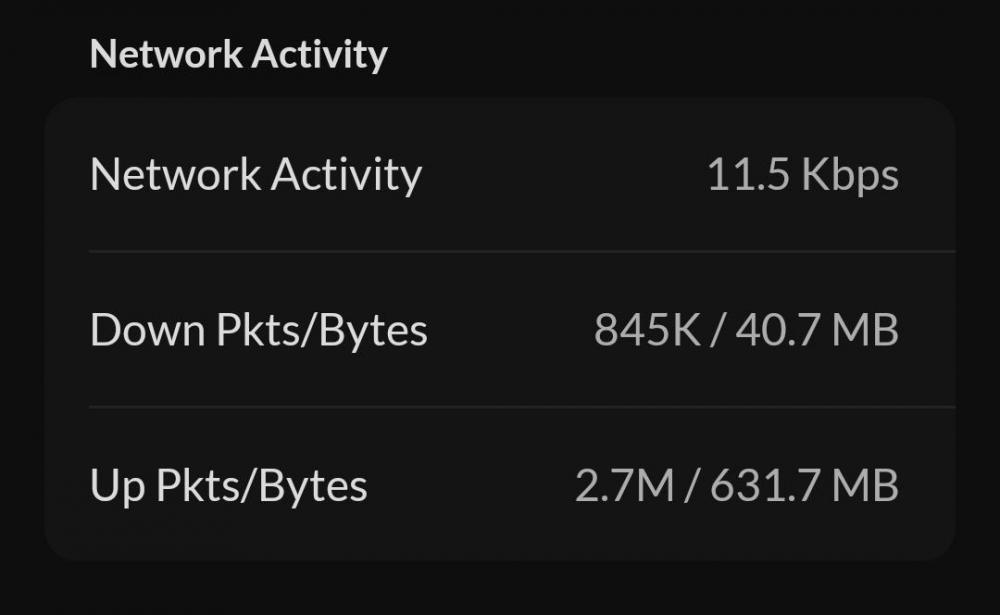
That's a good point and something I forgot to mention. It needs internet access and this is how much data it has used in the uptime (not sure how accurate this is, but just to give some idea): Uptime 9d 22h 31m
-
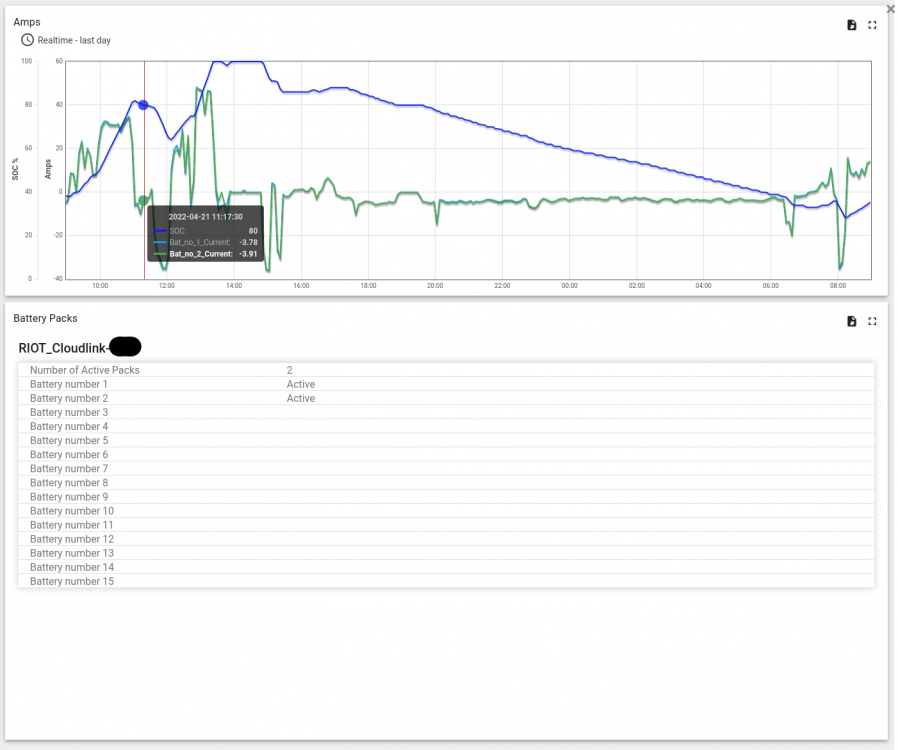
The inverter data one brings up this (mines going to be largely empty since battery only data): and the battery storage one this:

-
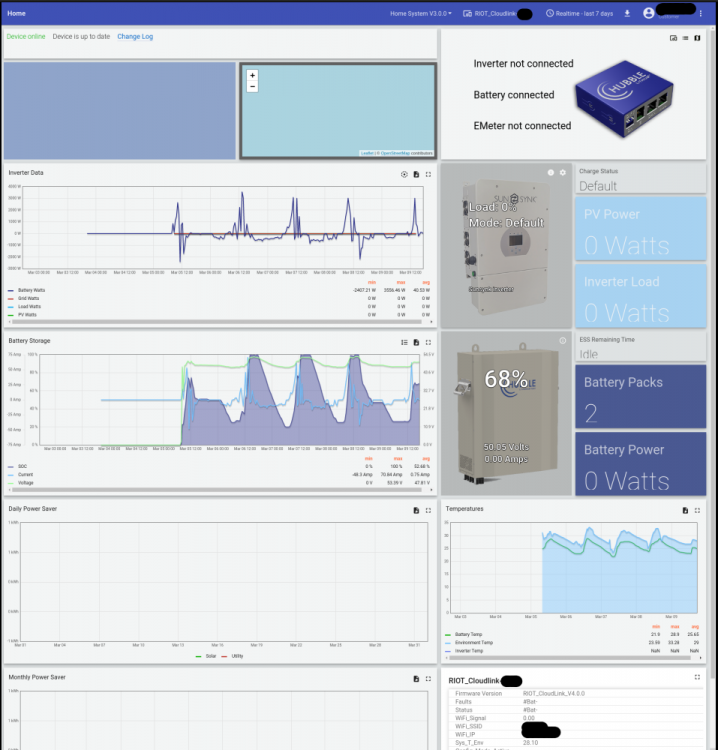
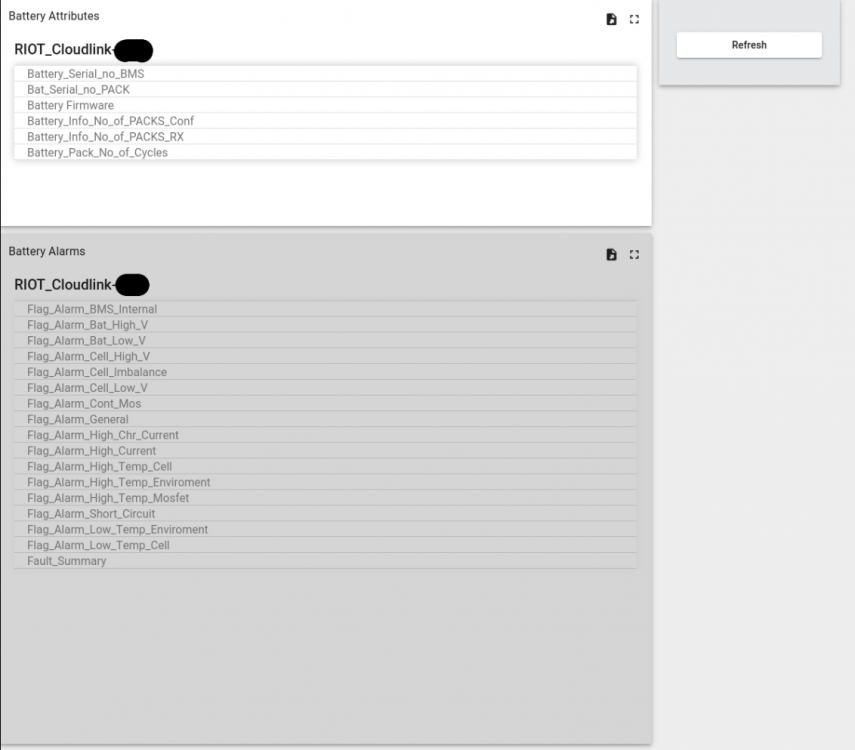
This is my personal opinion of a Hubble Cloudlink device I purchased and might be of use to someone considering buying one. First up my setup: 1 x Sunsynk 8kW 2 x Hubble AM-2 I do have a raspberry pi connected to my Sunsynk RS485 port which is sending data to my home assistant server so I only wanted the cloudlink for battery data and firmware updates, so I won't be going into the cloudlinks ability to show any of that data. So first up was installation. There's a nice enough setup guide but it's not exactly clear, well it wasn't to me anyway, what to connect where. I knew I needed to plug the RJ11 cable from the cloudlink serial to the primary batteries RS232 but wasn't to sure if I needed to plug the current cable going from the the inverter to the battery into the cloudlink CAN as well. If you just want the battery data, it just needs the RJ11 from the serial port on the cloudlink into the AM-2's RS232 port. After following the guide, registering on the portal, claiming the device and setting it up for wifi I could login to the portal but everything was showing as not connected. You need to open the remote console to the cloudlink (this is a small icon on the tile with the pic of the cloudlink, the 2nd icon): then go into device settings and then select what each port is connected to as is applicable. In my case that involves selecting "Battery" from the "Serial Conn To." dropdown and saving which reboots the device. The cloudlink then shows battery as connected and it correctly picked up 2 battery packs and was displaying a SOC.In short my device settings now look like this, with a single cable from serial on cloudlink to the RS232 port on the battery. With basic setup out the way lets take a look at the portal and the data offered. I should note at this point that I actually prefer simple to see at a glance over super complicated, so I love the 4 gauges on the SunSynk home screen and my home assistant main dashboard looks like this: I can get more detailed info if I need but I usually only want to see what is going on at a glance and this works well for me. Now the cloudlink dashboard, well it's not what can be described as pretty, and don't try opening it on a mobile device - it actually doesn't display badly just anytime you're on a graph you can't scroll since that does something on the graph, but does it have the functionality we want? This is the default view: Now please bear in mind mine is going to look a bit empty since I only want/care about battery data, and even though you have to select what you're connected to the cloudlinks dashboard doesn't hide the non applicable graphs so there's going to be a lot of empty. Now at a glance the battery does show the SOC, amps, volts and power. I should note the power figure shows in a different way to the sunsynk in that power going into (charging) the battery is a positive number whereas on the SunSynk it's a negative number. That's a good start but also the only data I can currently see. On the battery tile there's a small Info icon, top right: That brings up another window which looks more promising showing fields for battery firmware and SOH, not exactly data rich but only the SOH is visible: Now there are some additional theme's to select at the top of the dashboard dropdown: The red and dark theme's both show more battery attributes than the default screen (unfortunately all empty values as well): Unfortunately it seems like the only additional value I can see is the SOH. I have no idea what the latest firmware for the batteries is or should be but there isn't even a flag to indicate if it's up to date and I have no way of telling if it even gets firmware updates as it's supposed to. My hopes of some useful battery info like cycle counts, individual cell voltage values, high to low differences, or anything of that nature (since this is a Hubble device speaking to a Hubble battery) seems like a stretch too far. There is this little section called RIOT_Cloudlink which seems to have some interesting information, it's unfortunately a bit of a moving target so you'd need to monitor it constantly to get any useful information. It does seem to show some interesting things though: Having said all of this my SOH was shockingly low, which I didn't realise and the cloudlink alerted me to this. After a ticket and a call with a support agent about my low SOH, it seems like they can see a whole lot more information in my case the problem was identified as master batter, cell 1, which does seem to show up in the cloudlink windows above if you're watching at the correct time. I do find it extremely strange that all the useful information is hidden and they seem to want customers to log tickets to find out anything instead of making the information available. I suspect this is just going to stretch their support staff really thin but they seem to want to do it this way. In summary it looks like 3rd party devices like solar assistant (based on what I've seen on this forum, haven't used it myself) actually provide far more detailed info and are only lacking in the firmware update ability, assuming the cloudlink can actually do this. It's really only providing a single metric, SOH, which isn't even on a per battery level on the ui. I'm sure it's a great tool for the Hubble technicians and if you ever need support I think having a cloudlink is going to make your life simpler whether that's enough to make this a worthwhile purchase is a decision I'll leave to the reader.






-
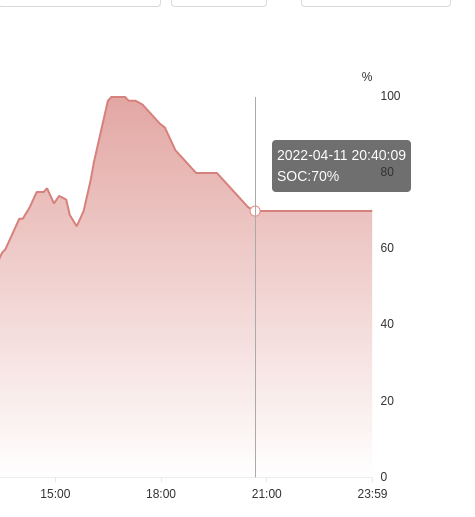
@Scorp007you may be correct, I'm no expert, I just found it super strange how I've never seen this behaviour before and I don't charge from the grid so on bad days my SOC is low most of the time. I really do find it to be unexpected though, if I set minimum SOC to 30% I don't really want to wake up to find it at 20%. I also really don't understand how there was zero drop-off from my set minimum SOC (70) over a > 3.5 hour period here but the day before, it was quite happy to slowly go below the minimum set SOC (50): I guess I'll just be super grateful mine somehow doesn't drop below the minimum set SOC. @Terminal3kyes I'm using hubbles as well

-
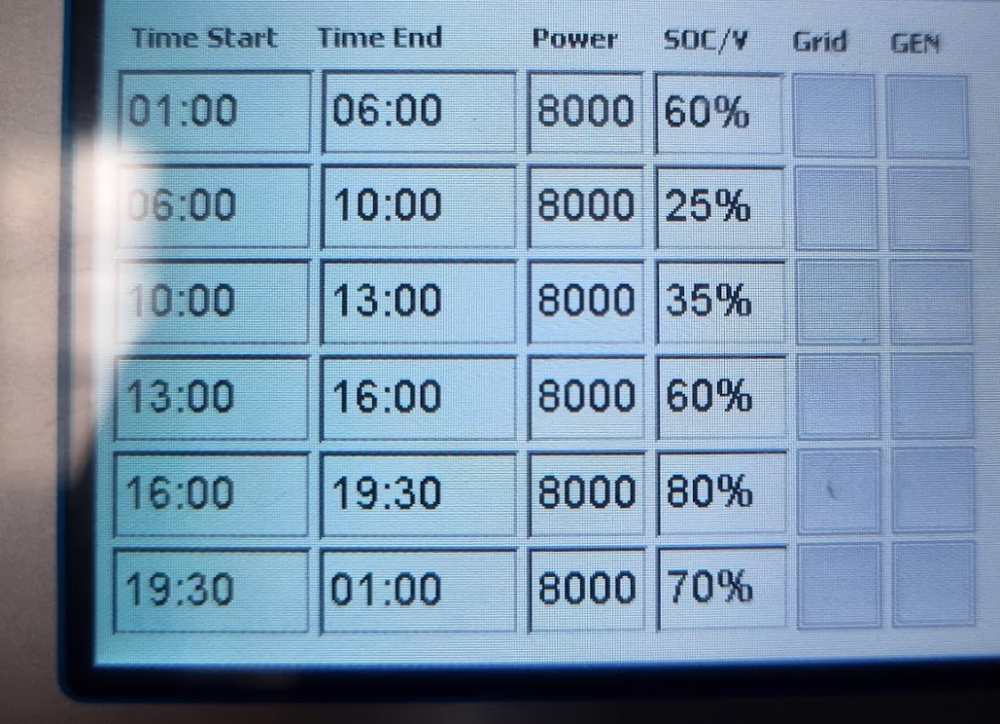
@Terminal3k I recently was running on a single battery for a few days and noticed this strange behaviour as well, it would actually go below my set minimum SOC all the way to low battery where it would then charge and discharge. I was getting close to a 1% drop every hour. In my two battery setup I've never noticed this, some days I would only get to 50% SOC and it would stay there until it got to the next time slot that allowed it to go below that level (which was the next morning). The announcement of load-shedding yesterday made me make some changes, just in case I needed a bit more power in the morning so I changed most of my rows to be a bit higher and somehow that drop-off below the set SOC stopped happening (it stayed at the set SOC from 20:30 to 01:00 no problem). I don't really know what I did that affected it and I'm back to 2 batteries now but these were my times and settings for last night/this morning they might be a good starting point to try them and then change things slowly and see if that helps at all.
-
I've got two Hubble AM-2's and I recently got a cloudlink to monitor them. I should really do a separate review on that sometime, but much to my surprise my SOH was on 76% 😢 My system was installed in July 2021 so my batteries are roughly 10 months old. I actually thought I had configured something incorrectly on the cloudlink somewhere so I logged a ticket. I got a call from a very friendly support agent who had a look (they can see additional information from their side) and said my master battery, cell 1 was misbehaving - lagging behind on charging and dropping off on discharging I think he said. No worries, I used a great installer who'll deal with all of this for me so I contacted him, battery is removed and checked in at Hubble on Wednesday morning. I was expecting to wait about 2 weeks, maybe longer with a long Easter weekend approaching but then today, 2 days later, my installer lets me know my battery will be ready for collection on Monday! Damn that was fast, but it gets better, it turns out they didn't actually replace the cell, they're giving me an entirely new battery! Now I don't know about anyone else but that's the best service I've had in my life. I've had issues with many things from laptops to vehicles and it's always been a case of replacing parts at best, sometimes many different ones until everything works as it should. It's also usually been a painful experience involving hours on phone calls. I don't how sheltered I was from that, but going through my installer and getting this done has been a painless experience with an outcome beyond my expectations and as a result I have to say a massive thanks to Hubble for this great service. It was a good choice getting a local companies batteries, they clearly stand behind their product. I must also say a massive thanks to my installer for his role in this, so thanks @Leshen
-
-
Now you've ruined it for me 🤣 I was fixated on the beautiful panels but now all I can see is that damn aerial which I don't think we've ever used! I will now be preparing a mission to go onto the roof and remove said aerial.
-
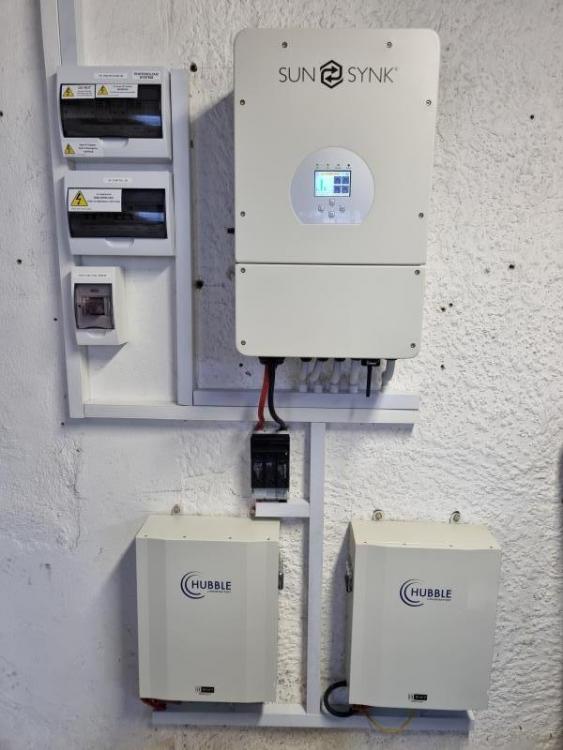
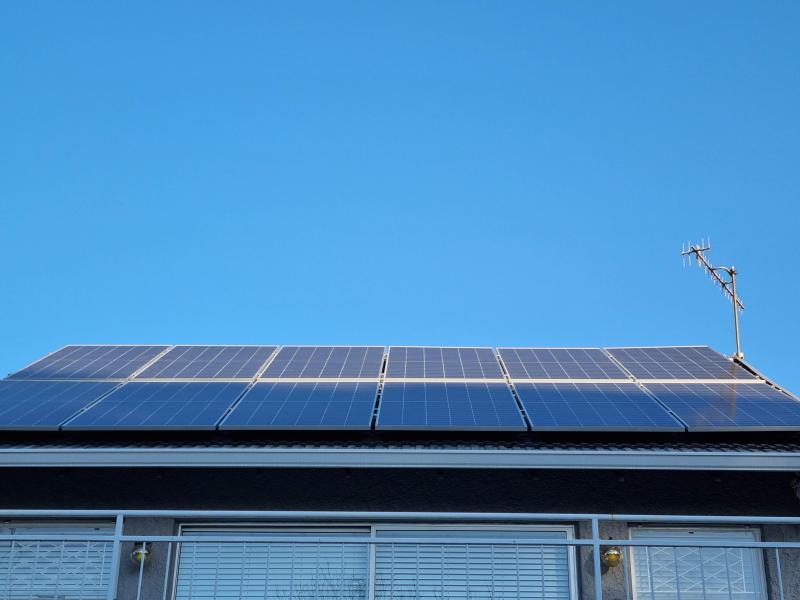
Yet Another Sunsynk Hubble Install. Consisting of: 12 * 535W JA solar panels 1 * 8kW Sunsynk 2 * Hubble AM-2 and lots and lots of wiring and installation work. Panels are on a smallish section of roof on the 2nd story and inverter is in a detached garage. Old house with lots of challenges... and the dark shot: Installation by @Leshen and I'm super happy. I've been constantly checking my solarman app and attempting to adjust my usage to daytime as much as possible which has actually been quite fun. It's great seeing the panels getting used instead of the grid 🙂



-
A bit of a thread revival, but just wanted to update this and say a massive thanks for all the input. I contacted @Leshen went through everything with him, got some great advice and now have a solar system running 🙂. As you all mentioned having an installer was super important and I'm thrilled with my super neat installation, I'll post some pics in the members installations section when I get a chance.
-
-
I’ve been reading posts on this site for a few days now, it’s a wonderful source of information for newbies like me. I of course have quite a few questions, if anyone could offer advice or info that would be greatly appreciated. The goal I’d like to mainly use as little grid power as possible during the day and charge some batteries enough to help offset some of the electricity costs during the evenings (keeping a bit in reserve for load shedding, when necessary). I’d like to keep the house running during load shedding/outages so the basic lights and plug points so fridges run and I can at least watch TV etc. The current usage: Daily avg last month (April) was 27kWh and over December that went up to 32kWh (aircon) Efergy monitor seems to sit around 0.4kW when everything is idling. I'm in Randburg, Johannesburg. The bigger power consumers: Pool pump 0.8kW (runs 4 hours in winter and around 8 hours in summer) 200L geyser which is on a timer and runs for an hour at 16:00 and two hours from 5am. I sometimes manually override this if there’s been quite a bit of hot water usage in the morning and someone wants to shower later on in the day, not sure I need to but happy wife, happy life, so just playing it safe. I have a 550W water pump (vsd) which is connected to two toilets (roughly 20 seconds each flush) to keep some water circulation from the backup water storage and it’s switched over to the whole house manually whenever there’s a water outage, this only runs when water is being used and it seems to be using 200W looking at my efergy The electric stove, hob and extractor (Our extractor doesn’t, and can’t, vent to outside and doesn’t always get used when cooking so wouldn’t want to go gas from a health perspective) The aircons 2 x 9000btu and 2 x 12000btu (all inverter type), these are only used in summer and generally only one at a time. Unfortunately one of the small ones in the bedroom is used overnight in warmer months, which without lots of batteries is probably going to be an eskom usage. Espresso machine (1500W, I think) High power kettle (3000W, I think) Upstairs lounge - avr (650W), sub (400W) and lcd tv (180W), these are all max figures, there are probably spikes but with everything running, it’s normally about 200-300W. I’m happy not having essentials like stove and geyser during power outages and I realise I’d have to carefully manage the draw of other devices or the system would trip. I monitored the Eferegy meter after load shedding and I initially had a spike of 700W this dropped down to 450W pretty quickly where it seemed to stay (obviously pool pump and geyser weren’t on). The available roof space: The one area of roof I have which gets the most unshaded sun on the 2nd story is pretty small roughly 6m x 4m so 24m2. It is currently in the sun from about 07:00 until after 16:00, the other areas are more difficult. I do have a much larger roof below the 2nd story one but it’s shaded by the 2nd story bit in the morning and then hit by some more shade in the afternoon from trees. There’s a decent section which will probably have 1 or 2 hours less sun than the 2nd story roof but it is roughly 6mx5m so 30m2. I then have a flattish roofed single garage which isn’t attached to the main house so cabling could be fun. It would be in the sun from sunrise until about 15:00 but I’d need to get some panel mounting system to raise them up slightly and angle them correctly and I guess with enough space between them to not provide any shade, this could be very challenging and expensive! The questions: This probably varies but where do you guys mount your inverters, batteries, etc? I think some of the installs are works of art and would like to have them on a proud display in the house, my wife would disagree though 😞 So where have you installed yours? How much noise and heat do they make? How close to the db board do they need to be? My db board is currently under a concrete roof on an ‘island’ in the kitchen so I’m guessing there’s going to be a lot of electrical work. Some inverters seem to have mppt controllers and others require separate units for those, if I went with a small solar array at first would I be able to easily add another array, possibly with another mppt if required at a later stage? And would the arrays need to have similar output or could one be larger than the other (would I need a separate mppt for this)? My initial thought was panels are the most efficient way to have excess solar (when the sun is shining) and cheaper than trying to store power so I wanted to possibly have two arrays on my roofs and try and move as much energy usage to peak times to hopefully minimise draw from the grid. Inverters, there’s a lot of different brands, some seem to be well supported with older manuals easily available on their website (victron) which is reassuring. Some don’t seem to though like Sunsynk, which seems to be a popular choice, how did you pick your inverter, was it based on price alone? From lots of reading on this site, the 8kW Sunsynk for example can draw and provide over 8kW of power if needed supplementing from the grid, so if I had a big spike of 11kW it would happily handle it? Just to check my understanding here but it could only provide a max of 8kW from the batteries (assuming a big enough battery/batteries) and solar excess, is that correct? How did you determine the sizing for your inverter, it seems like having some headroom would be a good call but it sounds like you could theoretically place another inverter in parallel down the line if you can manage to find the exact same one is that correct? I was thinking of starting smallish on the battery front with something like a 5.5kWh battery which hopefully should give around 4kWh of usage at around 80% DOD and when funds allow possibly add another, is that a good plan or should I just take the upfront hit and get a bigger battery or multiple batteries now? Also lots of different battery manufacturers, how did you choose yours? The panels seem to all come in different sizes and power ratings. I’m dealing with a smallish roof area so I think I’d have to go with some pretty high wattage panels to try and maximise generation for the space? The different sizes make working out what would fit really annoying. I will be mounting to a tile roof, how do you mount the panels and how close to the edges of the roof can they be? I’m on a postpaid smart meter with city power and I have no intention of feeding back to the grid. Am I in any way limited with the size of the solar array I am allowed to install? Installers, how did you choose yours? it sounds like there are quite a few less knowledgeable installers out there and I’m definitely going to need someone who knows what they are doing. If you got this far, thanks so much for reading this, any advice/answers would be great. I hope to have a system up and running as soon as possible 🙂





