Muttley
Members
-
Joined
-
Last visited
Everything posted by Muttley
-
Now that you mention that, I think I also had to do that once.. I'd re-calibrate based on the new MV Value and keep an eye on it. Good luck :)
-
I'm not sure what's causing the issue but I'm wondering if the voltage that's powering the sensor is providing stable voltages? I installed a Meanwell power supply and then a DC - DC Buck converter to try keep the power as stable as possible. Perhaps this could help?
-
Thanks so much!! This is awesome 😍
-
Please share your YAML... I need this on my dashboard 😁
-
Sold off forum
-
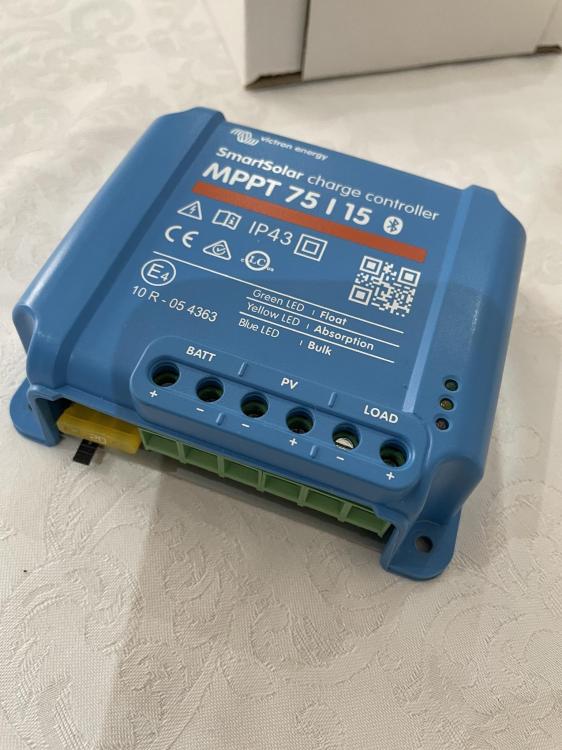
Item: Victron SmartSolar MPPT 75|15 with Bluetooth Age: > 1 year Price: R800.00 Payment Method Accepted: EFT/Geo Warranty: Victron 5 Year - So assume 4 years left Warranty Holder: Victron Packaging: Original Condition: Perfect Location: JHB/Sandton Reason: Purchased as a bundle deal from a user on Cabronite but have no need for it. I haven't tried it but as it's a Victron piece of kit, I have no doubt that it's working perfectly. Shipping: Sure, risk and cost for buyer Collection: Sure Link: Victron Datasheet


-
Thanks for this!
-
Encountered the same issue today—everything works fine on the desktop, but not on mobile. I tried re-downloading the plugin, but it didn’t help on the mobile side. Also, I can't seem to find the clear cache settings on iOS.
-
So glad to hear... :) Sometimes I do find that DF Robot sensors are just weird - had similar issues with one of their ADC but anyway.
-
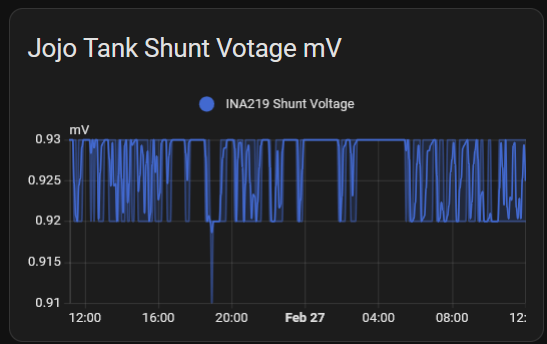
Nicely done....😍 When the community WhatsApp group starts moaning about there being no water, I occassionally go up and take a measurement with the tape measure - mine shows an accuracy of about 98% which works for me... The nerd in me also added in this to keep an eye on the raw readings (anything between 0.92 & 0.93 in my case = 100% capacity) Keep us posted on how it's working
-
That looks awesome... sorry about the fried components! I just saw that I didn't reply to your message on the home assistant forum - sorry about that 🤓 Here's the link to the original home assistant forum on this topic: https://community.home-assistant.io/t/esphome-water-level-sensor/126504/582
-
Hey... Welcome to the world of tinkering I guess I use the DC-DC voltage regulator to smooth out any potential voltage jumps - you could probably get away with not using one and connecting the INA and sensor directly but I do think it helps smooth out the data - this is what was also recommended on the home assistant community forum. The Voltage regullator is putting out 24V - perfect for both the INA219 (Max 26V) and the throw in sensor (12 - 36V, so 24V is the sweet spot I think ) I would deff use a buck converter to power the ESP32. From what I've read, you can certainly cut the cable, it shouldn't make any difference. I hope this helps
-
Good luck on the weekend project - it seems it's going to be slightly different to my setup due to the joined cylinders but I plugged my code into Claude.ai and asked it to provide instructions and described your tank as best as possible. I think it's going to be a bit of a trial and error - here's the code and instructions: # Configuration for dual connected cylindrical water tanks # This configuration assumes two tanks connected at approximately 75% height esphome: name: tankvolume # [Previous WiFi, API, and basic configuration remains the same] sensor: # INA219 sensor configuration remains the same as it's a single probe - platform: ina219 # [Previous INA219 configuration remains unchanged] - platform: template name: "Water Level" id: water_level unit_of_measurement: 'm' accuracy_decimals: 3 update_interval: 60s lambda: |- # CALIBRATION INSTRUCTIONS: # 1. Measure and record the shunt voltage when tanks are empty # 2. Measure and record the shunt voltage when tanks are full # 3. Update these values below: float shunt_voltage = id(ina219_shunt_voltage).state; float full_voltage = 0.00092; // UPDATE: Measure and set your full tank voltage float empty_voltage = 0.00042; // UPDATE: Measure and set your empty tank voltage float max_height = 1.570; // UPDATE: Set your tank height in meters // Calculate water level based on calibration float slope = (max_height - 0.0) / (full_voltage - empty_voltage); float intercept = max_height - slope * full_voltage; float water_level = slope * shunt_voltage + intercept; return std::max(0.0f, std::min(water_level, max_height)); - platform: template name: "Tank Volume" id: tank_volume unit_of_measurement: "litres" lambda: |- // TANK CONFIGURATION PARAMETERS // UPDATE THESE VALUES: constexpr float tank_radius = 0.71; // Set your tank radius in meters constexpr float tank_height = 1.57; // Set total tank height constexpr float connection_height = 1.18; // Set height of connection (75% of total height) constexpr float pi = 3.14159265f; float water_level = id(water_level).state; float total_volume = 0.0f; if (water_level <= connection_height) { // Below connection: Calculate as two separate cylinders total_volume = 2 * (pi * tank_radius * tank_radius * water_level * 1000); } else { // Above connection: Calculate as combined volume // First, volume up to connection float lower_volume = 2 * (pi * tank_radius * tank_radius * connection_height * 1000); // Then add combined volume above connection float upper_volume = pi * tank_radius * tank_radius * (water_level - connection_height) * 2000; total_volume = lower_volume + upper_volume; } return total_volume; # [Rest of the sensors remain largely the same, but update these values:] - platform: template name: "Days of Water Left" id: days_of_water_left unit_of_measurement: "days" lambda: |- float total_volume = id(tank_volume).state; float daily_usage = 1100.0; // UPDATE: Set your expected daily usage in liters float days_left = total_volume / daily_usage; // UPDATE: Adjust maximum days based on your total capacity if (days_left > 7.0) { // Change based on your maximum capacity return 7.0; } return std::max(0.0f, days_left); - platform: template name: "Time to Full" id: time_to_full unit_of_measurement: "hours" lambda: |- float current_volume = id(tank_volume).state; // UPDATE: Calculate your maximum volume based on your tank dimensions float max_volume = 2 * (pi * 0.71 * 0.71 * 1.57 * 1000); // Update with your dimensions float refill_rate = id(tank_refill_rate).state; if (refill_rate > 0) { return (max_volume - current_volume) / refill_rate; } else { return 0; } Here are the key steps for the user to implement this configuration: Physical Measurements Needed: Measure the radius of both tanks Measure the total height of the tanks Measure the height where the tanks are connected (approximately 75% of total height) Calibration Steps: Install the INA219 sensor and connect it to the ESP32 With tanks empty, note the shunt voltage reading With tanks full, note the shunt voltage reading Update these values in the "Water Level" sensor configuration Key Configuration Updates: In the Tank Volume sensor: Update tank_radius with your measured radius Update tank_height with your total tank height Update connection_height with the height where tanks are connected Usage Configuration: Update daily_usage in the "Days of Water Left" sensor with your expected daily water usage Adjust the maximum days cap based on your total tank capacity The main difference in this configuration compared to your original is the volume calculation that accounts for the connected tanks. When the water level is: Below the connection: It calculates volume as two separate cylinders Above the connection: It calculates the combined volume, treating the space above the connection as one larger cylinder
-
We apologise for the frustation caused, please continue to hold while we wait for your parts to arrive Let me know when the INA219 arrives and the struggle shall continue 🤓
-
Hey, At least we've still got our humour, but we'll get this right eventually So I think we should go back to basics here - I've previously tried using some DF Robot Components and I find them to be at times over engineered and just caused frustration and total randomness in terms of the data. EG: I purchased one of their ADS1115 modules and got terrible data - purchased a generic one and it was perfect. Can I suggest you purchase another INA219, which is like mine from PiShop or Communica ? I think this will remove any additional "calibration" etc that the DF Robot requires and we can use most of my code which works most of the time 🤣 Once this is sorted, we can dive into the code and see where's we're at - I still think that your mV reading is too low but I suspect the suggestion above will fix this.
-
They said it'll be simple Ok so a few more things come to mind: When I had the issue yesterday, I noticed that I was not getting any values for INA219 Power (W) or and Values for INA219 Current (mA). We need these values to get the tank volume and the tank %. The way that I got this to work was a simple reboot of the 24V power supply which powers the INA219 and the probe. I then started to get W and mA data coming in. Your example from above is showing the exact same scenario as I had: I think the above is step 1 in troubleshooting but I also noticed a few other things: I also noticed a few more things in your esphome code which I've updated based on your original figures shared and adjusted for a single tank like yours: - platform: template name: "Tank Volume" id: tank_volume unit_of_measurement: "litres" lambda: |- constexpr float tank_radius = 1.10; // Adjust the tank radius as needed constexpr float max_height = 2.70; // Adjust the max height as needed constexpr float pi = 3.14159265f; constexpr float total_volume = pi * tank_radius * tank_radius * max_height * 1000; float percentage_full = id(current_full_percentage).state; float water_level = max_height * (percentage_full / 100.0f); float current_volume = pi * tank_radius * tank_radius * water_level * 1000; return current_volume; Your max height seems quite low compared to what it's listed on the Jojo Website - they state that the height is 3150mm and you're only accounting for a height of 2700mm. Did you put a tape measure into the tank to the bottom with water inside to check? I think try the above steps and lets see what it comes up with. You may also need to reboot the ESP32 - I think the sequence I use is: power off probe, power of ESP32, power on probe, power on ESP32.

-
The joys of open source software 🤨 Turns out, I had a look at my dashboard a few moments ago and both Volume and Percentage we're missing yet I did absolutely nothing - no fiddling, I promise 🙃 Updated my ESP32 to the latest version and boom... everything was back. Maybe this is part of the issue you're having.
-
No worries - glad you got sorted, I'm sure your INA219 is good! NB: no need to drain the tank - just pull out the probe and take it a reading. Because it's only 2 calibrations points, full and empty and thus you can just take an empty reading with the probe out the tank and one when it's full, ie: at the bottom of the tank when it's full. Regarding the missing values, I forgot to mention that you'll need to add in a template sensor to your configuration.yaml file: template: - sensor: - name: "Water Tank Level" unique_id: water_tank_level state: > {% set current = states('sensor.ina219_current') | float(default=0) %} {% set height = ((current * 5.0663) - 24.86) | round(2) %} {% if 0.000 <= height <= 72.000 %} {{ height }} {% else %} unknown {% endif %} I completely forgot the logic for the above ^ so just use claude.ai - share your esp32 code with it and this and ask it to make the necessary changes. Or even ask it to explain the above to you. 🙃 Oh and also, chances are that your Jojo tank holds more than 10 000L!
-
So 3 things that I noticed when compared to my code: - your ina219 address is 0x45 - mine is 0x40 - I also noticed that your calibration numbers seem very low - perhaps adjust the point above and below and try take new calibrations. - the float max_height is only 1 decimal place - perhaps make this 3 Here's my code in case : captive_portal: i2c: sda: 21 scl: 22 sensor: - platform: ina219 address: 0x40 shunt_resistance: 0.1 ohm current: name: "INA219 Current" id: ina_current accuracy_decimals: 5 filters: - multiply: 1000 #convert from Amps to mA unit_of_measurement: "mA" power: name: "INA219 Power" accuracy_decimals: 5 bus_voltage: name: "INA219 Bus Voltage" accuracy_decimals: 2 shunt_voltage: name: "INA219 Shunt Voltage" id: ina219_shunt_voltage accuracy_decimals: 5 max_voltage: 32.0V max_current: 400mA update_interval: 10s - platform: template name: "Water Level" id: water_level unit_of_measurement: 'm' accuracy_decimals: 3 update_interval: 60s lambda: |- float shunt_voltage = id(ina219_shunt_voltage).state; float full_voltage = 0.00092; // Voltage at full condition float empty_voltage = 0.00042; // Voltage at empty condition float max_height = 1.570; // Adjust the max height as needed // Calculate water level based on calibration float slope = (max_height - 0.0) / (full_voltage - empty_voltage); float intercept = max_height - slope * full_voltage; float water_level = slope * shunt_voltage + intercept; // Ensure water level is within bounds water_level = std::max(0.0f, std::min(water_level, max_height)); ESP_LOGD("custom", "Shunt Voltage: %.5f V", shunt_voltage); ESP_LOGD("custom", "Water Level: %.5f m", water_level); return water_level; - platform: template name: "Current Full Percentage" id: current_full_percentage unit_of_measurement: '%' accuracy_decimals: 1 update_interval: 60s lambda: |- float max_full_reading = 9.2; // Adjust the maximum reading at full water level float min_empty_reading = 4.2; // Adjust the minimum reading at empty water level float current_reading = id(ina_current).state; float current_full_percentage = 100.0f * (current_reading - min_empty_reading) / (max_full_reading - min_empty_reading); return std::max(0.0f, std::min(current_full_percentage, 100.0f)); - platform: template name: "Tank Volume" id: tank_volume unit_of_measurement: "litres" lambda: |- constexpr float tank_radius = 0.71; // Adjust the tank radius as needed constexpr float max_height = 1.57; // Adjust the max height as needed constexpr float pi = 3.14159265f; constexpr float total_volume_single_tank = pi * tank_radius * tank_radius * max_height * 1000; float percentage_full = id(current_full_percentage).state; float water_level = max_height * (percentage_full / 100.0f); float current_volume_single_tank = pi * tank_radius * tank_radius * water_level * 1000; float total_volume_both_tanks = 2 * current_volume_single_tank; return total_volume_both_tanks; - platform: template name: "Days of Water Left" id: days_of_water_left unit_of_measurement: "days" accuracy_decimals: 1 update_interval: 60s lambda: |- float total_volume = id(tank_volume).state; float daily_usage = 1100.0; // 1100 liters per day float days_left = total_volume / daily_usage; // Cap the maximum days to 5 when tanks are full if (days_left > 5.0) { return 5.0; } return std::max(0.0f, days_left); - platform: template name: "Daily Water Consumption Rate" id: daily_water_consumption unit_of_measurement: "L/day" accuracy_decimals: 1 update_interval: 3600s # Update hourly lambda: |- static float last_volume = id(tank_volume).state; static unsigned long last_update = 0; float current_volume = id(tank_volume).state; unsigned long current_time = millis(); float consumption_rate = 0; if (last_update > 0) { float volume_change = last_volume - current_volume; float days_elapsed = (current_time - last_update) / (1000.0 * 60 * 60 * 24); consumption_rate = volume_change / days_elapsed; } last_volume = current_volume; last_update = current_time; return std::max(0.0f, consumption_rate); - platform: template name: "Tank Refill Rate" id: tank_refill_rate unit_of_measurement: "L/hour" accuracy_decimals: 1 update_interval: 300s # Update every 5 minutes lambda: |- static float last_volume = id(tank_volume).state; static unsigned long last_update = 0; float current_volume = id(tank_volume).state; unsigned long current_time = millis(); float refill_rate = 0; if (last_update > 0 && current_volume > last_volume) { float volume_change = current_volume - last_volume; float hours_elapsed = (current_time - last_update) / (1000.0 * 60 * 60); refill_rate = volume_change / hours_elapsed; } last_volume = current_volume; last_update = current_time; return refill_rate; - platform: template name: "Time to Empty" id: time_to_empty unit_of_measurement: "hours" accuracy_decimals: 1 update_interval: 60s lambda: |- float current_volume = id(tank_volume).state; float consumption_rate = id(daily_water_consumption).state / 24.0; // L/hour if (consumption_rate > 0) { return current_volume / consumption_rate; } else { return 0; // Avoid division by zero } - platform: template name: "Time to Full" id: time_to_full unit_of_measurement: "hours" accuracy_decimals: 1 update_interval: 60s lambda: |- float current_volume = id(tank_volume).state; float max_volume = 4973.0; // Maximum volume of both tanks float refill_rate = id(tank_refill_rate).state; if (refill_rate > 0) { return (max_volume - current_volume) / refill_rate; } else { return 0; // Not currently filling } - platform: template name: "Water Usage Efficiency" id: water_usage_efficiency unit_of_measurement: "%" accuracy_decimals: 1 update_interval: 3600s # Update hourly lambda: |- float actual_consumption = id(daily_water_consumption).state; float expected_consumption = 1100.0; // Expected daily usage if (expected_consumption > 0) { float efficiency = (expected_consumption - actual_consumption) / expected_consumption * 100; return std::min(100.0f, std::max(0.0f, efficiency)); } else { return 0; } - platform: template name: "Water Self-Sufficiency Duration" id: water_self_sufficiency unit_of_measurement: "days" accuracy_decimals: 1 lambda: |- float total_volume = id(tank_volume).state; float actual_consumption = id(daily_water_consumption).state; if (actual_consumption > 0) { return total_volume / actual_consumption; } else { return id(days_of_water_left).state; // Fallback to the standard calculation }
-
Thanks o grand master
-
Wowzers - thanks for all the info. I've got Greenrich batteries and not sure of the BMS software but I see that the BMSPace addon supports another model of Greenrich batts so hopefully I'll be ok. Weekend project loading 😍 Thanks once again!
-
This is awesome.. Would you mind sharing the hardware used to pull this info from the batteries? I have a single RS232 cable plus converter to USB and can access each battery's data via the Greenrich app on my Windows PC but if you could share how you managed to connect them all so that they push the data in HA, that would be awesome. Assuming it's all connected to an ESP32 or something but a wiring diagrim plus your config would be awesome
-
Hey @slipx Compliments of the New Year, I hope you're well! I've tried using the icon switch functionality mentioned above but it doesn't do anything. The icons remain un-clickable. Running the latest version of HA and all other frontend cards etc are up to date. I've also tried different browsers and clearning cache etc but still the same result. Here's the list of entities added under the entities section: load1_switch: switch.pool_pump load2_switch: switch.main_geyser load3_switch: switch.mns_geyser load4_switch: switch.kitchen_geyser Any help would greatly be appreciated
-
Sorry to hijack your request but I've also got such a cable so would love to pull the info from my Greenrich batts. Any input would greatly be appreciated
-
Yeah... I'm totally happy with 1 battery icon that represents all 5 as it gives me visibility of total battery storage available. I think your assumption is correct