


Muttley
Members
-
Joined
-
Last visited
Everything posted by Muttley
-
I'd suggest searching here - you may need to register for free but you should be able to find the part you need. Then get someone to manufacture it for you from a downloadable CAD file.
-
This may work if you're running home assistant with the Tuya integration. In fact, you may be able to use it without home assistant and just use the Tuya App. If you went the home assistant route, you could install tailscale to access home assistant remotely.
-
Awesome, thanks for this!
-
Thanks for the input guys - appreciate it
-
Hi guys, So I was up on the roof today because of this: (phase 2 of this solar addiction 🤓) I measured the angle of our existing array and the new frame - they're about 18°, facing North with no shading or obstructions. Total array size & config: 20 x JA Solar 460 Watt panels 5s2p Mppt 1 and 5s2p Mppt 2 total 9200 watts 21.84A/Mppt. Would it be worthwhile is trying to increase the tilt or will the gains be minimal? Thanks in advance
.jpeg.176c509f3183c525bedd924eeabad3c8.jpeg)
-
Thanks for this - didn't think to check the energy dashboard 🤓 Don't want to get rid of them, just want to get sufficient battery capacity to see us through the evenings so trying to get an average load.
-
Thanks so much as always - I'll see what I can work out
-
Hi guys, Would anyone be able to assist me in creating a view to show average watts consumed from the time that there's no longer PV in the afternoon till the next morning when there's PV again? If I could get a weekly and monthly average, this would really help me determine how much actual battery capacity I need to go Eksdom free from +-17:00 - 08:30. I realise that there will some days when PV will be limited but I'll just disregard these days. Thanks in advance
-
I missed that one, thanks! Out of curiosity, how would one make use of the additional mppt entities using a single Sunsynk 8kw inverter?
-
Hi @slipx I hope you're well I was wondering if you could assist me in removing the 2 additional mppt's from the card: I've removed the additional PV entities and reading the wiki and configuration but having no luck. Thanks as always. type: custom:sunsynk-power-flow-card view_layout: grid-area: flow cardstyle: full large_font: true show_solar: true panel_mode: false inverter: modern: true colour: '#959595' solar: mppts: two show_daily: true colour: '#F4C430' animation_speed: 9 max_power: 6600 pv1_name: North pv2_name: North pv3_name: pv4_name: battery: energy: 9920 shutdown_soc: 20 show_daily: true colour: lightgreen animation_speed: 6 max_power: 4100 load: show_aux: false show_daily: true animation_speed: 8 max_power: 8000 additional_loads: 1 load1_name: Pool load2_icon: mdi:pool grid: show_daily_buy: true no_grid_colour: red show_nonessential: false animation_speed: 8 max_power: 8000 entities: use_timer_248: switch.toggle_system_timer priority_load_243: switch.toggle_priority_load day_battery_charge_70: sensor.battery_charge_day day_battery_discharge_71: sensor.battery_discharge_day day_load_energy_84: sensor.daily_load_power_kwh day_grid_import_76: sensor.grid_import_day_buy day_grid_export_77: none day_pv_energy_108: sensor.daily_pv_power_kwh inverter_voltage_154: sensor.grid_inverter_voltage load_frequency_192: sensor.load_frequency inverter_current_164: sensor.inverter_output_current inverter_power_175: sensor.inverter_output_power grid_power_169: sensor.grid_power pv1_power_186: sensor.pv1_power pv2_power_187: sensor.pv2_power battery_voltage_183: sensor.battery_voltage_2 battery_soc_184: sensor.battery_soc battery_power_190: sensor.battery_output_power battery_current_191: sensor.battery_output_current essential_load1: sensor.pool_pump_power essential_power: sensor.load_power nonessential_power: none grid_ct_power_172: sensor.grid_external_power pv1_voltage_109: sensor.dc1_voltage pv1_current_110: sensor.dc1_current pv2_voltage_111: sensor.dc2_voltage pv2_current_112: sensor.dc2_current grid_connected_status_194: binary_sensor.grid_connected_status inverter_status_59: sensor.overall_state aux_power_166: sensor.aux_output_power remaining_solar: sensor.forecast_remaining_today battery_temp_182: sensor.ss_battery_temperature radiator_temp_91: sensor.ss_dc_radiator_temperature dc_transformer_temp_90: sensor.ss_dc_transformer_temperature

-
Awesome, thanks for the clarification
-
Thanks for the input - would you mind explaining 5s2p? Is it 5 panels in series and the 2 banks in parallel? 😵💫
-
Hi guys, I'd like to get some clarity and confirmation as our additional panels should be going up this week. The frame components are being galvanized and panels are in our garage but the install is imminent. Will post some pics of the final install when done. Can anyone advise what is the best way to wire up all the panels? Current: Currently have 10 x JA Solar 460 Watt panels (2 strings of 5 per MPPT) facing north Sunsynk 8kw inverter firmware: M 6.0.2.2 / S 1.7.2.4 / C E.4.2.6 New: 10 x JA Solar 460 Watt panels (same as current ones) facing north Panel info: Inverter sticker: Frame: Many thanks


-
Thanks for the input - I've messaged them to find out. (sorry for assuming you work for them 😜)
-
@slipx thanks for the great write up and config. Do you know if such a device would work with a pure C02 cylinder? (Have one outside which is connected to a soda stream machine in the kitchen)
-
This would be my go to option - my mate purchased from this buyer with no issues (just saying) I'm running the equivalent Dell Optiplex 3080 Micro Form Factor with 64GB of RAM, 512 NVME & a 1 TB SSD. It's running Proxmox with HA, Various Linux OS's, PiHole, TrueNAS, Portainer etc plus Tailscale for remote access and all the time ad blocking and it's just awesome. My UniFi controller lives in a cheap Google Cloud server. Some may say that my setup is overkill but I like that I have headroom and it just runs - no issues plus plenty of learning opportunities from it.
-
Just to add to what you guys are mentioning above - I tried to run HA on a RPi3 and it was a nightmare - every time it had to a little bit of heavy lifting, it would fall over so rather re-purpose an old PC/laptop etc. There's a great installation guide here for Proxmox.
-
2 things from your pics seem off re the Ethernet Cable: First and foremost - you need to plug it into the jack labelled RS485 - it's currently plugged into the CAN. See if you start getting data once you've changed this. Secondly, your first image shows a yellow network cable and the other end shows a black network cable.... If the above suggestion does not work - perhaps re look at how you've wired the network cable.
-
I'm not sure what Inverter you have (assuming it's an 8KW Sunsynk as this is where you've posted but this is the code I'm using courtesy of @slip As he is using a Nodemcu, you'll need to change this plus Wi-Fi details etc but everything from the captive portal should be copy and paste esp32: board: esp32dev framework: type: arduino
-
Not sure if this will help but I found that I initially needed to add just the ESP32 to HA with nothing connected it. Once it's added to HA and online, add the rest of the YAML code to it and upload it wirelessly. Once this is done, connect the TTL > RS485 board to the ESP32. Then try connecting it to the inverter. Hope this helps
-
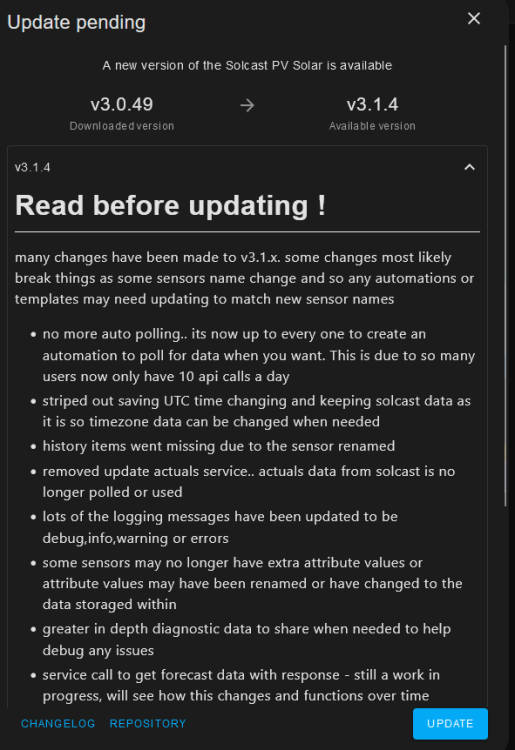
Hi guys, Has anyone done this update for Solcast? (concerned this update is going to break a few things)
-
Thanks - will consult with me good old friend Google for the next steps
-
@slipx is there any way that we can create an entity for Autarky? I'd like to be able to view this within my bar-card on my front page of HA and also be able to view this over a date range. (will help convince the Mrs why we need more panels and batteries 🤪)
-
I tried with a Pi and it crashed when compiling a simple ESP32 config... Got myself a MFF Dell Optiplex 5080 (i5 10th gen) off Carbonite which runs Proxmox. I then have a dedicated VM for HA and it just works... IMO the Pi's don't have enough grunt to run HA but that's my opinion....
-
Thanks for the feedback and the explanation 😉


