Muttley
Members
-
Joined
-
Last visited
Everything posted by Muttley
-
Hey @slipx Wondering if you can assist here. Long story short, as I'm such a fan, I deleted everything last night and started from scratch using all your YAML - figured it would be easier going forward. I now for some reason have a slight issue on the following graphs where the data is being visualised but it's barely readable due to the size of the graphs. I've tried to find settings in the YAML card code to increase this with no luck and I've also tried changing the layout of the View - this makes no difference. Previously these worked perfectly.... Any ideas? type: custom:plotly-graph view_layout: grid-area: daily entities: - entity: sensor.daily_pv_power_kwh statistic: state name: | $fn ({ ys,meta }) => "Solar" + "🔆" + "(" +ys[ys.length - 1]+"kWh)" period: day type: bar texttemplate: '%{y}' filters: - filter: i>0 marker: color: rgb(255, 155, 48) - entity: sensor.daily_load_power_kwh statistic: state name: | $fn ({ ys,meta }) => "Load" + "⚡" + "(" +ys[ys.length - 1]+"kWh)" period: day type: bar filters: - filter: i>0 texttemplate: '%{y}' marker: color: rgb(95, 182, 173) - entity: sensor.grid_import_day_buy statistic: state name: | $fn ({ ys,meta }) => "Grid Import" + "💡" + "(" +ys[ys.length - 1]+"kWh)" period: day type: bar texttemplate: '%{y}' filters: - filter: i>0 marker: color: rgb(84, 144, 194) - entity: sensor.battery_discharge_day statistic: state name: | $fn ({ ys,meta }) => "Battery Discharge" + "🖱️" + "(" +ys[ys.length - 1]+"kWh)" period: day type: bar texttemplate: '%{y}' filters: - filter: i>0 marker: color: rgb(151, 90, 182) - entity: sensor.battery_charge_day statistic: state name: | $fn ({ ys,meta }) => "Battery Charge" + "🔋" + "(" +ys[ys.length - 1]+"kWh)" period: day type: bar texttemplate: '%{y}' filters: - filter: i>0 marker: color: yellow hours_to_show: 5d title: null refresh_interval: 120 defaults: yaxes: fixedrange: true layout: legend: bgcolor: rgba(0,0,0,0) itemsizing: constant font: size: 11 height: 410 config: displayModeBar: false scrollZoom: false time_offset: 12h type: custom:plotly-graph view_layout: grid-area: sg entities: - entity: sensor.daily_pv_power_kwh statistic: state name: | $fn ({ ys,meta }) => "Solar" + "🔆" + "(" +ys[ys.length - 1]+"kWh)" period: day type: bar texttemplate: '%{y}' filters: - filter: i>0 marker: color: rgb(255, 155, 48) - entity: sensor.grid_import_day_buy statistic: state name: | $fn ({ ys,meta }) => "Grid Import" + "💡" + "(" +ys[ys.length - 1]+"kWh)" period: day type: bar texttemplate: '%{y}' filters: - filter: i>0 marker: color: rgb(84, 144, 194) - entity: sensor.daily_load_power_kwh statistic: state show_value: true name: | $fn ({ ys,meta }) => "Load" + "⚡" + "(" +ys[ys.length - 1]+"kWh)" period: day type: line texttemplate: '%{y}' line: color: rgb(95, 182, 173) width: 2 hours_to_show: 31d title: null refresh_interval: 600 defaults: yaxes: fixedrange: true layout: legend: bgcolor: rgba(0,0,0,0) itemsizing: constant font: size: 11 x: 0.4 height: 410 barmode: stack xaxis: rangeselector: 'y': 1.05 buttons: - count: 7 step: day - count: 31 step: day - count: 90 step: day config: displayModeBar: false scrollZoom: false

-
Thanks @Sc00bs. Yup 18 Panels facing North without any other roof space unfortunately - already having to construct a raise car port type structure on the flat roof to accommodate the additional 8 panels to prevent shading. So your suggestion would be to add 8 of the same panels which I have? (really want to try reduce the grid import side of things)

-
Thanks, This is the spec of my current panels:

-
Hi guys, Wondering if anyone can assist here regarding my current setup and planned upgrade of PV panels. Currently have the following: 1 x 8kw Sunsynk Hybrid Inverter 10 x 460W JA Solar Panels - 2 strings, 5 panels per MPPT. 2 x Greenrich WM5000 We have space to install x 8 additional panels (around the 1.2m x 2.3m size), facing north with no shading. What would you guys suggest regarding panel size (W) and string config to maximise PV input yet keeping the inverter happy? Thanks in advance
-
Here's a slight contribution to the goodness on this thread which lives on my main HA screen: type: custom:bar-card entities: - entity: sensor.load_shedding_area_eskde_4_sandownext10cityofjohannesburggauteng icon: mdi:power color: Red min: '1' max: '8' target: 'off' - entity: sensor.sunsynk_battery_soc min: '0' max: '100' target: '100' name: 'Inverter Battery Charge ' icon: mdi:battery color: Green - entity: sensor.sunsynk_daily_pv_power_kwh min: '0' max: '32' target: '100' name: Daily Solar Production icon: mdi:solar-power-variant color: orange - entity: sensor.pool_temperature_sensor icon: mdi:pool-thermometer min: '0' max: '32' target: '0' severity: null color: '#5490c2' - entity: sensor.jojo_tank_volume icon: mdi:water-pump target: '5' severity: - from: '0' to: '100' max: '2400' min: '0' color: '#5fb6ad' - entity: sensor.speedtest_ping target: '5' from: '0' to: '100' color: Purple columns: '1'

-
Epic, thanks as always!
-
Hey @slipx I tried to modify the card below to include the "left today" solar on the top right side of this card without any luck. I thought it would be quite useful to have this in the card 😉

-
Me again 🙈 I seem to be struggling with these sensors: - entity: sensor.time_zone1 - entity: sensor.time_zone2 etc Is this something that should get pulled from the inverter via the ESP32 or is it a manual addition to your configuration.yaml file? Just send me an invoice and your banking details already 🤑
-
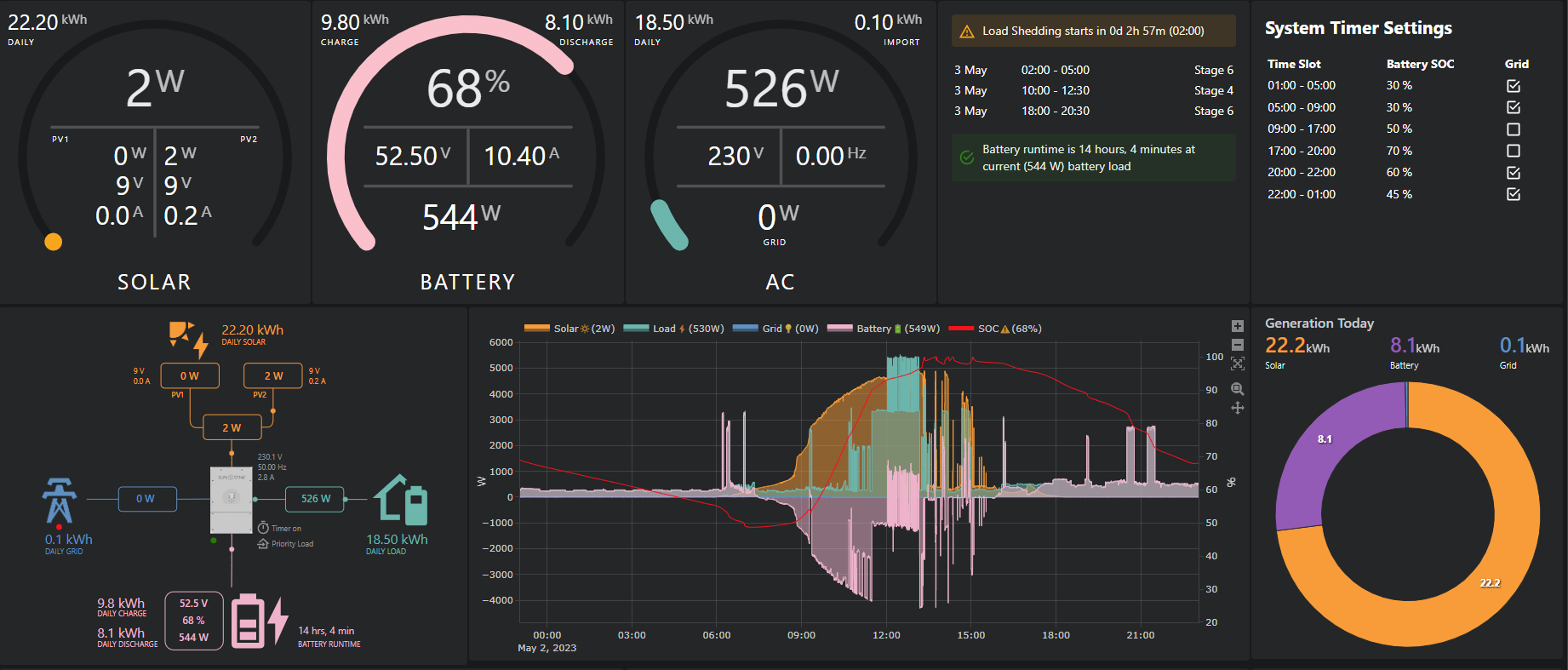
Hey, Me again here to bug you - you're work is just too good not to copy 🤓 I'm struggling to replicate this card - I have the text sensors that you added above in my ESP32 code and I've tried the code below but the result is not anything like ^ type: markdown content: " ## System Timer Settings\n<table width=\"100%\" border=0>\n <tbody> \n <tr>\n <td align=\"left\">\n <b>Time Slot</b>\n </td>\n <td align=\"left\">\n <b>Battery SOC</b>\n </td>\n <td align=\"left\">\n\t<b>Grid</b>\n\t</td>\n </tr>\n <tr>\n <td align=\"left\">\n 01:00 - 05:00\n </td>\n <td align=\"left\">\n {{ states('sensor.sunsynk_setting_soc_timezone1') }} %\n </td>\n <td align=\"left\">\n\t{% if is_state('sensor.sunsynk_setting_grid_charge_timezone1', '1') %} <ha-icon icon=\"mdi:checkbox-marked-outline\"></ha-icon> {% else %} <ha-icon icon=\"mdi:checkbox-blank-outline\"></ha-icon> {% endif %}\n\t</td>\n </tr>\n <tr>\n <td align=\"left\">\n 05:00 - 09:00\n </td>\n <td align=\"left\">\n {{ states('sensor.sunsynk_setting_soc_timezone2') }} %\n </td>\n <td align=\"left\">\n\t{% if is_state('sensor.sunsynk_setting_grid_charge_timezone2', '1') %} <ha-icon icon=\"mdi:checkbox-marked-outline\"></ha-icon> {% else %} <ha-icon icon=\"mdi:checkbox-blank-outline\"></ha-icon> {% endif %}\n\t</td>\n </tr>\n <tr>\n <td align=\"left\">\n 09:00 - 17:00\n </td>\n <td align=\"left\">\n {{ states('sensor.sunsynk_setting_soc_timezone3') }} %\n </td>\n <td align=\"left\">\n\t{% if is_state('sensor.sunsynk_setting_grid_charge_timezone3', '1') %} <ha-icon icon=\"mdi:checkbox-marked-outline\"></ha-icon> {% else %} <ha-icon icon=\"mdi:checkbox-blank-outline\"></ha-icon> {% endif %}\n\t</td>\n </tr>\n <tr>\n <td align=\"left\">\n 17:00 - 20:00\n </td>\n <td align=\"left\">\n {{ states('sensor.sunsynk_setting_soc_timezone4') }} %\n </td>\n <td align=\"left\">\n\t{% if is_state('sensor.sunsynk_setting_grid_charge_timezone4', '1') %} <ha-icon icon=\"mdi:checkbox-marked-outline\"></ha-icon> {% else %} <ha-icon icon=\"mdi:checkbox-blank-outline\"></ha-icon> {% endif %}\n\t</td>\n </tr>\n <tr>\n <td align=\"left\">\n 20:00 - 22:00\n </td>\n <td align=\"left\">\n {{ states('sensor.sunsynk_setting_soc_timezone5') }} %\n </td>\n <td align=\"left\">\n\t{% if is_state('sensor.sunsynk_setting_grid_charge_timezone5', '1') %} <ha-icon icon=\"mdi:checkbox-marked-outline\"></ha-icon> {% else %} <ha-icon icon=\"mdi:checkbox-blank-outline\"></ha-icon> {% endif %}\n\t</td>\n </tr>\n <tr>\n <td align=\"left\">\n 22:00 - 01:00\n </td>\n <td align=\"left\">\n {{ states('sensor.sunsynk_setting_soc_timezone6') }} %\n </td>\n <td align=\"left\">\n\t{% if is_state('sensor.sunsynk_setting_grid_charge_timezone6', '1') %} <ha-icon icon=\"mdi:checkbox-marked-outline\"></ha-icon> {% else %} <ha-icon icon=\"mdi:checkbox-blank-outline\"></ha-icon> {% endif %}\n\t</td>\n </tr>\n </tbody>\n</table>" view_layout: grid-area: weather Also, you need to sign up for the buymeacoffeebeer thing!

-
Thank you so much!
-
Hey @slipx You are an absolute legend for all of this - thank you! I posted on another threat so apologies for asking here but: Would you mind sharing your other card codes? (The Sunsynk Power Flow Card one is sorted on my end) (I've added all the required HACS cards as per your Github). Also, which sensors are you using for the battery config in the HA Energy Dashboard? -Energy into battery -Energy out battery

-
Mine shows this when there's loadshedding... are you sure you're not being loadshed when it's that colour/icon?
-
Hi guys, Wondering if anyone can point me as to which entities I need to use for: 1. Daily load 2. A on the inverter 3. Non Essential load I've kindly used @jacauc's code from here Lastly but not a major one: I don't seem to have any entities for PV1 & 2's Voltage & Amps. Removing this from the card config seems to break everything.
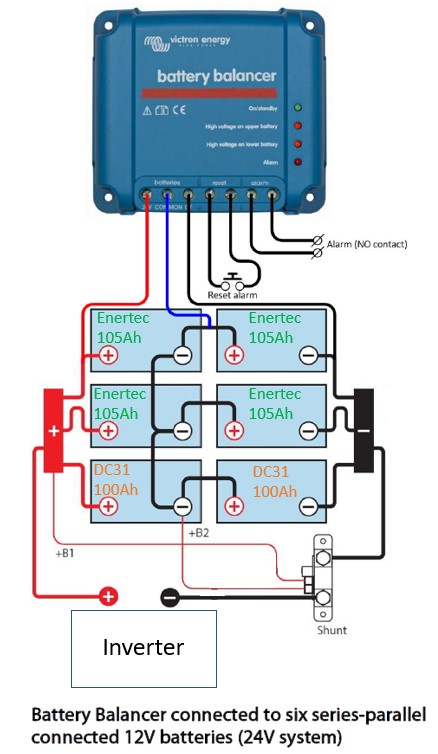
 Thanks for the feedback and assistance as always - it's greatly appreciated! It appears that the URL's provided are for your local machine 😜 If you wouldn't mind sharing the public integration, that would be awesome- also hoping your ESP32 vid will be a start -> finish (ESP32 code + all the other goodies needed to get the Power Flow dashboard in place). Trying to sift though all the previous posts and trying to match what's relevant is making my brain 🤯 Thanks once again!Hey, Been watching your vids and thanks for doing this but I'm a bit confused.... I've got the Sunsynk Dongle (currently waiting for installer to come back here on Monday to add me to region 2 as he had me setup in region 1). So my weekend tinkering is limited to the ESP32 at the moment My Q's are: Is there a point in having both the dongle and an ESP32 running simultaneously? Am I correct in assuming that the your current videos rely on having the dongle installed and that the planned ESP32 video mentioned above will include a config etc so that the data from the ESP32 will display in the awesome power card mentioned in your vids? Just wanna make sure I'm going down the right rabbit hole here 😜Installed happened yesterday so finally managed to plug in and test the ESP32. Had to do what @Sc00bs suggested: remove the R7 Resistor & join 2 & 7 -> A; 1 & 8 -> B Now I just need to tinker with nice images etc etc etc Thanks once again to all involved - super chuffed!Thank you so much for the input! Looking forward to this projectHi guys, Thanks for the awesome thread! I'm in the process of purchasing all the components to integrate my soon to be installed Sunsynk 8kw Inverter into HA via an ESP32. 3 Quick q's in this regard: I'm planning on using @sjlouw's guide, found on page 3 - thanks for this! By going this route, I'm assuming that I won't need to setup any MQTT brokers or make use of @Klatremis's Sunsynk HA Addon. Is this correct that the ESP32 will send the sensor data via Wi-Fi to my HA instance? Slightly related to the above but trying to keep this simple, again, by using @sjlouw's guide, I don't need to purchase Solarassistant. Is this correct? Lastly, How are you guys powering your ESP32's? Is there a module that I can purchase to tap off USB power from the inverter itself? Thanks once againThanks for the feedback. Assuming they discharge more or less equally, the fact that the Enertec's are 105Ah and the Royals's are 100Ah is not an issue?Hi guys, Perhaps someone can give clarity/guidance: I have 4 x Enertec 105Ah deep cycle batteries connected in series-parallel to make the 24V bank and using a Victron Battery Balancer. All interconnects are the same length. These batteries were given to me by a mate who got solar. I also have 2 x Royal DC31 100Ah deep cycle batteries (my original batteries) which are not being used. I have read that one should not mix batteries with different Ah ratings/ages. Apparently this can be done by using a battery balancer such as the one that I have. Can anyone confirm what I should do? The diagram below is from Victron but I've modified it to show how it would look with the additional 2 x batteries connected (orange writing). Inverter is a Mecer 2400 VA unit, charging the 4 batteries at 20amps. I also have a Victron Smartshunt and temp sensor in my setup. Thanks in advance 😀
 Hi guys, I've gone a slightly different route and purchased a Victron Bluesmart IP65 12/10 charger to charge my gate motor battery which I "upgraded" last year. Its still a LA battery but it's a 20aH Battery. I think that the standard charger charges up the battery waaaay too slowly hence the decision to buy a better charger. If this doesn't help - I'm going to get myself a drop in Lithium battery. Does anyone know how I go about preventing the on board PCB of the Centurion from alarming as I won't be using it's built in charger?So I did of Googling and came up with this - another weekend project here we go! Id still really appreciate any input re my logic of making my dumb inverter a bit smarterHi guys, So I'm hoping that someone here can help me out and bear with my logic 😃 I currently have a Mecer 2400 VA Inverter with 2 x Royal DC31 batteries inside my server cabinet and I've been trying to find a way of getting meaningful data out of the darn thing to integrate into Home Assistant which runs on a RPI3. I came across the Victron Smart Shunt and battery temp sensor on YouTube and thought that this could be quite an easy way to get battery data- well to my phone at least via the Victron App. I know that I may need to purchase an additional Victron VE to USB Interface cable to connect to the RPI but that's where I'm stuck and was wondering if anyone here has created such an integration or knows where I could find something like this? Some of you may be wondering why Victron... I've only read great things about the brand and I'm planning on slowly upgrading my entire kit so I'm happy to do this in time and stick in their eco system. Thanks in advance!A useful tip that I got from Larry at CBI is when setting these up is to plug it into a regular plug first, pair it and then put it in the DB Board or wherever it's going. In my case, the whole colour thing was quite difficult to do leaning over a pool box