


Muttley
Members
-
Joined
-
Last visited
Everything posted by Muttley
-
Hi, I'm no expert but have you installed it through HACS within HA? You may also need to do a developer style browser refresh as recommended to me by @slip before:

-
Hi guys, I stumbled upon an automation within Home Assistant's HACS that claims to auto adjust the fan speed based on a certain temp. I don't really have a need for this but perhaps it would be useful for some here: HACS ->Automation -> + Explore & Download Repositories -> Search for "Auto Fan" or https://github.com/UbhiTS/ad-autofanspeed
-
I'd probably suggest calling https://www.elleyhillpower.co.za/ and chat to one of the tech's as they're the importers/distributors
-
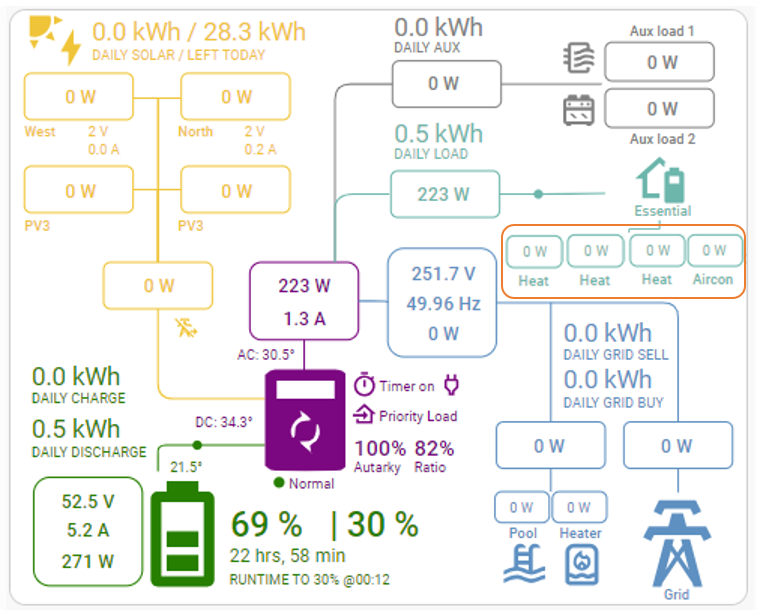
Hey @slipx I hope you're well. Is there any way that you could add in any additional essential loads to the full card? (apologies for butchering your artwork :D)
-
Bump
-
Awesome... thanks for this. All sorted now
-
That did the trick - thanks so much. Should the HA App (iOS) update automatically as this is the last place where the changes are not visible?
-
Thanks.. I tried to delete all browser cache etc on Chrome and it made no different but it's rendering correctly in Firefox. Will fiddle a bit more (at least I know the config is good )

-
Hey, Thanks as always for updating this! I'm struggling to get the "show_remaining_energy" to display: (Sunsynk Inverter) Would appreciate any help

-
Bump
-
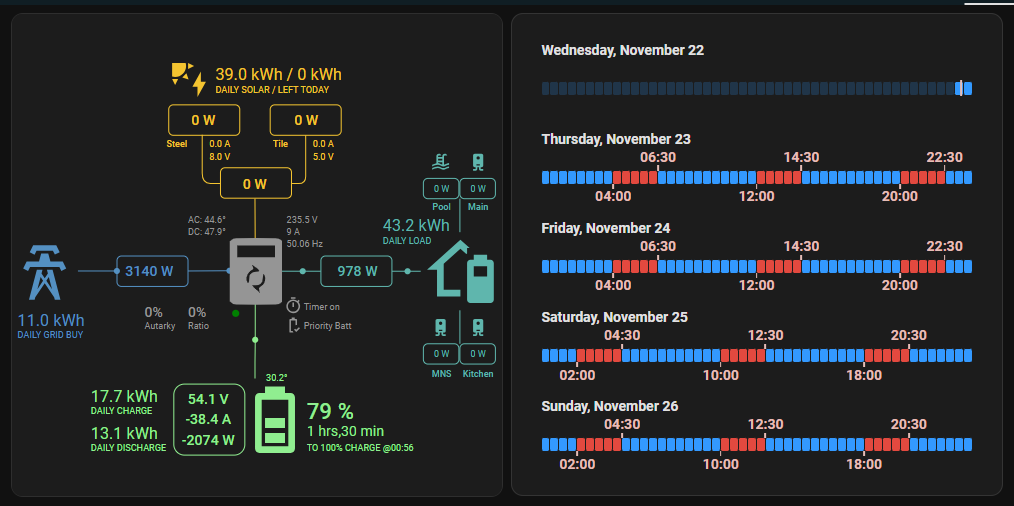
Can't take the credit for this. See here: Link (assuming you have the Load Shedding by Wernerhp add-on already running) You'll basically need: His load shedding add-on Lovelace HTML Jinja2 Template card - found in HACS front end This code (with your loadshedding area): (line 77 changes the colour of the blue bars) type: custom:html-template-card ignore_line_breaks: true content: > {% set area_sensor = "sensor.load_shedding_area_eskde_4_sandownext10cityofjohannesburggauteng" %} {% set number_of_days = 5 %} {% set show_day_borders = false %} {% set show_end_times = true %} {% set timeslots = 48 %} <style> @media (prefers-color-scheme: light) { {% if show_day_borders %} .day_container { background-color: #fbeff3 !important; } {% endif %} .current_time_indicator_text, .current_slot_indicator_start_text, .current_slot_indicator_end_text { color: #785551 !important; } .current_time_indicator, .current_slot_indicator_start, .current_slot_indicator_end { background-color: #785551 !important; } .slot { background-color: #66FF99 !important; } } .day_container { {% if show_day_borders %} background-color: #2b2120; border-radius: 0.75rem; {% endif %} padding-top: 0.5rem; padding-bottom: 1.75rem; margin: 0.25rem 0; } h3.day_heading, .current_time_indicator_text, .current_slot_indicator_start_text, .current_slot_indicator_end_text { font-family: Roboto, Ubuntu, sans-serif; font-weight: 600; } h3.day_heading { font-size: 1.0rem; margin: 0 0 0 1rem; } .slot_container { display: grid; grid-template-columns: repeat({{ timeslots }}, 1fr); gap: 0.0725rem; width: calc(100% - 2rem); margin: 0 1rem; line-height: 0.9375rem; position: relative; } .slot_container .slot:first-of-type { border-radius: 15%; } .slot_container .slot:last-of-type { border-radius: 15%; } .slot { border-radius: 15%; background-color: #3399FF; } .active_slot_stage_1 { background-color: #f6a829 !important; } .active_slot_stage_2 { background-color: #f8980d !important; } .active_slot_stage_3 { background-color: #e66e0e !important; } .active_slot_stage_4 { background-color: #e3493f !important; } .active_slot_stage_5 { background-color: #d93e3d !important; } .active_slot_stage_6 { background-color: #cf3131 !important; } .active_slot_stage_7 { background-color: #b21e1d !important; } .active_slot_stage_8 { background-color: black !important; } div.active_slot { background-color: black; } div.fade_slot { opacity:0.2; } .current_time_indicator { width: 0.125rem; position: absolute; height: 120%; top: -10%; border-radius: 15%; transform: translate(-50%, 0); background-color: #e6bdb7; } .current_time_indicator_text { position: absolute; bottom: 140%; transform: translate(-50%, 0); color: #e6bdb7; } .current_slot_indicator_start { width: 0.125rem; position: absolute; height: 40%; top: 100%; border-radius: 15%; transform: translate(-50%, 0); background-color: #e6bdb7; } .current_slot_indicator_start_text { position: absolute; top: 150%; transform: translate(-50%, 0); color: #e6bdb7; } .current_slot_indicator_end { width: 0.125rem; position: absolute; height: 40%; bottom: 100%; border-radius: 15%; transform: translate(-50%, 0); background-color: #e6bdb7; } .current_slot_indicator_end_text { position: absolute; bottom: 150%; transform: translate(-50%, 0); color: #e6bdb7; } </style> {% set area_schedule = state_attr(area_sensor, "forecast") %} {% if area_schedule is none %}{% set area_schedule = [] %}{% endif %} {% for day_offset_idx in range(number_of_days) %} {% set today_datetime_midnight = now().replace(hour=0,minute=0,second=0,microsecond=0) + timedelta(days=day_offset_idx) %} <div class="day_container"> <h3 class="day_heading" style="{% if day_offset_idx == 0 or show_end_times %} margin-bottom: 1.5rem; {% else %} margin-bottom: 0.5rem; {% endif %}">{{ today_datetime_midnight.strftime("%A, %B %-d") }}</h3> <div class="slot_container"> {% set ns = namespace(active_class_name="", last_slot_was_active=false, current_slot_was_activated=false) %} {% for half_hour_time_slot_idx in range(timeslots) %} {% set half_hour_time_slot = today_datetime_midnight + timedelta(minutes=30*half_hour_time_slot_idx) %} {% set ns.active_class_name = "" %} {% set ns.current_slot_was_activated = false %} {% for loadshedding in area_schedule %} {% if not ns.current_slot_was_activated %} {% if loadshedding["start_time"] <= half_hour_time_slot < loadshedding["end_time"] %} {% if not ns.last_slot_was_active %} {% set percentage_of_region = (half_hour_time_slot_idx/timeslots)*100 %} <span class="current_slot_indicator_start" style="left:{{ percentage_of_region }}%"> </span> <span class="current_slot_indicator_start_text" style="left:{{ percentage_of_region }}%; {% if half_hour_time_slot.hour == 0 %}transform: none;{% elif half_hour_time_slot.hour == 23 %}transform: translate(-100%,0);{% endif %}">{{ half_hour_time_slot.strftime("%H:%M") }}</span> {% endif %} {% set ns.current_slot_was_activated = true %} {% set ns.last_slot_was_active = true %} {% set ns.active_class_name = "active_slot active_slot_" + loadshedding['stage']|lower|replace(' ','_') %} {% endif %} {% endif %} {% endfor %} {% if not ns.current_slot_was_activated %} {% if show_end_times and ns.last_slot_was_active %} {% set percentage_of_region = (half_hour_time_slot_idx/timeslots)*100 %} <span class="current_slot_indicator_end" style="left:{{ percentage_of_region }}%"> </span> <span class="current_slot_indicator_end_text" style="left:{{ percentage_of_region }}%; {% if half_hour_time_slot.hour == 0 %}transform: none;{% elif half_hour_time_slot.hour == 23 %}transform: translate(-100%,0);{% endif %}">{{ half_hour_time_slot.strftime("%H:%M") }}</span> {% endif %} {% set ns.last_slot_was_active = false %} {% endif %} <div class="slot {% if now() > half_hour_time_slot + timedelta(minutes=30) %}fade_slot{% endif %} {{ ns.active_class_name }}"> </div> {% endfor %} {% if day_offset_idx == 0 %} {% set current_time_indicator_progress = now().hour*2 + now().minute/30 %} {% set percentage_of_region = (current_time_indicator_progress/timeslots)*100 %} <span class="current_time_indicator" style="left:{{ percentage_of_region }}%"> </span> {% if not show_end_times %} <span class="current_time_indicator_text" style="left:{{ percentage_of_region }}%">Now</span> {% endif %} {% endif %} </div> </div> {% endfor %}
-
Thanks so much!
-
Hey @slipx Quick Q: Are you able to share what the hex colour code is for the grid visuals? (I'd like to match the blue with the blue on the load shedding schedule on the left) Also, happy to share the code for this if anyone is interested

-
Thank you so much as always - I really appreciate it!
-
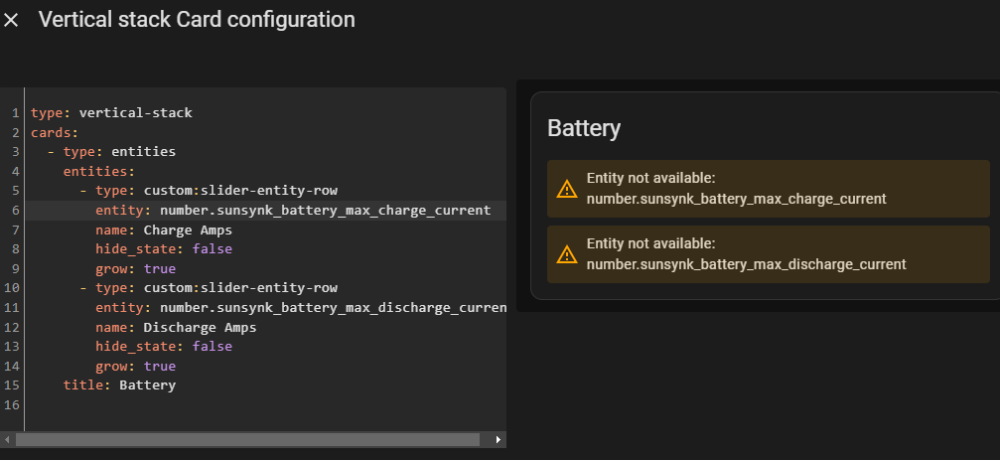
Thanks so much - just getting stuck on the creation of the new entities/template sensor:
-
Bump
-
Yeah - well, I'm using this version:

-
Hey, It's 250A x 2 (Positive and Negative)
-
Hey @slipx I hope you're well I was wondering if it would be possible to add a slider on your inverter control card to adjust the Battery Charge Amps: Thanks as always!
.thumb.png.758b7d0f176216fef777611909416c3f.png)
-
Epic as always Steve! Thanks for sharing
-
Just noticed something... I think something is up with your solar entities... 3080.6A? and 819.2A. Not sure if you've seen this....
-
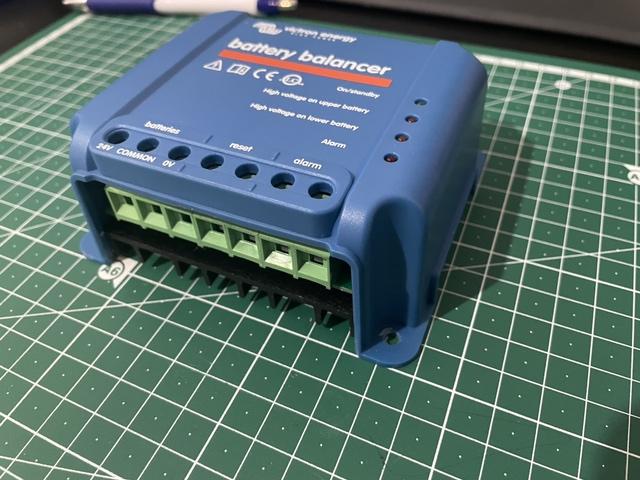
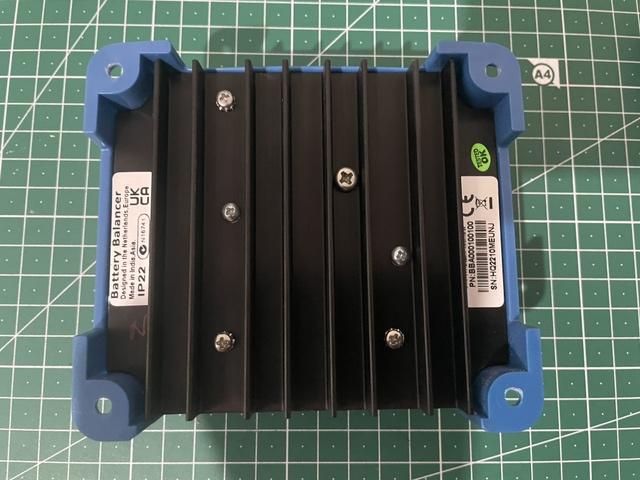
Item: Victron 24V Battery Balancer Age: 10 Months Price: R700.00 Payment Method Accepted: EFT/Geo Payment Warranty: Remainder of 5 year warranty with Victron Packaging: Will bubble wrap & box Condition: Excellent Location: Sandton, JHB Reason: No longer needed Shipping: Sure, at buyers risk and cost Collection: Sure Link: Victron


-
Perhaps @slipx can help here...
-
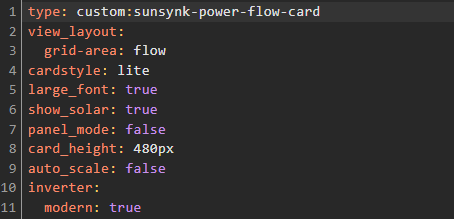
See last line:
-
Very interesting suggestion - thanks so much! Will look into it



.png.7c0458429c6766c27eceffb1968c19c9.png)