marbella
Members
-
Joined
-
Last visited
-
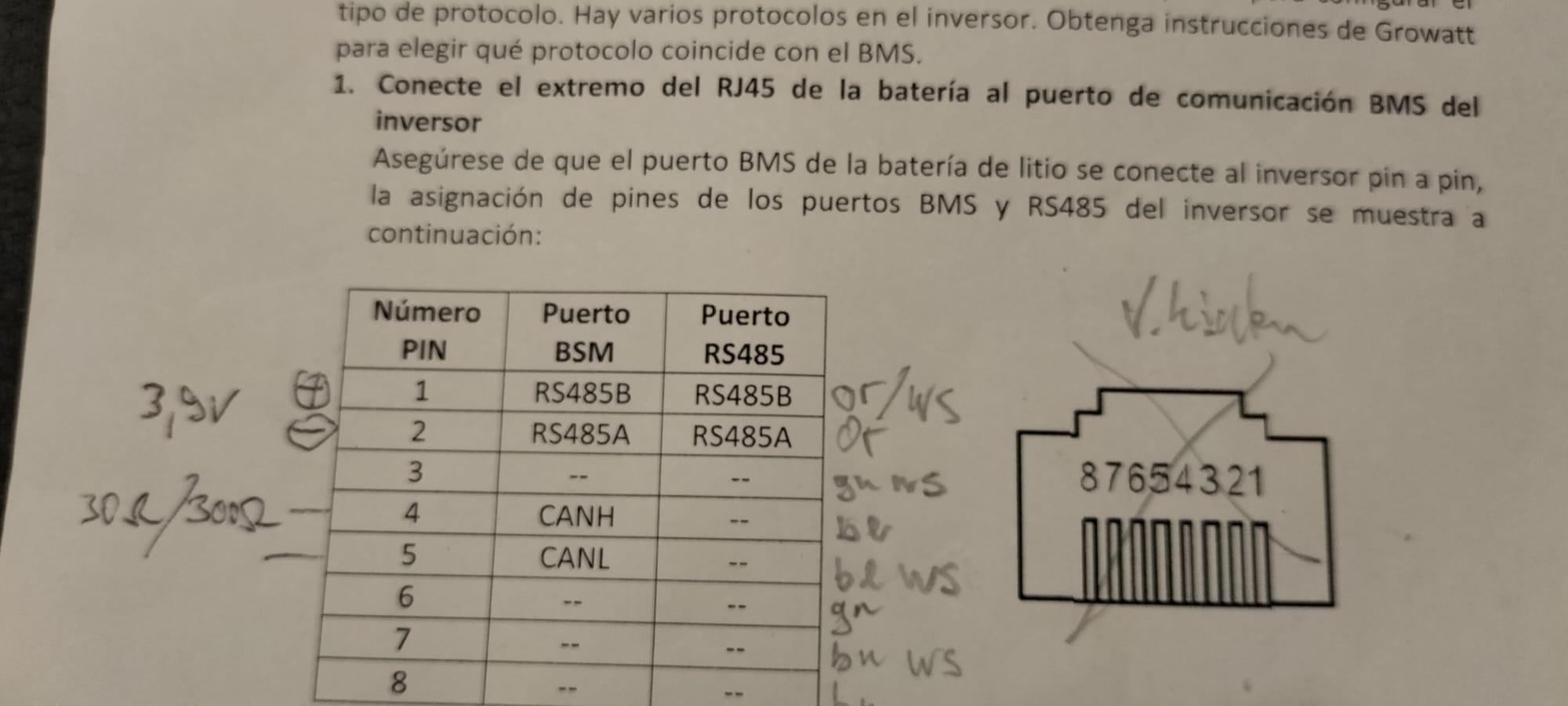
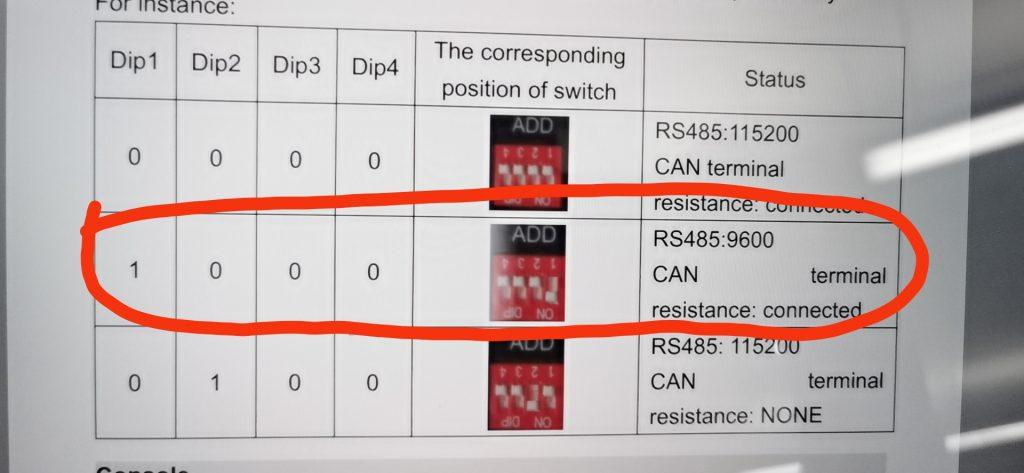
Hello everybody, please HELP!!! I run 2 Growatt spf5000es with 3 Pylontech US3000 TAB since several month without ever rebooting them. The BMS-communication was running fine on Li and I got proper % Values. so far all perfect. I have 2 white Wifi -F sticks configured correctly and got reasonable data every 5 Minutes via the shine Phone App. Recently we overloaded the 10kVA Capacity and the inverters went on Overload F09 and switched off! First I had problems deleting and restarting but when I finally switched the batteries off RESTART went ok but after the Reboot I had a F04 and F20 Communication error! I am now about 12 hours trying to reconfigure the BMS Communication again. It worked with Protokoll L52 and using the CAN-Bus (upper middle pylontec)with a all wire Ethernet cable without crossing. the firmware displayed at boot is 113 01 C05 and 114 01 C05 that appears to be rather new, I never updated it but the Inverters are from 2023 Did GROWATT update my inverters behind my back and produced this incompatibility? According to different sources the Firmware changes the BMS Control, maybe even the pinout. btw The Manual has a wrong graphic numbering on the RJ45 Jack. The error is consistent in English Spanish and German Manual. After studying the subject I came to the conclusion that BOTH, Growatt and pylontec can either use CAN Bus or RS485 assuming the cable, dip switches and RJ45 socket are correctly set but there is a lot of confusion about the cable without 123, cable with only 2 wires, cable with crossing, so I measured the pins 1&2 from SPF that have around 3.9 VDC, plus on 1 As expected there is also a resistance between 4&5 where the Can bus should be on the plug 09 (BMS) at SPF to make things a bit more weird Pylontecs BMS has the red Dip Switch Upside down, so 1 is at the right and on downwards I understand that the dip Switches are only checked once at the boot sequence of the battery so a full shutdown (black switches) is necessary!


-
multisibcontrol works great now with axpert and 3 pylontec unfortunatedly i had to switch to growatt and miss the multisibcontrol
-
looks great an I would be prepared to pay for your software if I only could connect my 3 pylontec clones (TAB4836) ! I spent over 40 hours now working on it with diferent cables, settings, drivers, baud rates etc, RX and TX blinks but after a short while it says pylon stopped. I tried to verify the cable and FTDI Chip with batterieviw but once out of several hundered tries batteryview asked my for a barcode numer that it never accepted, maybe because pylontec does not support TAB

-
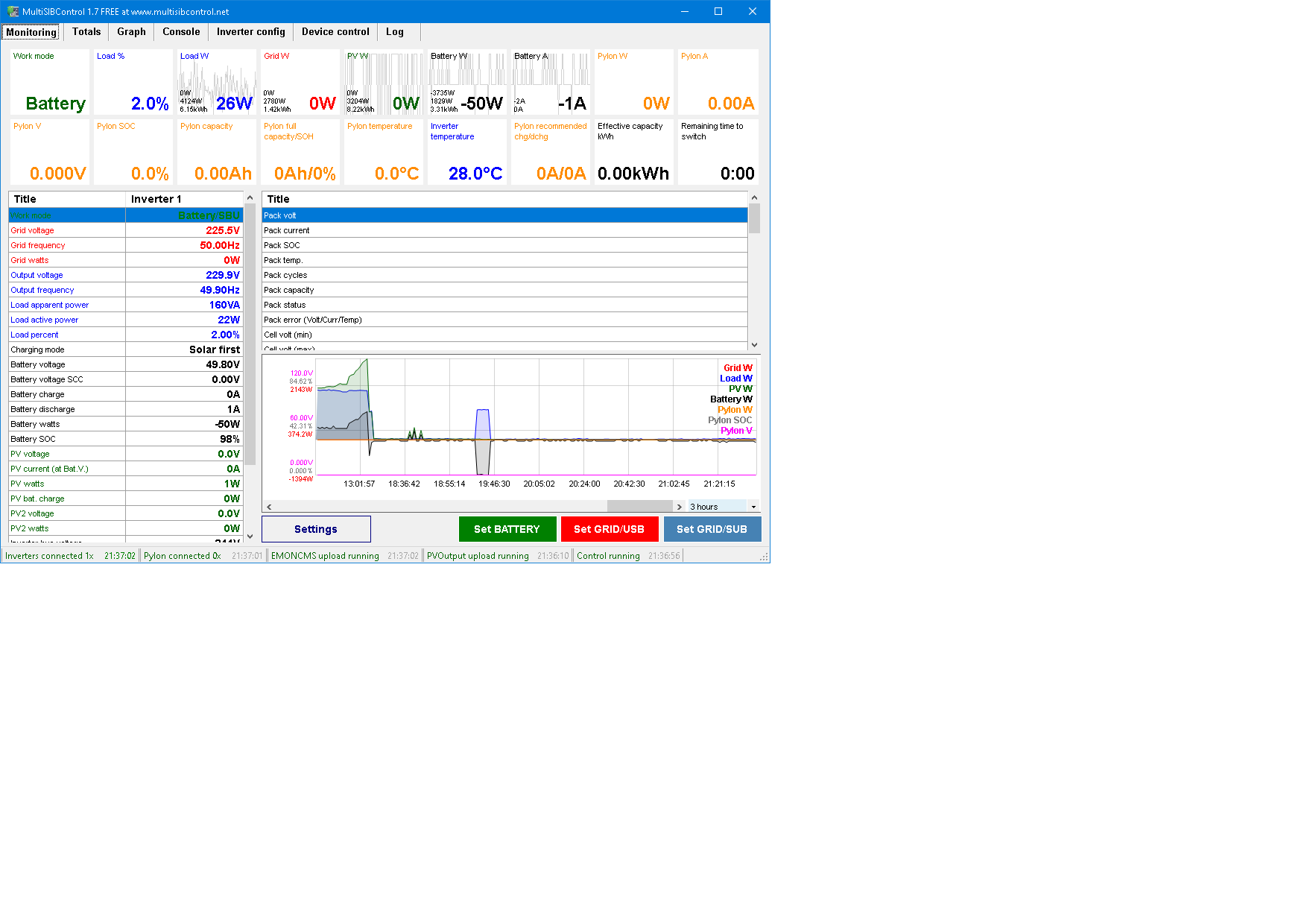
it seems the (unnecessary) update attempts of far too many people caused too much trouble for pylontec, so they removed the battery view program successfully from all sources! I found zero download possibilities with google in 30 min. I have a FTDI USB to RS485 adapter connected to the master of my 3 identical pylontec Clones from TAB, they are actually 100% clones US3500C R4836 The RX and TX lights are flashing a lot and MultiSiBControl 1.7 says Voltronic and Pylontec connected but shows no data! The MultiSib has a Console window but whatever I send to the pylontec I get now answer. The cable I tested in several configurations and it is now in one of 2 configurations weher Multisib says connected. WhatsApp Video 2023-03-30 at 21.43.56.mp4

-
-
I tried installing different CH340 USB to serial Driver Software and even changed Com8 to Com2 that all works fine with "Solarpowermonitor 2.2.81" but "Solarpower 1.16SP5" what seems identical to "Watchpower 1.15" does not find the MUST PV1800 Inverter! BTW the defaullt Password is not 12345678 but : administrator
-
Growatt MIN 5000TL-XH can handle pylontecj 3000c ?
-
the Must can work only with the pylontec via voltage control as user type 53,5V stop charging 46V stop discharging SBU home LBU
-
I uploaded all the PDFs but they are invisible now! Nevertheless I got my MUST with Pylontek to work
-
thank you very much, I hope there is a software / firmware update available for the MUST PV18-5048vhm if not it seems I have to get a new inverter , maybe AXPERT VM II 5048 ? I found a new manual for must 18-5048vhm but this forum silly enough only allows 1 MB attachments!
-
Dear Experts! I have a 48v Pylontec US3000C Clone running with a Must PV18-5048-VHM Inverter and 12 panels a 230W in sunny Spain! First it seems I need at least 2 of these batteries to not exceed the current limits. But do these pylontec communicate the SOC level or other important parameters with my Must Inverter or should I use an other battery or another 'Inverter? us3000c-installation-manual-v10-20cqsv0801-ger-inu.pdf