


PeterGutti
Members
-
Joined
-
Last visited
Everything posted by PeterGutti
-
Hi Cem! only now i'm reading your messages, sorry! As the Axpert inverter and ICC are running very smoothly i don't check the forum very often. ICC currently is connected with RS232-to-USB cable. and... yes i still would like to have a USB port. I could use it as backup. My dealer/supporter explained me that this replacement part cannot be ordered. Serial: 92931506100847


-
Hi everybody! The USB interface of my Axpert 5kva inverter is broken. Is anybody out there that does not use the USB interface? I'm running two Axpert 5KVA in parallel. One has RS232 the other has USB interface. Since months the USB interface is broken. The installer and salesman ordered vom Voltronic a replacement USB but received instead an RS232. He explained that Voltronic does not deliver replacement USB cards. (True? i don't know) I live in Spain, Costa Blanca, near Calpe/Denia, 100km south of Valencia Peter
-
Hi all! did i report to this forum that everything is working now? After upgrading the firmware of the two Axperts 5KV the generator (red) connects to both Axperts and charges the batteries and at the same time feeds the loads (bypassing).
-
Oh yes! During the day the inverter delivers power to the loads by by-passing the batteries! At the same time the batteries get charged also. After sun-set all loads have to be fed from the batteries. Therefore the voltage drops! I'm learning slowly Thank you all! Fantastic support here.
-
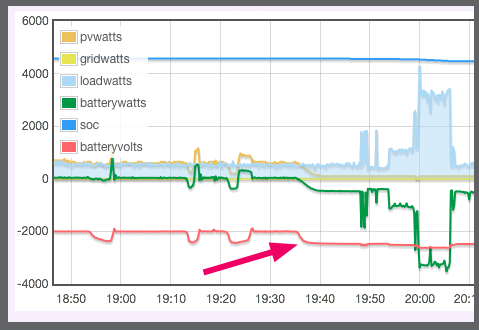
Hi @ebrsa. One last uncertainty: During the day the batteries get charged up to the specified voltage (54V). And than, after sunset, the voltage drops to 51V withing minutes. Is that a normal behaviour? Or the barreries are weak? Greeting, Peter
-
@Manie Didn't you send me a link to a downloadable program that is able to communicate with both i/f, COM and USB? I thinks its an early version of ICC. Today i get a new USB port. With this program i would be able to test it. Thanks.
-
@Manie What does it mean when the blue field does not contain a status information? This behavour started a few days ago, after i moved pi to a cooler location. Also the USB communication is down (may be the primary error?)

-
about USB: command lsusb reports the following status: USB status: pi@aicc:~/AICC $ lsusb Bus 001 Device 005: ID 0665:5161 Cypress Semiconductor USB to Serial Bus 001 Device 004: ID 0403:6015 Future Technology Devices International, Ltd Bridge(I2C/SPI/UART/FIFO) Bus 001 Device 003: ID 0424:ec00 Standard Microsystems Corp. SMSC9512/9514 Fast Ethernet Adapter Bus 001 Device 002: ID 0424:9514 Standard Microsystems Corp. Bus 001 Device 001: ID 1d6b:0002 Linux Foundation 2.0 root hub If i remember correctly, ID 0665:5161 is the Axpert USB port. What surprises me, is the text "USB to Serial" !
-
Hey @ebrsa - muchas gracias! thank you for this analysis. Send me your banking data so i can transfer an amount. The Axpert parameters are quite close to your recommendations: 26: 56,8 27: 54,8. But the BMV parm 2 is at 52,8. This influences the SOC calculation, i assume. Axpert Level is 72.40 Will modify the BMV settings. BMV is used to start the Generator in case of low battery due to bad weather. This happens only 2-3 times per year.
-
@Sidewinder Hi! Thanks for the hints. Will install V2 of ICC as soon as is available. Actually it says i'm running the actual version (1.1.3)
-
I'm still trying to bring USB com back to live.. I powered each Inverter off, but not a the same time, not to get a power outage in the house. Restarted ICC and the pi. No luck! What confuses me is the status: The blue field does not contain any text. Normally it says "Battery Mode". The button to change the mode says "Change to Battery". This would mean that inverter reports it is in "Grid mode"! No? When pushing that button and confirm to switch to battery mode, nothing happens! Whats wrong with that bl....y inverter?
-
@Mark Yes i can do that also, but then the master inverter goes into error 80. And the only way to clear that is to power off.. I think! I did not explain the whole story because lenghty messages are less read as the short messages.
-
This problem does not happen on my new, second inverter. Its the one with the USB interface, it has a sligthly different design. When pulling the battery fuse it immediately show no sign of life: Display goes off. The older one, having RS232 interfaces and runs as master, needs minutes to go off.
-
Hi @Mark No, Its not needed to connect parallel Inverters (think about how would one connect 5 or more inverters?). On the inverter/Battery page the latest entry says "Inverter Count" is 2. And the "Cluster info" page shows all details of all connected inverters.
-
I did what you recommended: Powered off the two Axperts (parallel) and restarted it. After that, USB com worked again. But than i stopped ICC and restarted it (only the APP, not the pi). Unexptedly the USB link was down again. Will try again by shutting down.. but this should not be the solution, because it produces a power outage in the house. I could shutdown only the Slave Axpert with the USB interface (the other has RS232). But than the Master Axpert gets an error 80 (undocumented). Unfortunately by simply switching off the Axpert by the on/off switch only switches off the the output side (seen on the display), the inverter still is powered. Also completely unclear to is the fact that when taking off the panels and the batteries, it takes about 2mins until the Inverter is really powerless. Is there some type of battery backup inside of the inverter?
-
I moved my pi to another location on the installation board (wall) where the surrounding temp is 5° less. Interrestingly, the CPU temp now goes up to 70deg, but.. pi ICC does not get any data from the Axperts boxes. All zero. I tried various things without success: Unplug, new cable, different USB interface, reboot.. nothing made it run again. The data from the Batt.Monitor comes through. I also noticed, that the temp falls withing seconds by 5-10 deg when stopping ICC, (pushing stop button).
-
Must be the temperature: right now its 65° !! And it makes sense as the running period gets shorter while the outside temperture rises. And... its placed below the Inverter, may be hot air is blown out if it.. Will fix this first. Many thanks! Peter
-
ICC Stops working. I'm just wondering if other users expierience similar problems: ICC stops working and pi is not reachable using VNC, although Pi reponds to Ping. Therefore i'm unable to see what happend. Only option is power off/on on pi. This now happend three times, with intervals of 11, 9 and 3 days. If it further comes down lo 1 or two days .... what could i look for? change? Any hints and tips are welcome.
-
Hi @Don- thats exactly what is specified: Bulk(Parm 26) 56,4V Float(Parm 27) 54,8V. Utility is the diesel Generator = emergeny situation, i'm off grid. Only using it 3-4 times a year when there is a longer period of real bad weather. In spain we mostly have sunny weather (too sunny, we should get rain! the land drys out)
-
Today, ICC stopped reading the values from the inverters. After i detected that situation (@09:00), i simply stopped ICC and started it again using the Stop/Start button of the dashboard.

-
ICC fails after about 200 hrs: Fatal IO error 11: Recource unavailable. See attached image. No action whatsoever on the server during the time of failure. I just restarted ICC (using regina rexx) and everything was ok again.

-
Don, with the generator i'm limited to 30A or so. The reason is, that the generator cannot deliver more. If set higher, the charge controller requests more from the gen than it can deliver. After a few minutes, the gen dies!
-
Hi Mark, just saw your question (from december, sorry). I have 24 panels polycrystalline, 25W, 60C, 24V. Dont understand what you mean about wiring.
-
Hi Don. I had this behaviour also: It has to do with the locales settings: Decimals should be a point (some countries use the comma). After correcting the language setting it worked since then.
-
Sidewinder, thank you for this detailed upgrade description. What i did differently: I unpacked the rar using Mac: On the pi i have apple file protocol installed that allows to access the pi like any other server in the nework. This way its easy to copy files from/to pi. It seems that this method somehow changed the ICC exec file. I save (copy) the solar db once a week, would like to automate.. (i lost it once and had to reenter all the settings). Now the second time i did all tasks (unrar, etc) within pi (UX) and now it works.. Except that the machine ID changed(:<)


