


PeterGutti
Members
-
Joined
-
Last visited
-
OK, thanks again (it's sunday!) In this case i will buy a new Axpert inverter, the King rack version or the VMIII, with litio batteries from DC Solar Energy. I do no like and want to depend on SMH for battery management. SMH is an info system. Everything should work without SMH and HA. Reason: These software solutions are not fools proof. Means, needs control, update and maintenance. I use HA to start the grid=generator and the pool pump based on data from SMH. But these functions are no essential. Thanks for helping. Greetings Peter
-
and i have SMH communicating with the inverters. May be one ca read out more info about the models.
-
i have two in parallel, but they are not identical. From the other i cannot see the label! as it is close to the wall. Peter
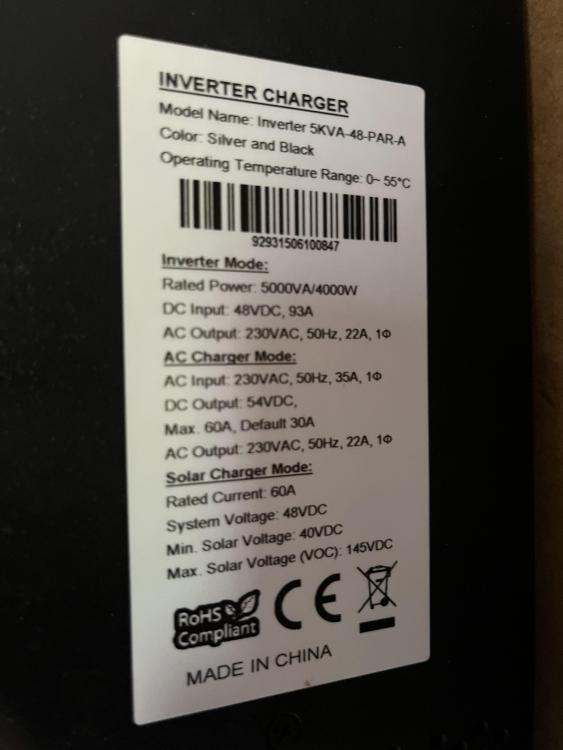
-
Hi I need to replace my good old lead batteries running with two Voltronic inverters 4k, in parallel. My question is: can I use my inverters, with modern lithium batteries? and question number two: what batteries are recommend? There are so many they are all looking super neat. It’s hard for me to select the right one. It’s to say I live in Spain.
-
I decided to upgrade from ICC to SMH as soon as got the announcement. Main reason was that now it looks some kind of a pro software so i can expect that SMH runs stable, more stable than ICC did (crashed quite often). I'm very pleased with SMH up to now. It has a nice dashboard including a lot of details about the whole system. With EMONcms no longer on the same pi, rather than on a remote host, opens the possibility to access it from anywhere over the internet. I used GPIO to do some load balancing based on the battery status. It has been renamed to APM but looks quite the same. I understand that it is being phased out. Therefore i'm looking for another Home Assistent solution. I installed OpenHAB on a pi. At first glance it looks as it would be overkill for my requirements: Enable/disable pool pump, start power generator if needed, heat water boiler, and charge the EV if battery allows (planed). If all of this functions work properly SMH brings added value to me. I'm therefore not surprised to pay a regular fee (of course not too high as i do not make money with my solar system).
-
I'm planning to buy a new car: Hybrid plug-in. My solar panels produce enough power during summer time to charge the car's battery after noon. All the chargers i found rely on the red connection: If it detects power going to the red it will re-direct it to the car. As i do not have a red connection (island) ... how could that problem be solved? Red = Car? Theoretically i could use the SOC: IF at 100% then car charger ON. The problem with this would be that the SOC falls as soon as the load changes. Means, after a few minutes the SOC will be down to 98...95 indicating to stop charging the car, go back to charging the batteries. We call this a jo-jo effect.
-
Hey Thank You Eddie. I will immediately try this solution. The pictures look excellent. Will inform you of my doings.
-
Hi Youda. i'm planning to also buy a EV with plug-in. I also would like to use the excess electricity of my PV panels to charge the car. At least in summer time and after the batteries are fully charged. But i do not have the skill to do that all myself. I'm looking for a solution on the market, a wallbox with DC input. Is there any? Current installation: 2xAxpert 5kVA, 24 Batt a 1500Ah, ICC software to monitor, ICC GPIO to start/stop the power generator and the pool pump.
-
-
Noone using Apple file protocol (AFP) to access a pi form a OS system??
-
There may be better places in the web to discuss this topic.... anyhow i give it a try. I'm running ICC software on a pi to monitor the Axpert inverters. And a second one for GPIO to start/stop the generator and the pool pump depending on the SOC. I use(d) AFP (Apple File Protocol) to exchange files to/from my MacBook. Typically config end log files i saved this way because a crash on a pi can destroy the "harddisk" = SD card. The "problem" started after i installed a completely new system downloaded from the ICC developer. It solved the issues with ICC but opened a new one: AFP now refuses to connect. I installed AFP using "sudo apt-get install netatalk". When trying to connect to the server (ICC pi) i get a message saying: there are no compatible resources or you don't have permission. I'm using the only user available on that pi named pi. The second pi still can be accessed using AFP. I'm looking / asking here for some assistance on how to show and modify the users in relacion to AFP (Apple File Protocol). Thanks in advance .. Peter i not even know how to find out the actual Debian version..
-
Yes i did - but Manie's reaction was a bit .. touchy?
-
I'm somehow happy that i'm not the only one having this problem. So its not my fault or system. Thank you Durran.
-
I'm running two Axpert 5kva in parallel mode. and use ICC to monitor the inverters and collect data. Every now and then (average 5days) the software stops working. I often realise it hours or even days later when the EMON statistics do not get updated anymore. I'm asking here if other users of ICC experience the same behaviour? As ICC does not give a clou what happened, even the log file gets cleared when started again, so that the latest entries are gone.. It's a fantastic piece of software, except when its not running.. ICC version is 3.1
-
Good news: The USB interface Mars sent me finally works. I now can connect both, BMV and Voltronic, over USB to ICC. Before, under mixed communication (RS232 for Voltronic and USB for BMV) the connection failed every now and than: After 80 hrs ... 800 hrs of ICC running time. I learned that this might be a problem of Linux(!?). But now no longer its an issue. The replacement was not that complicated: make Inverter powerless: Power off, disconnect batteries and panels (by pulling fuses) disconnect old card, unscrew it screw in the new card and connect the three plugs (cannot be confused) back on power by inserting all the fuses and switch the inverter power on Connect USB cable and watch! It did not work the first time, so i left it for a few days. Today i checked all the connectors and tried again. I have been told, that the inverter may have to be reset multiple times to make changes work. But today i did not power off the inverter... I hope with this setup the communication problem i experienced are over! Thanks again to Mars who shipped a replacement part within days. Great support!
-
-
Hi everybody! I'm impressed how people in this forum support each other! Hope i can give back something in the future. Yes,, my cards looks exactly like the 2015 fotos in the pdf. I would be happy to buy one. Will send PM with address.


