


AndySu
Members
-
Joined
-
Last visited
Everything posted by AndySu
-
12/08/26 A new platform update has been published. Key changes: • Security: Added request rate limiting, CSRF protection, and additional checks to prevent Path Traversal and RCE vulnerabilities. • I-V Curve Analysis: Added tools for string diagnostics. The parser calculates the Fill Factor, detects steps, and identifies open-circuit voltage drop (Voc-drop). We also implemented current and voltage point extraction for charting. • Authorization: Configured Google Sign-In. Basic parsing features remain available without registration, while advanced analysis has been moved to the authorized users' zone. • Localization: Completed translation of the interface and reports (available in Ukrainian, English, and Chinese).
-
big update! Big Parsers Update TodayToday is a big update for the parsers. Here are the details: ### Support for new log types added The capabilities of the system have been significantly expanded, now decrypting files that were previously ignored: • Critical and active alarms (alarmg_major, alarmg_active) — information about the most important accidents in the ESS (Energy Storage System) is now available. • LUNA2000 battery logs (bmu_alarm_log) — added support for diagnostics of battery blocks. • Universal performance (perfmg) — the system learned to understand any performance variations: hourly, daily, monthly, as well as old SmartLogger formats (his_per_data). • Alternative inverter logs (his_inv_data, his_fan_data) — added support for operating parameters for large industrial ESS systems. • New panel inspection format (sun_inspect_rec) — decoded a new extended format of IV-curve diagnostics, which differs from the classic panel passport. • Text and debugging data (text_log, sun_dbg_info) — the system now automatically sorts standard text reports and decrypts inverter system debugs. • Memory (RAM) optimization — all parsers have been ported to streaming processing, reducing server RAM consumption by tens of times when processing massive log archives. ### Bug Fixes • Missing data: Fixed an issue in the main log (his_inv_rd) where significant data arrays were lost (in some cases, up to 90% of records were missing). • SmartLogger compatibility: Fixed device recognition logic, due to which internal communications (dsp_log) and oscillograms (dsp_wave_data) from SmartLogger were not read by the parser. • Column shifting: Repaired "broken" column shifts in dsp_log reports, which caused some values to end up in the wrong cells. ### Improved Report Quality (Usability) • Code decryption: Added translation of many numeric codes into text format (statuses, alarm names, etc.). • More details: From settings (cfg_file_ctrl), a full dictionary of parameters is now extracted (previously only a part was extracted), and voltage and current now have the correct scale (divided by 10 or 100 to show actual Volts and Amperes). • New metrics: In oscillograms (dsp_wave_data), calculations for average values and phase imbalance were added, and in communication logs (dsp_log), indicators of insulation resistance and grid disconnection reasons appeared. All these updates have successfully passed mass testing on a database of over 450 real files. Wellcome! and please - check your files - this help me to teach AI )))
-
https://andysu3.mooo.com/hua3/env3 is comin' ! - at 24/04/26 still trying to use free coders to the max (there are still alternatives to qwen, luckily)) 1 - added Huawei by serials check - here is a little explanation - Huawei (at least here)behaves with a warranty like this - when there is a warranty - equipment replacement without problems (checked - they even paid for the transfer),when there is no warranty - they don't do off-warranty repairs at all. They only offer to extend it before the end of the off-warranty.Therefore - I think - it's better to control here. Also - pay attention to the country of service - there may be no service. 2 - added documentation on error codes. 3 - beta testers are really needed - please come and test
-
I made a small parser of emap log files for Huawei Sun2000. Please test it. It helps to analyze failures in work. Thanks for the feedback. Huawei Log Parser also huawei inspection file view Huawei instruments Beta I kindly ask you to upload your data - it will help a lot in improving the program Thank you

-
Please help. I have a Deye battery and an inverter that only supports the RS485 protocol Pylontech or PACE. Is it possible to change the protocol in the Deye battery through the settings so that there is communication with my inverter. Or only with the help of a converter?
-
If you use can protocol need set the dip switch to 0010, use 485 protocol need to set the dip switch to 0100. (answer from dyness manufacturer) for reading i prefer use python scripts like this https://github.com/Frankkkkk/python-pylontech in rs485 dyness use whole pylontech protocol - search public info (pylon rs485 protocol ver 2.8)
-
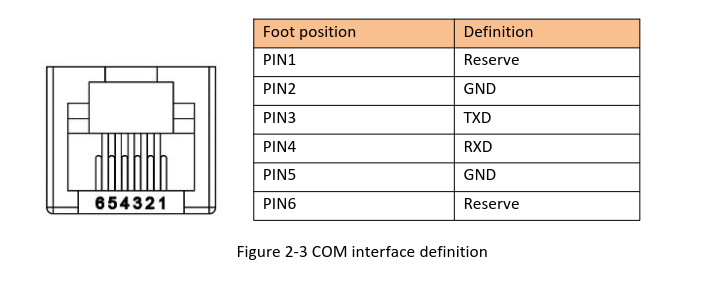
try this connect 3wires rx,tx,and gnd - important! and use usb/rs232 converter (not ttl!)
-
i have similar issue with deye and dyness b4850 for CAN connect try use thes pinout inverter 4-5 and short 6and7 battery - 4-5 if you use cable with T568B in both sides: invetrter Blue(4)-WhiteBlue(5) and short Green(6)-WhiteBrown(7) battery only Blue(4)-WhiteBlue(5) if if you do everything right -you may look on iverter screen battery name (DYNESS) and battery capacity


