onobeka
Members
-
Joined
-
Last visited
-
Thank you Coulomb!
-
Question for the ones who have reversed the airflow: did you notice a significant reduction of the temeperature as reported by the inverters? Mine are Easun iGrid Sv4. They have the dust filters at the top, which do a good job. Afrer two years I opened them to blow the dust out, but there was not much dust. Mine are also in a garage/workshop which is dusty by design. This prevented me to reverse the fans so far. However, I added a third one and the space where the inverters are located became pretty packed. From the logs I have in HA, during the night they run at 33C while during the day they can get to 50C. I am running an aircon in the garage and the temp is generally 22C.
-
Indeed, it does not make a difference. Meanwhile I can sell to grid so I've tuned my automation such that I am always selling a little bit and consuming the rest via the safe margin of 0-500W that goes to the grid. For the other issue, I've set the inverter back to 2A charge, briefly, when I see that it's set to max (80A in my case, although maximum would be 120A) and the battery is discharging. This way, it will start again going to 10, 20, 30 ... 80A.
-
I would have expected that the AC charge would behave the same as the solar charge, trying to keep the battery at float, but it clearly does not. Maybe it is related to the fact that the inverter in the discussion(which does not have any PVs) is set as “Solar first” for charging mode?!?. I can set it to “Solar and utility simultaneously” to see if it makes a difference.
-
-
Thank you Coulomb! Indeed, SA recognizes it as an Infini inverter. I can continue like this. I do understand that with a Growatt SPF (5000 or 6000) ES it would be possible to set the max charge current in increments of 1A, yet that would be again a hassle to integrate and I am pretty sure I may reach another inconvenience. Speaking about inconvenience, I've noticed something else that looks a bit weird. With the current setup, when the battery is near full or full, even if the max charge current is set to 80A, the inverter can push as much as the battery accepts, for example: 7A. At some moment the battery starts to discharge, because the sun starts to set, however the inverter will remain stuck at 7A charge, while the max is still 80A and the battery is 90%, of course the battery voltage dropped as well to 50V while the bulk/float are set at 52V (15s 940A battery mix of 3xus5000 and 2 DIY 320A MB31 cells with JK BMSes). Now, if I would stop/start the inverter, after a restart it would go back to 80A. Or, without the stop/start if I set the max charge to 2A (lower than the 7A) and then back to a higher than 7A, let's say 50A, it would charge again with 50A. This is solvable via a Home Assistant automation, of course. Still, I find it strange.
-
-
Hello, I have a different type of inverter, the Easun iGrid SV-4 and I am trying to set programmatically the maximum grid charge current. I can do so via Solar Assistant by using MQTT yet I am still bound to the dreaded: 2,10,20,...120A fixed values. I would like to be able to set these values with finer grain. I've tried SolarPower and WatchPower and in there the dropdowns are still bound to those fixed values, however when a change is operated through the LCD menu, the change is gradual with some random intermediate values, which are displayed also in the applications. So, if I would go the ESPHome route, provided that it would work for my inverter as well, is there a chance to set an integer value between 2 and 120A without being forced to stick to the predefined values? Thank you very much. I am using this inverter as a controllable power supply to charge the battery from the grid (a grid-tied inverter) in order to consume all production and feed less to the grid.
-
-
Does anyone know what the new version brings in terms of bug fixes? My two inverters (Easun iGrid SV4s) are running 76.01. I am tempted to update to 76.03 provided that there are benefits, given the risk of bricking the inverters. Maybe something like the premature float issue?
-
Hello, I have currently three Pylontech us5000 moduels that work fine with the Voltronic copy of the inverters (Easun) or Solar Assistant. Since I've moved away from PYL mode (as I cannot change the voltages), I run my battery bank in USE mode with lower voltages (52/52.5V). Also I have two inverters in parallel and in PYL mode, one would complain about not seeing the battery (I only have one BMS cable coming out of the batteries). Soon I will be building a DIY battery, 15S and I need to choose a BMS for it. I will add it in parallel with the Pylontech bank. I am hesitating between JK (active ballancing) and Seplos. I do not envision communication with the inverter yet it would be nice to be able to connect the second battery to Solar Assistant. As the interface looks like, this would not be possible as I can select just one battery model there. Is there a BMS that would map on the Pylontech protocol, or the other way around? I also have Home Assistant, so the other option would be that I would see the new BMS directy in HA (where I also see the Pylontech via Solar Assistant and MQTT). Do you have another suggestion? Thank you!
-
-
Alright, the battery was replaced. I've charged the first module to 100% (as the others also were), to get to the same voltage and I will set them in parallel. There's almost no difference in between cell voltages of the new module (0.014V) at 100% and no temperature increase. Thank you very much for all your support!
-
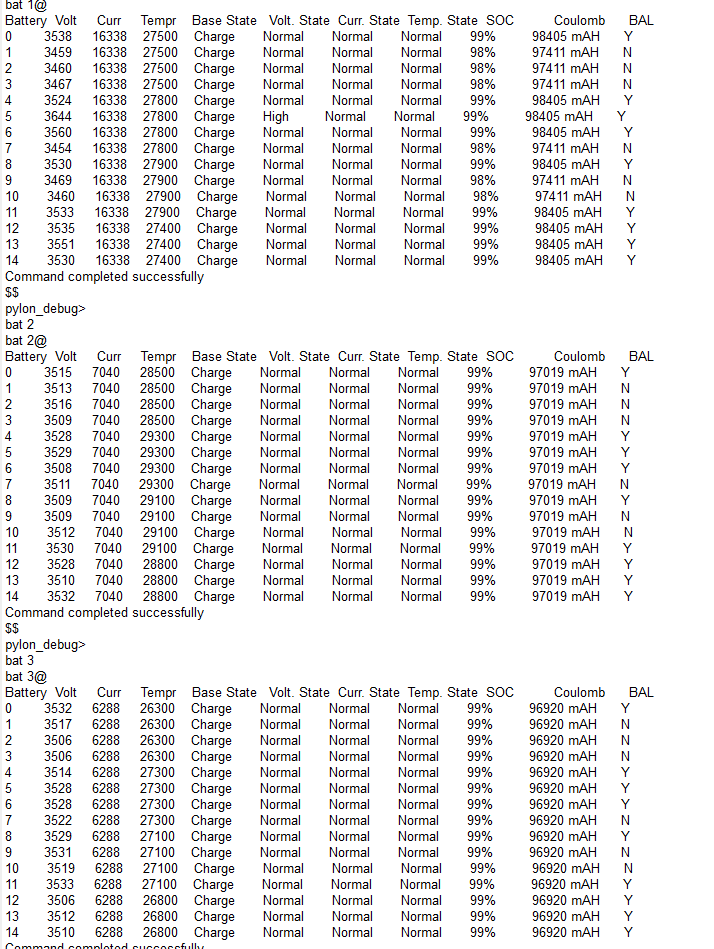
MeDat, I know that they are buying time, they’ve said though to try that and if the phenomena is still there they will change it. So, I’ve sent new logs on Friday and yesterday. Obviously, nothing changed. I will wait for their answer next week. Until then, I am back on 51.7V float and 52V bulk. There was no balancing today, not that it needed to, voltages remained aligned. However, the BMS temperature spiked again to 38.5C. I have no idea why. It seems there are two issues with that module. I hope they will replace it.
-
Yes, now they are back on 53.2V (PYL) mode. I am hunting now
-
I guess, they want to try to escape replacing the battery. Less hassle for them, more for me. Anyway, I've changed it and I wait for the phenomena to happen again, now in pack #2 :).
-
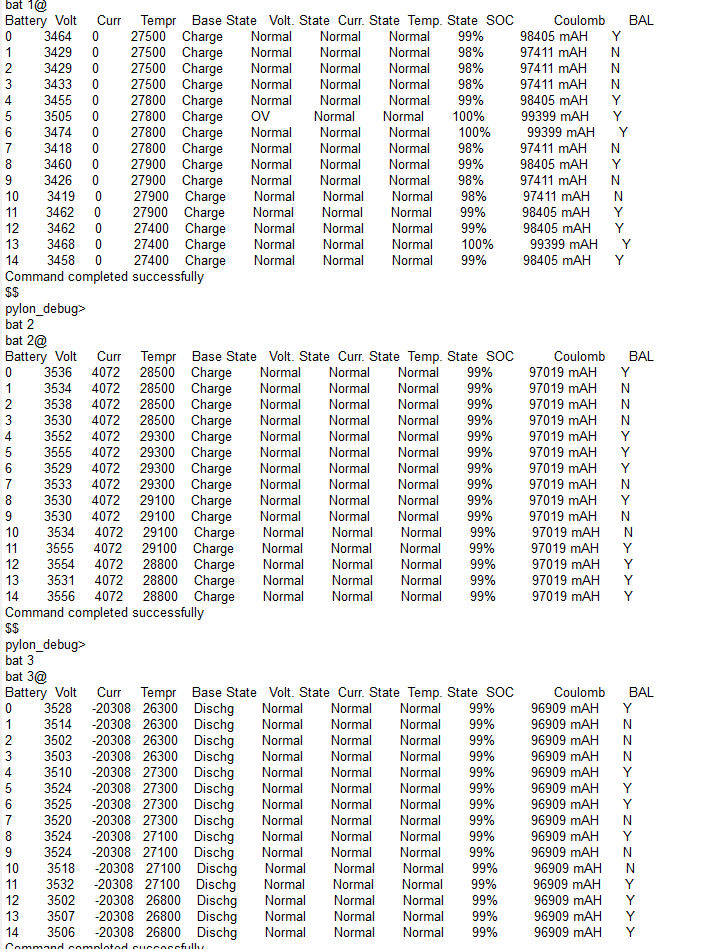
They've asked to make this battery a slave and move it in the rack, to check if the temperature issue still happens. To me this is pointless as the temperature is a consequence of the overvoltage. In case the phenomena remains they said they will replace it. I've tried to make them realize this is irrelevant. So, I guess I need to put in some elbow grease. For now, I've lowered the float to 51.8V and bulk to 52V to see how it behaves. At 51.8V the balancing is active and that cell is not overshooting.
-
And here it is, this time there's no doubt. It is Over voltage.


-
Thank you MeDat, that is probably correct, there are no errors stored. Today I might have a chance to catch the event of 3.6+V with some logs.