


Vitaliy
Members
-
Joined
-
Last visited
Everything posted by Vitaliy
-
Hmm. After I revisited configuration documentation and looked precisely ti screenshots I found that probably it possible to draw generator as an aux. The problem only that probably only sunsilk/deye users familiar with AUX word. Users of other inverters just may not recognize this ability. And showing generator is not explicitly explained in documentation as a use case.
-
Hi @slipx Thanks again for your beautiful card) There is an idea. How do you think maybe it's a time to add one more energy source in addition to the grid - generator? (Diesel, gasoline, etc). For countries with frequent blackouts a generator is popular additional emergency power source and it would be nice ti see on card current parameters and daily consumption from the generator. Thanks
-
hi what is the "The premature float bug" you talk about? can you pls tell a bit more details? Unfortunately, problems grows up with my King 1. May be you remember I complained once that it stopped to generate PV power for a few hours and we made a guess that it can be some wiring issue, but it unlikely in 2s5p system. After that the inverter was working relatively good, only rarely disturbed with this mppt bug. But a couple days ago I realized the bug have begun progressing since begin of April. And mppt randomly decides to mix in PV power in SUB mode or not. PV voltage at the same time is good. It may doesn't take PV till 11 AM, then start working. Or work till 5 PM and then stop when it's still enough sun. It's interesting - if I switch to SBU mode or cut off grid manually - in a couple minutes it starts taking PV power and produces good power. Then if I return to SUB mode or switch on the grid - in a few minutes PV generation goes down and then becomes zero or varies in 0-5-10W. Changing battery parameters or switching from USR to PYL didn't help. Changes in parameter 16 (my usual setting is SLb UCb) also didn't help. Complete shutdown and restart the inverter didn't help. How you think does updating to 72.04 may help? (Btw did someone tried 72.04 and is it good?) Or it's some hardware problem? Because nothing changed in firmware/software parts in a long time. So maybe some electronic components (capacitors, etc) started degrading after a 1.5 years of running? ThanksHmm. It's possible. I'm sure the inverter has AC voltage sensor before this relay (because there is no gaps in his values history) But indeed, maybe somewhy the inverter periodically connects AC charger. Btw, I have wifi power monitor just before AC input of the inverter and in days when I used SBU mode it didn't show more then 1W consumption. Mostly zero. But I can make an experiment - again switch to SBU mode and then disconnect input of inverter from power meter (I have the switch between). And then ensure that 1W isn't own consumption of the meter. Btw, in SUB or USB modes if the grid disappeared - nothing clicks inside the inverter This clicking makes me a bit mad, especially not only due noise, but also when I thinking that it makes unnecessary wearout of the relay contacts and potentially can relatively quickly kills the relay
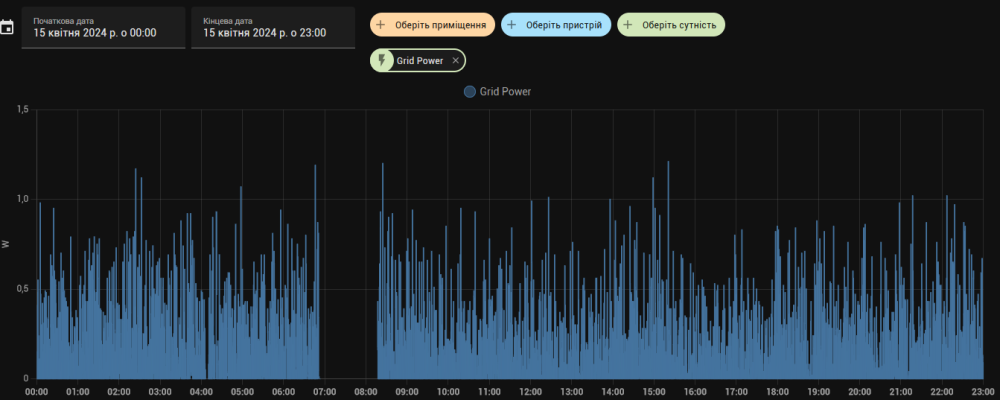 Thank you, mate! I returned to SUB mode and clicking disappeared. I don't think it's any MPPT relay clicking because what is the difference for MPPT how to work in SUB and SBU modes? It's obviously not the Load relay. ) I saw a few schemas that I found in https://powerforum.co.za/topic/14666-repair-of-axpert-inverters-a-journey-started/. One is Mixo's schema Second is I have no idea which relay except "Earth bound" can continuously (RY1?) clicking in that way I don't see any side affects on the load side. And if it this relay clicking - what is the reason to do this? Bug in firmware? Also maybe it periodically connect\disconnect AC charger (input part of dual transformation in AC IN->battery + MPPT-> AC OUT). But again - why?? I have no idea how old is board version in my inverter. I bought it in Jan 2022 and it had 72.00 firmware from the factory. Thanks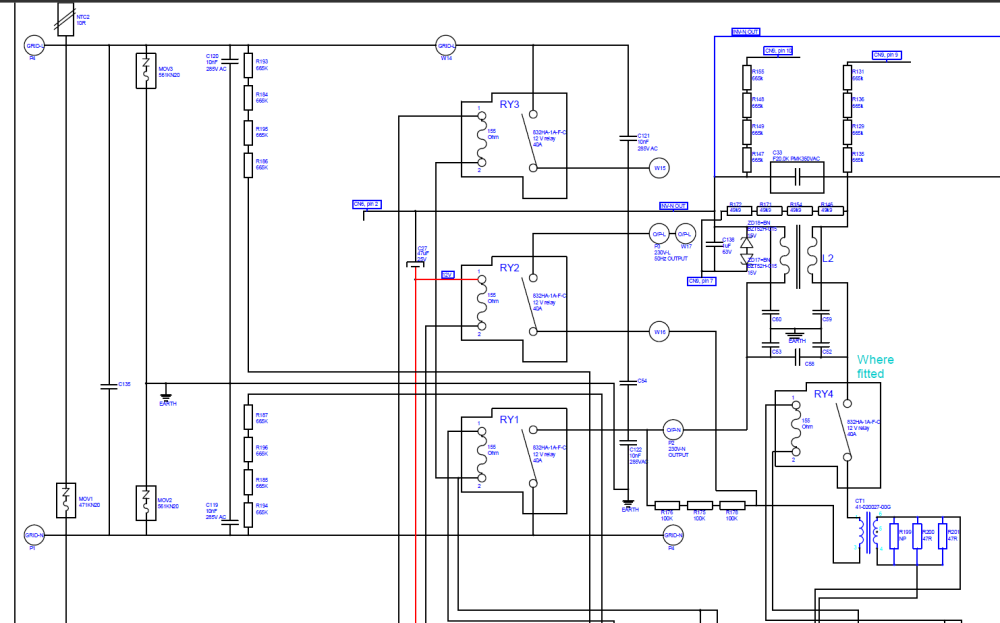
 Maybe someone has an electrical scheme of King or knows purpose of 4 relays on the main board (visible on pictures in the service manual)?Hi I have run the invertor so far in USB or SUB modes. Yesterday I decided to try SBU mode and it works well, except that I became hearing some clicks inside inverter. Like some relay switches. It happens in random intervals, somtimes once per a few minutes, sometilime a few times per a minute. No matter is it day or night. I made a guess that it maybe dry contact relay, but I checked with a tester and it looks stay in single state. So I just curious what is a source of that clicks. Any ideas? Thanks Ps. I found just a couple of similar complains on another forum. Without referring to a mode and without an answer. And i haven't use connection to pylin bms. https://forums.aeva.asn.au/viewtopic.php?p=95978&sid=8ece6d65173bd301456b956c8d11959f#p95978I used french Nexans 6mm2 photovoltaic cable with 3 layers of insulation and UV radiation protection. I thought that designed to be enough resistant to outdoor conditions including working under direct sun radiation. If it's wrong expectation I will research on web and maybe cover cables with some additional isolation tape or some conduit. And basically as far as I know MC4 connectors also designed to be waterproof and work in outdoor conditions. I was put all wiring on the edge of panels with idea that it will allow easily re-commutate wiring if i will change inverter to an another high voltage model or if i decided to change panels pairing scheme. (Honestly to do this I had to design and make on 3d printer special cable holders). Unfortunately, this roof has just 7 degree angle and not best azimuth, but I have no better place for panels. There is 10-15 cm space between the roof and panels. Btw, I mounted all the stuff by myself. It's completely DIY project :) No, there are exactly 5 pairs of cable which routed from panels to the box. Basically, I think that's I can't imagine connection problem in 5P system that can produce such symptoms. Taking in account that in time of low generation the inverter showed pretty good PV voltage 98-99V. If one of strings had bad connection it will produce 20% lower generation than usual in similar conditions, but not 10W. If some string had short circuit through a water - this, I guess, had to produce drop of PV voltage of the panels system. But all was looking like the inverter just won't to consume. So at the moment my bet is that the firmware even 72.00 version probably still have some sporadic issue with MPPT driving algorithm that of course much less frequent then in older versions but not resolved completely. At least until I will realize what is exact root cause if it really connection problems. PS. today it was working wellhi Thanks for reply. I saw on the forum that older firmware may have issues, but my is newest U1 72.00, U2 102.73, U3 00.24, U4 01.21 I though about some connector issue, but it's 5P and all pairs connected not on the field, but in water proof Schneider Electric box on a wall... After second "self repair" it seems was working as expected till the sun went down. I hope tomorrow this issue will not reproduced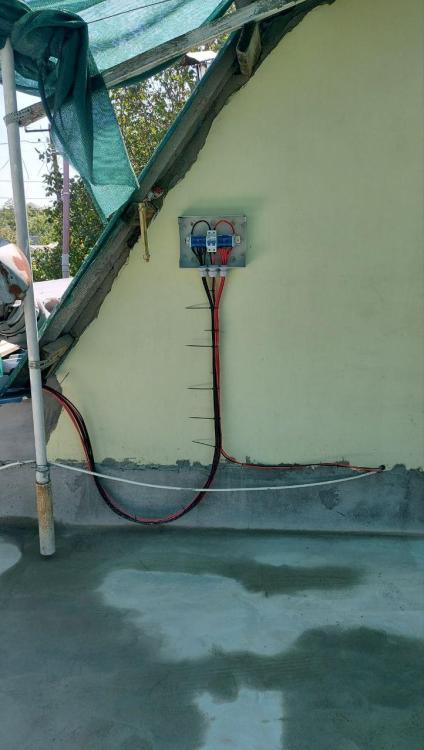
.thumb.jpg.6d08e449c78a4ef4d9fa1ea0821faf19.jpg)
.thumb.jpg.2c7a21bd6eb5e5a3b0921f013f9e0a16.jpg)
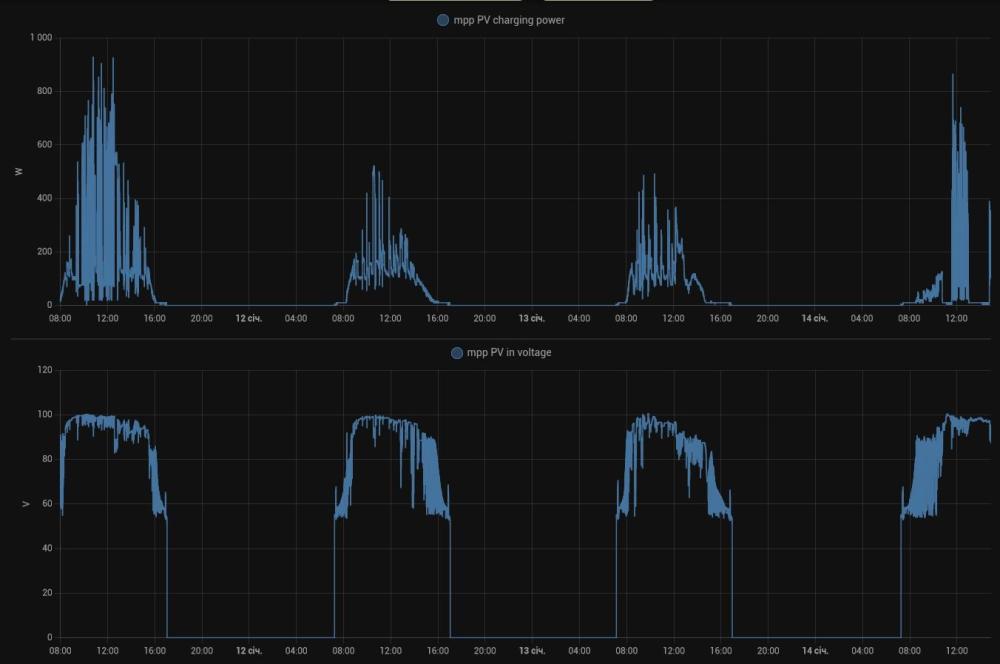
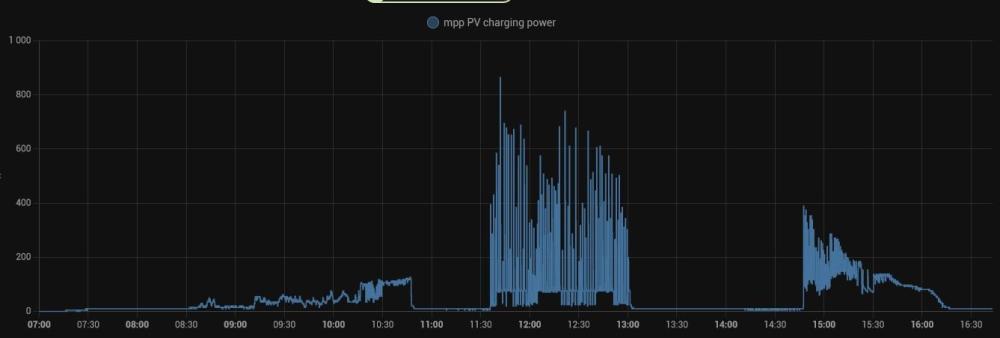 At the moment it works and I hope it will continue work well. What confused me it that was not cloudy when I saw these pauses in solar generation. So i begun suspect that there is some issue with the system.hi guys Today I got very strange issue. Due to thin layer of snow morning solar power was not best (about 85W) so i decided to went to roof and clear panels with the brush. When returned I checked the solar power and found that inverter produces 5-10W when PV voltage was pretty good. I was pretty confused. I turned off and then on solar panels. It didn't help immediately. But after a while inverter returned to good conditions and begun produced 300-400W from panels. Unfortunately after a hour and half it again begun work in 5-10W mode. And after about 2 hours it begun working again. It seems I never saw such behavior before. MPPT in the King sometimes stuck for short periods, but not for so long as today. It's not first time when I cleaning panels and do it carefully, so I think I didn't any damage. What it can be? Is it a sign of some defects in MPPT board or can some circuit issue in 2s5p panels inspire such behavior? Does anyone saw similar issues? King + 2xUS5000 + 10x460W panels(2s5p) Thanks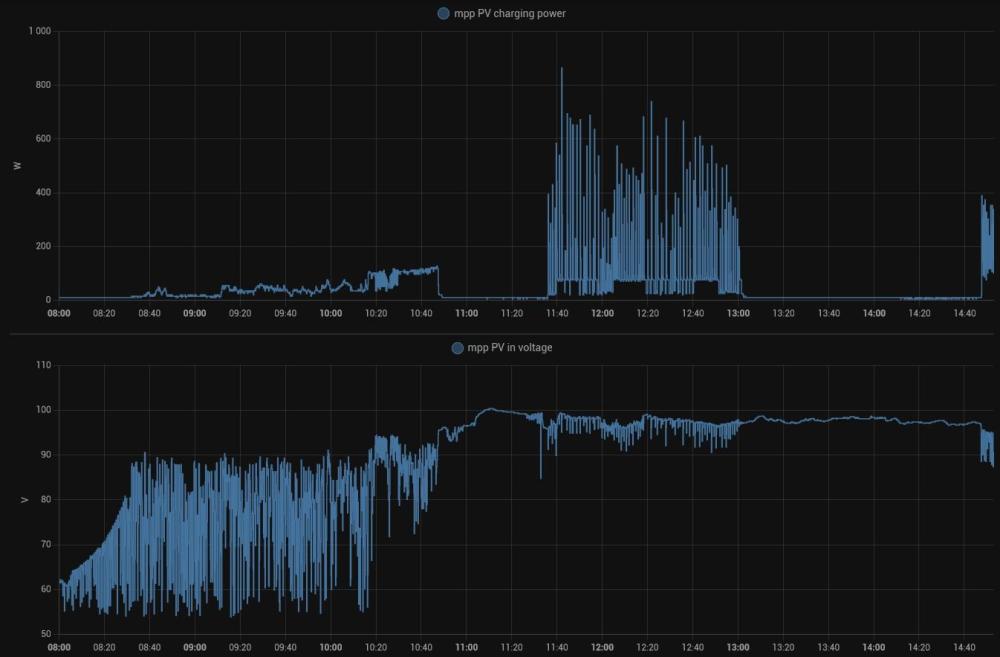
 good. there is one additional small issue. I tried to connect a few daily energy sensors and found that the card doesn't recognize they are in Wh - displays values as is. so i made workaround with template sensors. but it would be nice if the card will able to recognize and autoscale energy valueshi Great card! Is it possible to hide common PV box when there is only single PV1? ThanksThanks mate! Pls don't spend too much time on it, just if you really curious on this issue. because I'm not sure that in nearest time I'm ready to re-flash something again. last time stressed me enough when I thought that I bricked the inverter. Honestly, the system works pretty nice even In the current state. I wanted to repair battery link just for see proper SOC in the inverter data, but this is not a big deal. I going to somehow try to integrate Pylontech data from console port to Home Assistant so I hope will see real state of the batteriesMy bad. Of corse 102.73 which I took on this forum. Previously was 102.71 So U1 72.00 U2 102.73 U3 00.24 U4 01.21hi guys So today I finally decided to flash new MCU firmware 103.73 to make rs485 link with Pylontach workable. Flashing process wasn't problemless and cost me a few additional grey hairs (see https://powerforum.co.za/topic/15297-black-screen-display-status-after-faulty-update/?do=findComment&comment=184975) But after it had flashed then link with battery began working stable without any 61 errors. Btw, now I have two US5000 batteries. Unfortunateely when I switched to PYL battery mode I found a couple new issues: 1. When the King works in PYL battery mode it just turning off solar DC if load in house less then 150W. So with this small workload inverter doesn't mix in solar with grid nor compensate own comsumption from solar. When workload was becaming less then 150W something ckicking inside like relay and DC\DC sign between MPPT and Battery was disappering. Rerturning to USR battery solves this issue - solar is still workable all the time. 2. I monitor the inverter with a software which run on Orange PI SBC in a Docker container. It gets data from the inverter via USB connection and sends to Home Assistant via MQTT. The problem is that in PYL mode it seem the software stop getting data from USB. (https://github.com/catalinbordan/docker-voltronic-homeassistant) At the same time if I disconnect USB and connect WatchPower Windows software via COM port - it can get values. Returning to USR mode again immediatelly solves this issue. To be honest second issue is not too big deal - I can swith to using COM. It not too pleasure but at least has workaround. But the first problem pretty disappointing me. Does anyone faced same issues with Axpert King 5KW + Pylontech? Any chance to solve it? As result I returned to use USR battery mode...
 hi So I finally decided to upgrade remote module firmware, prepared the cable with 1KOm resistor, etc. And faced the same issue. I was scared a lot ( But I decided to press "Update MCU" again and found that it looks like continue writing blocks incrementally. So I pressed the button again and again, maybe 20 times until the flashing completed. And it succeeded. The display start working and showed 103.73 huh...
 Used this adapter with rj45-rs232 cable supplied with this 1KW inverter. When I turned the inverter on - notebook just turned off immediately. So i decided that something wrong with this adapter. Nonestly, don't want to try it yet another time. Better to buy new one which has only tx, rx and gnd
 Hi Not yet. With Coulomb's USER settings it works not bad so far, and so far we hadn't too long outages so I was discharging it not less then about 70%. so I decided that upgrading isn't too urgent. And I have to buy usb-rs232 cable. I had such a stick, but firstly I can't find it and secondary I fear to use it because last time when i tried to use it with voltronic 1kw 12V inverter - my notebook just turned off twice. I guess the stick is wrongly designed and maybe 12V from the inverter rj45 somehow passed back to PC. Don't want to burn notebook out.The advantage of esp32 approach is that i guess it possible when you can connect diy-style batteries with Bluetooth bms to an inverter with LIB or some other proto emulationI see. So are you using something like IDA or similar? That's pretty hard work, I have never been deep to reverse engineering too much. Merge is difficult even for disassembled sources because for every single new binary file disassembler may assign new labels, especially after the linker had shifted some function codes in object files after changes. I work in a forward way industry - sources to binary, not in reverseIt's interesting. Do you have access to sources of firmwares? Or just patching the binary?Btw, am i guess right that only dsp firmware could be updated via usb flash drive (dsp.hex file way) and display has only rs232 way? And second question - should i power it from gasoline generator during firmware update process to avoid brick the display due to unexpected grid outage? Or battery itself is enough protection for flashing. EDIT. Found some answers here https://forums.aeva.asn.au/viewtopic.php?p=72173#p72173


.jpg.463b847490b14c96fe900deb3149977a.jpg)
.jpg.1f234676f8c879c4f96bc0d65a81415e.jpg)


