Frankista
Members
-
Joined
-
Last visited
-
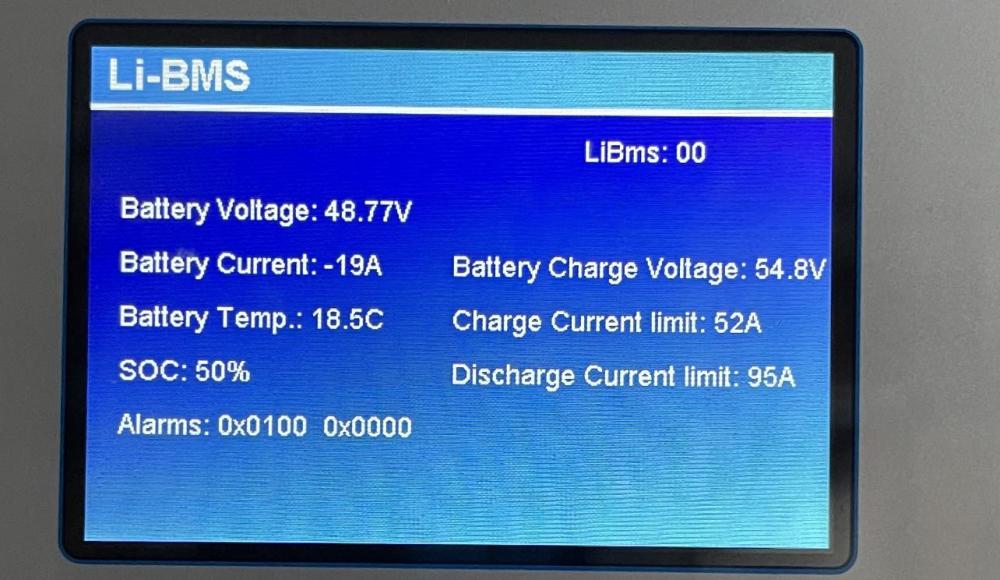
Hello All, I have this major issue that is really annoying me. I wonder if someone could help: I have a 21kWp PV installation connected to 3 deye inverters of 8000 W each set in parallel. They communicate via CAN with a BMS with five batteries of 200 AH 48V each. from time to time, I am getting this error from my BMS: 0x0100 0x0000. As a result the Deye inverters stop seeing the fiv batteries and drops the charging and discharging max current from 262 Amps and 495 Amps to 52 Amps and 95 Amps. See pic for error: Ay idea how to solve this issue? I have contacted the battery vendors and they could not help.
-
I have a hybrid system (3 deye inverters connected to a battery bank and connected to the grid). On the load, i have a tesla charger. When the grid (or main) is on, the tesla charger works seamlessly although it is getting the power from the PV and/or batteries. However, when i cut the main power (or grid), the tesla charger returns an error and stops charging. I wonder if this "Signal Island Mode" can solve the issue. Any clue?
-
Unchecking Grid Peak Shaving will solve the issue? In other terms the grid will stop charging the batteries?
-
Now I set it up like this as my battery levels are at 65% so the grid does not get used. However as soon as I change it to more than the current SOC, although the grid charge is is unchecked, the power flows from the grid to the batteries and the load!!!
-
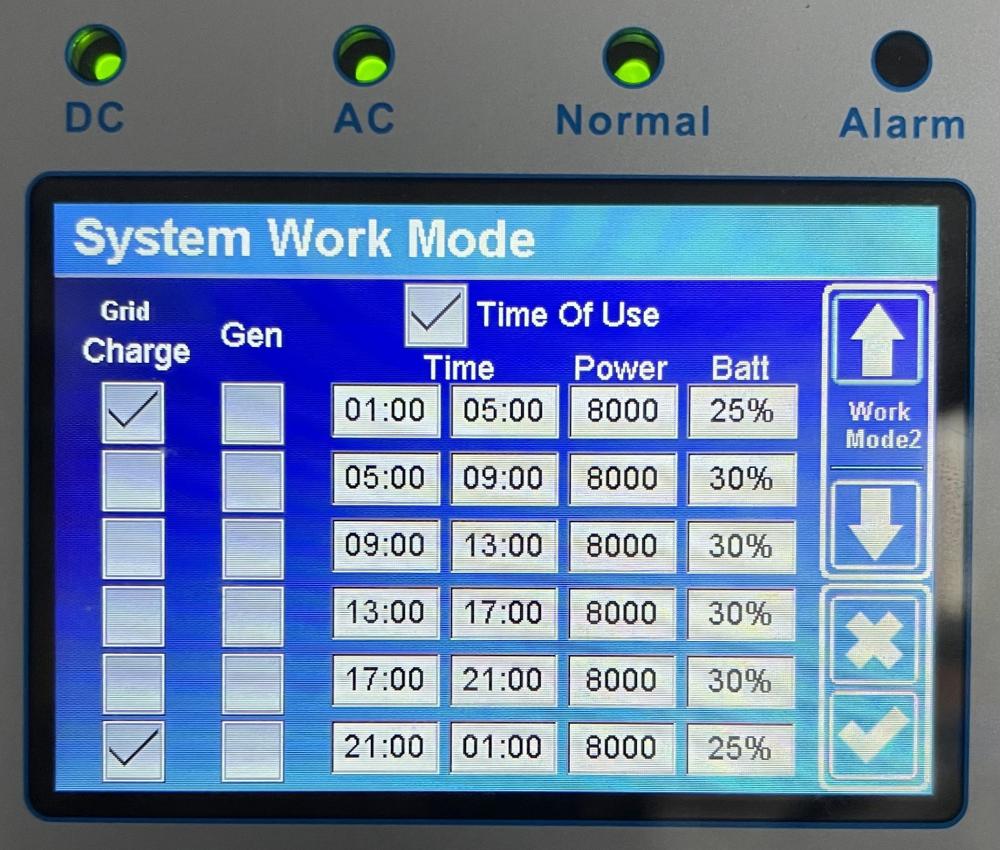
Hello. I have another issue here: Regarding the TOU I am trying to have the following scenario: between 9 pm till 5 am if battery goes lower than 25% then charge from the grid. During the day, don’t use the grid at all. I have therefor enabled the following settings (see images) Then I noticed the following: Although the SOC was between 25% and 30% and the time was 17:10 the grid was still getting used and the battery was still getting charged by the grid. I did as well another experiment: Time was 17:30. SOC was 76%. Grid charge was unchecked between 17:00 and 21:00 and battery settings was 80%. The grid was charging the battery. As soon as I set the battery in TOU to 50% grid stopped getting used and battery started discharge by providing power to the load. Is that normal? Why is the battery getting charged by the grid although the “grid charge” time slot is unchecked?
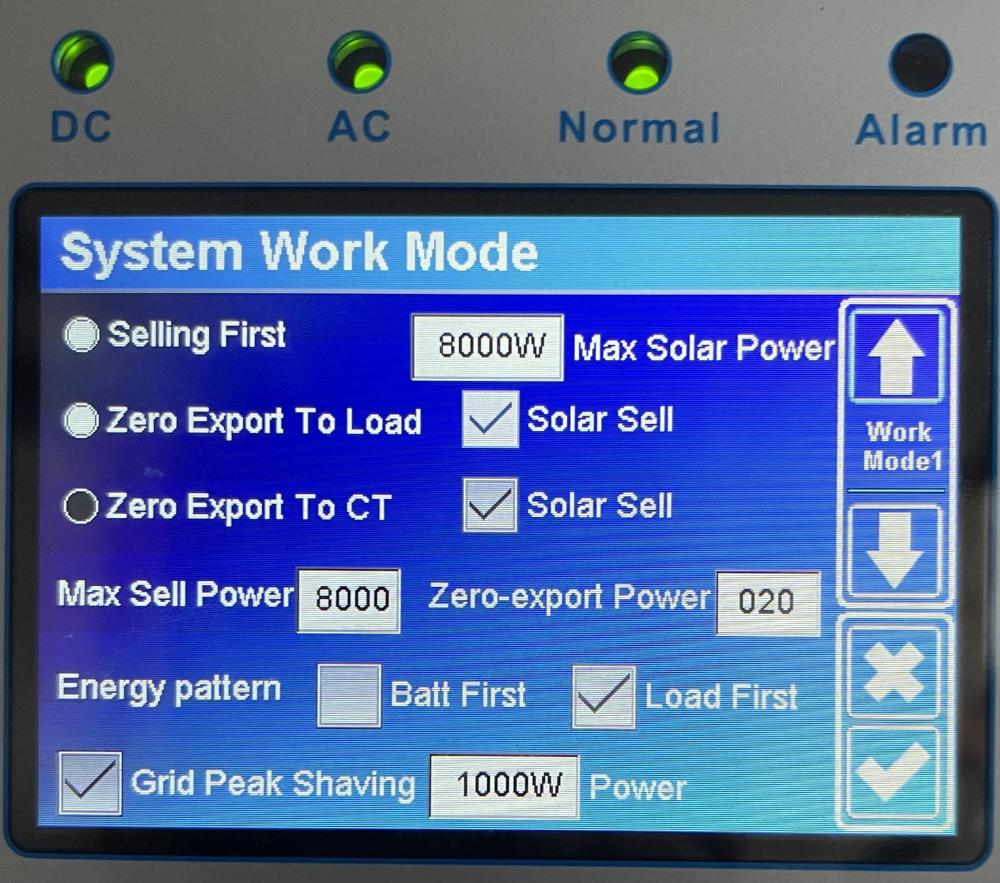 Hello, would it be sufficient to connect the neutral load wire from the inverter to the earth? Is that how you’d suggest to do it?I still have one important question regarding charge and discharge current limits. I have set them to 117 amps for charge and discharge. Since I have three inverters I’m supposed to reach 350 amps charge / discharge for my whole battery bank of 1000 ah (5 batteries of 200 ah each) There is only one CAN cable connecting the master battery to the master inverter i have plugged my car that is supposed to be drawing 25 amps to charge. While checking on the SOLARMAN app I can see that 2/3 of my consumption is coming from the batteries while 1/3 is still coming from the grid! ive check the li BMS on the master inverter and saw that the max discharge current is limited to 95 amps!!! I’m not sure where this limitation is coming from. many idea how to get the system draw more from the batteries and less from the grid? Can someone help? i have set the grid peak shaving to 1000 w per inverter.
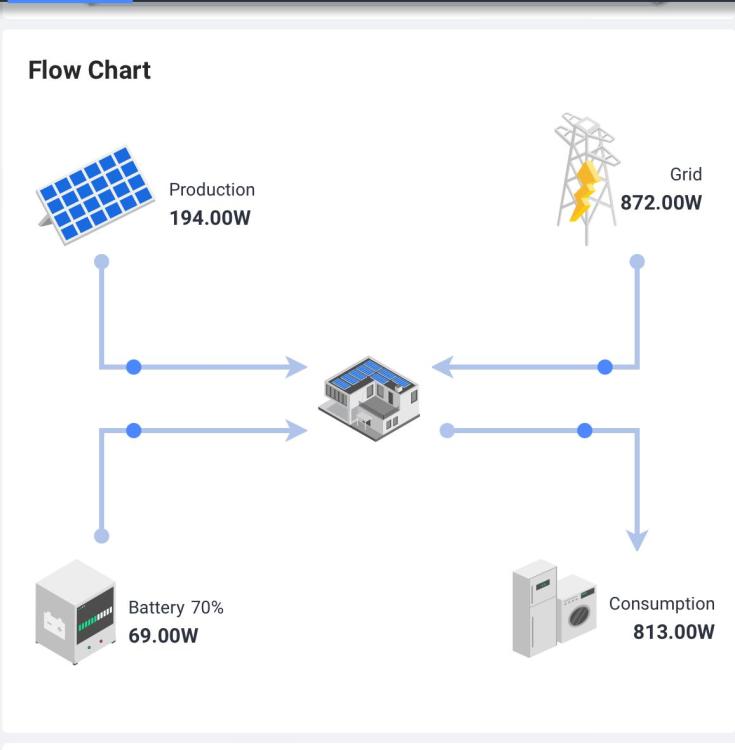
 How can I enforce the following scenario: load is first served from PV then from batteries and if this is not enough then it should come from the grid. Currently I’m not able to achieve this result. check the pic below what would the settings be?
 I have the inverters, batteries and PV earthed. I must have an earth neutral bridge installed on my main load board since the charger there works fine however I don’t have it installed on the breakers linking the inverters to the load. I don’t have it either on the circuit breakers linking the grid to the inverters. note that for the grid to inverters CB I have three of them of 63 amps each with a differential switch. I have the same on the inverters to loadHello, i have three Deye inverters connected to a 1000 ah battery bank. When the grid is off, I automatically get an error on the Tesla charger « not sufficient ground ». has anyone experienced this in the past? I did some googling and learnt that many inverters don’t connect the ground to the neutral and that causes this issue. please share your input.Cables are 50mm2 the bus are are solidly attached to the it box although they are not straight 😁
 BritishRacingGreen reacted to a post in a topic:
Deye 8kW Hybrid Inverters Charge/Discharge Configurations?
Hello. This is my final battery wiring. It is working like a charm! Thanks to everyone who has helped and gave advice. I followed all of them.
BritishRacingGreen reacted to a post in a topic:
Deye 8kW Hybrid Inverters Charge/Discharge Configurations?
Hello. This is my final battery wiring. It is working like a charm! Thanks to everyone who has helped and gave advice. I followed all of them.
 the batteries are physically disconnected. in the settings i have put no batteries. I do not know why there is a voltage there... That has puzzled me as well. Even when not in parallel like now I see 5 kw going to batteries where there is none.
 Yes. they are switched on. This is how to reproduce the issue: when all is running, I set them to parallel mode (master, slave 1 and slave 2). I get an alert for a second, then all goes to normal BUT OFF as per the image above in this thread. I tried the following: 1- Turn off the whole system (Inverters, PV, Grid and Load) 2- Turned back on: PV then inverters, then grid then load and the inverters remain off. upon disabling parallel mode, all comes back to life.