SRY
Members
-
Joined
-
Last visited
-
-
Thanks, makes sense. Will post on the SunSynk forum regarding the wire sizes for the different battery sizes and see if anyone has any input. Thanks for your input. 👍
-
@TaliaB Thanks for your feedback, your inputs to my questions are always very helpful and greatly appreciated! 😉 As you've stated, yes I am referring to the ferrite ring (stated in the manual as "magnetic ring") supplied with the 8Kw SunSynk inverters. My 5kw SunSynk inverter did not come with this ring. They only supply 1 ring and it's not possible to wrap 2 x 50mm cables around a single ring twice. Perhaps if you can purchase another one, then running 1 cable in each ring might work? I'm assuming that you placed the rings in the boxes you have circled in pic 1 of your post or are those housing the busbars? Wrapping the BMS cable in the smaller ferrite ring is not an issue.😉 Just to clarify, I'm referring specifically to SunSynk batteries ONLY (the 5Kw, 10Kw and 15Kw sizes). I'm also only referring to installing 1 battery per inverter. No other parallel connected batteries. So, perhaps to rephrase my question as follows: If I have 5kw SunSynk Inverter and I want to upgrade the battery to either a: 10kw SunSynk Battery - do I need to upgrade the wire size to 50mm or 15kw SunSynk Battery - do I need to upgrade the wire size to 75mm? AND the same question applied to a 8Kw, 10Kw or 12Kw Inverter, upgrading batteries from 5Kw to 10Kw and 15Kw respectively? This is what is not clear in the Manuals supplied by SunSynk? Cos if you go by the manual, you would just use 25mm wire size for a 5KW SunSynk inverter for all battery sizes and the above mentioned wire sizes for 8kw, 10Kw and 12Kw inverters respectively?
-
Thanks, but I am the installer and I don't know what size to fit, thus my query. 😆 Perhaps you not familiar with the SunSynk inverters but the 8kw Inverter comes with a magnetic ring for the battery connection; check page 12 and 16 of the 8Kw manual to see what I'm referring too.
-
After reading numerous posts on this subject, I thought I would consolidate the following: Having read the various SunSynk Manuals (3.6/5Kw and 8kw inverter), I still find the information regarding wire gauge sizing and fuse disconnect sizes for the batteries a tad bit confusing/contradictory. For instance, in the 3.6/5Kw manual, it states that the wire size for the battery connection should be 25mm but neglects to clarify if this is for a 5kw, 10Kw or 15kw battery? As the wire sizes are “apparently” different for each battery size respectively, if you order the 5kw vs 10Kw vs 15kw battery wire set for the SunSynks? BUT after ordering a 10Kw battery wire set, it was exactly the same size (25mm) as my 5KW set, I ordered on my initial setup. So, either I received the incorrect wire set or there is no difference between the 5kw and 10kw wire sets that are sold? The manuals state the following: 3.6/5Kw Inverter Manual: · Battery wire connection size = 25mm · Battery Fuse/disconnect = 150A 8Kw Inverter Manual: · Battery wire connection size = 50mm (single phase) & 70mm (3 Phase) · Battery Fuse/disconnect = 250A As a side notes: · I’ve seen lots of posts with pics on this forum were 160A fuse/disconnects have been used on 8Kw inverters for the batteries – is this fine? If so, why? · There is no way to pass 2 x 50mm wires around the provided magnetic ring….I know! I’ve tried! Best suggestion for this problem? 10Kw Inverter Manual (Not available for single phase): · Battery wire connection size = 95mm (3 Phase) - single phase unknown? · Battery Fuse/disconnect = 300A 12Kw Inverter Manual (Not available for single phase): · Battery wire connection size = 120mm (3 Phase) - single phase unknown? · Battery Fuse/disconnect = 300A So my question is, which component dictates the sizing of the wire? The Inverter or the Battery or both? Bottom line is, I would like to know that if I want to upgrade a 5Kw SunSynk Inverter with a 10kw or 15kw Battery, do I need to increase the wire size? (Should answer the above question then) And the same for increasing battery sizes on a 8kw, 10kw or 12Kw single phase inverter? Any info on this “rabbit hole” would be appreciated. 😉
-
-
-
The delay/response is quick, it takes 2 seconds, at most, to switch the plugs off. So I'm more than happy with the response time and even with the 2 heaters and washing machine on at the same time (Which isn't often), I'm not close to overloading the inverters capacity (5Kw SunSynk). So all good so far. 👍 The only problem now, is I've peering into the black hole that is home automation and have already ordered more switches to convert all my lights and plugs...and and.....😆
-
-
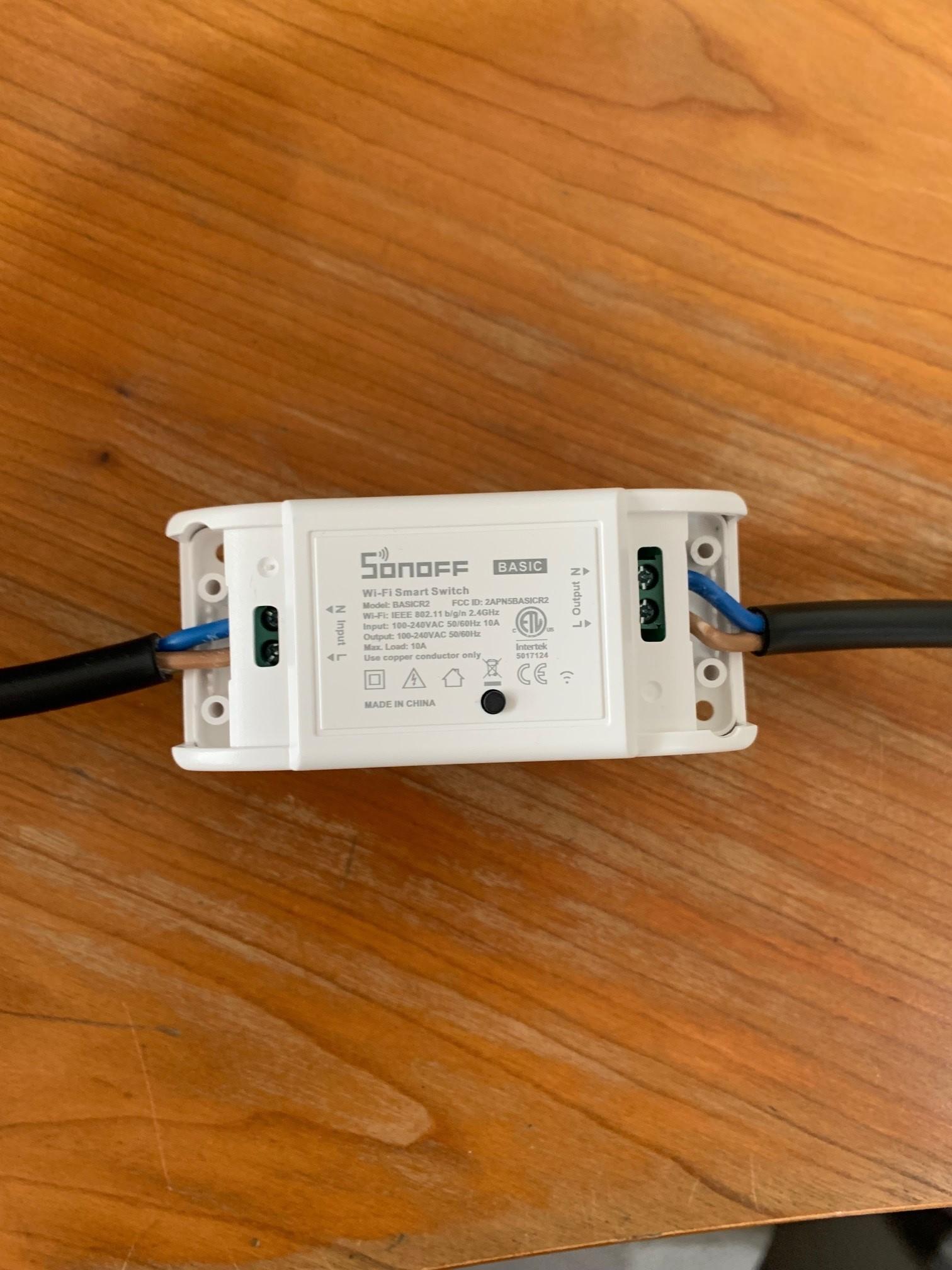
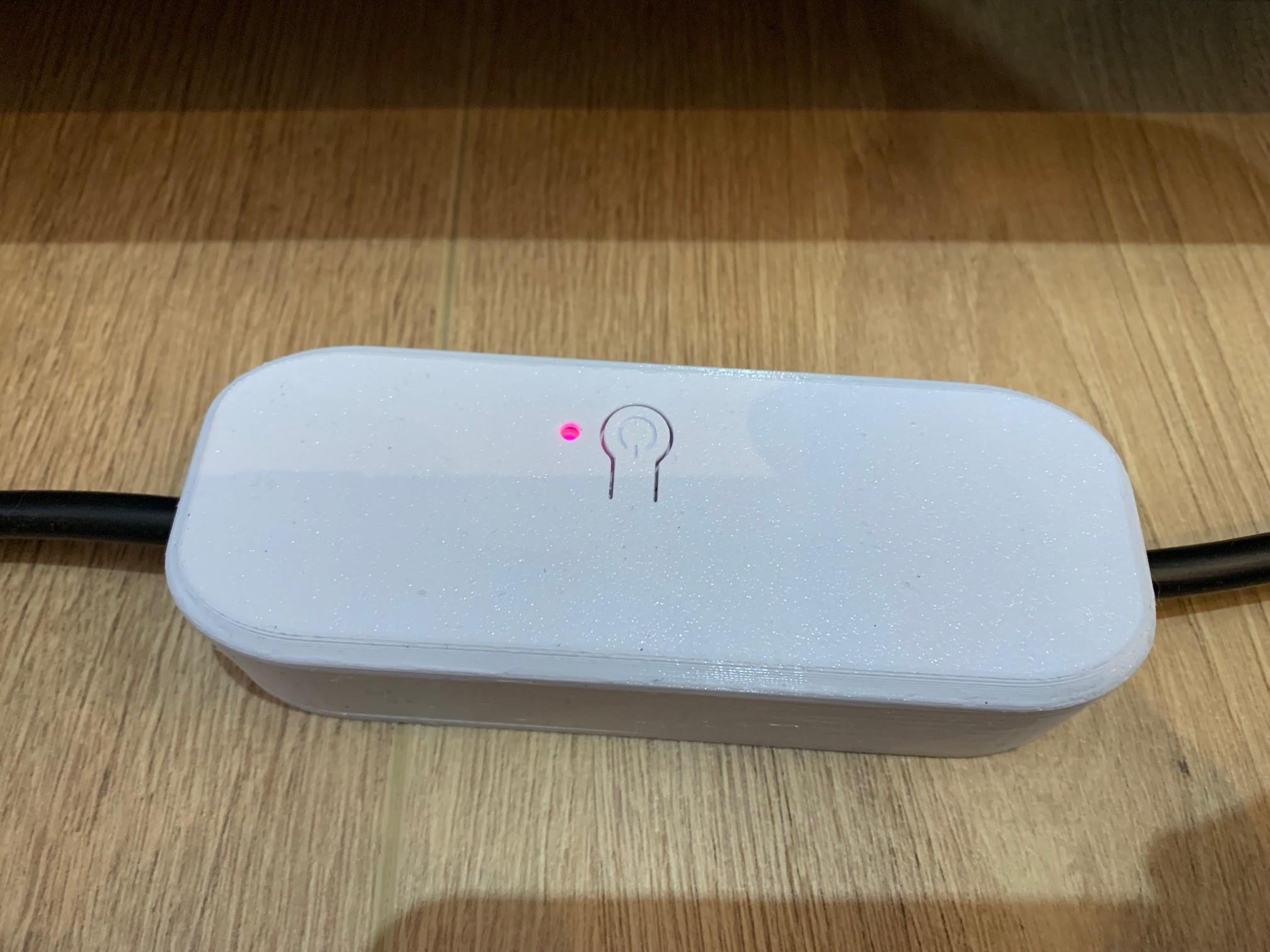
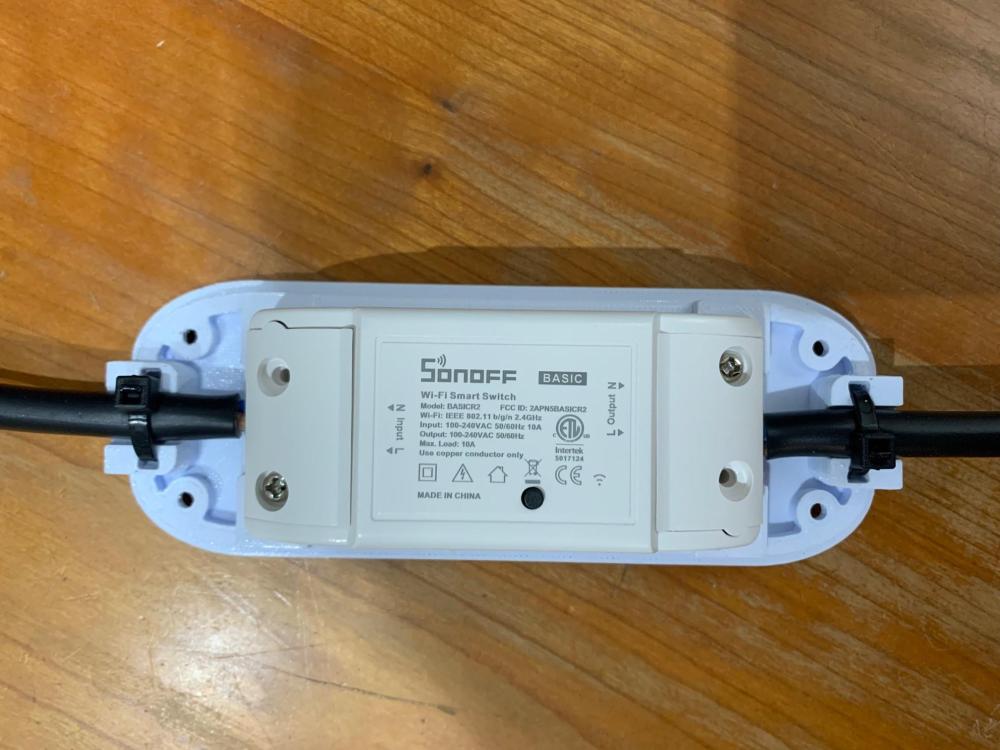
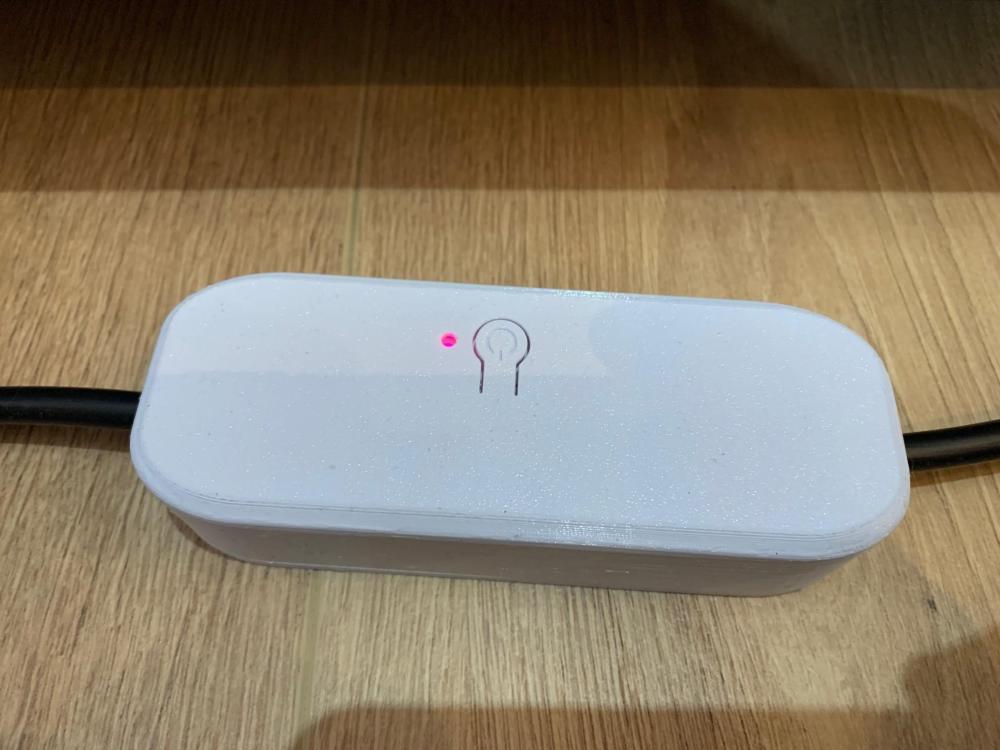
Ok, so got the Sonoff Loadshedder Kit from Geewiz and have installed it. I'm very happy with the set up so far and works exactly as I want it too. Thanks to @abd7 for the undated wiring diagram, much appreciated. 👍 For my scenario, I use it to switch off my washing machine and 2 x oil heaters in the house, when the grid falls away. All the WIFI switches are connected to extension cords, so that I can use them for other appliance in the future (After winter). When the grid come back , it switches the washing machine back on (not the heaters). I can switch the heaters on, as required again. Notes: The Sonoff BasicR2 switches only have a live and neutral and I wanted to keep the earth wire on all my extensions/plugs. So I found a casing on Thingiverse that accommodated the earth wire running underneath, and printed them. It makes the switch a bit bulker but they are a bit more robust now. See pics below: The kit came with a Sonoff Mini Extreme, so make sure that you wire the "Line In" on the switch in the correct slot, as it is not located in the same spot as the older Sonoff R2 switches, as depicted in the wiring diagrams (They actually swapped around). So make sure you connect them correctly. The 3D printed DIN rail that you can buy is also for the older R2 switch and will not fit the Mini Extreme, as it is much smaller. So something to consider if you buy this with your kit. (But you can also just stick it inside with double sided tape). Will see if the original designer will share the files and modify it to fit the mini, when I have some time. So far, all good and will see how the system holds up over the next few months.


-
Thanks for the feedback abd7. Yes, I was thinking of the Geewiz one. Think I will get the kit and a switch or 2 and test it out. We give feedback on how it goes...👍
-
Ok, so I have no knowledge of home automation whatsoever but read a post somewhere that suggested the above mentioned kit to switch off specific plugs in your home during loadshedding. The requirement is as follows: When loadshedding kicks in, this device is triggered when the Eskom Grid falls away. It then controls a “scene” that you have set up that tells the WIFI switched you have connected, to turn off. When the Eskom grid returns, its switches them on again. I think this is something I would like to try and connect to my washing machine plug. So that the plug is switched off during loadshedding and can’t be used while the inverter is on and drain my battery So was wondering if anyone has used this kind of a kit and if they work (Reliably)?
-
-
Correct, this is just the detailed diagram for the Change Over Board (Sub DB). The essentials side will have everything you mentioned. That diagram is for another day. 😉
-
-
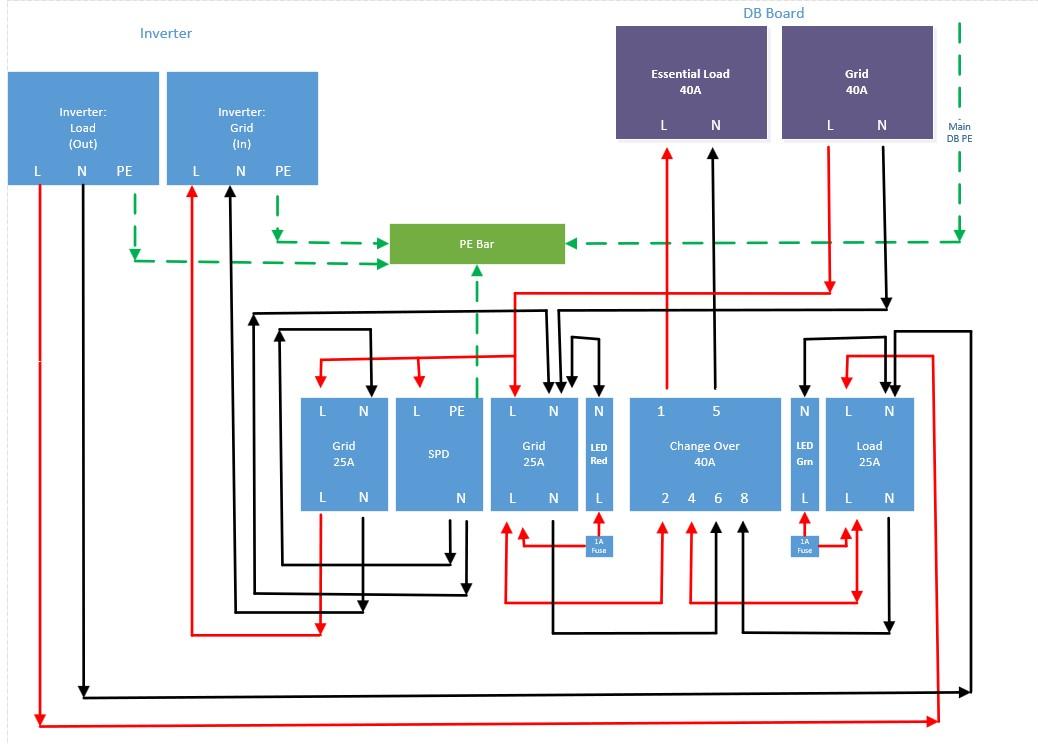
@WannabeSolarSparky and @TaliaB As per Wannane's changeover diagram and TaliaB's input for the LED Fuses, I combined the diagram with this info for a change over panel. Let me know if this is correct?

-
-
@WannabeSolarSparky what size is the first MCB in your above configuration? 40A?
-
-
Thanks for everyone's assistance. I've put fuse wires on the Live and connected the Neutrals, as suggested. See pics below: 1st pic was taken during loadshedding, so only load light is on. Next pic is when the power came back on and the Grid light came on. Hopefully I did that all correct and can close all the covers now. 🙂


-
-
👍 Ok great, mine too. Just need to buy some inline fuse holders & fuses now and then I can finish this installation.
-
-
Thanks for your input Wannabe. Just another question, I see in your diagram that you running an Earth wire back to your main DB. Are you connecting it to the main DB earth bar or are you running it to another standalone Earth bar?
-
Hi, do I require these fuses for the live wires on the DIN type LED indicators I have?