


Charl Joubert
Members
-
Joined
-
Last visited
Everything posted by Charl Joubert
-
Hi! Did you get your voltage up through the update? I sent Deye a WhatsApp a little while ago but they never responded.
-
Hmmm ja I get you. I think considering both options are only 300w difference then I'll go with the "safer" setup of 13, 13 and 5. The 31 panels are already on my roof so it's just a simple rewire (I say like I know what I'm talking about). Thanks all for helping me think.
-
Ah I didn't realise that was a factor. Tell me if my thinking is right then... The datasheet tells me that the VoC at 20 degrees is 43.1v - so then 15 would make it 646.5v. How much wiggle room is there!? Between 25 degrees and 5 degrees there's about a 3v difference. Geez I feel like I'm going to have a few spare solar panels... My brian is telling me 13 and 13 with 5 on one MPPT 2. But my heart wants to do 15 and 15 with 1 not connected at all. Doing some napkin maths on the 20 degree Vmp of 36.1... 26 will give me 16219.01w plus... 5 current limited by the inverter at 12.5A giving 2256.25w... That's 18475.26w but is "safe" because 14 of them with that VoC will go up to 603.4v giving me more headroom. If I do 2 x 15 I get 18714.24w but I fly very close to the sun. I don't think 300w difference is worth it. Captain Disillusion tells me to love with my heart and use my brain for everything else. I think I know what should be done. I'll have a chat with my installer. Seems like a nice dude. I hope this won't be too much of a mission to rewire AGAIN. But I think the 4kW gain is worth it.
-
Been a while since I posted here, all has been good with my system but now in summer I'm encountering a problem. I think for the sake of simplicity I'll speak on only the ONE inverter since I'll basically mirror what I do on the master to the slave. 16 x Solar Panels (CS7N-665): Vmp - 38.5v Imp - 17.25A Pmax - 665W Inverter (Deye 12kVA 3ph): MPPT voltage range - 200v-650v PV Input Current - 26A and 13A (This I understand as to mean 26A max for using the 1st MPPT's 1st string or 13A max per string on the 1st MPPT - this is important because of the Solar panels' voltages) I didn't know this information at first and just trusted my installer. I had all 16 panels on the 1st MPPT 1st string. I was maxing out at 26A quite a lot recently so I felt things weren't correct. I had a different installer come check it out to see why my amps were maxing out (the graph was flat for a large portion of the day) and he basically split it into two strings (one for each MPPT). NOW I'm maxing out at 26A and 13A for most of the day and my wattage is also maxed at 14kW for most of the day. The voltages for each MPPT is sitting at about 190v as well. So the 2nd installer ballanced everything very well... but it's wrong in my opinion. I think the installer should have looked at these numbers before hand and not made assumptoins. But hey, we all make mistakes. My suspicion on BOTH setups is that there's parallelling happening somewhere which makes the amps max out. Now that I've looked up the numbers... of course yes... I can't parallel at ALL because 17.25 x 2 is 34.5... more than the 25.5A the inverter can take. SO if he puts the 16 panels in series (no parallel anywhere) into the 1st string of the 1st MPPT I'll be getting: Max power output: 10644.48W Max power voltage (Vmp): 616V Max power current (Imp): 17.28A Which fits within the parameters of the inverter correct? Have I done my maths right? I've sent a video of my calculations to my new installer and he's going to give it a watch and get back to me, but a 2nd opinion is always welcome.

-
Did you ever get sorted? On my Deye (basically SunSynk) to my Freedom Won you go from 4 and 5 to 7 and 8. Let me get the exact thing in the manual: And... So you'll connect Pin 4 - 7 and then 5 - 8. Then on the inverter you set your lithium mode to 00 and battery type to Lithium.


-
I can't find anywhere that says you can, or even should. My only source is talking to someone from Sunsynk by Malibongwe. As for anything that says you shouldn't the only thing I've found is what @P1000 pointed out, and the only reason for it is that the generator and grid could have a frequency conflict which doesn't seem to apply in the case of using it as Aux. My other source is that mine has been fine since Friday (that's four days as of the date of posting). It's actually behaving correctly and nothing out of the ordinary is happening. I promise that if anything DOES explode or go wrong I'll post it here. Ja that makes sense to me too. But as I said, if anything goes wrong I'll post here. It's been fine so far.
-
Nothing blew up! I can confirm that on this software version you can in fact bridge the two Smart Loads: For a fuller story see this post. The more I thought about it the more it made logical sense. You bridge everything else and the two inverters basically "share" everything, why not the Smart Load as well.

-
I have an update (spoiler - I "fixed" it). After lots of back and forth we finally came to the conclusion that we had to bridge the Smart Load as well but that was making matters worse whenever a geyser kicked in. Here's what I did, in this order (and yes I followed shut down and start up procedure correctly every time): Physically: Unbridged Smart Load - Still had grid draw. Settings: Made the slave solo and turned off the master - No grid draw. Made the master solo and turned off the slave - No grid draw (this was a surprise). Swapped master and slave in parallel - grid draw. Swapped back to original master and slave paralell config - grid draw. Factory reset (9999) everything and reinstated original parallel - grid draw (but less strangely). At this point I wasn't sure what to think so I added Smart Load settings and schedule back, gave it 60 seconds to kick in, then switched the working mode to Zero Export to CT and SUDDENLY the grid draw went away. I was now angry because I had been switching between CT and Load mode before and it made no difference! I was very scared to actually touch it now that it was correct. BUT I had to rebridge the Smart Load. So I shut everything down, rebridged it, booted it all up, and still... no grid draw. So now I have my two inverters properly parallelled and both supplying Smart Load to my geysers without unecessarily drawing from the grid. Here are some pictures for the curious: Compared to a usual day where grid draw was happening: And here's my software version:


-
I took a drive to Sunsynk SA. Funny they're about 5 minutes from my house. I spoke with one of their experts. The guy tells me that if I'm going to use the aux port then everything must be paralelled INCLUDING the aux port. So my installer is going to come back at some point and we're going to bridge them and see what happens. I'll report back when the smoke clears
-
I'd like to share my experience with my aux port (Smart Load). I think that the main reservation behind it is that there's a lack of experience with it in general. Also to wire it up is a proper mission since you have to totally divorce whatever is wired to it from the rest of the house or it causes issues. I've personally had my six geysers put onto Smart Load purely to force them to use the sun and leave my battery alone at night. I think if I wasn't on a parallel system it would work perfectly fine (We still have some kinks to work out and are converting some to gas). I have also sometimes turned on the "On when on grid" function to force it on when I have a lot of guests. For me it's meant the difference between 2kW draw and 20kW draw and my one battery lasts a lot longer at night. I can now even pick and choose which one runs: So for your case I definitely recommend it, but find yourself a brave... no brave is the wrong word... a determined electrician who is willing to do the leg work and wire things correctly. If you so much as share a single neutral it's a bugger up (which we had in my case). The electrician I had actually popped one of my aircons.

-
I've found the manual with some Google-Fu! HAHA. It's a bit ambiguous. I'm sort of reading between the lines where it says you can't paralell it, but it doesn't say you can't connect it to just one of the inverters. Do they mean to say you can't use it at all when the system is in parallel? That the ports cannot themselves be connected in parallel but one can be used? My installer is also roping in an expert because it is behaving strangely. Just to give you an idea I have one set of geysers connected to slave and another set to master: When the Smart Master breakers are on, it draws from grid. When the Smart Slave breakers are on, it does NOT draw from grid. When BOTH the Smart Slave and Master breakers are on, it still doesn't draw from grid. I have a very large house and I was excited about being able to manage which geysers are being used from one point and stopping them from draining my battery at night. For now it "works" but I don't think it's "correct".
-
Ah I see. I only have a user manual. But there's no frequencies to be in conflict. It's not being used as a Gen port. Would you mind sending me that manual so I can read further please?
-
Doesn't work at all?! My geysers are warm though so can you tell me more? I'm not sure I understand what you mean by it "does not work".
-
Hi, All! I'm having trouble finding wiring diagrams for the smart load function on these Deye inverters. So far as I can tell for two in parallel your battery runs common between them, the AC runs common between them, the outputs run common between them. Is this now the same for smart load? Because I've got the one inverter going to one set of geysers and the other inverter going to another set of geysers. It works but I'm getting some really weird numbers and strange grid draws close to 3kW depending on which ones are active at the time. SMART LOAD, not the non-essential load before someone asks about my CTs HAHA!
-
Do you mean these readings? Here's master and slave: Quick add up tells me 552w which matches close enough:


-
I have no non-essentials. Everything is 100% on the main "backup" line. EDIT: You made me wonder now, so I switched it back to Zero Export to Load so it doesn't feed to non-essentials... same story.
-
Update: My installer is here. He tells me that there's no way DC can influence AC so my magnets theory is out the window (I'm not surprised). As a test we've switched grid charge off completely, checked the CT ratio is correct, switched between Battery and Load priority (wich seemed to make no difference). He says he's going to chat with Deye to see where this extra Grid draw is coming from. Because if you do the maths for: 5703 + 7058 = 12761 then you minus the 12821w solar and you get -60w. Where is this 772w coming from?? I guess we'll wait for Deye to respond.

-
I have an update. We've had the CTs installed in the correct position and the 2nd set of CTs removed. I then asked Deye to update me again to the latest firmware (1131), put it into CT mode and I no longer have negative values. It's been fine for the last three weeks since then. BUT... another issue still remains. I see when my battery is charging off PV it pulls from grid as well in proportion to the load. It's almost like you can say PV + Load * X = Grid. The moment the battery is full the grid pull goes away. You can see it on the graph here minus that loadshedding period. And no, charge from grid isn't selected during this time. I'm getting a 2nd battery installed soon so I'm going to ask the installers if my battery cables and AC cables are not running too close to each other... because (and I wave my hands around like I know what I'm talking about) magnetic fields...

-
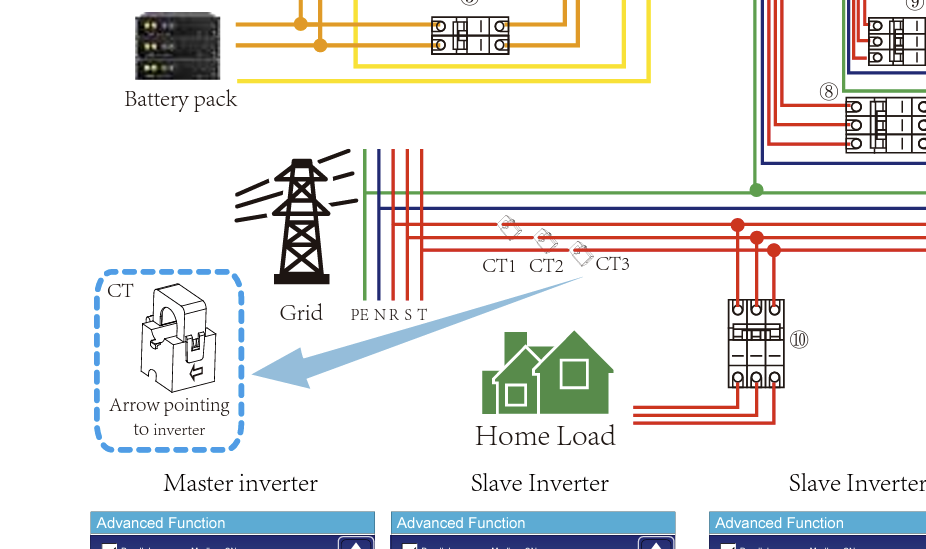
You know you might actually be right! When looking at the diagram for a parallel 3ph setup I only see one set of CTs. It likely explains my funky numbers. Nevertheless, I'm soon to go Island Mode and see what City Power says about my 0 usage...
-
They responded within about half an hour. It's quite scary how you just have to give them a serial number and bam, they've got you. The language barrier wasn't that bad at all either. For my specific case it took a day or two for her and the engineers to figure out what was wrong but once they figured it out they were able to give me the right version number. I'm planning on getting a 2nd battery and just going to plonk the things onto Island mode. No need to worry about all these little wattage leaks.
-
Problem Solved. Long story short is Deye downgraded me one version and suddenly I could select Zero Export to Load. Here's an interesting graph to look at. You can see that my values were actually fluctuating wildly all over the place. Then you see a gap from about 13h00 until 16h00 when the downgrade was done and I was able to change to Zero Export to Load. And this next graph is a zoom in of where I did a force charge from grid (like before) and then let it drain again. Funny it took about seven minutes to go up 1% and then less than two minutes to drop that 1% again. I'm now convinced my CTs are installed wrong. Lucky me, I don't need them! For those interested in the firmware, this was the version I was on and Deye downgraded me from 1127 to 1126:


-
Deye downgraded my software by one version for me because the latest that I was on would default to Zero Export to CT. I was then able to select Zero Export to Load and my weird negative values went away. I can only imagine that my CTs, besides being uneccessary, were installed incorrectly throwing the values off. I hope that can point you in the right direction.
-
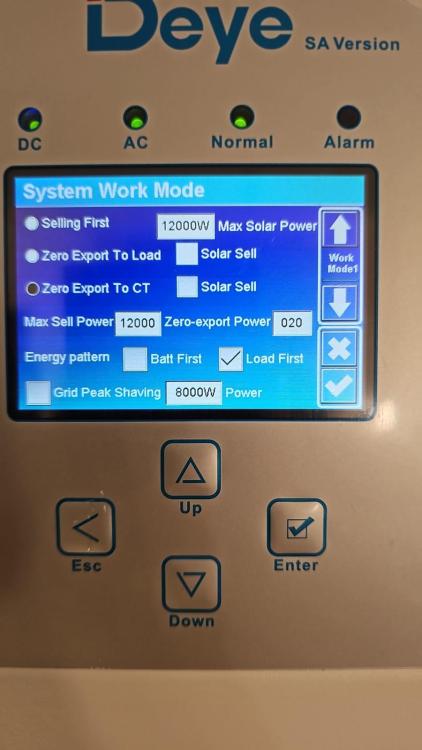
Hi all I'm sitting with a small issue that seems to be messing with the values. I'm trying to change from Zero Export to CT to Zero Export to Load. The reason being that I have nothing on the "non-essential" side of things. Everything is on main backup feed of the inverter. It goes grid -> inverter -> house. My geysers will soon be on the "Smart Load" but that's besides the point. When I had the single inverter for the first two weeks my values made sense and was on the Zero Export to Load setting. Now that I've connected the second inverter and put them into Parallel it keeps jumping back to Zero Export to CT and I'm now getting negative values under very specific circumstances. I was told by Deye Support to factory reset and I still get the same problem. See below: I'm finding that late at night when my battery charges from grid then the load of the house goes into negative on Solar Assistant. This shows as 0 on the display. Here's a graph of me forcing the battery charge to test different settings. You can see that the difference between the load and the grid when the battery charges separate, but not by the amount that the battery is charging. That separation would need about 300w more difference if I had to do the maths. But there's barely 150w difference initially when not charging. Deye have told me they're getting feedback from an Engineer tomorrow about changing the setting. Can this be CT related? I've checked a few times and they're the right way around (pointing to the inverter), in the correct positions on the grid line, and... I THINK they're connected to the correct spots in the inverter... would that make a difference? I have six of them because of it being 2x 3ph inverters. Once I'm able to change the export setting this won't be an issue. But hopefully someone knows better than I do and this can help someone else in the same situation.

-
Ah I know exactly what you're saying. I'm having the same issue with mine where my CTs are likely in the wrong position. In my instance they don't actually need to be connected and it seems to be forcing the "Zero Export to CT" option. It keeps jumping back from "Zero Export to Load". I'm going to disconnect my CTs and report back to see if my values are corrected. I like to think of myself as a budding expert so let me try to answer some of your questions (and likely illicit some corrections): Your three main ones, Load Power, Grid Power, and PV power can be read as: Load Power - How much your inverter is giving out to your load. Or another way to put it is how much your house is pulling. Grid Power - How much Eskom is giving to compliment the Battery and PV to supply the Load PV Power - How much your PV is supplying to make up the load. Not how much the PV can potentially give out. For instance mine was just a few minutes ago generating 14.2kW to charge the battery and the moment it 100% it dropped down to match the load. I think this is due to incorrect installation of the CT. In my case I'm going to remove them since I'm not planning on feeding back AND ALL of my load is on the main "backup" feed of the inverter. As far as I can tell the little CTs need to be connected BEFORE the main DB on the incomming main grid line. I'd need about 100m of CT cable but that's besides the point. Ja this is my suspicion as well. The CTs aren't installed correctly. They may be backwards OR in the wrong spot. As you can see here I'm also getting negative values with the CT function enabled: I'm not sure how your backup solution is set up but in my case I don't think I need the CTs. I'm going to disconnect them and report back. On these inverters you have three "sources"; your main backup, the non-essentials, and the "smart" load. The non-essentials are what needs the CTs connected properly. Another curious thing is that when I enable the Solar Sell option the numbers jump back to where they're supposed to be. I set the sell to 5w because I don't actually want to sell. But this for some reason makes my solar dip out for about a minute every ten minutes roughly and grid picks up the slack. Not ideal. UPDATE: So I pulled my CTs loose and it confused the system. It had no idea what was going on. Running a single inverter not in Parallel it let me set "Zero Export to Load" and the numbers made sense. Putting them both into Parallel again and the setting changed back to "Zero Export to CT". So I've left it, put the CTs back. I've contacted the Chinese Deye support line again and they're roping in an engineer who should respond tomorrow. I hope it can shed light on your problem as well. Just a note on Solar Assistant, the "Auxiliary load power" graph is the smart load. The non-essentials are 100% what use the CTs. I see on my graph there was a flutter in non-essential when I fiddled. I'll update again tomorrow. So glad it's not just me having this issue!


