


guyi9000
Members
-
Joined
-
Last visited
-
i also wnat to buy two of these? where? deye jhb does not repsond when you msg them
-
HI guys part number? how do we order online or at deye in SA? Thanks
-
HI there, what is the part number? im gonna order 2 or what do i request from themn? thanks
-
Thank you, definitely experienced this issue 6 months ago, cant remember if i unplugged it , you can access this board without breaking the seal on the side. ill buy a couple of these
-
much appreciated I fought a long 6 month fight with installer and deye and finally got it repalced. HOwever could experince this again as i plan to try and keep this inverter for at least 15 years, that way i feel it pays itslef off and returns some profit. so you just unplugged the little wifi board inside the inverter and everything resotred? sounds like an option.
-
HI guys Have a Deye SUN-8k-SG01Lp1-EU inverter Currently (after resolving panel and wifi logger failure by installer sending the inverter in) the system connects fine to the Solarman smart application on android im told that the app to now use is the DEYE CLOUD app. When connecting to the Deye cloud app after setting up a plant and adding i get a "The current logger is not imported on the system and cannot be added" error when trying to add the logger to the plant. wifi and logger are working fine as it works with solarman app, so this is definitely and issue on their end? how would i go about resolving? thank for any assistance
-
Any idea where we can buy parts for these inverters? Lcd panel and ic board for wifi module? Thinking long term
-
Hey all, wifi module doesnt work< panel stopped working few days ago status lights stopped working as well very disappointed in Deye Products and Dey quality, Inverter not even over 1 year old, how can we go fully offgrid with low quality like this? youd think for the price deye products would work. Also, i dont get a replacement but the same inverter is to be fixed? installer eventually got back to me after 1 year of asking, now the inverter is with deye for the next 21 days. Really dont know what to do, ill keep yall posted on deye service turnaround time. Such an expensive product should be able to work, i have 10 year old cheap tablets that work, no excuse from deye really, im guessing i should have went with growatt then, if deye isnt much better. any advice on improving reliability of these things? turn of smart load? etc?
-
Today my panel on the Deye 8kw inverter stopped working. Been waiting a year for my installer to replace/fix mine. Now i jave no idea what the inverter is doing. Installer tried tonput a new wifi module but that didnt work either. Im very disheartened qith Deye products and wouldnt recommend them to anyone. Im vying to gonoff grid but how can i with such an unreliable inverter? Can anyone recommend someone on jhb who fixes these things? Possibly on the spot or with a loaner unit? Or where I can get a replacement panel? Or is it some other issue. Any recommendations on a reliable inverter brand with wifi? And genie support?
-
Hi all Have 1x deye 8kw inverter (wifi module not working) 2x dyness bx51100 bat, (upgrade later) 14x ecco 550w solar panels. I would like to add a wind turbine to this system for assistance at night or when there is wind. Any recommendations or advice? Even installers appreciated. Can deye 8kw handle a turbine or what else do i need?
-
Hi, upgrade options? I have 2x bx51100 5kw batterries. I see now there is a 10kw dyness battery avaialble. If i want to add more batteries can i only add other dyness bx51100s? Or can i add a 10kw dyness batterry to my system? Would rather go 10kw as its more convenient. Can i have 2x bx51100 and then add a 10kw dyness to that?
-
Hi Have Deye 8kw 2x dyness BX5100, plan to double up when i have saved 1. What is the recommended settings? Discharge rate etc? 2. How do i do the software update to the batterries? Im currently only discharging to 45% to 50% to prolong batterry life. I need them to last around 15 years if possible?

-
Okay thank you, and its just a matter of flipping the switch? Wont cause any issues? The geyserwise wont lose memery or anything? Ideally id just leave it on solar, in winter or cloudy days id have to intervene though
-
Hi guys, any link or store for where i can purchase deye parts? Long story short i have a deye 8kw inverter and the wifi logger stopped working. Bought another stuckman lsw-3 and it also doesnt work. My next attempt is to buy the little board it connects to. Any advice? Imaged attached. It is referred to as wifi plug v1.2
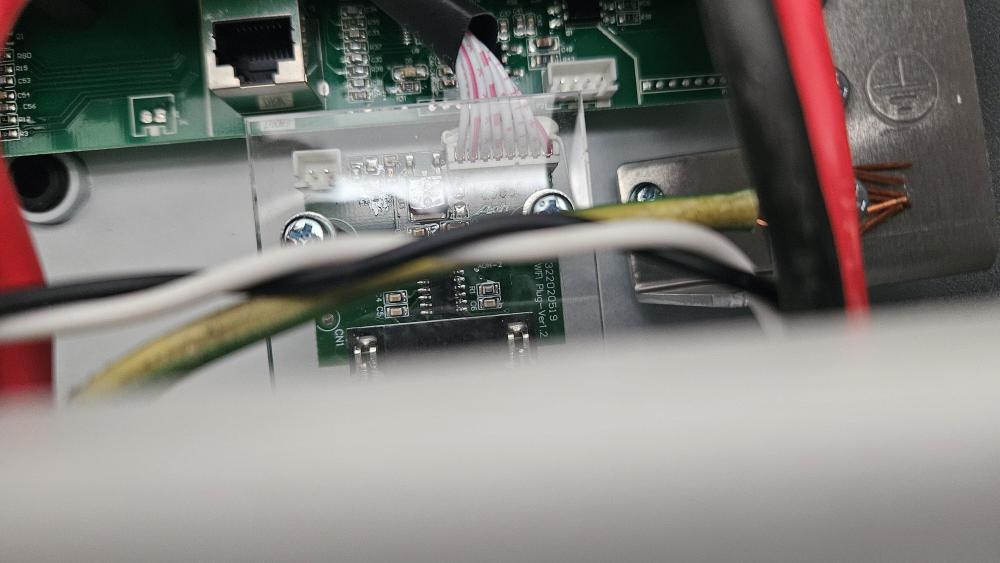
-
Hi guys, as the topic says, how do i switch my geyser from solar to grid and from grid to solar when required? Hardware 14 panel 550w with Deye 8kw inverter single phase and 2x Dyness batterries Geyser is a 6bar kwikot superline 600 dual. (Will look at reverse pump later as its dual). I installed geyserwise with 2kw ptc geyserwise ac element. This prefeeds my gas geyser. For the geyserwise element i would like the ability to switch it from grid to solar or from solar to grid on the fly. Can this be done? Currently my stove/oven and geyser are on eskom and everything else on solar. Ideally id like something wifo or something on the db board? Have cbi switches. Any ideas? Thanks

