


Wicard
Members
-
Joined
-
Last visited
-
Hi, I don't have the 3.5Kw but this is what I found in AI , maybe you have found this too, but hope it can help. The Ecco 3.5kW inverter error code "t l" typically indicates a low voltage issue, specifically with the battery. This could be due to the battery voltage being too low for the inverter to operate correctly. Here's a more detailed breakdown: Possible Causes: Low Battery Voltage: The battery may not be fully charged or may be unable to hold a sufficient charge. Faulty Battery: There could be a problem with the battery itself, such as a failing cell or a general defect. Incorrect Battery Settings: The inverter might be configured with incorrect voltage settings for the connected battery. Wiring Issues: Loose or faulty wiring connections between the battery and the inverter can also cause voltage drops. Load Issues: Excessive load on the inverter can also cause the battery voltage to drop below the required level. Troubleshooting Steps: 1. Check the Battery: Ensure the battery is properly connected and the terminals are clean and tight. Use a multimeter to measure the battery voltage directly. If it's below the recommended level for your inverter, try charging the battery or consider replacing it if it's old or faulty. 2. Verify Inverter Settings: Consult the inverter's manual to check the correct battery voltage settings for your specific model. Make sure the inverter is configured to match the battery's voltage specifications. 3. Inspect Wiring: Carefully examine the wiring connections between the battery and the inverter for any signs of damage or loose connections. Ensure that the wiring is properly sized for the current and voltage requirements. 4. Reduce Load: If you have a heavy load connected to the inverter, try disconnecting some appliances to see if the voltage stabilizes. 5. Consult a Professional: If you're unable to resolve the issue, it's best to contact a qualified solar installer or electrician for assistance. 6. Reset the Inverter: Try turning off the inverter, disconnecting the battery, and then reconnecting everything after a few minutes. This can sometimes clear minor errors. Important Notes: Always prioritize safety when working with electrical systems. If you're uncomfortable with any of the troubleshooting steps, consult a professional. Refer to your specific inverter's manual for detailed instructions and error code explanations.
-
-
Hi, If by any chance you still around, have you ever found the the rs-485 pinouts for the fivestar inverter, I have a fivestar battery but need to add it to my ECCO 5.5Kw, wondering if it might be able to read the RS-485 communication , I have the pinouts for my inverter though but searching for the fivestar pins. thanks
-
Well give it a go but I think the best is to first check you modbus registers with an app on Windows called " Radzio Modbus Master Simulator " to get the addresses used. it is a bit trail and error like I have done before I got the modbus registers.
-
@biscuitza here you go, I have found the Modbus registers , Using the RS485 port with USB to RS485 plugged into my Home Assistant I can read all the needed info without the use of CLOUD Logging. Check my other post on the other form for the pdf.
-
OK, here is 'n little gift for everyone that needs the info, I finally got hold of someone at ECCO and he shared the details with me, the original is Chines and I have Google Translated the other file. Enjoy. ECCO Inverter Modbus Info_Translated.pdf ECCO Inverter Modbus Info_CH.pdf
-
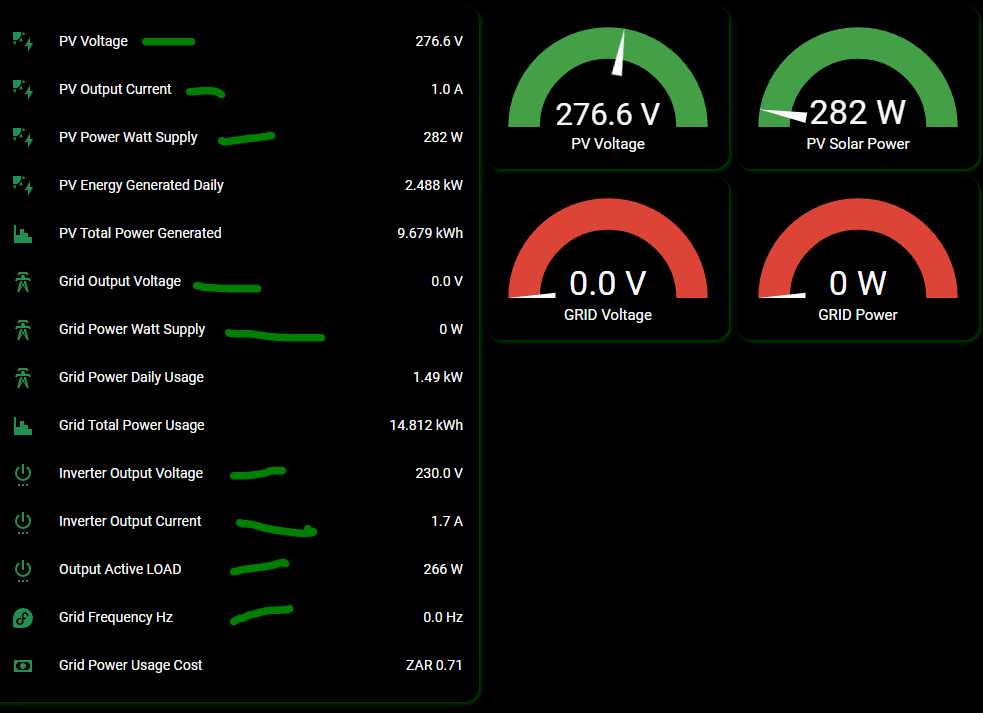
@4ChordMonty , Yea I can't even find the manufacturer , all I get is South African info on this ECCO's , maybe if you still have the Chinese details I will also give it a go. I have found with trial and error a few Modbus Register adresses but there should be a lot more, but we need the register mapping. I'm wondering if the 3.5Kw have the same addresses. This is what I have found thus far. ( all marked green ) the others are calculation sensors, and the grid gets switched off until 16:00.
-
Not sure where to get the firmware to update this, I have not even tested my 5.5kw on battery as I'm in the process of searching for a Lithium but still not sure what to get. I have been emailing eccosolar.co.za for info but 5 emails in and no reply yet.. PATHETIC , I'm looking for the Modbus Register mapping for this inverter. But will keep my eyes and ears open..
-
I might have found a way to add my ECCO 5,5Kw to home assistance , there is a bit of work to do and also a lot of trial and error. I bought a USB to RS485 converter and make use of an app om Windows called " Radzio Modbus Master Simulator " to get the addresses used for this ECCO Inverter, The only issue is to find out what each address does and or mean. With many hours playing around I think I found 6 addresses , inserting the addresses into home assistant it gave me numbers and this numbers changed when I draw more power and or switched of the panels and grid. Now it's time for more playing to find more data.


-
OK, I might have found away to read the data on Home Assistant via the MODBUS module , I used an app om windows called " Radzio Modbus Master Simulator " to get the addresses used for this ECCO Inverter, The only issue is to find what each address does. With many hours playing around I think I found 2 addresses , one for PV Power and other for Output Active Power, inserting the addresses into home assistant it gave me numbers and this numbers changed when I draw more power and or switched of the panels. Now it's time for more playing to find more data.
-
Good Day, I know this post is for MUST inverter but I have an ECCO Inverter 5.5Kw and found that it's close to to MUST inverter, Why I say that , I did not find any software for this ECCO inverter but with the Solar Power Monitor software It detects my ECCO as PH1800 but it displays no information in fact it detects it as other models too sometimes. The connection was attempted via the RS485 port using a RS485 to USB device. I'm trying to find what and how to get information out this inverter without using the WiFi Plug Pro that logs everything to a cloud. This inverter Have 2 x RJ45 connections 1 = RS232 and 1 = RS485, the WiFi Plug Pro is connected to the RS232 port, I tried to get info via the RS232 with with Serial to Serial , TTL and no TTL I tried basically everything I know and that is not much. LoL, I could not get anything directly from the RS232 port. However I did saw that the WiFi Plug Pro have 2 areas where one can monitor TX, RX. I found that one of them use BAUD RATE 115200 and give constant output with every 5 min when the dongle sends data to the cloud it send out a few binary codes, something I don't know much about. The other TX,RX point have a BAUD RATE 9600 and via serial screen non readable data, I did find via Device Monitoring Studio that it's Modbus output also unknown to me, The data a got was ( Read holding Registers ) also send every 5 min when update to cloud are sent. I also tried with a RS485 to USB device to get data from the RS485 port but there is nothing totally nothing , I believe it needs a request to get a responds and I don't know how to send a request. Some snippets of the serial data @ BAUD Rate 115200 01:53:00.551 -> [0;32mI (5135796) get_wifi_status: wifi.status.sta_dhcp_done = 1[0m 01:53:00.551 -> [0;32mI (5135796) get_wifi_status: dhcp_undone_count = 0[0m 01:53:00.645 -> [0;32mI (5135916) gfp_process_function: --> gpr send 7[0m 01:53:00.692 -> 66 E7 00 01 00 09 FF 04 01 03 02 00 00 B8 44 01:53:01.156 -> [0;32mI (5136376) task_modbus_tcp_function: <---- 010 S1[0m 01:53:01.156 -> 66 E8 00 01 00 0A FF 04 01 03 00 6C 00 03 C5 D6 01:53:01.156 -> [0;33mW (5136376) gfp_process_function: mbox_data.len = 16[0m 01:53:01.156 -> [0;33mW (5136376) gfp_process_function: suspend rtu task[0m 01:53:01.340 -> [0;32mI (5136586) gfp_process_function: --> gpr send 11[0m 01:53:01.340 -> 66 E8 00 01 00 0D FF 04 01 03 06 00 00 00 40 00 01:53:01.340 -> 00 20 A1 01:53:01.572 -> [0;32mI (5136806) get_wifi_status: wifi.status.sta_dhcp_done = 1[0m 01:53:01.572 -> [0;32mI (5136806) get_wifi_status: dhcp_undone_count = 0[0m 01:53:01.804 -> [0;32mI (5137046) task_modbus_tcp_function: <---- 010 S1[0m 01:53:01.804 -> 66 E9 00 01 00 0A FF 04 01 03 00 AB 00 1C 35 E3 01:53:01.804 -> [0;33mW (5137046) gfp_process_function: mbox_data.len = 16[0m 01:53:01.804 -> [0;33mW (5137056) gfp_process_function: suspend rtu task[0m 01:53:02.129 -> [0;32mI (5137356) gfp_process_function: --> gpr send 61[0m 01:53:02.129 -> 66 E9 00 01 00 3F FF 04 01 03 38 36 00 00 00 00 01:53:02.129 -> 00 00 00 00 00 00 00 00 00 00 00 00 00 00 00 00 01:53:02.129 -> 00 00 00 00 00 00 01 00 00 39 32 35 33 32 33 30 01:53:02.129 -> 36 31 30 32 30 36 31 00 00 00 00 00 00 00 00 00 01:53:02.129 -> 00 00 00 B7 AC 01:53:02.592 -> [0;32mI (5137816) get_wifi_status: wifi.status.sta_dhcp_done = 1[0m 01:53:02.592 -> [0;32mI (5137816) get_wifi_status: dhcp_undone_count = 0[0m 01:53:02.592 -> [0;32mI (5137826) task_modbus_tcp_function: <---- 010 S1[0m 01:53:02.592 -> 66 EA 00 01 00 0A FF 04 01 03 00 C8 00 16 45 FA 01:53:02.592 -> [0;33mW (5137836) gfp_process_function: mbox_data.len = 16[0m 01:53:02.592 -> [0;33mW (5137836) gfp_process_function: suspend rtu task[0m 01:53:02.918 -> [0;32mI (5138146) gfp_process_function: --> gpr send 49[0m 01:53:02.918 -> 66 EA 00 01 00 33 FF 04 01 03 2C 90 00 00 04 09 01:53:02.918 -> 3D 13 8A 01 1F 09 3D 00 03 13 8F 00 04 00 00 09 01:53:02.918 -> 3D 00 12 13 8C 01 24 01 A9 00 00 FF F9 00 00 0C 01:53:02.918 -> F8 00 C6 00 00 00 00 9A 96 01:53:03.379 -> [0;32mI (5138606) task_modbus_tcp_function: <---- 010 S1[0m 01:53:03.379 -> 66 EB 00 01 00 0A FF 04 01 03 00 DF 00 0D B5 F5 01:53:03.379 -> [0;33mW (5138616) gfp_process_function: mbox_data.len = 16[0m 01:53:03.379 -> [0;33mW (5138616) gfp_process_function: suspend rtu task[0m 01:53:03.610 -> [0;32mI (5138826) get_wifi_status: wifi.status.sta_dhcp_done = 1[0m 01:53:03.610 -> [0;32mI (5138826) get_wifi_status: dhcp_undone_count = 0[0m 01:53:03.656 -> [0;32mI (5138916) gfp_process_function: --> gpr send 31[0m 01:53:03.703 -> 66 EB 00 01 00 21 FF 04 01 03 1A 00 03 00 00 00 01:53:03.703 -> 07 00 16 00 17 00 16 00 05 00 00 00 44 FF F9 00 01:53:03.703 -> 00 00 00 00 00 16 82 01:53:04.121 -> [0;32mI (5139386) task_modbus_tcp_function: <---- 010 S1[0m 01:53:04.166 -> 66 EC 00 01 00 0A FF 04 01 03 01 2C 00 0C 85 FA 01:53:04.166 -> [0;33mW (5139386) gfp_process_function: mbox_data.len = 16[0m 01:53:04.166 -> [0;33mW (5139396) gfp_process_function: suspend rtu task[0m 01:53:04.350 -> [0;32mI (5139596) gfp_process_function: --> gpr send 29[0m 01:53:04.350 -> 66 EC 00 01 00 1F FF 04 01 03 18 00 00 00 02 00 01:53:04.350 -> 00 00 01 00 00 00 00 00 00 00 00 00 01 00 01 00 01:53:04.350 -> 01 00 00 62 46 01:53:04.625 -> [0;32mI (5139836) get_wifi_status: wifi.status.sta_dhcp_done = 1[0m 01:53:04.625 -> [0;32mI (5139836) get_wifi_status: dhcp_undone_count = 0[0m 01:53:05.596 -> [0;32mI (5140846) get_wifi_status: wifi.status.sta_dhcp_done = 1[0m The other Serial on BAUD Rate 9600 (Modbus) Output Packet 3: MODBUS Response (packet size: 8, data size: 4) Mode: RTU Address: 1 (Slave) Function: 3 (Read Holding Registers) CRC:1494 (OK) Packet 5: MODBUS Response (packet size: 8, data size: 4) Mode: RTU Address: 1 (Slave) Function: 3 (Read Holding Registers) CRC:42006 (OK) Packet 7: MODBUS Response (packet size: 8, data size: 4) Mode: RTU Address: 1 (Slave) Function: 3 (Read Holding Registers) CRC:50646 (OK) Packet 9: MODBUS Response (packet size: 8, data size: 4) Mode: RTU Address: 1 (Slave) Function: 3 (Read Holding Registers) CRC:13795 (OK) Packet 11: MODBUS Response (packet size: 8, data size: 4) Mode: RTU Address: 1 (Slave) Function: 3 (Read Holding Registers) CRC:17914 (OK) Packet 13: MODBUS Response (packet size: 8, data size: 4) Mode: RTU Address: 1 (Slave) Function: 3 (Read Holding Registers) CRC:46581 (OK) Picture of the WiFi Plug Pro with connections

-
@ShaunCro Yeah I have tried this, on the RS232 port as the modbus id for the WiFi Plug pro is set to 1 on setting 25 on inverter , I tried setup the software that could do modbus with same settings ID 1 etc... but no avail , I will try again another day as I'm waiting for ESP D1 Wemos and ttl (max3232) to see if I can do it that way. As far as I have it the RS232 does not need TTL when connecting strait to PC as the levels should be the same , the WiFi dongle have a MAX3232 as it does need to be ttl level , but yeah I have tried all the ways from strait RS232 , FTDI UART , FTDI TTL , even my own TTL level converter I've build for ESP communication..
-
Hi all, Well I also had issue with my WiFi Plug Pro and had to get it removed to be able to re-register it, I also played with the serial connection but I can not find any software to talk to this ECCO 5.5Kw Solar Inverter I tried basically every free version I could find and really do not want to pay for something that might not work. I wonder if there are anyone out there that might have found software that is supported for this ECCO inverters. I can't even find the Serial commands to try talk to it via serial connection. I really hope I can get this working as I do want to add it to my home assistant for monitoring.
-
Hi all, I have been battling with my ECCO 5.5Kw Hybrid with this Datalogger WiFi Plug Pro, but at the end got it working after I had to asked ebonde to remove the previous subscriber. While struggling I tried getting this to work via serial (RS232) strait to the PC but got no where. I'm not sure what local software have support for this ECCO inverters as I basically tried everyone that is free as I do not want to pay for something and I can't get it to work, all the software I got have support for other makes and models but nothing close to the ECCO. Does anyone ells know of software that might work, if so I will appreciate it if you can share the name of it. I have tried Solar Power Power Moinitor WINCC WatchPower and a few others I can't remember.

