Haysdb
Members
-
Joined
-
Last visited
-
-
-
-
Limit to Load, if it works like the Deye Zero Export to Load, uses an internal CT to measure loads flows in and out of the various terminals. It can’t distinguish non-essential loads from the grid. Only the essential and smart loads get measured. Everything in and out of the grid terminals is just import and export because no external CT is used. With Limit to Load not checked it’s probably the same as the Deye Zero Export to CT which uses internal CTs to measure loads on the 3 terminals and an external CT to measure non-essential loads. The inverter knows how much power its sending out on the grid terminals and it knows how much power is going to the grid via the external CT, so it can calculate how much is consumed by non-essential loads.
-
This is the best thread I’ve found on smart load. It answers questions few other threads do. And it’s all correct, not half and half like the Sunsynk YT video. I’ve spent way too much time trying to understand smart load and trying to use it for something it’s not really suited for: charging an EV with excess solar. Turns out just connecting the damn thing to non-essential loads accomplishes what I want: use any excess solar power that’s available, not use battery power, and be counted as consumption by my inverter. If smart load could provide ONLY excess solar above a trigger point of 1320 “excess” watts, it’d be great, but that’s not what it does. It’s simply on or off at a trigger point. My car doesn’t know how much solar is available, it just consumes however many amps I tell it to, and much of that is going to be electricity at peak rates. A smart EVSE could do that but I can’t export so there’s never any “excess” to be measured.
-
-
-
-
-
It was installed by an electrician who does a lot of solar so I’d hope they know how to install a CT. My comment about zero export was related to their being no PV so nothing to generate power. Solar Sell checked or unchecked shouldn’t matter since there’s nothing to export. No?
-
“essential load, non-essential load, backup load and, i guess, home load” These terms are right out of the Deye manual so I’ll take a swing at it. Essential load and backup load are the same thing. Non-essential loads are connected to the grid and essentially bypass the inverter. They lose power when the grid goes down and do not use battery power. Home load encompasses all loads. Everything on your side of the utility meter is a home load.
-
BMS is powered from battery? You mean the BMS *in* the battery? Yes, it’s powered from the battery. It’s literally connected to the battery terminals. I think I’m misunderstanding the question.
-
The arrow on my CT points away from the inverter and yet everything is being reported correctly: production, consumption, import, and export. Solar Assistant also reports everything correctly. Why worry whether export is allowed or not allowed? There’s nothing to export.
-
I think of the smart load as semi-essential loads. They’re loads you’d like to keep running in case the power goes out but only up to a point. Like, if I can keep them running with 20% battery, ok, but if it costs more than that it’s not worth it. I tried way too hard to use smart load for something it’s not suited for - an EVSE (EV charger). It finally seeped through my thick skull that’s just simply non-essential. I’ll never want to charge my EV from my home battery. If smart load could provide ONLY excess solar at a trigger point of 1320 “excess” watts (6A), then it’d do what I want, but that’s not what it does.
-
This is what I’ve been thinking: I can’t prevent smart load from using battery when the grid is available but I can limit how much power can be drawn from battery for each time slot in time of use. During peak solar production hours I can force use of the grid by limiting battery power.
-
-
Some battery is being used when the grid is available. 544 watts. What is controlling how much battery is used? Edit: answer: the time of use settings for power for the current time slot, right?
-
This throws a monkey wrench into my theory about how smart load works. This is actually exactly the way I *WANT* it to work, but I didn’t think it was possible for the inverter to know how much power it could generate but isn’t. It you’re exporting excess power to the grid it knows how much you’re exporting but if you’re off grid or zero export, it’s simply not generating any excess power to measure. Clever engineers can maybe infer it from MPPT data so that must be what they’re doing. I want to connect an EVSE and set the smart load to come on if I have 1320w (6A) of excess solar available. edit: I don’t have an explanation for what you observed but I’m extremely skeptical that the Deye is doing any sort of estimate of solar power that’s not currently being generated. It would be a wild guess at best.
-
-
-
-
-
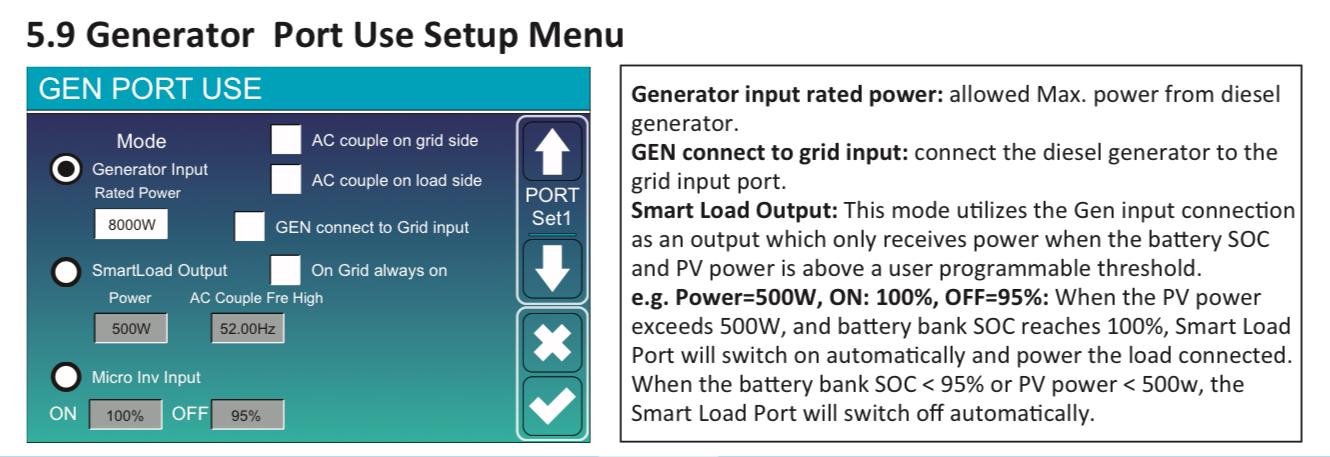
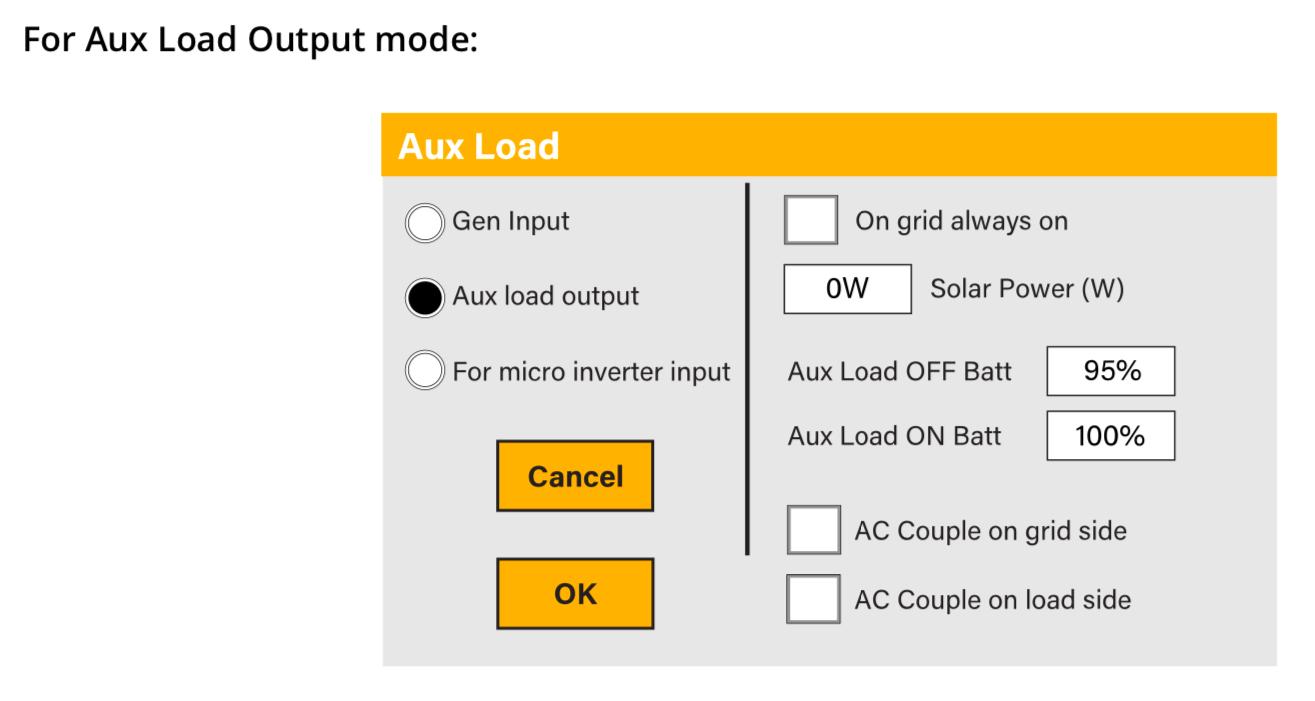
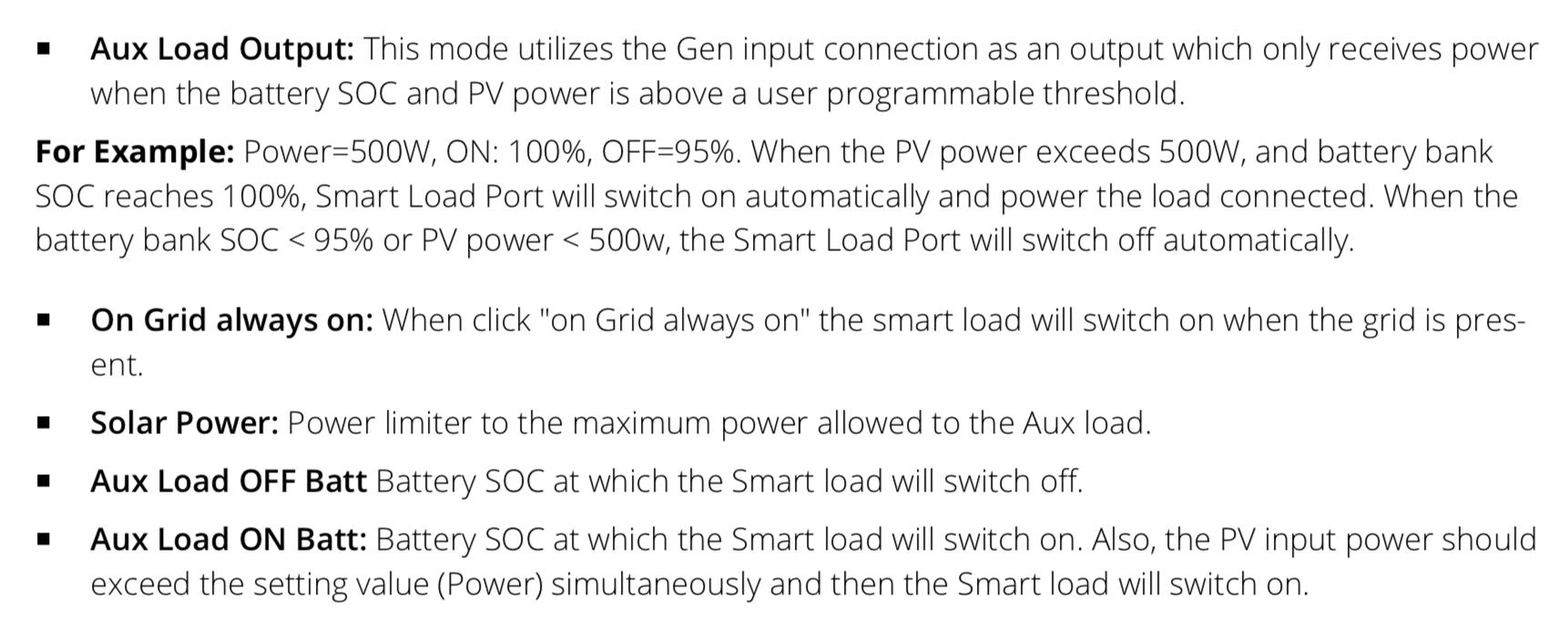
I first interpreted Power as the amount of “excess” solar power but then realized this doesn’t work if you’re zero export or off grid. The inverter doesn’t “know” how much power it isn’t generating, only the power it IS generating, so the engineers who designed these inverters kind of had their hands tied and came up with the best solution available. I’ll set this to something below my base load, like 100w or something, so that it’s “on” any time there’s solar. The smart load doesn’t know “how much” extra solar is available, only that it’s more than x. the Sunsynk videos drive me utterly insane. They’re supposed to know how these things work and yet there’s absolutely some wrong information in their videos. The Power setting isn’t a limiter, it’s a trigger. Smart Load isn’t limited to battery power. It doesn’t NOT use solar power. If their inverter actually works the way they describe then I’d want nothing to do with it because their engineers are complete idiots. For example, I set Power to 500 watts, the port comes on, and it powers some device that requires more than 500 watts. This would be A Bad Thing. Priority #1 of a device that’s controlling potentially all of your loads, as mine is, is to power the loads. Full stop. Not providing enough power just isn’t an option so long as you’re grid tied. If that setting on the Sunsynk really is a limiter, then that’s A Big Problem and why the hell did they change it from the way the Deye and Sol-Ark work?
-
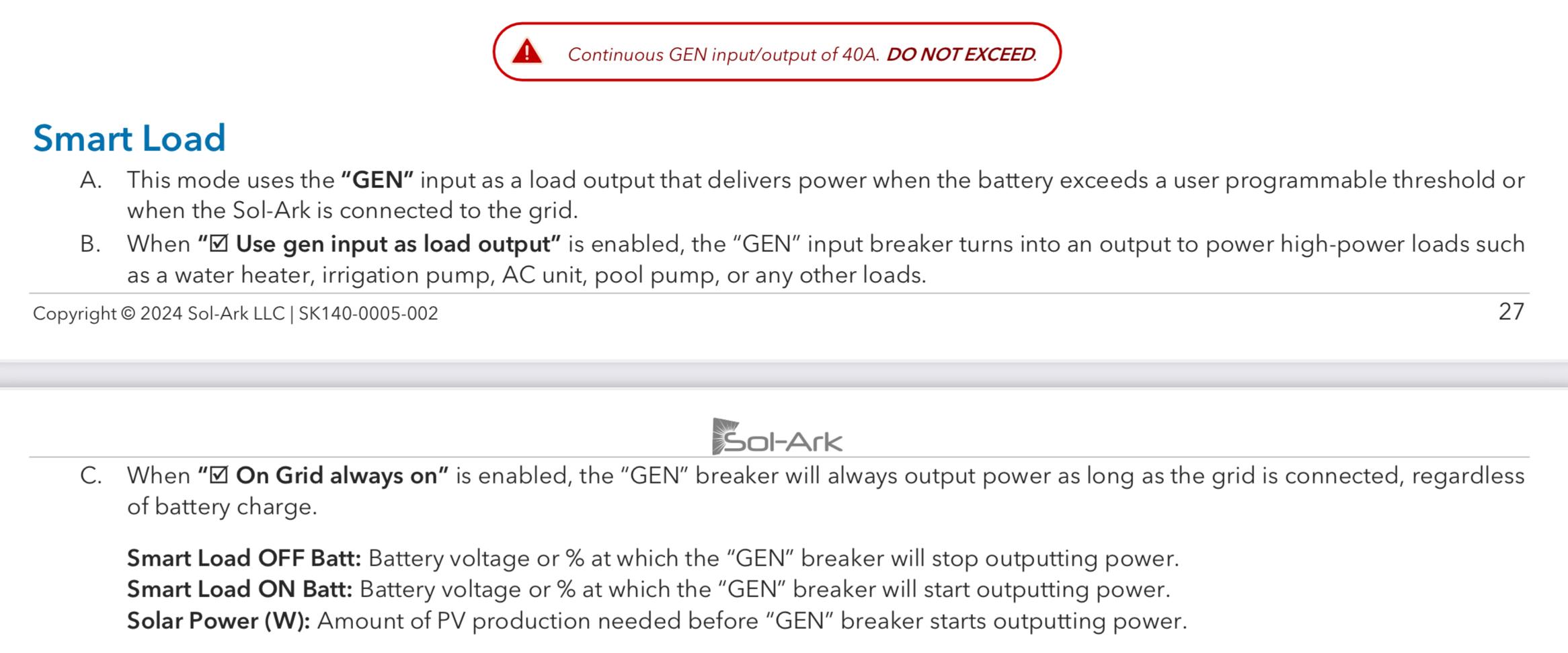
From the manuals The Sunsynk manual describes the Power setting as a limiter but this makes no sense at all. What if your load needs more power than this? This sounds like a great way to damage expensive electrical equipment. Why on earth would you do this? Why would you WANT it to work this way? Both the Deye and Sol-Ark manuals describe this as a trigger. The Sol-Ark manual specifically states that the smart load port is limited to 40A. Sunsynk (in a YT video) says it’s limited to 50% of the capacity of the inverter. Deye doesn’t say anything but a forum post says it’s only limited to the passthrough current. In my case any of these is more than adequate. I’m more limited by my electrical service (30A continuous) than I am by my inverter.





-
How Smart Load Works (My Theory) Deye/Sunsynk/Sol-Ark Smart Load My hypothesis is that all of these inverters work the same. It makes no sense for them to work differently. Deye is the OEM for all of them. They each have a different UI, but I’m betting the underlying functionality is the same. Between 3 different user manuals, this is how I think they all work: The GEN port can function as a smart load port It’s for what I call semi-essential loads, striking a middle ground between non-essential loads (Grid) and essential loads (Load). It’s grid-tied, but depending on settings can remain “on” and using battery power even if the grid goes down, until a specified battery SOC is reached. It is either “on” or “off” based on user-specified criteria. That’s it. On or off. If “On Grid always on” is enabled, the port is live when the grid is available, without regard to any other settings. It’s just “on”, period. In this sense it’s similar to the Grid port. What I don’t know is how much battery power, if any, is used in this mode. Since battery SOC is ignored, this leads me to believe that battery power may not even be used. It would be awesome if this is the case. The “Power” setting is a trigger, not a limiter. (I call bullshit on the Sunsynk video and on their user manual) The “Power” setting refers to total PV production, not “excess” production. This limits its value but it simply can’t measure excess PV because in many scenarios (zero export or off grid) there simply won’t BE any as PV output will be curtailed to match the load. Excess PV will be zero, even if there’s unused capacity. The inverter doesn’t actually “know” how much extra PV power there is because it never gets generated in the first place. I’ll set this to something less than my base load, so around 150w so that it’s on whenever there’s any solar power being generated and off otherwise. Priority #1 for the inverter must be to power your loads. “Power” being a limiter violates priority #1. Priority #2 must be to use all available PV before using battery or grid. Isn’t this the PURPOSE of the smart load port, to make productive use of excess solar power? Limiting the smart load to only battery power (that Sunsynk video again) violates priority #2 and makes no sense. What if you have only a small battery limited to .5c? What if battery power is limited in Time of Use? What happens to your load if it can’t get the power it needs? This violates priority #1. My desire is to use the smart load port to power an EVSE to charge an EV. I want to use whatever excess solar is available, supplemented by grid power. I don’t want to use battery. I hope to minimize the use of battery via the Power setting in Time of Use. For example, if I enable “On grid always on” to turn the port to always on, to charge overnight, I’ll set Power in Time of Use to a number just above my typical nighttime base load, like 1000w to avoid using a small battery to charge a big battery. Ok, set me straight y’all.
-
This is going to be a bit of a rant born of frustration at (1) poor documentation and (2) wrong information being posted by people who should know better (I’m looking at you Sunsynk). So, how does Smart Load REALLY work? First, a huge caveat. I don’t “know” from personal experimentation. This is my hypothesis based on reading forum posts and watching youtube videos and on what makes SENSE and what DOESN’T make sense. I do intend to verify my theory when I get some battery storage in a few weeks. And finally, please please please set me straight if I’m wrong on any point. This is intended to be a conversation. Hopefully by the end of it we’ll come to some definitive answers. There’s a pdf document about this somewhere. I’ll try to find it and try to reconcile with it. (I posted this in diysolarforum also)
-
No notifications as of Dec 2024 I use Solarman to export data into a spreadsheet for analysis. I use Deye Cloud to check on the system as the graphs are prettier. Both of those update every 5 to 6 minutes, Just installed Solar Assistant but don't have enough data yet for it to be very useful.