TheoVogel
Members
-
Joined
-
Last visited
Everything posted by TheoVogel
-
A few years ago we converted our whole house to 220v GU10 downlights. I think there us about 50 in total. The contractor who installed the lights supplied them with 5w Voltex branded bulbs. Before the job was done some of these ether died completely or started flickering. Later I bought a whole bunch of these from Voltex. They are really cheap at around R15 each. About half I had to replace within the first 6 months. I replaced these with way more expensive bulb ls from Builders Warehouse, but these weren't any better. It is becoming a chore to replace the bulbs. I have 2 Osram LEDs that's been going strong for 14 years. I paid my early adoption tax for these, I think they were R150 back then, but were well worth it. Which bulbs GU10 do I buy that will last as long as they claim?
-
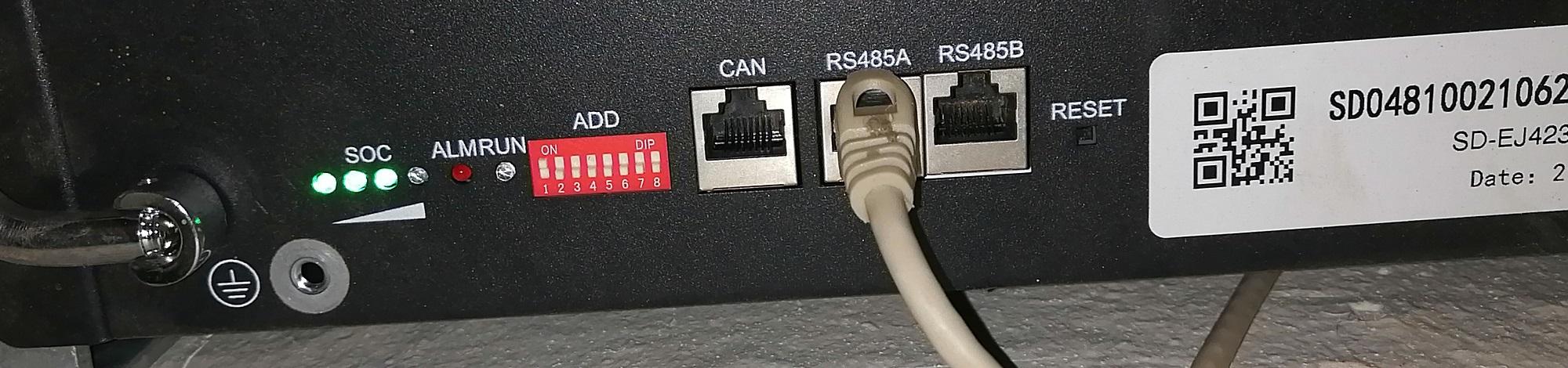
Hi Guys, I am glad this conversation started up again. I had an interaction with a friendly young man called Kobus from Solar Europea few months ago. He shared the in-out of the cable he uses for the Shoto batteries as well as the software needed. I never tested it, but here are the pictures of the RS485 cable. It looks to be pin1 and 2 on the RJ45.


-
So I have my Shoto battery diode replaced. It's a very small surface mount device. The one battery tests as 19v and my inverter refuses to charge it. Any idea on how to the voltage to 40 something?
-
There's your problem:
-
Thanks for the info, I will definitely try that. Out of curiosity, who was the the supplier in your case?
-
Both my Shoto's were assembled on 21 June 2021. Issues probably not only limited to only one batch.
-
I can't confirm the validity of this statement. But according to my installer there was a bad batch of Shoto 5.12's that came into SA towards the end of last year. There has been numerous issues with this batch when using more than one battery where the one battery just dies like what myself and Justice MM experienced. These faulty batteries needs to have the BMS replaced. In my experience at least it seems like the master battery is one that dies. Should I have both batteries taken for the BMS issue or only the dead one? I am going to take both in, hopefully load shedding or our normal weekly Roodepoort power outage doesn't make me regret getting both batteries looked at. @Justice MMdo you have any feedback on your Shoto issues?
-
Hi Scuba, I guess this converter could work providing you have the correct pin-out that matches what the Shoto battery accepts and have the correct software. So far I haven't been able to confirm that I have the correct pinouts or software. I tried all possible combinations of the pinouts to the RJ45 I found in the above screenshot without being able to connect using Battery Studio. I know that the Solar Assistant cable does indeed work, hence asking for pictures of the RJ45 side to help be reverse engineer it and build my own cable.
-
I just spoke to someone that will not be named at one of thr Shoto Importers in Pretoria. He is apparently not allowed to share the BMS computer software to anyone who is not an installer. (Maybe I should have lied about being an end user) He did however tell me that Battery Studio won't work on the 5.12's Not sure what the thinking behind this closed ecosystem is.
-
Hi Guys, I am looking to make a RS485 cable that would allow me to get detailed battery parameters from my Shoto batteries. My neighbor was so kind to borrow me this USB to RS485 converter: He works in industrial automation so I am sure this unit should be fairly bullet proof. I've been struggle to get the battery and PC to talk using software called Battery Studio (given to me by a friendly forum member ) which it apparently what I should use for Shoto. I have no way for confirming if this is the correct software as Google doesn't even know. I found this pin-out diagram, but I am unsure if the RS485-A and B should go to more than one pin on the RJ45 connector? This RS485 converter does have a ground lead, should also be connected to more than one pin, as per the diagram? Does anyone perhaps own a SolarAssistant cable for Shoto, how are these wired up?


-
Great answer, than you for sharing
-
I also noticed the missing grounding wire on one of the batteries. It's ironic that the ungrounded battery is the working one. I will switch the rs485 wires around, but the fact that there is no light on the battery leads me to believe that this might now bring it back to life. How would you know if the batteries are talking to each other?
-
Well spotted, unfortunately this wasn't the problem. The picture look like it's not all the way down, but it actually is.
-
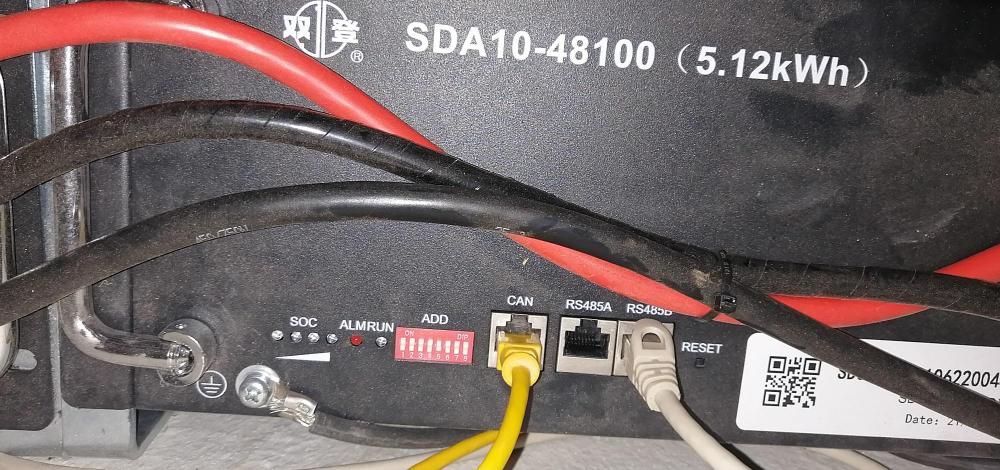
This is exactly what has happened to my Shoto batteries. Everything worked fine for 3 months. The first sign that things were not right came when I noticed one evening that the battery SOC was showing 0% on the Solarman app as well as they Deye's display, although the battery is configured to shut down at 20% The next morning the battery started charging from 0% all the way to 100% as usual, but the same thing happed that evening, 0% SOC by 22:00. My batteries are wall mounted so I had to get onto a stepladder to get a view of the battery's display. The slave battery had its display LEDs lit, but the master was completely dead. My first port of call was to do a full system shutdown. Flicked the cutover switch to Eskom only followed by switching off all the DC breakers then the Solar panel disconnect on the inverter and then die big green button on the side of the inverter. I then continued to reset the batteries. The slave looked to have reset, but nothing brings the master battery back to life. My installer is still on holiday, so he cant help. Any ideas?

-
Thanks for all the insights. It looks like solar production in Gauteng is pretty flat throughout the year. I was expecting a bigger dip in winter. Good news though!
-
Hi Guys, I am sure was asked before, but searches weren't very successful, probably because million keywords around the same topic. Could you please post your solar production graphs my month. I live in Johannesburg and is trying to predict my production how much my solar system would produce during the autumn and winter months. Thanks Theo
-
Battery type is set to lithium. Not sure what I am missing
-
Hi, I've got an interesting issue. I've got an 8kw Deye inverter with two 5.12Kwh Shoto batteries. BMS comms seem to be working as I get SOC readings as well as max charge and discharge percentages etc. when going into the battery settings. On the Time Of Use menu I get voltages and not SOC. What could be the reason for this?
-
I think I answered my own question. I was afraid to tinker with the wifi connection as I struggled my ass off getting it to sort off working. The logger never played well with my Mikrotik access points. It keeps dropping off randomly even with excellent signal. I found an old TP-link and that worked. Local mode can't be configured as a permanent solution. You connect your phone directly to the logger network and get as-at-now stats, no graphs or historical info etc.
-
Hi Gurus of the Solarworld, I recently had a 8kw Deye inverter, 7kw Panels and 10 Kwh batteries installed. As luck would have it I haven't had a good sun day yet. That said, it managed to charge the the batteries to fill or nearly full every day. The installer did not install the CT coil in the right place even after repeatedly telling him that it wasn't. It only measures essential loads. Low and behold, he is coming back to fix it as I still owe him some money. To my actual question. I found bits and bobs around the Solarman Smart app and local mode. If I configure it to local mode does it mean I loose the cloud monitoring or can both be active at the same time? The lag on Solarman is not good enough in my view. Is there a way barring SolarAssist and Raspberry Pi to get real-time stats directly from the inverter or wifi logger? Homeassistant integration would also be a massive plus.
-
Hi, Did you get these two play together in the end. I am about to have a Deye 8kw with 2 Shoto 5.2kwh's installed I questioned the comms issue with the installer and he assured me that this is not a problem, but I's like some confirmation.
-
Thanks for the info. The ups seems to charge at around 1 amp, so it will take around 2 days to fully charge a 44ah battery. Would it be possible to add an additional charger with the ups or paradox alarm built in charger?
-
Hi, I have a small 650va Eaton ups. I use this to power the TV, decoder and WiFi routers during load shedding. The standard 7ah battery is on its way out. It used to power this setup for 30 minutes plus, but now barely last a minute. Could I replace the battery with a Bluenova or Freedom 12v lithium battery of the same or larger capacity. They sells these as drop in replacements for alarms, ups's etc. This would obviously use the internal charing circuit of the ups/alarm. Would this work optimal or would the voltages be too far out of wack?
-
Thanks everyone
-
Hi, I am in the process of completely re-doing a part of my roof. I plan on installing solar panels later in the year. Would it be possible to install the solar panel mounting brackets while they working on the roof instead of having to lift tiles again later. Is the mounting spacing etc the same for most panels or do you install mounting hardware for your specific panel dimensions? Hope to get answers soon as they begin with the roof tomorrow.