Jack Kitley
Members
-
Joined
-
Last visited
Everything posted by Jack Kitley
-
This was sorted. Turns out my raspberry pi PSU was failing and causing a continuous boot loop. Powering a with an iphone dongle which is 5V 2A and working great.
-
Noticed that solar assistant just stopped this morning at 5am. I cant connect to it via bluetooth to check what happened. I see its connected to the network and is assigned an IP. Not sure what to do next.


-
So weird. update just appeared in solar assistant and now i have sensors , switches etc for days!!! great
-
@kellerzaI tried to use your add on thanks but couldn't get battery readings and got timeouts and data became inconsistent. Since started using solar assistant. All works fine now.
-
@Multiformwhere do you get "It exposes 76 sensors and switches over MQTT". I have only a few.

-
thank you
-
@Multiform I also have solar assistant but in energy dashboard i cant add any sensors. There are non available. Any help would be appreciated .
-
I purchased solar assistant recently and it works really well with home assistant / MQTT. The issue that im having is inside the energy dashboard and adding sensors. There are non available for use. I read the solar assistant docs and they indicate that sensors should be available for use. https://solar-assistant.io/help/home-assistant/energy Any help would be appreciated.
-
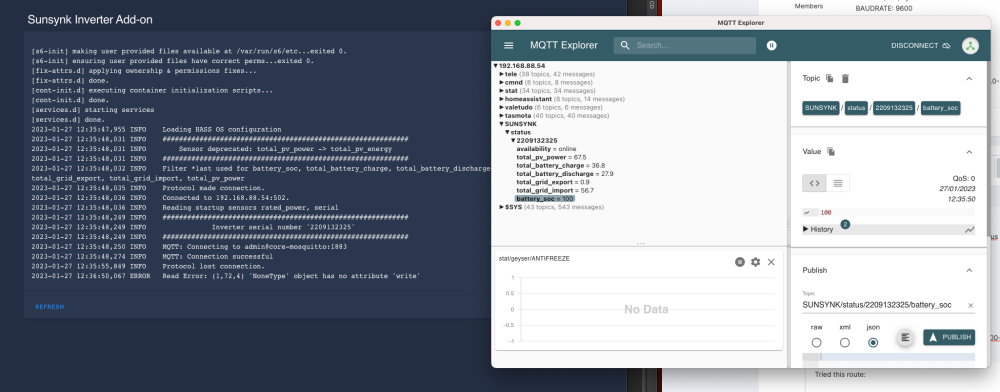
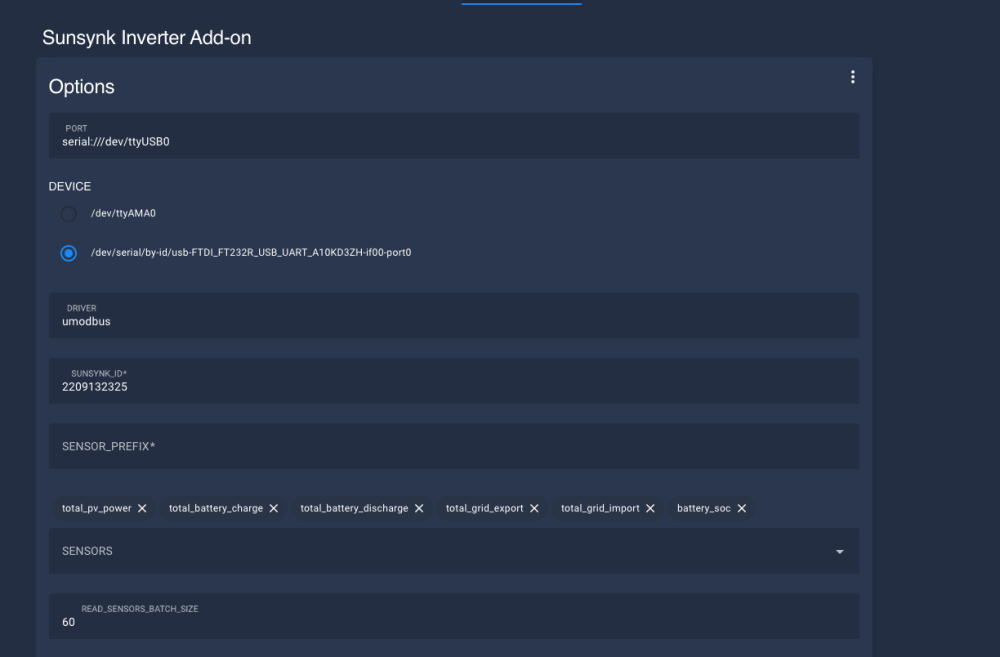
Thanks @kellerza Just an update. I made use of said cable above and crimped Orange, Yellow and Black to pins 1,2,3 on the RJ45. I made use of KellerZa repo which worked straight away but with some timeout issues which i thought wasnt refreshing the data quick enough. i added more sensors and did some tests and data seems to be coming quicker on MQTT now. example of my Sunsynk Yaml which i edited from the add-on: PORT: "" DEVICE: /dev/serial/by-id/usb-FTDI_FT232R_USB_UART_A10KD3ZH-if00-port0 DRIVER: umodbus SUNSYNK_ID: "2209133222" SENSOR_PREFIX: "" SENSORS: - total_pv_power - total_battery_charge - total_battery_discharge - total_grid_export - total_grid_import - battery_soc - battery_temperature - grid_voltage - battery_power - inverter_power - load_power - grid_power - battery_voltage - overall_state - grid_connected_status - total_active_energy - total_pv_energy - rated_power - pv1_power - pv2_power READ_SENSORS_BATCH_SIZE: 60 NUMBER_ENTITY_MODE: auto PROFILES: [] MODBUS_SERVER_ID: 1 MQTT_HOST: core-mosquitto MQTT_PORT: 1883 MQTT_USERNAME: admin MQTT_PASSWORD: <pwd> DEBUG: 2


-
2nd attempt was using umodbus and this also times out it seems.

-
Tried this route thanks. Both ways work for me but i get initial Data to mqtt and then just no new data. Almost stale. @kellerza Not sure if there is an issue.
-
@kellerzaSeems to have worked i think?

-
Thank you @kellerza. I see that matches with my other image i found. So B(Yellow) to RJ45 pin 1 A(Orange) to RJ45 pin2 GND(Black) to RJ45 pin3 and i should be good to go? Thanks for your lib.

-
Hi All, Was wondering if anyone had info on this cable that i purchased. It has USB but on other side a few wires that i need to crimp to RJ45. Not sure of order with this colour scheme. Any help appreciated. Thanks

-
Hi I control my pool pump via home assistant and mqtt. I added sonoff dual into the pump elec box. It controls the light and pump. I also have a temp module in the weir that tells me water temp. The pool pump works with sunrise and runs multiple times during the day.
.jpeg.efd38e089b454801def027fa81423837.jpeg)


-
I see the temp inside the tube as a work around. There are three wires from the controller that connect to the panel. A 12v, a neutral and a data wire. The data wire is two way. My aim is to intercept the data via that data wire and then mimic the calls to change temp, put on the pump and also be able to read data like error codes, temp sensor values and states of pump and heating. I want to be able to remove the panel completely and then replace with a D1 mini and then integrate into home assistant via MQTT. If anyone has been able to reverse engineer this then please give heads up. Thanks
-
You get anywhere with this?