


gooseberry
Members
-
Joined
-
Last visited
-
Selling my grid-tied inverter after upgrading. Ideal for AC-coupling to an existing system in order to add more solar panels cheaply. Includes CT coil. Item: Solis 4.6kW Dual MPPT Grid-Tied Inverter + Wifi Logger Age: I've had it for 4.5 years, not sure. Price: R4700 Payment Method Accepted: EFT/Cash Warranty: None Packaging: None Condition: Excellent Location: Somerset West Reason: Upgrading Shipping: Can do Pargo etc Collection: Yes Link:

-
This looks amazing!
-
-
-
-
-
Yep, it was this. I didn't see the arrestors were 180VDC rated only.
-
Can anyone give me some pointers or a recommendation for someone who can come take a look in the Somerset West area?
-
I've got a Solis 4G 4.6kW inverter connected to 2 strings of 4 450W JA Solar panels. It's connected to the grid and has the CT clamp connected. I'm seeing voltage (>180V) on the strings (both with the multimeter and on the Solis itself but I'm getting an ILEAK-PRO04 error) I'm not sure whether the leakage is on the DC or the AC side. It happens with both strings, or either string connected. I've got some Noark DC switches which I can use to switch the strings on or off. This was a self-install with a second-hand inverter. The message on the web interface is that it sometimes happens when it's raining, but it's not been dry for a few days and the issue persists. It also adds that you updating the Firmware might help but I don't have the stick to do that with. Anyone know someone who can help? I'm in the Somerset West area. I've also switched around the positive PV connecters going into the inverter as I've seen that people sometimes mismatch the + -'s going into the MPPTs resulting in this error but that didn't solve the problem. Some pics of t he install: The connection here is connecting 2 strings of 2 panels in series to give a 4 panel string. (did it this way so I can also connect them in parallel to the Axpert I'm running as UPS in case there is a long power outage) :


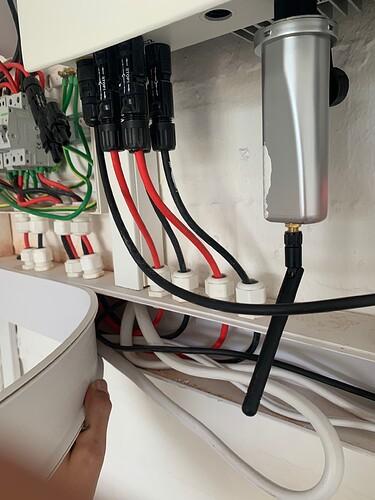

-
-
but that is what specialised DC breakers are made for... like the Noark ones. Of course you avoid it if you can.
-
Those fuses you can't disconnect under load though right?
-
I'm assuming you have a PWM charger? In that case the higher voltage obtained by adding panels in series does not help, it will still only charge at the current one panel can provide. You need to connect your panels in parallel.
-
Yes on both counts.
-
You can probably only have 4 350W panels (2 strings of 2 panels each connected in parallel). You'd need to upgrade your inverter to add more panels or buy a separate MPPT.
-
-
The Atlas geyser is a POS. We could never get it to work reliably. Replaced it with a fan forced Paloma and the difference is night and day.
-
You can have 8 or 9 panels per string, you can oversize your array I believe. The 10400W max is the max the MPPTs are able to produce, not the max rated kWp of the array. Just don't exceed the voltage rating.
-
I read it as he wants to take advantage of his old meter (which I presume rolls back) in which case he'd need a bidirectional hybrid inverter, or a pure grid-tied inverter.
-
-
Just be aware that what you're doing is illegal according to the Eskom SSEG guidelines. You'll have to register and get a new meter.
-
The Growatt is not a hybrid system and can't push into the grid.


