


MrOccO
Members
-
Joined
-
Last visited
-
-
-
-
-
-
Hi @Denarius, the RS232 connector is a female.
-
-
-
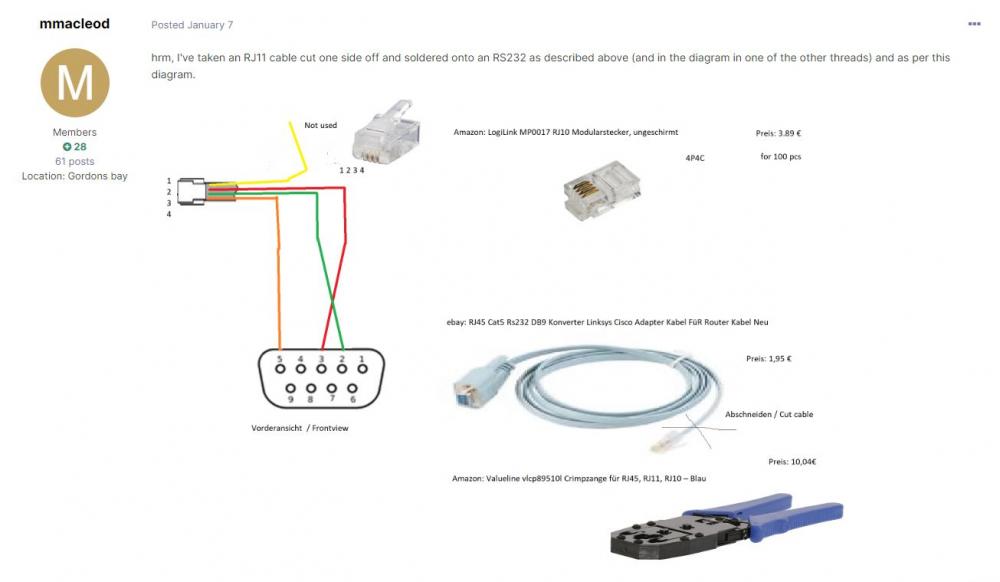
Hi Guys, just an update. I have managed to get it working. @YellowTapemeasureThe unit does have a console port but now they use a RJ45 connection. My frustration is dropping 20k per battery and the vendor does not want to know you in terms of support. Frustrating. Anyway the pinout is as follows for anyone else looking for it: RJ45 CONNECTOR:-------------- > DB9 RS232 PIN 1 -------------- > NOT CONNECTED PIN 2-------------- > NOT CONNECTED PIN 3-------------- > PIN 2 PIN 4-------------- > NOT CONNECTED PIN 5-------------- > NOT CONNECTED PIN 6-------------- > PIN 3 PIN 7-------------- > NOT CONNECTED PIN 8-------------- > PIN 5 Yani from Multisib had to make an update on his brilliant program and now Multisib communicates with Pylontech and Invertor flawlessly. Thanks @DeeJayand @YellowTapemeasurefor your valuable feedback.
-
Hi All, please can I ask some guidance with tech gurus here. We just purchased another 3000 pylontech battery. I see the new model is revised. The previous 2000 and 3000 we have used a RJ11 console port. We have a cable that communicated fine with the batteries to the PC via serial RS232. The new 3000c unit has a RJ45 console port. Anyone know what the pinout is for the console port in order for me to make up a new cable?
-
-
Hi Plaashaas, I made it myself. very easy. Get a serial cable, chop one end off and connect pins. Found diagram on this site will post link.
-
-
Ok, so when I downloaded it it would read the pylons only and Axpert would not read (brand new version - Purchased axpert in July 2020). I contacted the support and man, Yani is amazing. This guy went above and beyond and managed to get it working with some program alterations. I can confidently say that this software is unbelievably good. This software works amazingly well. If it ever does come to a paid version it is worth every cent.


