


HubbleLithium
Commercial Members
-
Joined
-
Last visited
Everything posted by HubbleLithium
-
Hi P1000, First of all interesting post. We have been following it and not commenting as to stay neutral. Regarding spares. - BMS: Our BMS units are manufactured in the East and they are double coated to prevent corrosion. The BMS have been approved for Telecomms and datacentres and has CE approval etc. We have 2 service centres, JHB and CT. We order a 5% spare holding over the required minimum for BMS units per container. We currently have local spares of BMS units in JHB & CT. To date we have not had a BMS fail. We have had LCD display issues on 2 batteries but we swapped out the screen. We currently have over 60 spare full BMS boards available with more spares arriving monthly. The BMS we use can deliver 150Amps continuous output and input. Our AM-2 batteries are set to deliver up to 120Amp output per battery. The BMS is over specced for what we use, but we prefer this as the components run cooler, this is why we have not had a BMS failure in any unit so far. The problem with overspeccing the BMS is all the component prices increase and cables are bigger, so cost increase is a factor. - Cells: We have spare cells that we can swap out with our units, but you also have to condition the cells and give them a top up charge every 6-8 months so they do not undervoltage and get damaged. To date we have not replaced any cells. If there is a issue we swap the full battery pack out if its new or there is issues within a week after install etc. We also do not want to overcapatalise on older cells as the technology is moving very fast and cells get more energy dense every year. Hope that helps.
-
Hi Kill_switch, You dont require a RIOT to make the AM-2 work on the Sunsynk. The AM-2 has built in CANbus. You can use the RIOT for cloud monitoring in your case.
-
Hi Jacques69, Please Pm me your serial number and your email address. We can set it up manually and provide the login.
-
Hi Kill_switch, Good question. When we looked at the design with holes on top it created a problem for dust and particle, especially water incursion if there is a leak from a water pipe above the battery etc. The only heat being generated will be from the BMS charger which is situated at the bottom when charging at a high rate, however the temperature of this is neglegable. The BMS has temperature control and shutdown if the temperature gets too high or will start throttling the charge/discahrge back if above 65 degrees temperature. The internal prismatic cells we use generate almost no heat due to them being grade A cells.
-
Hi Community, We've had numerous requests from clients to send some photos of the new Wallmount to see what it looks like installed. Herewith some Eye Candy for you all.

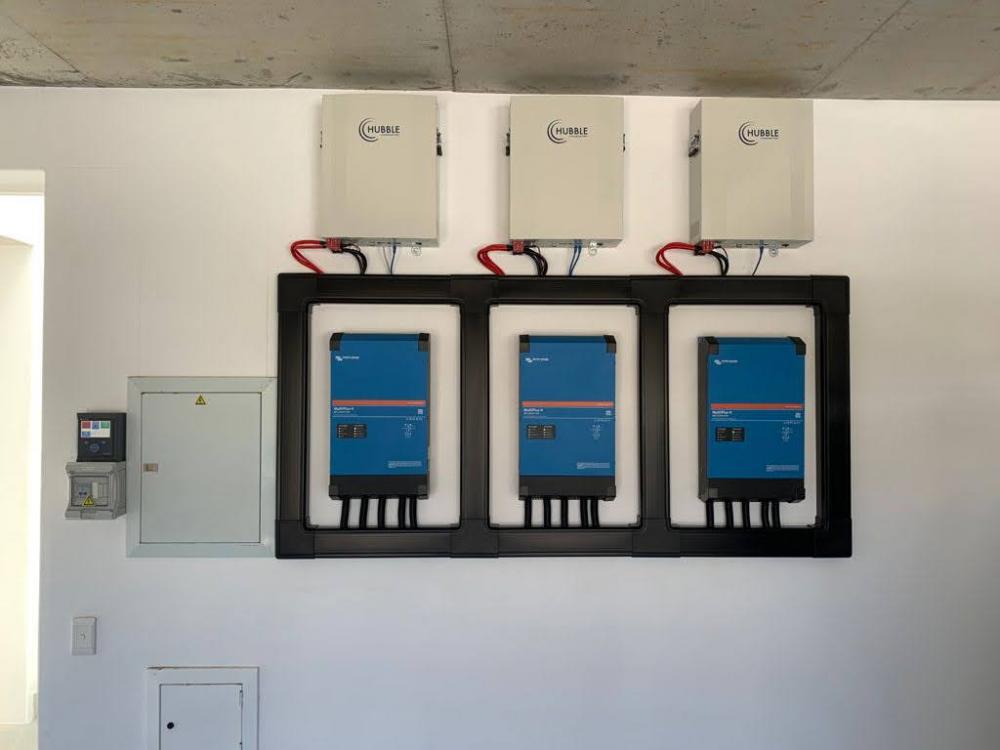
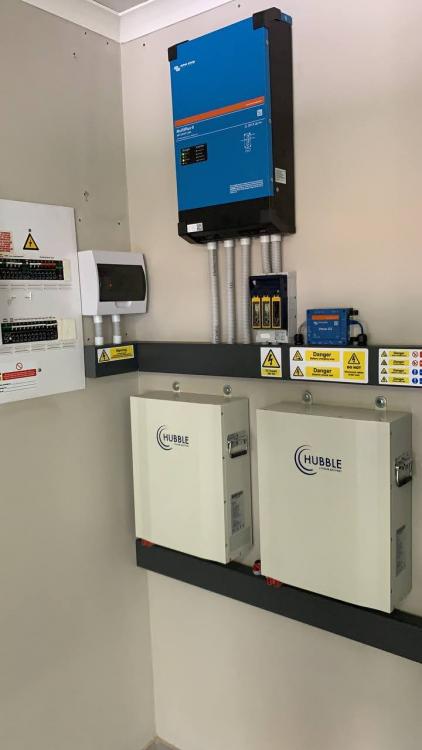
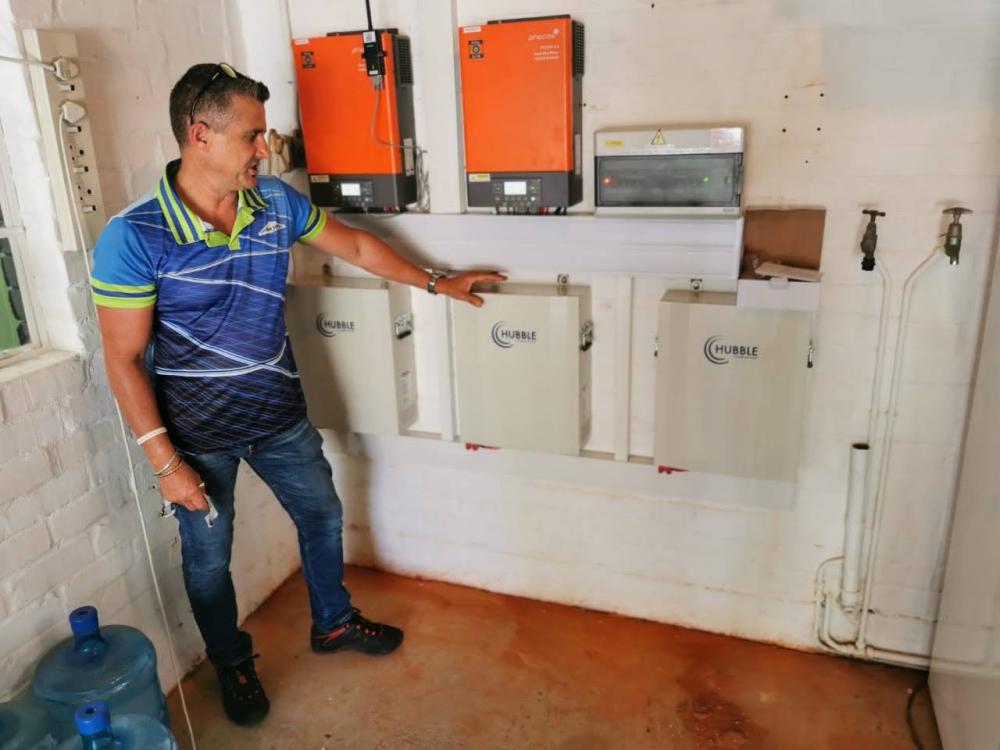
-
Hi Jason, Axpert MKSII, VMIII, KING and MAX integration is complete and is being beta tested currently. We expect to release the OTA firmware update to the stable branch in 2 weeks. Note that only the Hubble CANbus batteries is supported for Axpert integration at this point in time.
-
Quick heads up to the community. We have completed full Phocos Axpert integration with the RIOT & Hubble Lithium batteries.

-
Hello Community, The RIOT Cloudlink is causing a stir in the market currently and we were hoping to announce in the next month more about it, however we have been inundated with questions and we have been asked to release a sneak preview for discussion. WHAT IS RIOT RIOT Systems with Hubble Lithium have developed a A.I. comms device that enables the Hubble range of Lithium batteries to have full CAN Bus and Cloud monitoring capability. The RIOT device is an optional addon to the Hubble X and AM range of products and will allow your Hubble to integrate with almost any CAN bus Inverter including SMA, Victron, Growatt, GoodWE, Sunsynk, Deye inverters on the market. This is made possible by the RIOT CAN bus protocol, which encapsulates 5 CAN bus protocols. Current Development The RIOT is in Beta testing to add Axpert and Phocos inverters for full communication and cloud monitoring for the Huble range of Lithium batteries. What this means is that there will be 2 way communication and full integration released in the next few weeks with a firmware update OTA for your RIOT device that will enable full Axpert integration with the AM Range, and X-200 batteries. (The X-100 is not supported for 2-way Axpert integration. Only monitoring). Whats next? We will release the Phocos Any-Grid firmware update OTA in the next 7 days for full 2-way integration between the AM-2 and the Phocos inverters. Our partnership with Phocos to integrate the Hubble range of batteries have been a priority since 2020. 14 days after that we should be ready to release Axpert MKSII, VMIII, KING & MAX Protocol firmware updates to enable full 2-way communication. Where can I get a RIOT? The Powerforum store will be a distributor of the product. We are looking forward to their review of the product. More information will be made available in due course. You can read more here or see a demo of the Cloudlink Dashboard in Action on the following link: https://www.hubblelithium.co.za/riot.html
-
Hi Andrew, You can email [email protected] and they can assist in the sale of the software or compelete unit and they will assist with the setup for you.
-
Hi Andrew, I presume it's a MKS model. There is no software update required on these as they do not have a modbus port to integrate like the King, Max and VM3 models. You can set the settings manually on USER and then the battery will work. Program 29 cutoff should be set to 46V. If you require full integration then you can install a ICC raspbery pi with the Hubble ICC software on it. You then get full monitoring, integration and communication. Checkout www.iccsoftware.co.za if you require full communication.
-
Hi Flipster, Yes only the Axpert only needs the update. The battery is ready with the software alread on it.
-
Hi Ironeye, The patch cable is for interlinking more batteries. You need to make up a cable for the Axpert. Cable should be pin 1 to pin 3 and pin 2 to pin 5. Pin 1 and 2 side goes into the Hubble. Make sure you give the Hubble an address so the inverter can recognise the pack. If you only have 1 battery then set pin 1 up rest down to make it the master. All the best
-
Hi Fault 69 under 02.49 has been changed to notification 69 and now won't flash red fault. It is just to let the user know the lithium pack is on 100 percent. The Lib protocol is very stable and the Hubble has certified integration with the Lib protocol. It will support up to 16 Hubble batteries with addresses set.
-
Hi Henry, How old is the inverter? MCU Version 02.00 is quite old. Version 02.49 is available.
-
Hi Coulomb, The MCU for the KING and the VMIII is the same firmware. You can use the same on either. The Main CPU firmware is specific to the King or VM. The oldest MCU upgrade we have done is from MCU 02.40 to 02.49. I do have the firmwares. Please check your PM.
-
Hi SchalkB, The Hubble has full integration with Axpert VMIII and King 5KVA models through the new Voltronic Protocol. You will require SBU firmware 02.49 to enable the "lib" Lithium battery function under setting 5. You will also require Main CPU version 71.92. This fixes the problem where the rectifier wont drop out when the battery reaches 100% with notice 69. SImply plug in the Hubble through RS485-A to the BMS port and it will take up to 120 seconds to sync. Once it has synced the battery icon will flash. If you have an existing battery then you will need to bring it in to one of our service centres so that we can flash the new protocol on the Hubble.


