biletskiy
Members
-
Joined
-
Last visited
-
-
When flashing the correct version of the software with the standard update program, it is difficult to completely kill the inverter. Even if the inverter is not fully flashed and stops turning on. Even if the inverter does not turn on, the boot loader remains intact. You need to press the power button in time during the start of the update program. It is not possible to read the firmware using JITAG on this model. The firmware is protected by the manufacturer with a 128-bit password. What version of the software was installed in the inverter and what version of the software was flashed?
-
Шановний пане Артуре з України, ніхто вам цей інвертор не прошиє на 11кВт.
-
5000VA / 24V is very strange, usually this power is at 48V. Why do you need new firmware? If the inverter turns on, look and write the firmware version number that is currently installed in the inverter
-
Hello! Check what serial numbers these inverters have, using the WatchPower program. Are the serial numbers normal or a set of numbers 3 and 5 535353535353535?
-
-
можешь выслать мне прошивку, спасибо большое [email protected] Ой, не отправляй. у меня есть эта прошивка MAXII_8K_81.07.rar
-
can you send me the firmware thanks very much [email protected]
-
-
Thanks Coulomb, but the archive cannot be opened. I need a password for the archive SV II 5k SN 96132112101353 2934-07S2 FW Upgrade_2809_DSP INFINI V II 5KW TWIN 52.31.7z
-
Check if the display board receives 12 Volts from the power supply on the main board
-
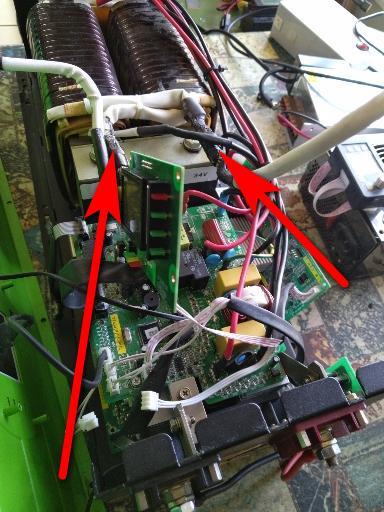
1. The manufacturer does not provide firmware 2. You do not need firmware, the processors in these inverters very rarely fail. Very rarely, and after a thunderstorm, they shorten the 5V power supply. It is very easy to check on the 5V power line. 3. The inverter turns on, but does not output voltage and reports an error, right? 4. Probable cause, the power electrical wires at the junction burned out. Look at the photo. It is necessary to crimp with tinned sleeves. The wires are copper, the winding of the transformer is aluminum. Chinese inverter, cheap.
-
1.Turn on inverter with WiFi dongle 2. Take any laptop with WiFi, scan the network, connect to the WiFi network with the name of your dongle 3. See network properties, in network settings, DNS server address 4. Enter this DNS server address in the browser window and you will be taken to the settings console of your WiFi dongle. You put everything you need there.
-
-
I do not know, I have no information about this firmware. At your own risk.
-
-
VMIII TWIN_Ver_60.04 VMIII TWIN_Ver60.04.7z
-
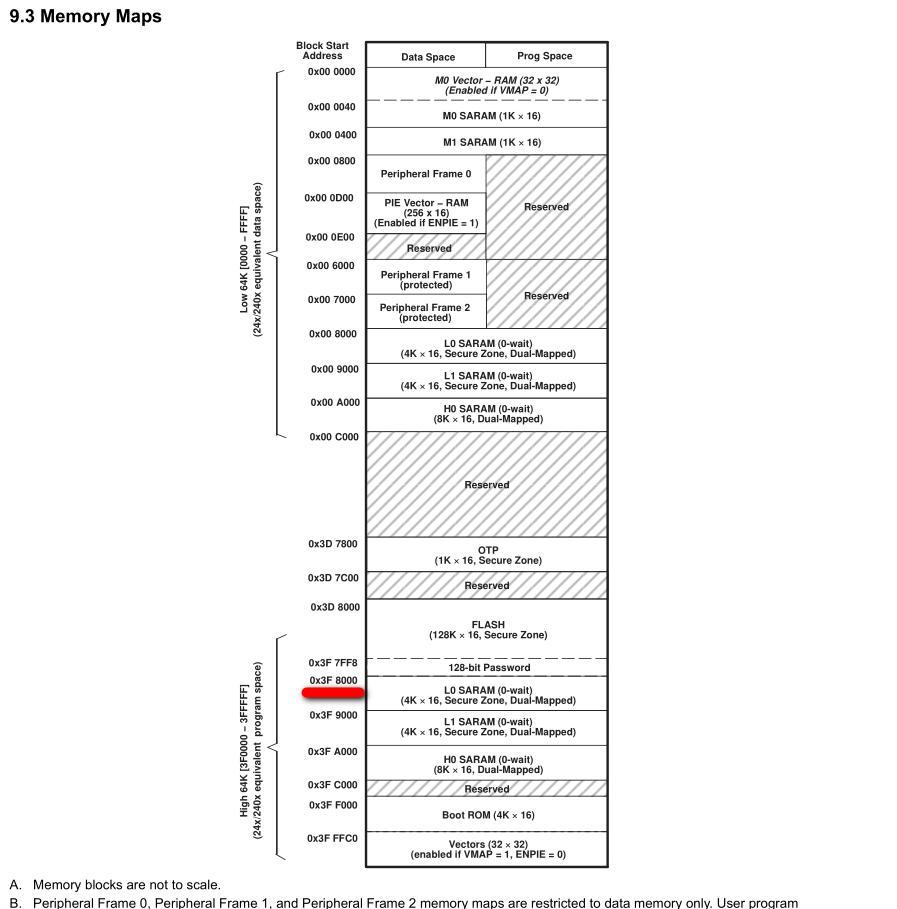
Thanks for the useful information! Question. Is the bootloader address 0x3F8000 correct? TMS320F2809 processor. Isn't the bootloader in flash memory? The Single-access RAM (SARAM) area starts from address 0x3F8000

-
Trouble shooting for error 51 How-to-check-error-code-51.pdf
-
Can't find Arena Flasher tool Please send a link to download Arena Flasher tool Thank you!