HiTech
Members
-
Joined
-
Last visited
Everything posted by HiTech
-
Confirm also seeing the PV statistics not recording correctly. Battery was dropping to 0% SOC intermittently. Other stats now seem to be OK, just PV missing on both real-time and historical. Since 8:40 this morning (26/07/2022) PV Graph missing post 8:30 Battery SOC = 0% intermittently Battery discharge = 445kW 😏🙄


-
You have a valid point, however majority of todays equipment provides for OTA updates. It's all to do with the process of writing the file and relevant checksums being completed prior to commiting the reset/reboot. But again if the hardware or interfaces do not permit for such controls, then unattended upgrades could go horribly wrong. Refer to the post on 16 February in this discussion, where Steve (Powerforum Store) also mentioned the possibility, post discussions with Hubble. Hence why I was looking for confirmation from Hubble themselves. There is also the query between the abilities of the older RIOT unit versus the newer Cloudlink, where we need to be sure which unit is in operation and whether the functionality in this regard (OTA) differs.
-
Good point @PowerUser I'd like to see Hubble ( @HubbleLithium ) confirm this, as you mentioned this was the only reason I invested in the Cloudlink (RIOT). They promoted this as the primary reason to ensure remote assessment of the batteries and remote upgrades, ensuring one did not have to lug these units to Hubble every time there was an issue. Especially relevant for those in remote locations. The monitoring facility on the Cloudlink does not meet the standards on many other solutions and hence this would render these devices purposeless.
-
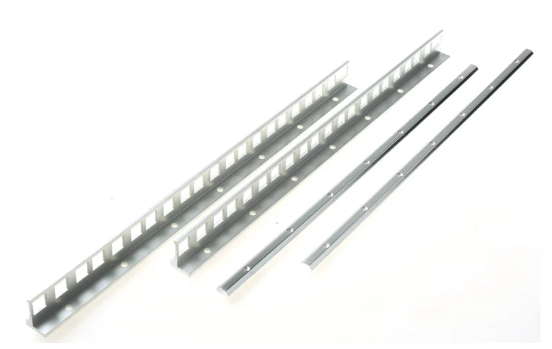
Number of options available - If the unit being mounted does not have mounting screw facilities - as per AM2, best to use either the single rack per battery, as listed by system32 or if the batteries are the same size (width) as your rack allowing no horizontal movement, use the mounting angle sleeves. (Basically right-angle sleeves mounted on vertical rail posts allowing battery to be slipped in. NB: Batteries are heavy, thus the choice of rail must be able to accomodate the weight (42kg) Listed as; # Mounting Angle for use with 19" (Made by Rittal - RS Components) # Navepoint 1U rackmount 4-post shelf rail (Amazon)


-
Great to hear of the inspiration Derek, looking really good so far. Mine was also mainly solo and thus takes time, but the detail and staged approach, pays off in the end. Enjoy!
-
Thanks @TimCam, left enough space for the parallel unit, however so far looking as if the single unit is handling the house. 😅 Load shedding has been a breeze, incl. the latest Stage6. 😁 Geysers (and trees) are the biggest pain and struggling with those geysers (already on Geyserwise) feeding off the second DB board upstairs, as currently still unable to provide a second three phase feed to that DB and hence cannot split essential / non-essential on that board. (3xDB boards in house). Main board has split, where other geyser, stove and oven are left as non essential. Currently building solution (Sonoff) to switch off geysers upstairs during both power failure/load shedding, which will be triggered using relay on the ATS output. My relay has two N/O connections, use one for PE/N bond and other as trigger for Geyser shutdown. Originally was looking at some threads which used Eskom' input to control geysers and other during load shedding, however one also runs the risk of normal grid failure and would have to cater for those instances too.
-
Final install complete and was just in time for the latest bout of load-shedding. With this implementation, almost impossible to identify whether load-shedding's active. Minor adjustments in play as one finds the sweat spots, based on PV performance and ensuring optimal PV utilisation. Seen a number of posts which also agree to prioritise load and let battery charge over the day, thus ensures optimal usage of PV and not letting generation power go to waste. Obviously those with smaller battery stores will need to alter this during load shedding, but this lot only trickles down about 6-8% during a 2hr load-shedding period. Still having some minor issues with regards to ATS activation (posted question in this regard), otherwise this combination of equipment definitely seems to be an optimal matchup and definitely capable of delivering the anticipated load. Will also be working on some solutions to control geysers further during repetitive load-shedding (stage 4+). PS. Some chainsaw action still required on the western trees. 😅


-
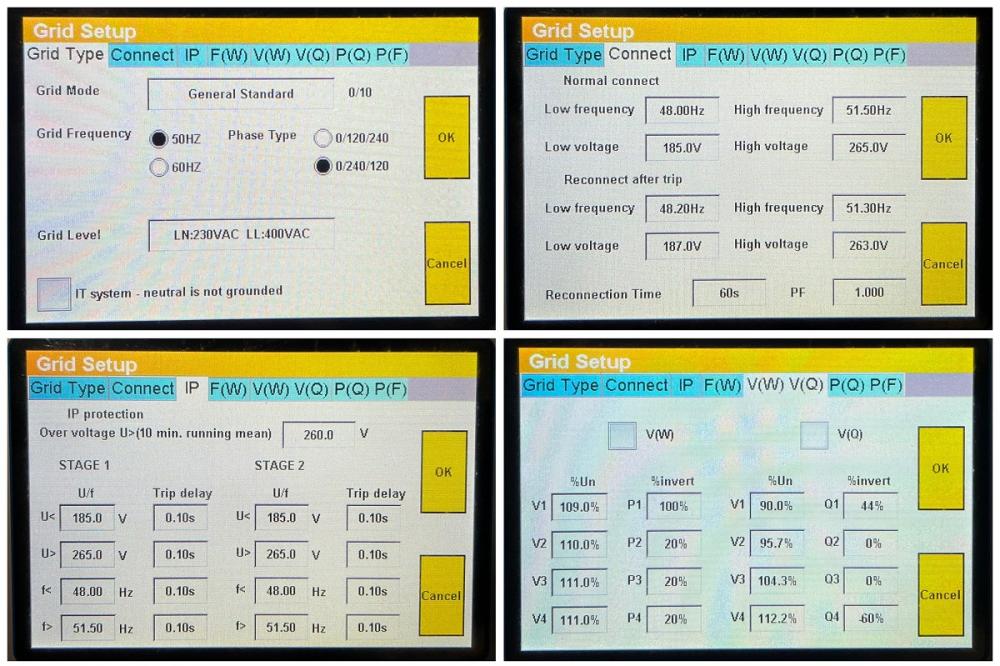
Good point on the relay click @P1000, rather being the grid disconnection vs the island signal. (Island is ticked as below) I see on the new MCU version, under grid setting, there is an additional setting: ‘IT System - neutral is not grounded’. Not sure if this now plays a role in activating ATS? Still concerned if the Master should be selected for single unit, as my status symbol/ring (bottom left) is red, yet no faults or events, so must be operational aspect?

-
Quick query on SunSynk 12kW. With Grid supply failing, there is a relay clicking within the inverter, yet no 220V output on pins 5/6 (CN2 Grid_Ry), to activate the E/N bond. Signal Island Mode is selected under Battery configuration. Single inverter in Hybrid configuration. Only item which is strange to me, is the Inverter is selected as Slave (default) under Advanced Equip Mode: Should this not be Master in order to provide island mode, or is this setting only relevant when parallel mode is active? I.E. Should a standalone unit not still be Master? Also notice Red ring on bottom left status symbol (See below), yet no alerts, faults, etc. Could that also Master/Slave related? Thanks Update: Changed to Master under 'Advanced Equip Mode': Still no 220V being issued on ATS (5/6). 12V is present on pins 7&8.

-
It is concerning to see SunSynk limiting the response to certified installers, as mentioned, they do not always see installations through to the end and thus missing the finer details required in many aspects. They will definitely learn a great deal from listening to some high end self installers, who assess the units on an ongoing basis. As for the noise on the SunSynk fan noise - expect this depends on the model, as I see many models and even versions thereof have changed the layout (fans and heatsinks). I am running the latest 12kW 3P unit and runs majority of the time with no Fan, however the minute the load suddenly increases (>4.5kW), the low speed fans kick in, which are not to loud. However once charging from PV at anywhere above 80A, the second level (High speed AC Temp >51deg) fans kickin and these would be quite load in an enclosed area/room (Battery Bank of 4 x Hubble AM2). See it has specifications as Cooling: Smart cooling Noise: <30dB on local provider data sheets.
-
Would require a little more information on your configuration to comment - Panels: Are all 12 panels in a single array, running single/dual MPPT (should correspond to first point)? As soon as you introduce panels with different azimuth or elevation in the same array, you are likely to affect the entire array (Same as shading). Battery: Battery feeding into the load is likely to be based on configuration of the inverter and hence need to look at listing your timings and relevant capacities (SOC). I.E. Compare configuration against the time you are experiencing the battery feed. Is it always in the same window of time or random? There is a similar thread in this regard, which you may find interesting -
-
SunSynk 12K Updated Original MCU versions: SW Ver.:M 2004-1084 / S 18-07 / C 1001-E014 New MCU versions: SW Ver.:M 2004-1108 / S 18-07 / C 1001-E024 Only visible difference thus far is on Grid Settings.
-
Thanks @HyperCut for the info - at least provides some means of comparison of systems and real expectations. I am currently generating approx 16kWh on 12panels (2x6 JA460), with the remaining 6 panels going up this weekend (Hoping for 24k with 18 units). Worst time of year to assess, entering mid winter, but at least we can state this is the lowest we will ever get. First time I have seen anyone mention preheating water for the gas - has this proven to use less gas? Running the heat-pump for the pool is a must - elaborates on the reason for having solar - reap the rewards and get to utilse things you previously avoided due to cost. Also currently running at between 50 - 60kWh per day, so long way to go to make a dent in the kitty. With only 12 panels still have charge rate at 100A, will increase after this weekend. Was thinking of 200A with 4 x AM2 and have 50mm cable throughout.
-
Anyone aware of the latest version for SunSynk 12kW 3Phase unit? Currently running on SW Ver.: M 2004-1084 / S 18-07 / C 1001-E014
-
Not saying the MPPT is unnecessary, as depends on the Voc and Imp values of panels and Inverters MPPT Spec. However if all units remain within the specification, then through introducing a parallel configuration you reduce the direct impact between the two arrays and could use single MPPT. I.E. If Blue and Red arrays are in series they will have direct influence on one another and should one be shaded or not have sufficient sunshine, it will degrade the other array. Putting these arrays in parallel will reduce the direct impact and allow for each to operate more independently. Options of achieving this is either through multiple MPPT's or if arrays are balanced, using a splitter box (Some even use splitter MC4 connectors) to combine the two arrays in parallel and feed to your MPPT. Again must be in spec, as Series configuration will increase your Voltage (Voc) and the parallel configuration you Amperage (Imp). Remember it's the amperage which provides the power (Voltage is a constant) and as mentioned a few times above, the Inverter should only draw Amps from the panels based on the load being supplied, hence the erratic readings from PV panels and not always being as specified. No load = no Amps from PV's and poor light could result in high voltage but very low amps. Obtain your Inverter MPPT specs - Arrange the panels in different arrays and calculate the max Voc and Imp for each configuration and confirm if any of these are possible on your single MPPT.
-
As also pointed out above by Greenfields - its not good practice to have the same array with split panels / panels facing in different directions (azimuth). Always ensure panels/array are aligned per MPPT to avoid unexpected degradation of output due to different panels affecting one another. Other good practice is to try ensure your MPPT's are balanced - providing equal capacity and thus providing consistent power throughout the day. Depending on your Inverters MPPT - think you have an 80A unit, you could look at using a splitter box and ensuring you bring back your arrays in parallel to your MPPT - Again one would need to calculate best options and ensure you remain within spec of your inverter. When arrays are in parallel they have less influence on one another from shading affect.
-
@YellowTapemeasure Definitely cheaper to purchase direct - I ordered the evening and they delivered the next morning. @HyperCut Neat installation, great to hear you are getting through the night with current batteries - As you said we should have done this years ago, however this kit would not have been available back then. 🙂 What is you average production from the PV's per day and what charge rate are you using on batteries?
-
Hi Leon, Try Geewiz, they still have a reasonable range of Efergy units. https://www.geewiz.co.za Transmitter: https://www.geewiz.co.za/smart-home-accessories/140781-efergy-electricity-submetering-transmitter-monitor.html Other options are RS Components (https://za.rs-online.com) or Sustainable.co.za Hope this helps
-
There are multiple reasons for ensuring you have trickle feed, primarily used to reduce the chance of tripping pre-paid meters, should current be fed onto the grid, thus through ensuring the Inverter draws current consistently, you prevent the feedback onto the grid. Secondly the constand feed can also ensure accidental feedback is minimised when you have large consumption devices turning on and off, in which time the inverter may not always respond quick enough and you could result in feedback, thus the greater value in trickle feed may assist in this regard. Powershaving is a subject all on it's own, with it primarily being used to limit the amount of power being sourced, be it Grid (in this case) or AUX/GEN under those settings. This could be used to balance requirements where limitations are present. E.G. Only have a 5kW Generator, then to ensure you remain within spec, one can apply a Shaving value below 5kW to GEN input. Same on Grid, it you never wish to draw more than XXkW from grid and supliment remainder from Battery/other, with would apply this to the grid settings.
-
On the latest releases of SunSynk 12kW 3-Phase units, they have introduced as new parameter “Grid Phase”. I see this has also been updated/added to the latest manual V12, however no explanation of the setting available. Refer to pic extract below. Is this simply a new method for altering the 3phase Phase rotation – either 0/120/240 or 0/240/120 or may this have any reference to the voltage types used on 3-phase. i.e. US = 120V SA = 240V Default is 0/240/120 - should we just maintain this if there are no 3phase motors involved?

-
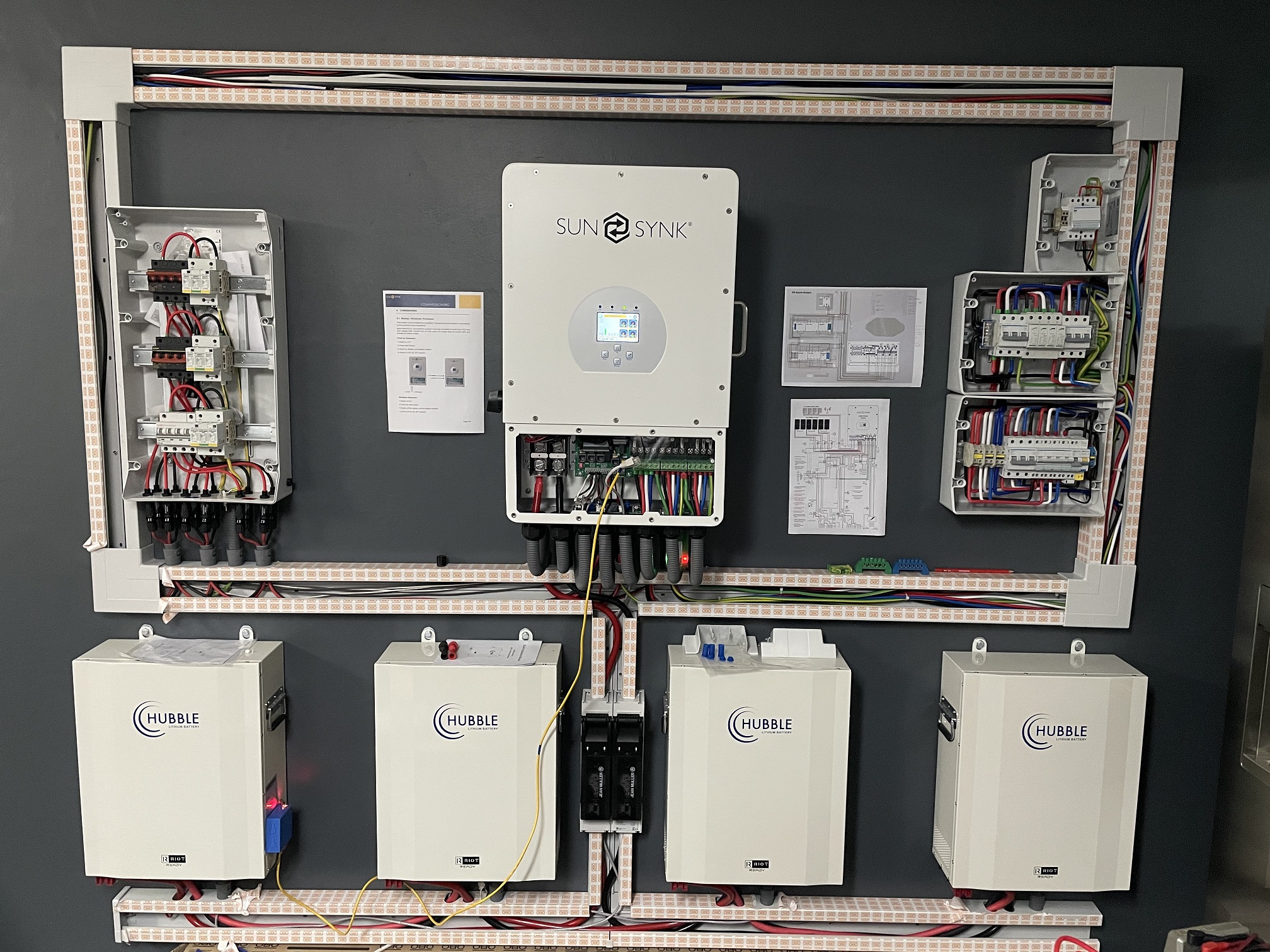
Entered Commissioning and Testing Phase - #Respect for those who work with 16mm cable on a daily basis.

-
@system32 Thanks again for the feedback and updates on new version of Hubble firmware. Subsequent to the update, has your SunSynk battery settings updated under the Lithium BMS selection? IE. What are your readings now displayed under inverters battery settings, capacity, floating, equalization, shutdown, restart, etc. just interesting to know if capacity changed to 105Ah, were all these other settings adjusted at all? Thanks.
-
Without repeating the process - first take a look at the posts made in this thread on February 16, by both Maxxis and PowerForum Store. The workaround solution has been described there. There are additional points made later in the discussion with regards to exactly which values to utilise in the manual setup, i.e. whether to use what is listed on the batteries themselves, or the Hubble website (https://www.hubblelithium.co.za/sunsynk-hubble-setup.html). This discussion has been very detailed in this regard and currently majority have settled for using AGM settings, while few have indicated firmware updates have solved the problem. Do you have a Cloudlink installed? - as this will permit remote assessment and support of the batteries by Hubble.
-
Yet to power up my four Hubble AM2's received earlier this year and hoping if there is a common firmware issue, that this can be amended remotely using the Cloudlink (RIOT). As stated earlier in this post - Hubble will be able to perform remote assessment of batteries should you have a Cloudlink installed. Avoids having to haul these batteries across town. Glad to hear the problem could be resolved through firmware update and not hardware related.
-
Hi, Known as OBO and available from O-Line in either single (100x53) or double runs (165*53). Multiple accessories, including internal divider to separate cabling. Has a little price tag, but looking at the quality and ease of installation, worth every penny. I ordered online and they delivered the next morning. Products - Building installations - Device Installation Ducts and Trunking https://www.o-line.co.za/products/building-installations/device-installation-ducts-and-trunking/ Select product and then scroll down for associated accesories.