HiTech
Members
-
Joined
-
Last visited
Everything posted by HiTech
-
Hi, Yes you add to the wishlist and then send the wishlist through to the appropriate branch, they will send you the invoice and payment details. I've just completed another installation and they literally delivered the following day after ordering, once again.
-
Hi Saliegh, I did consider, however found I was going to have to cable the batteries in any case and this led to me looking for the ultimate layout to ensure cable lengths could be maintained. With this design, I have Positive running from Left (Batt 1) and Negative from Right (Batt 4) and found busbar would have just increased the install requirements with no benefit. I believe if you cannot maintain the cable lengths (evenly spaced equipment) or the 50mm cable is too costly, then busbar would make sense.
-
Searched all over for Grey Flex Conduit and especially the grey connectors. Eventually resorted to looking overseas. Once I had identified the options, I found RS Components could bring this in for me and ordered through them. As for the Contactor, Used the ESC240, however as mentioned this was not required on 3-phase and ultimately used this to control LED status lights and trigger Sonof MINI for load shedding controls - geysers, etc. (PS. Apologies on late response, was traveling abroad).

-
Totally agree - It is a very simple process and hence my frustration of why this is being held up in their support logging process. I have all the required equipment (cables, Cloudlink, etc.) and simply require the software and confirmation from Hubble based on battery details. I am not the only one who has/is experiencing this and have no issues with the product, other than the difficulty experienced with after sales support (Reputational damage). Had the same issue with Cloudlink support some time back. Have approached them through an alternative channel and hoping this receives some attention and leads to a resolution in this regard.
-
Remember the Inverter does not have to reside next to the DB board if you have the necessary ducting in place. This is normally only done to avoid running cables through existing spaces. Therefore your no1 priority is to ensure you have identified the Inverter location and provision the necessary ducting to; Main DB board, PV Roofing feeds to all arrays Earthing facilities (may be external spike) Possible Generator AUX feed (future) etc. I have three DB boards in the house, yet installed Inverter and its own DB's in garage with underground feeds to main house DB. Then some other criteria to manage are; Enough space for inverter and batteries (wall or cabinet) with sufficient ventilation (If on back wall of garage) two cars arrive home - hot engines - increases env temperature The noise of cooling fans (already mentioned by Milan188). Appearance - as you mention avoid using walls such as entrance for cable feeds Lastly ensure you have space for expansion - additional batteries, etc. You never have enough (overcast days) and if Eskom does not turn things around, you'll need the extra. Good luck and enjoy!
-
First issue is to actually get Hubble to assist, even with the Cloudlink (RIOT) in place. I found there support to be really poor to non existent, especially when using the online portal (hubble.raiseaticket.com). I am still sitting with four AM2's with different firmware versions (purchased at the same time) - been requesting assistance for three months, in obtaining a new version so I may update all four batteries to same version, however still no assistance after having contacted them multiple times and through different channels. I have another two installations coming up and following suite with @Leshen to opt for alternative battery brand at this stage. SunSynk inverter with SunSynk batteries seems to be the most appropriate (Extended warranties), followed by BSL or FreedomWon.
-
@Milan188 Yes, can confirm having received/seen W31 a few times and can definitely confirm it is related to the BMS comms. I have Solar Assistant, Cloudlink and Hubble all connected and can relate to times when testing and configuring all these cables, the minute you see Li BMS loose display, within a minute thereof a W31 appears. Automatically corrects after BMS comms restored. Running M 2004-1108 / S 18-07 / C 1001-E024
-
An important diagnostic is always to take a screen shot of the information screen at the time of the problem, which provides all the details and assists in fault diagnostics. Simply click on the AC load meter to access this screen. Most definitely pointing towards either CT coil issue and/or Firmware problem, as these numbers do not add up, with the primary values missing around the Grid feed. Could be a faulty CT coil, dropped during install/transit process, or as in most cases faulty cabling when the cables have been extended. Use twisted pair as stated by @YellowTapemeasure or I have also used 2.5mm silicon based cabling to extend over 20m (Silcone wire strnd 2.5). Similar to what comes with CT coil. Once you have replaced the cabling and no improvement, the firmware is the next easiest option, followed by having to replace or test the actual CT coil. Question - Does the Grid reading ever go above the 20W? I.E. Do you see any fluctuation in this reading?
-
Those ‘charge capacity’ values are a concern. If looking at your LiBMS values on your inverter (when set to Lithium Batt), what charge current limit is displayed there? Charge current should be higher with the lower SOC and reduce as you reach 100% SOC. Your Batt #1 has low SOC with low Charge capacity.
-
Preferable to connect your PI directly to battery terminals, as in the event of power output tripping through overload or earth leakage, you would loose the function of Solar Assistant plugged into normal power socket and not be able to diagnose any issues remotely. The PI power supply connectors are attached directly to the same terminals on the batteries as your Inverter DC feed is connected. I prefer to connect them to one of the batteries as to avoid any poor connectivity on the inverter itself, where the most power is evident and connections must be 100%. The Solar Assistant can co-exist with current dongle. You are attaching PI to RS485 (RJ45) connector in inverter (as below) and the dongle using RS232. As spec'd on SA site: https://solar-assistant.io/help/deye/configuration Great to have the real time visibility from Solar Assistant, backed up with your Inverter portal providing other specifics. Solar assistant uses any browser and you can access it directly on your own network IP address or through the SA portal once registered.

-
Can you confirm you are seeing the same issue being displayed on the Inverters on-screen display. IE, when Battery is not charging (with sufficient PV) as in this example, does the Inverter indicate the same reading. I do trust the Solar Assistant, as it is theoretically reading directly from inverter, but worth checking as, you say this is inconsistent. I've experienced a number of issues with PV providing load, especially when load is fluctuating, but never had an issue while charging batteries, only when batteries are full does the PV become erratic. Seems you may be getting a false 100% charged from batteries and this is putting the inverter into the incorrect mode. You mention incompatible BMS, thus trust you using AGM and based on battery model these settings (Battery) will need to be assessed. Seeing you have Solar Assistant, you may have the RS232 cable and can assess the batteries through PBMS Tool and check they are equalised. (Lots of threads around Pbms on this forum).
-
Hi, Welcome aboard and glad you are already seeing the benefits of solar. Regarding the settings - Tick at the top (Time of Use) enables this page/settings The ticks are whether or not to allow/use the GRID or GENERATOR to charge the batteries Tick = Enable Solar will always charge batteries based on the Battery settings - Charge Rate: (NB: You have a PV charge rate and Grid Charge rate) Time - The period the specific line is applicable Power - The maximum power to be provided by the batteries in that period. E.G. If it was set to 2000W and you were using 5000W on load, then battery would provide 2000 and Grid 3000. This allows you to stretch your battery time through the night and allowing Grid to top up where necessary. You want to remove Grid, so probably not relevant and remain on max Battery / Inverter values. Batt - The minimum value the batteries may discharge to in that period. Once batteries reach that percentage - Inverter reverts to Grid If set to 100%, batteries are theoretically unavailable in that period, unless the Grid fails where batteries will take over. Brief explanation but should help - idea is to manage your batteries capacity throughout the day Eskom Trickle feed (Grid Trickle Feed) is usually used for prepaid meters, which require a constant feed from the grid, to avoid tripping. you can set this to 0 if not using prepaid and wish to have no Eskom feed. Will still fluctuate as PV fluctuates, but you will remove the constant use. Looking at some of your stats - seemed you may be exporting to the GRID - Should be Zero Export enabled as we are not permitted to export power. Enjoy!!
-
Would suggest posting this as a new query under the Questions and Answers, may get a few more views that way. This thread is very specific to the Hubble AM2 issues and may or may not relate to your issue. To start could you provide a little background on what you have installed, Inverter model, batteries and model, (brief desc on cabling used may also help) PV quantity and model, etc. This will assist in trying to determine if your settings correspond to your equipment/configuration. Can you post your LiBMS screen from under settings. Batt qty/type/model will determine whether other settings are correct. Looking at your timers, you may not be giving your batteries time to charge, based on the percentages, that's if you do not have sufficient PV to run the environment through the day and provide sufficient charge. Does you battery discharge through the daylight hours?
-
Good point - was definitely specific to inverters. Although numerous confirmation of units being sent in and confirming faulty cells, with repairs and replacements being performed. Expect that's true for many products with high sale numbers, there will always be a % of DOA's.
-
Today: 02 September 2022 is the first day since 24 August that the Sunsynk Portal with 12kW 3P has no 65kW spikes and is displaying correctly. Seems the issue may have been resolved as of yesterday, where the last spike I saw was around 04:45AM CAT.

-
Was relating to the fact they have had a bad stint on the last batches of AM2's, together with the issue of having to rectify the ratings of the batteries and hoping this was in time to ensure they recovered their market space. Fortunately have not experienced any of these issues on my units thus far, yet issues with poor connections on RS232 connectors and cannot get their Cloudlink to to communicate with the Sunsynk12K (With Hubblelithium assisting).
-
@system32 This has been an extensive discussion topic and wondering if this topic/thread has driven Hubble to ensure their new released series of batteries, mitigates all the issues raised to date?
-
Seen a few adverts making the rounds with regards to the new Hubble AM Series batteries - See specs and pamphlet below. New AM-5 Released, while also seeing the AM-2 Revision 2 and an AM-4 series released. AM-10 still listed as future release. Question being, are these in time and do they have the necessary enhancements to maintain the Hubble brand? Specs as per Hubblelithium.co.za The AM-5 is the first of its series to have LFP prismatic cells, featuring a 5.12kWh system capacity as well as monitoring capabilities via the Hubble Cloudlink. Specification: 51.2V 5.12KWh Rating: 1C Parallel: up to 8 packs with full communications Extras: Battery Link & DC cables included Internal Fire Suppression System: Yes CAN Bus: Yes Hubble Cloudlink Ready: Yes AM-5 Flyer.pdf

-
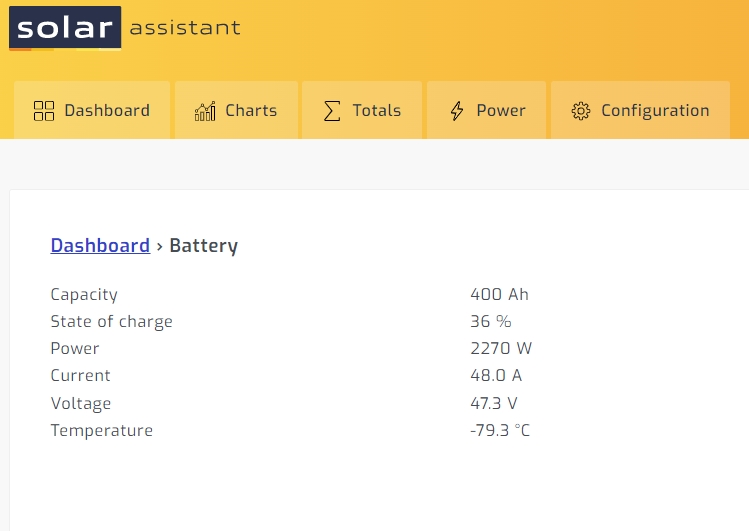
Interesting, I had also previously had a chat to them stating they were reading environmental temp versus actual battery and after seeing your post, I updated however received a different date: and now seeing a completely negative temp value - thus from the 29deg to -79deg. Waiting for the system to prompt me with new update available, see yours is later.

-
As you say - Solar Assistant is the win, based on the number of issues we have experienced in the past two months on Sunsynk portal. The real time stats on SA also allows great diagnostics and assessments when looking at fine tuning. When you say backup - are you simply copying the MicroSD or has the App hidden options?
-
Update: SunSynk Support have confirmed they are aware of the 12kW 3-P graphing problem and attempting to resolve it as soon as possible. No defined ETR.
-
Had a few 12kW 3Phase owners/installers on different forums confirm they are experiencing the same issue. Thanks @Danielhaynes for confirmation above. Thus either Firmware related or Sunsynk portal related problem for 3Phase units. Have logged a support call with SunSynk and awaiting feedback. Definitely no evidence of these increases in power on the unit or surrounds (@Treschen), would expect these should trip the main MCB or at least trigger an alarm/alert based on overvoltage on the unit, thus only associated to the portal and also not regular occurrence. Actually disappeared for the whole of 26th Aug after 09:00, only to restart at around 8:20 the following day and extremely active yesterday - as below. Will let you know once I receive any feedback.

-
As of yesterday I am seeing 65K AC Grid spikes being recorded on the SunSynk Generation and Grid graphs. This records in both directions (to and from Grid) with zero-export. No changes introduced prior to this period and these spikes/recordings are not evident on any other monitors (Solar Assistant, Cloudlink - comparisons below). Sunsynk 12kW 3-Phase. If this was true, expect MCB's would have likely tripped. These are now at random times and correspond to no other activity. Even evident during very quiet morning hours and occur throughout the day, including periods when running on battery (20:00+) or PV. Started from 07:00 CAT yesterday (25/08/2022). Anyone else noticing this on portal or seen this before?


-
Which Batteries/BMS are you using and quantity. These are important points of information, to allow any assessment or correlation to similar issues. But as Suly mentions above, Inverter is the goto source for true reading.
-
Yip - And how you miss it when it's not there! Would be a issue during load-shedding, but can get around it for now, as long as it does not influence long term statistics - As I posted above - the battery discharge. This will result in having to go for Solar Assistant, Thingsboard, or other pretty soon. As both SunSynk and Cloudlink are not proving to be resourceful sources of information.