MeepMoop
Members
-
Joined
-
Last visited
Everything posted by MeepMoop
-
I agree with @PieterO. My Raystech batteries with the same issue were replaced under warranty. (I was lucky enough to have an installer that handled it for me)
-
Last thing I would recommend (if you haven't tried already) is to reset the wifi on the batteries before trying again one more time. You can do so by holding down the little square reset button (near the LAN ports) for a few seconds until the run light flickers a few times. That was the missing step for me when I struggled to add my batteries
-
No worries. I think we were talking past each other yeah. I didn't understand the Battery protection unit
-
You said you bought a battery protection unit. But don't know how to wire it. I sent the manual for it. don't understand your point .😐
-
Check the manual for how to wire it. https://www.victronenergy.com/upload/documents/Datasheet-Battery-Protect-65-A--100-A--220-A-EN-.pdf
-
Should be fine. The BMS will be aware of the load (which is super low in any case).
-
Agree, and while discharging, if any run far below others.
-
I think it's important to get the CFE app and add the battery on there to see what the individual cells look like and what the real SoC is.
-
Update: Looks like one of the batteries was dead-on arrival and the installer somehow didn't notice (haha). Today it gives off that sweet smell of exposed lithium. They are both being replaced under warranty. Would not recommend Raystech batteries.
-
Those values seem okay then. I spoke to my installer, who spoke to Raystech and got a support agent to WhatsApp call me. See my latest reply here for how we got 1 of them to charge:
-
Update: Raystech support assisted with getting the battery that was tripping to charge by removing the parallel DC connections and setting the inverter to AGM Voltage mode, with values for voltage: Float 53.6v, Absorption 53.8v. The other battery refuses to charge, and doesn't toggle the internal breaker when turned on. (I don't like these digital on off switches that toggle the internal breaker electronically. More points of failure) Might need help on the second point.
-
Similar to you, the system ran fine for about 1 month, then during Loadshedding it tripped under load (was about 5kw load, batteries should handle 10kw) with fault code F56. After that trip, batteries were not charging properly. Tripped again in a 4 hour load shedding slot with 1kw load. And then the batteries dropped from 51% to 1% in the same 4hour load shedding. SoC according to Smart BESS was very different for each battery (75 vs 35). I checked this after the first trip and notified my installer Got help from the battery support yesterday to get one of the batteries to charge properly by using AGM V mode (Float 53.6, Absorption 53.8) I still have a problem with the other battery refusing to charge. So for now, running off just the one.
-
Have you checked the values of each battery in the CFE energy app? Before my problems started, the app was showing 2 very different SoCs for each battery. One wasn't actually charging
-
How old are your batteries? I'm starting to suspect there might be bad batches of CFE / Raystech 5100s in the wild
-
No problem @PieterO. I don't have any PV yet, so can't comment on that
-
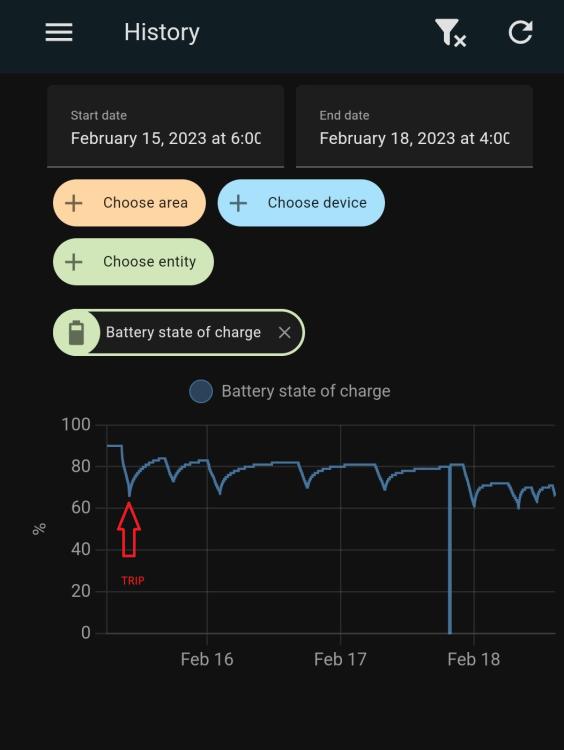
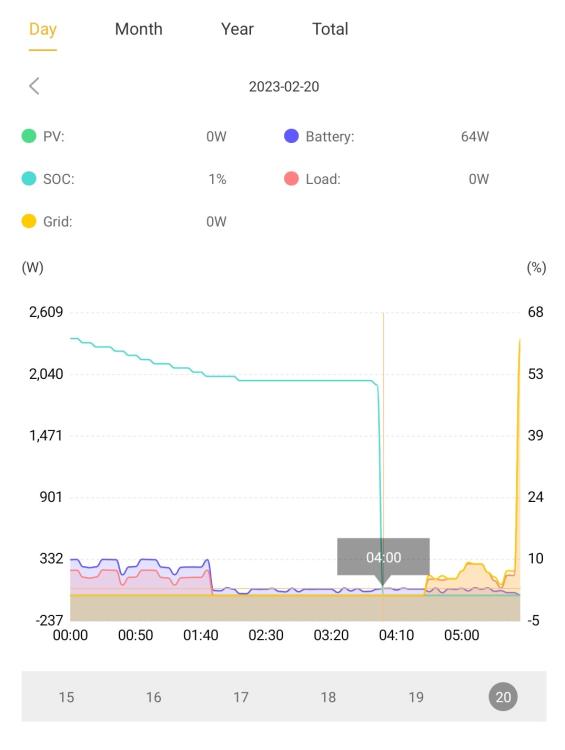
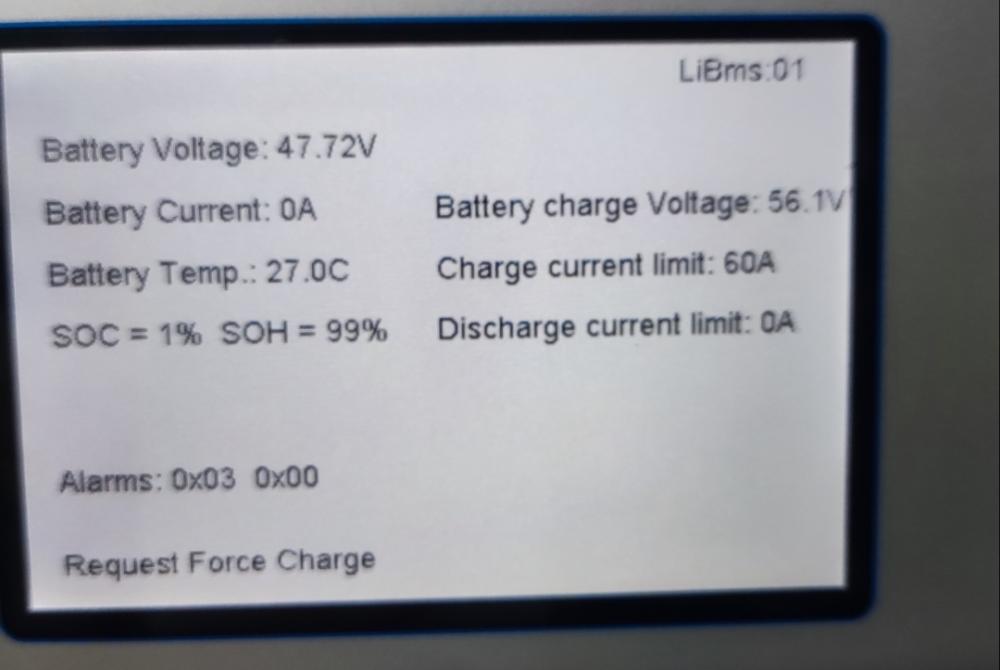
I'm looking for help with a battery issue. Background: Sunsynk 8kw + 2x Raystech 5100S batteries and No panels (yet) installed +- 1 month ago. System ran fine for the first few weeks, carrying decent loads during Load Shedding. The problems started about 1 week ago when the Inverter tripped with the error F56 DC Low Volt when it was under load. Since then, the batteries haven't wanted to fully charge, even though there have been enough opportunities to do so from the grid (Setting is to charge them to 90%, Grid charge amps 60A). SoC gradually decreasing: But wait, there's more! Yesterday, I woke up to the batteries reporting 1% SOC according to the inverter, with the 'Master' battery making a clicking noise repeatedly (Cycling On / Off / On / Off permanently), and both batteries refusing to charge. (Click link for video). SoC dropped from 51% to 1% Readings from Smart BESS appear to be okay, with both batteries cell voltages appearing 'okay' (All cells report between 2.98v and 3.02v), with both SoC values being 0, and voltage of 1 battery at 49v (The tripping one), and the other at 51.3v (The original 'slave') The inverter LiBMS screen shows a fault code 0x03, and 'Request Force Charge' (The battery manual doesn't mention this value in the fault code list). Things I've tried with no success (i.e. The batteries refuse to charge): - Swap the Master and Slave batteries - Switch to AGM V Battery mode to force a charge - Double check the Work mode settings (Use timer checked and not checked) - Run only the non-tripping battery temporarily in Lithium and AGM V modes - Requested Sunsynk Firmware update - went from MCU 6014 to 6022 Current status is that the Installer has spoken to Raystech, and they are working on a Firmware update that *might* fix the issue - but in the mean time I don't have backup power :S Has anyone else experienced something similar? Any ideas?
-
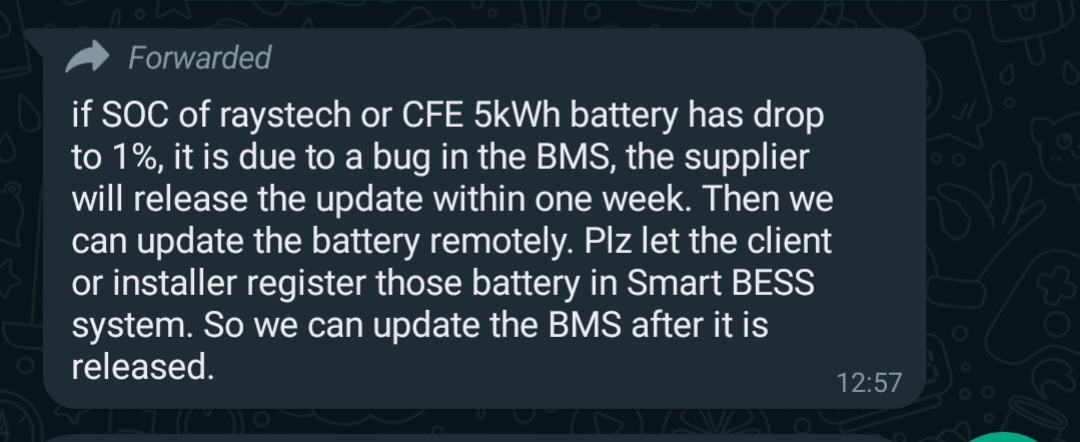
I have Raystech 5100S batteries, which are rebranded CFEs, that have BMS software problems. Apparently CFE is aware of these issues, here's a quote from Raystech support on a specific issue related to SOC dropping to 1% It might help others in the thread, so I'm just adding it here.

-
My installer mostly does Sunsynk inverters with Averge / Ecco / Leoch batteries. Indeed they do work
-
I tried a higher amp setting to allow the "force charge" that the BMS requested. No dice. But I'll keep those things in mind once I get my panels installed. Regarding individual cell values, I can see them using Smart BESS. They look okay to me


-
System mode was attempted without timer, and timer for 100% in all slots. As well as AGM V mode, with 56v in all parameters. One of the batteries still keeps tripping. The last thing I can think of is that the Grid charge amps is too low for the "Request Force Charge" that the BMS is sending to the inverter. I could try setting Grid charge amps to something like 150A? (where the installer left it on 85A)
-
@system32 We did give that a go today with the installer. Didn't work. I tried it again now just for fun. No success. Thanks anyway That's how the LiBMS screen looks now. https://photos.app.goo.gl/Ysfq1H7m8BnT3Jyr5
-
I have the Raystech 5100S which is just a rebrand of the CFE 5100S and I have experienced the exact same problem. I had a few F56 DC Low voltage errors on my Sunsynk, and in the last 4 hour load shedding slot, the batteries went from 70% to 51% and straight down to 1%. Feedback from my installer, which they got from Raystech: if SOC of raystech or CFE 5kWh battery has drop to 1%, it is due to a bug in the BMS, the supplier will release the update within one week. Then we can update the battery remotely. Plz let the client or installer register those battery in Smart BESS system. So we can update the BMS after it is released. They are installed in parallel, and the Smart BESS showed 2 very different SOCs before this happened (70 and 35). My batteries are now in a state where they refuse to charge, and 1 of them is flipping on and off on its own permanently. Smart BESS shows both SOCs as Zero now