


Coulomb
-
Joined
-
Last visited
Posts posted by Coulomb
-
-
2 hours ago, Martin S said:
your suggestion regarding the bulk charge time and set that to 900 minutes, I have dropped the the bulk charge voltage to be the same as the float charge (54v).
If you choose to have the bulk/absorb and float voltages the same, then the premature float bug is largely irrelevant, and there isn't any (much) need to set the "bulk" charge time. I say "much" because it's preferable to stay in bulk/absorb stage as long as possible, in that when in float mode, there is the danger that the inverter-charger will decide to change back to bulk stage, and that goes via zero and very low charging for about a minute. That can be unnecessarily hard on the battery if you happen to have a large load on at the time (which is likely, because large loads tend to trigger the change back to bulk stage).
2 hours ago, Martin S said:the BMS inside the battery will actually stop charging the cell once ideal volts and current is reached.
The way the BMS stops charging is to disconnect the battery from the charge source, i.e. from the inverter, via a massive MOSFET switch inside the battery. They're supposed to be able to switch off charging without switching off discharging, but I'm dubious about that. The inverter can act quite strangely when the battery suddenly disconnects, so it's best to avoid this if at all possible.
-
16 hours ago, Trev501 said:
1. Does anyone have the correct inverter battery settings (in USR mode) for this battery when used with this inverter? I actually have some settings from Pylontech but I think they may be referring to the VMiii rather than VMii inverter.
The inverter model doesn't matter as far as the battery settings are concerned (assuming battery type is USE). There are several sets floating around; these are the ones I recommend:
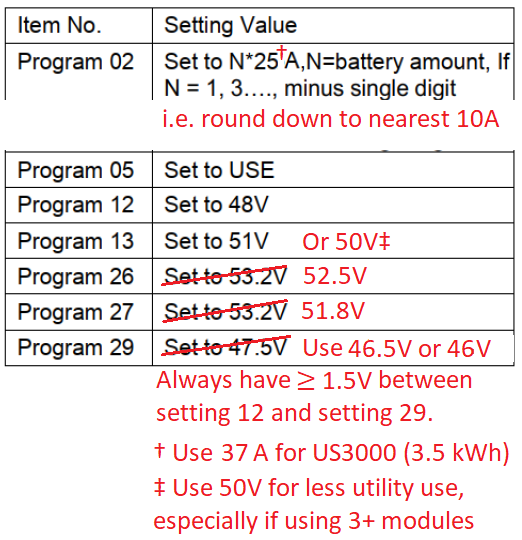 16 hours ago, Trev501 said:
I assume that the VMii is unable to use the Ethernet port to ‘talk’ to the battery unlike the VMiii.
Correct.
16 hours ago, Trev501 said:2. When drawing power from the grid, there appears to be a lower limit on current being taken. In other words, if the inverter is supplying power to the load and the load is removed, the current drawn from the grid doesn’t drop below about 1.5 Amps despite the fact that the load is virtually zero.
There is a largish capacitor across the AC input, and this (or something else) causes significant imaginary power to be drawn by the inverter. This does no harm, and you only get charged for real power (which is a small fraction of that), so just ignore it. Voltage times current gives you apparent power, which in this case is close to the imaginary power. The capacitance will actually slightly correct your house's power factor (which is almost always inductive).
16 hours ago, Trev501 said:3. I have downloaded the very useful Axpert Settings 1.1 file by Chris Hobson. This has helped a lot with deciding which settings to use but I am a little confused by the need to start the inverter on batteries as mentioned in the Addendum. The inverter is designed to run without batteries when necessary so why is this a requirement?
Chris' settings file was written a long time ago, before batteryless operation was possible.
-
14 hours ago, Warlok said:
Could someone please explain as both units are 5.2kw/h but they say the Du is more suitable for daily cycling and the BU is for occasional cycling.
My guess is that the cells in the more expensive model are optimised for power, rather than energy. So they are heavier, and can take higher charge and discharge currents, but cost more to make.
-
13 hours ago, Martin S said:
I need help with my Axpert King 5Kw that came with 71.90 firmware.
My inverter has the 'PYL' battery option but I am not using Pylontech batteries, so I am forced to go with the "USE" option
Actually, you could update the removable display firmware (the one that talks to the BMS), and have the choice of 6 other BMS protocols other than PYL. But sadly, none of those look like Daly (but I don't know battery BMSs very well).
13 hours ago, Martin S said:Everything works great except that the inverter prematurely switches to float charge, so now I have a case where the battery's SoC is at 70% and the inverter tries to charge the remaining 30% with only 4A, bulk normally charges around 20-35A from MPPT.
Yes, that bug comes for free with every inverter-charger out of the Voltronic Power factory. You can work around it with the "bulk charging time" option (actually absorb time), or even the equalisation settings. But these have the chance of spending longer than necessary in absorb (reducing life), or less than necessary (still not fully charging the battery some days). Perhaps best to use one of the workarounds for now, until Weber and I get around to patching the King main firmware.
Or you could temporarily use patched firmware version 71.80d, which is a small step back from the 71.90 that you are using now.
13 hours ago, Martin S said:The batteries, according to the manufacturer supports CAN- communication at 500 kbit/s, I tried the PYL option with a CAN-type-b and CAN-type-A cable but I get a fault 61 (communication error) on the inverter. I think Pylontech uses RS485 for comms?
My understanding is that Pylontech can use either RS-485 or CAN, but only the most advanced removable display firmwares support CAN, and Pylontech is only supported by the removable display firmware via RS-485.
13 hours ago, Martin S said:https://ibb.co/WF6sNCM
https://ibb.co/2vt0Npy
https://ibb.co/1Xn7dT9
https://ibb.co/tQTccM5[url=https://ibb.co/WF6sNCM][img]https://i.ibb.co/sQ2tp7N/20210220-120437.jpg[/img][/url]
[url=https://ibb.co/2vt0Npy][img]https://i.ibb.co/D9CPpjt/20210220-115457.jpg[/img][/url]
[url=https://ibb.co/1Xn7dT9][img]https://i.ibb.co/2M6Wsdj/20210220-115534.jpg[/img][/url]
[url=https://ibb.co/tQTccM5][img]https://i.ibb.co/rFRMMGJ/20210220-115510.jpg[/img][/url]I don't know why the img tags don't work on your images. But if you paste the bare URL (https... .jpg), press enter, and second or two, it displays the image:


-
On 2020/04/10 at 7:58 PM, flltech said:
Axpert MKS II doesn't have sharing at least in battery mode (I never tested it without batteries). It would have been really great for Axpert MKS II to also have this feature but it doesn't seem to exist.
The SUB output source priority is present in the Axpert MKS II's updated model, known as the PIP-5048MGX, and probably also as the Axpert MKS III (Voltronic are slow at times to update their web site with the latest models). This model is basically an Axpert MKS II but with removable display (and therefore the ability to talk to a battery's BMS), plus SUB mode.
-
-
On 2021/02/20 at 6:41 AM, Rafiki said:
can we connect the generator to the hidrid ac input
If it's an Axpert type (sometimes mislabelled as a hybrid inverter-charger), then yes. You might be unlucky with the generator though; Axperts are very picky. See this FAQ.
-
Edited by Coulomb
30 minutes ago, Ben Harper said:OK.. so I have the RJ45 -> RS232 -> USB cables plugged in, and I can clearly talk to the thing, but every command I issue responds with "(NAK".
@Coulomb Have you ever seen this?
Yes, when the CRC is incorrect. But you say that's right below.
QuoteI know I've got the CRC correct, because it was working perfectly over USB.
One other interesting thing.. after rebooting the inverter (ie all plugs out), the very first time I try to talk to it (asking it for QPIGS), it gives me "(PI30" response.
Thereafter, it responds exclusively with "(NAK".Well, (PI30 is the response for the QPI command (Query Protocol Id), and QPI is the first 3 letters of QPIGS. That command is one of the many that requires a correct CRC. So that suggests to me that something is wrong at your end. The CRC must have been calculated on only the first 3 characters of the command (at startup only). Perhaps connect to another PC at 2400 bps and check that the whole command is coming out, and that the checksum is indeed correct as you assume.
Some of the communications boards are a little flaky at 9600 bps (required for flash updating). But to fail at 2400 bps would be extraordinary.
Edit: I should add that comms via USB uses the same serial port on the DSP, so there is a lot of electronics and cable in common between the two ports. So if something has gone wrong with your comms board or control board or cable between these two that is affecting USB, it may well be affecting RS-232 as well. That doesn't explain your "(PI30" response though.
-
1 hour ago, Vani said:
5. battery type is set to Flooded lead acid
That should be USE. Otherwise, settings 26, 27, and 29 will be ignored, and will default to values you don't like.
1 hour ago, Vani said:11. Max utility charging is 30A (Default)
Check the specifications for your battery modules. Usually lead acid should only be run at 0.15C, which is 0.15 x 105 = 16 A, use 20 A (closest allowed value).
1 hour ago, Vani said:12. Voltage point back to utility is 24.5V (Dont want DOD to go below 50%)
With setting 29 at 24 V, the effective value for this will be 25.0 V (1 V higher). You might have to compromise a bit, e.g. 23.7 V cutoff, effective back-to-grid voltage 24.7 V.
1 hour ago, Vani said:I notice that solar charges the battery up to 30.4V and then hovers there for quite a while until battery is required again.
That's pretty high, and I don't know why.
1 hour ago, Vani said:Is 30.4V too high to charge the batteries up to???
Depends on the battery. Trojans might be OK with it; most other brands will boil. Changing setting 05 to USE should fix this problem.
1 hour ago, Vani said:My solar charger can handle a max of 80V and 50A.
I note that the 50 A is on the battery side, so this is 1250 W nominal.
1 hour ago, Vani said:I have two 415W canadian solar panels. Input Voltage ranges from 25V to about 40V as they are wired in parallel. Going to add another panel so that the battery is not utilised as often as it is now. My hope is that the solar will cover a max of 500W demand during the day. I have no way to check what amps are coming from the panel as the inverter only shows input voltage and not amps.
Oh. I thought most models showed PV charging current (but is that total or net into the battery? never clear), and they all showed PV power.
1 hour ago, Vani said:So my questions are:
1. Is 30.4V too high for the batteries when charged by solar
Most likely, yes.
1 hour ago, Vani said:2. How else can i check what amps are delivered from the panels.
Check the menus carefully; otherwise, at least when debugging, a DC clamp meter.
1 hour ago, Vani said:3. Other than the solar charger max of 80V and 50A, Is there any maximum for the number of Watts that can pushed to the inverter?
Yes. 50 A x 25 V = 1250 W; you could "overclock" by about 20%, so 1250 x 1.2 = 1500 W. But that's absolute maximum. 4 415 W panels would be too much. Three of those giant panels is about right for your system.
-
Edited by Coulomb
See this post: https://powerforum.co.za/topic/6619-kodak-vmiii-axpert-48v-inverter-and-pylontech-us3000-settings/?do=findComment&comment=80387
Or change battery type (setting 05) to PyL and use the magic cable.
-
-
Edited by Coulomb
19 hours ago, Tokolosh said:Currently set to UPS I shall try APL will give feedback.
That will presumably be worse.
That machine must be very sensitive. Your best option would appear to be to swap the inverter for an Axpert King (they come with many names). They have zero transfer time, unless the output exceeds the rated power for more than a few seconds, and as long as ECO mode is not used.
Edit: or a suitably sized UPS, just for the oxygen pump. But you'd want one with a good battery.
-
Edited by Coulomb
14 minutes ago, Tokolosh said:When inverter switches from Batt. / PV, back to grid there is a long enough pause/ dip that my Oxygen Machine alarm goes off. Its mill seconds but it happens every time.
IF (and it's a big IF) you have decent mains (utility) where you live, you could try using the UPS option for setting 03 (AC input voltage range). As well as being more picky about the voltage of the AC-in connection, it uses a fast transfer board inside the inverter-charger that halves the transfer time from 20 ms to 10 ms. It seems to use semiconductor devices (TRIACs?) to carry the load current while the slower mechanical contacts are still switching over.
Many users (myself included until recently) leave the setting on APL, since it allows a larger range of AC-in voltage (down to 90 VAC, according to the manual I have open, as opposed to 170 VAC minimum for UPS). It also seems that APL is much better when using unstable power sources like generators. But if you have good utility and a critical load, APL might be a better choice for setting 03.
Worth a try, I think.
-
6 hours ago, mbeddedfiend said:
I see 0A 0W 0VA on the inverter. It's strange because on my digital clamp meter reading that measures DC current I get around 7.2A discharge from the battery.
Is this normal for this inverter?
I don't know the 12 V models, but that certainly doesn't seem right to me.
It is showing 230 V output? Does it actually power the load?
I assume it must be yes to both the above, since that 91 W has to go somewhere, and most of it should end up in the load.
-
-
-
5 hours ago, Tropman said:
I have set program 13 on my Axpert 5KVA inverter to 51V
Setting 13 is the "back to battery" voltage setting. It's about going to battery mode from line mode, not the other way around.
But the easiest way to force to force the inverter to go to line mode so you can start utility charging is with the output source priority (setting 01). The values have different names on different models, but for most it will be something like Uti to select Utility first. Afterwards, restore setting 01 to what it was, probably SBU (Solar then Battery and Utility last).
Sorry, this reply may be too late for today's shedding.
-
14 hours ago, Costa said:
Could the “relatively frequent” power ups and downs have caused this?
I would not think so. But then again, was your pre-charge circuit in place for those frequent power ups?
Everyone should be using pre-charge from day zero. The extremely high charge current is not good for the capacitors, which protect the MOSFETs, but also the high rate of current change could combine with various inductances to create high voltage spikes, which can definitely cause harm, and conceivably recoverable glitches such as you found.
Warning 32 (why can't people distinguish errors from warnings?) must presumably be instigated by the removable display processor. I haven't found that pathway as yet, so I can't confirm. It isn't documented anywhere that I've found (but that's sadly not surprising).
-
2 hours ago, woodenmonster said:
I opened it up and found that the circuit board was burned, is it worth fixing I can't see any other burned components.
It doesn't look too bad, in that there isn't any charred fibreglass that I can see. Any charring has to be completely removed, because it can be conductive.
That said, you seem to have a complete track vaporised. That one would seem to be easy enough to replace with thick copper wire. Sometimes it might not be obvious where the track was supposed to be.
I note that the dead component appears to be a diode bridge, and there are no diode bridges in the 5 kVA models that there are more service manuals for. You might find a service manual for your model, perhaps even on this forum; check the files/download section. Even though you haven't spotted any other obvious failed components, an overload sufficient to vaporise a track probably took some other components with it.
Good luck! 🤞
-
1 hour ago, epromise said:
So what you are saying is that the 7.2/6.5kW Firmware will run on 230V and 120V hardware but not on 3.6kW?
Yes.
1 hour ago, epromise said:Has anyone ever tried it,
I hope not.
Quoteor where do you get the information.
Let's just say that I'm handy with reverse engineering.
QuoteI have not seen any "official" download sites for the firmware.
There used to be, and it was very convenient. Alas, the arrival of the clone makers made it much harder to get firmware updates. But sometimes you just need them, and if so, you have to ask your supplier. End users need not contact Voltronic Power directly.
QuoteIs there any way to get/download the newest Axpert Max 3.6kW model firmware?
You have to ask whoever sold you the inverter-charger. They in turn contact Voltronic Power if they deem it important enough. It can be a slow process.
QuoteGreetings to Brisbane from Vienna, Austria!
Greetings to Austria, from Australia 🙂
-
Edited by Coulomb
On 2021/02/16 at 12:53 AM, epromise said: Is it possible to safely patch the Axpert Max 3.6 with 7.2 Firmware that can be found here https://www.ostrovni-elektrarny.cz/?podpora ?
No, you can't safely update a 3.6 kW model with 7.2 kW firmware. That's not what is usually referred to as patching; patching is changing the behaviour of a program (firmware or software) by small changes, usually at the binary level, leaving the majority of the code untouched.
The Axpert MAX 7.2 90.xx firmwares are dual model, in the sense that they can run both 7.2 kW 230 V hardware, and 6.5 kW 120 V hardware. The hardware is detected at power-up by measuring the voltage on a DSP pin. When Axpert Max main firmware version 90.19 is running on 120 V hardware, it reports itself as version 45.19. The minor version numbers (after the dot) don't always agree like that. For example Axpert Max main firmware version 45.84 reports itself as 50.75 when running on 120 V hardware. 45.84 also does not support 3.6 kW hardware.
[ Edit: 91.19 → 90.19 ]
[ Edit: Added "what" before "is referred to" ]
-
15 hours ago, TjObie said:
Have you done a Firmware upgrade on the USB port on a 5kW model? or is this just something new on the 7.2 kW?
I don't have a model with a removable display yet. But my understanding is that any model with a removable display can update the main firmware via USB. You need an On The Go (OTG) cable, since most USB sticks are USB-A and the removable display has a micro-USB port. You just need dsp.hex on the USB stick.
You can't update the removable display firmware with USB. For that update, you still need a Windows computer and a compatible USB to RS-232 adapter.
-
On 2021/02/14 at 6:59 PM, TjObie said:
BUT I cannot get the 45.02 updated to 90.19.
I can't immediately see why this would not work. I don't think that the version of removable display firmware would affect this; it's only a small part of the display firmware that does the main firmware updating. But that's a guess. Of course, it's not possible to revert to the firmware that the inverter came with, unless your supplier sends you a firmware update file (which in this case would be a downgrade).
Perhaps try updating to 45.06 first. Oh, I see that it came from this dodgy looking site:
https://mega.nz/file/sFMXBCjS#aurxi7YDrssifgeRlyEASRHdUig7CAn-_6nlumyfrh0
45.06 looks legitimate to me, but I have not looked hard, and I don't own a MAX. So try it if you are desperate or in a bold mood.
I don't know why Voltronic is changing their major firmware version numbers so much lately. A similar thing is happening to Axpert VM III firmware, where there are presently 3 major version numbers that I'm aware of.
-
Edited by Coulomb
On 2021/02/14 at 6:44 AM, wolfandy said:I believe the setting SUB is what you are looking for (and usually all Axperts have that mode). It will run on solar until your solar production reaches 0 (during which time it will draw the shortfall between load and solar production from the battery). Once your solar productions reaches 0, it will switch over to utility
That's usually called SOL (SOLar first output source priority).
On 2021/02/15 at 2:52 AM, Cliffie said:my Merccer only has sbu
I've not heard of an Axpert (most Mecers are Axperts) that only has one Output Source Priority setting option.
What model do you have? There are many 5 kVA models.
What are you using for changing settings? Front panel buttons, Watchpower, ICC, or some other monitoring software?


Another Newbie :-)
in Starting In Solar? Feel free to introduce yourself
·
Edited by Coulomb
The VM models have weird fan control. It looks to me that only one fan may be PWM controlled; the other may be on/off. This seems to be one of the cost cutting areas for the "V" (Value?) models. It doesn't seem to me to be a good place to cut costs. Others have mentioned that the VM models are noisy.
You won't need the cable between the inverter-charger and the battery. But when you add the second battery module, you'll still have to use the short RJ-45 (or is it RJ-11?) cable(s) between modules; that's how the BMS on each module talks to the others.