


PurePower
Members
-
Joined
-
Last visited
Everything posted by PurePower
-
I am looking for 2 cell pouches from a US2000 module. If anyone has cell pouches or a dead pylontech US2000 series, i will be glad to take it off your hands.
-
Sold
-
Bump
-
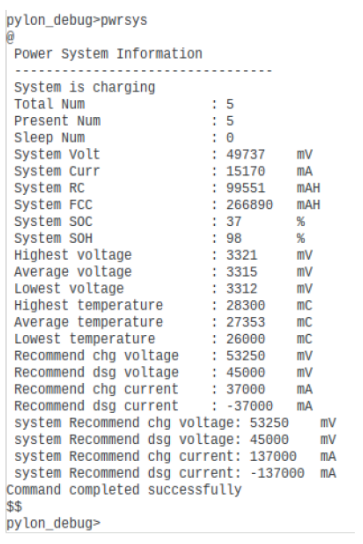
I have seen cases that certain versions of the BatteryView application does not correctly read the values correctly due to invalid regex within the config files. Best way to check is to login as Administrator and use the console. Run the command "pwrsys" and you should see the following: I believe these are the values you are after?
-
downgrade is possible, just select the relevant firmware
-
That is an old tool and not suitable for the C models.
-
Does the battery cabinet have support rails? Any pics?
-
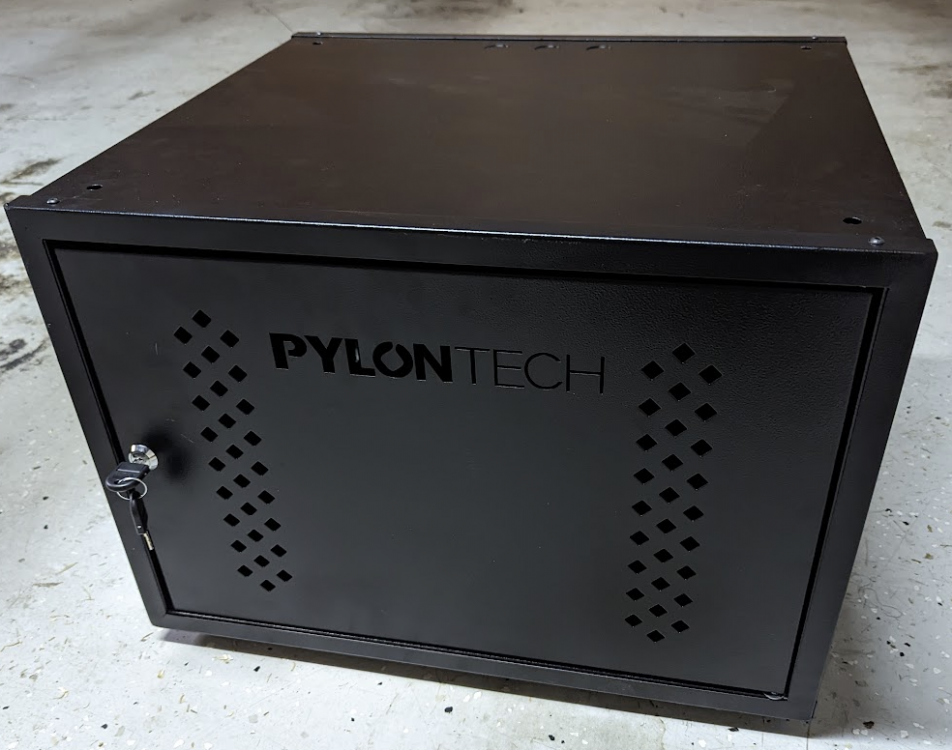
For housing up to 2 x Pylontech US3000 Lithium-Ion batteries Dimensions assembled - W 550mm X D 500 mm X H 390mm. Perforated front door Lockable front door 25MM Gland holes on each side Top/bottom access hole Adjustable feet Heavy duty uprights Modular stackable Item: Pylontech US3000 Battery 2 Bay Cabinet Age: Less than 1 week old Price: R2500...price drop....R1500 Payment Method Accepted: EFT/Cash Warranty: None Packaging: None Condition: Practically new Location: Bergbron, Johannesburg Reason: Want a bigger 3 Bay cabinet as I have the space Shipping: At the buyers cost Collection: Preferred
-
Out of interest, why did you sell?
-
The special flash tool is not on this forum. BatteryView is not the special flash tool here that is spoken of either.
-
Please share the special flash tool and firmware
-
Do you still have those 3 modules available? I also wanna rebuild a cell pack
-
Did you upgrade any firmware on them?
-
Hi, I am looking for a damaged/non working Pylontech US2000 module. If you do have, please PM me and i will be glad to take it off your hands.
-
Inverter still available?
-
Still available?
-
Is this inverter still available?
-
I would disconnect each battery and upgrade them individually.
-
This happened to me a few years back on my US2000B and i was provided with this BMS Force update tool which did work for me. Essentially its the update firmware window you use within BatteryView but it runs seperately.
-
I usually disconnect the entire battery pack from the inverter and switch it completely off prior to upgrading firmware. I then also only switch on the battery module that i want to upgrade and then iterate the same for the remainder of the pack. Only one battery is ever on when upgrading. This will eliminate the issue with the red alarm light from the master.
-
That's a good interpretation of the files and logic being applied in the new BatteryView 3.0.28. If you translate the flow diagram included in the BatteryView zip file, you can deduce the same as you have mentioned. Unfortunately I have never seen release notes from Pylontech, it would be really great if they supplied them with the firmware files. I successfully upgraded my "older" US3000C to v2.7 with BatteryView 3.0.28 using the firmware zip file. As per Jeff, just use the zip method with BatteryView 3.0.28 and all the thinking will be done by the software
-
So who has successfully loaded v2.7 on a US C battery?
-
There is massive confusion here. My US3000C production date is 27/02/2021 and it came shipped with v1.6 but was upgraded by Segen to v1.7. Since then i have been upgrading it successfully using a .bin file with BatteryView 3.0.24 and currently on v2.6. Now i am in two minds to going to v2.7 as its not clear from Jeff's posts if this latest update applies to my US3000C. I am starting to think that Jeff is referring to BatteryView and not the US3000C. It seems that using BatteryView v3.0.28, one should always use the .zip file, for the previous BatteryView versions like 3.0.24, using the bin file is ok.
-
Is Jeff saying that there are 2 versions of the US3000C? If so, how does one distinguish them?
-
What firmware file did you use for the US3000B? It is a different file to the US3000C. Latest firmware for US3000C is v2.6


