rgt.dnl
Members
-
Joined
-
Last visited
Everything posted by rgt.dnl
-
@hilt_ctn thanks so much for your response. On point 2, I have a rolling total that resets at midnight. When it goes back to zero it effectively adds back the units used to the total. I created the daily usage sensor via the utility meter helper. I am at a loss of how to get the rolling total to work such that I don't need to manually update the total units left every day. Thanks again for your help.
-
@kellerza noob question. Sorry in advance. 1. How can I change the input text code below to input number? input_text: prepaid_units: name: Enter Prepaid units from meter pattern: '\d+(\.\d+)?' mode: password icon: mdi:home-lightning-bolt-outline min: 1 max: 10 2. How can I automatically enter the total based on what it is at 00H00? Many thanks in advance.
-
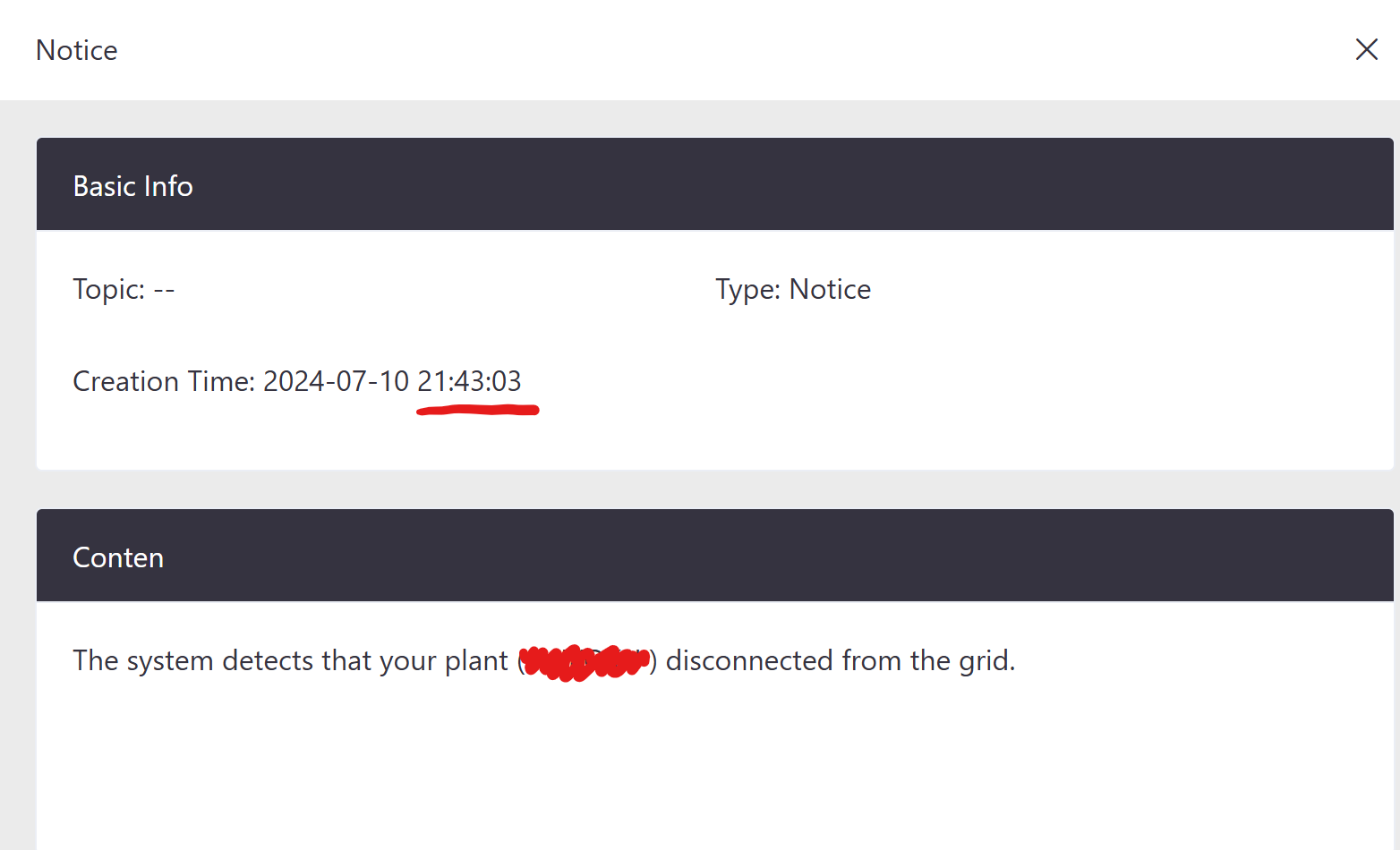
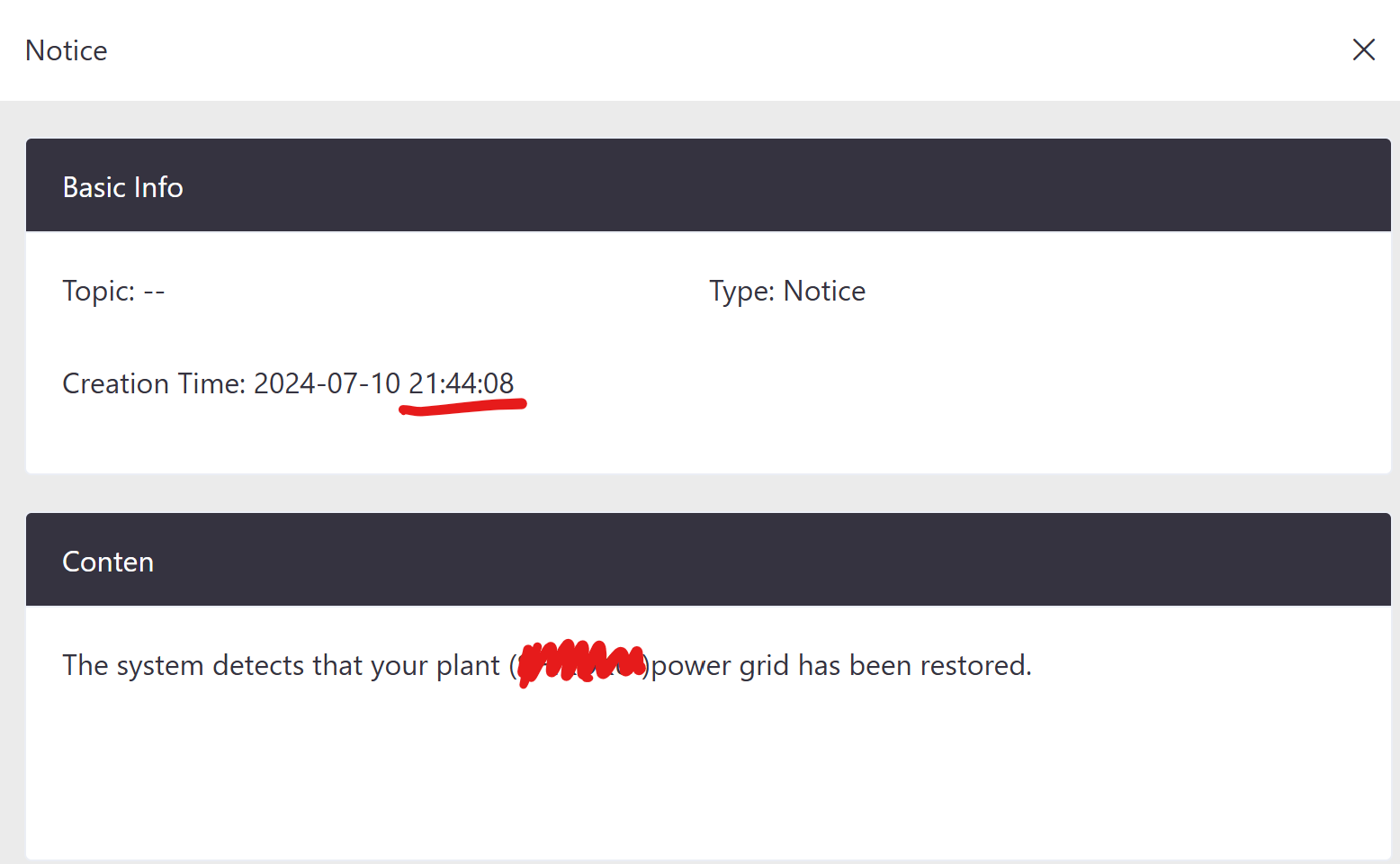
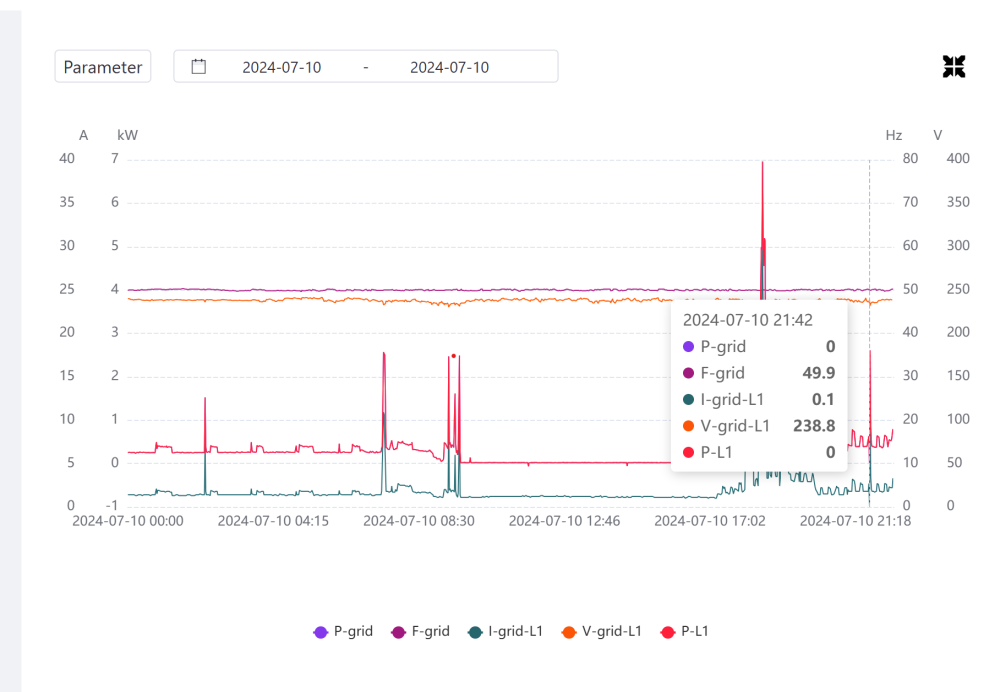
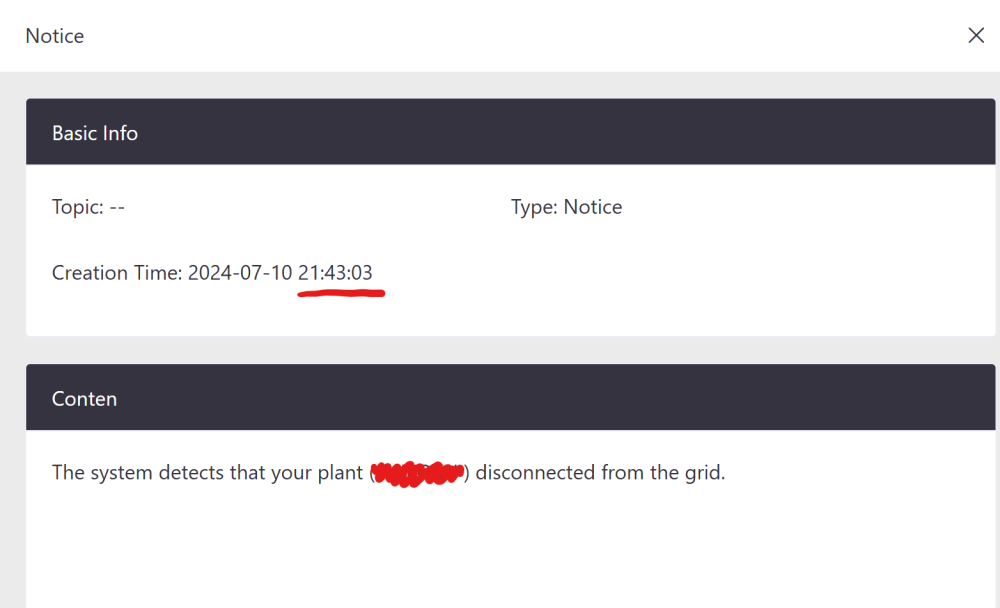
Hello, this has happened a few time over the last few days. My Sunsynk Inverter sends a Grid Disconnect notification and then a minute or so later sends a Grid Connection restored notification. However, there is not interruption in the Grid Supply. The latest example is shown below where the Grid Power is 0 but frequency & voltage etc. seems normal. Does anyone know what the explanation for this could be? Many thanks in advance

-
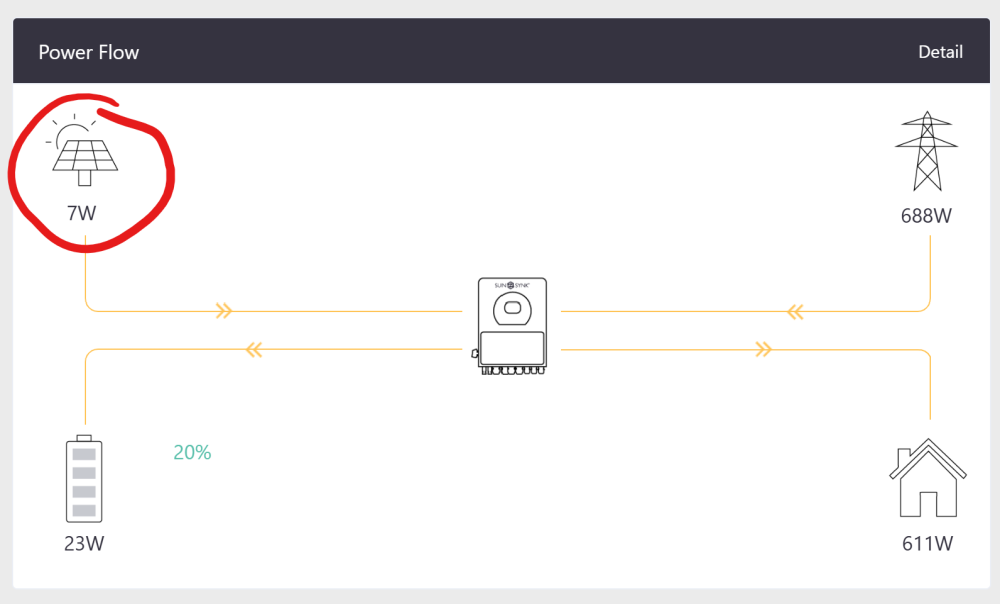
Hello, its 22h56 and my panels are showing 7W of power (String 1 = 2W and String = 5W). Its a overcast and rainy night, no Moon (in case that has an effect). Is it normal for the Panels to produce single digit Watts at night? If not, what is the possible cause/fix? Many thanks in advance!
-
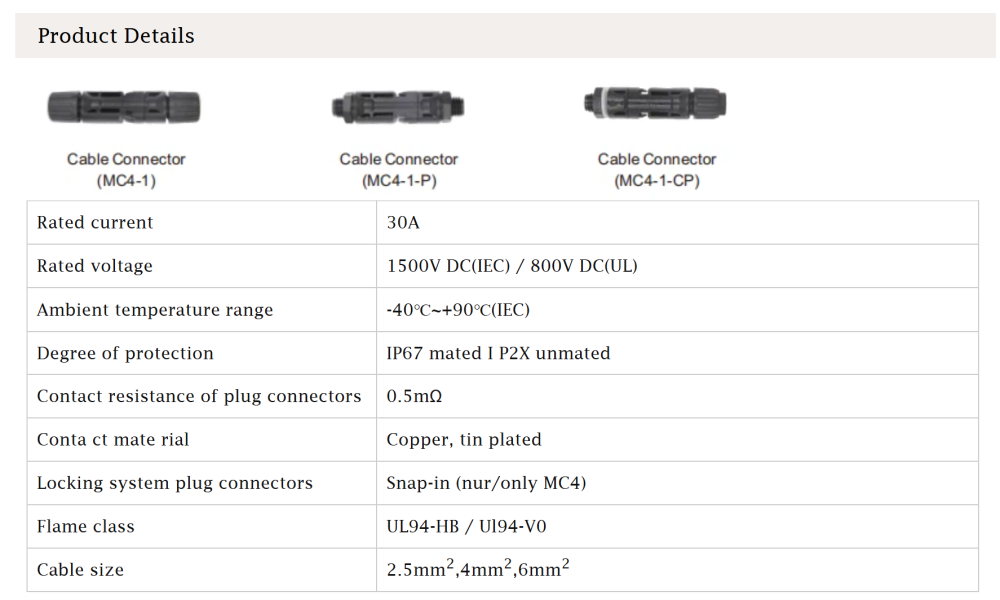
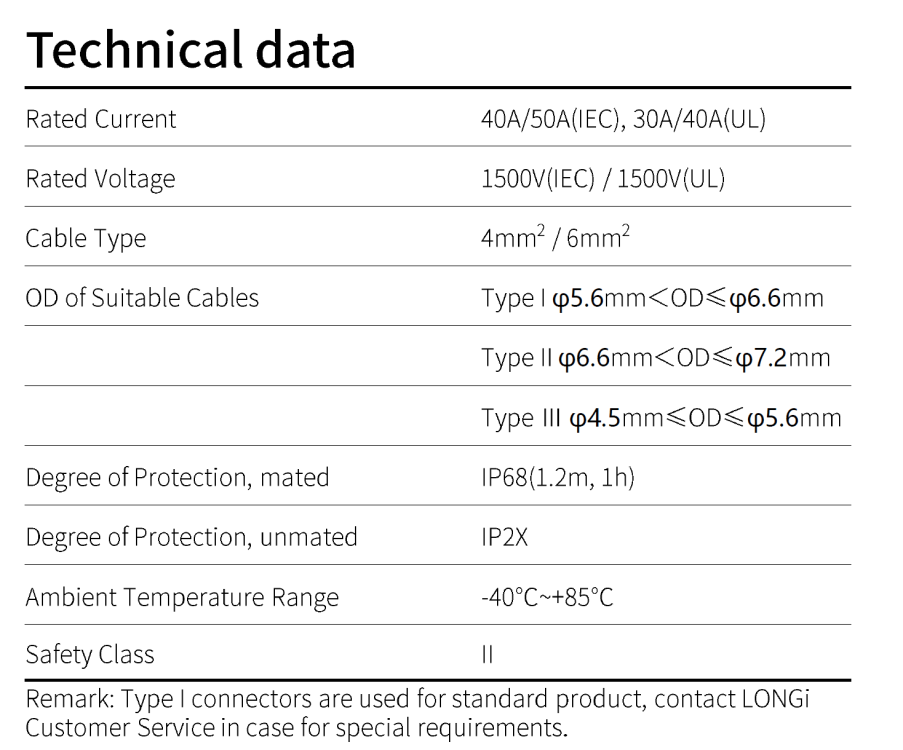
Hello, I was wondering if anyone could help. I have panels (that I want to install) that use the following PV-LR5 connector (technical documents attached): Would there be an issue if I used the TOSUNLux MC4-1 Connector (see below) to connect my panels to the inverter (via the combiner box)? If it is a problem, could someone recommend a compatible MC4 connector to link up to the PV-LR5 connector? Many thanks in advance! LONGI-LR5-Manual.pdf Datasheet LR5 Connector V1.pdf
-
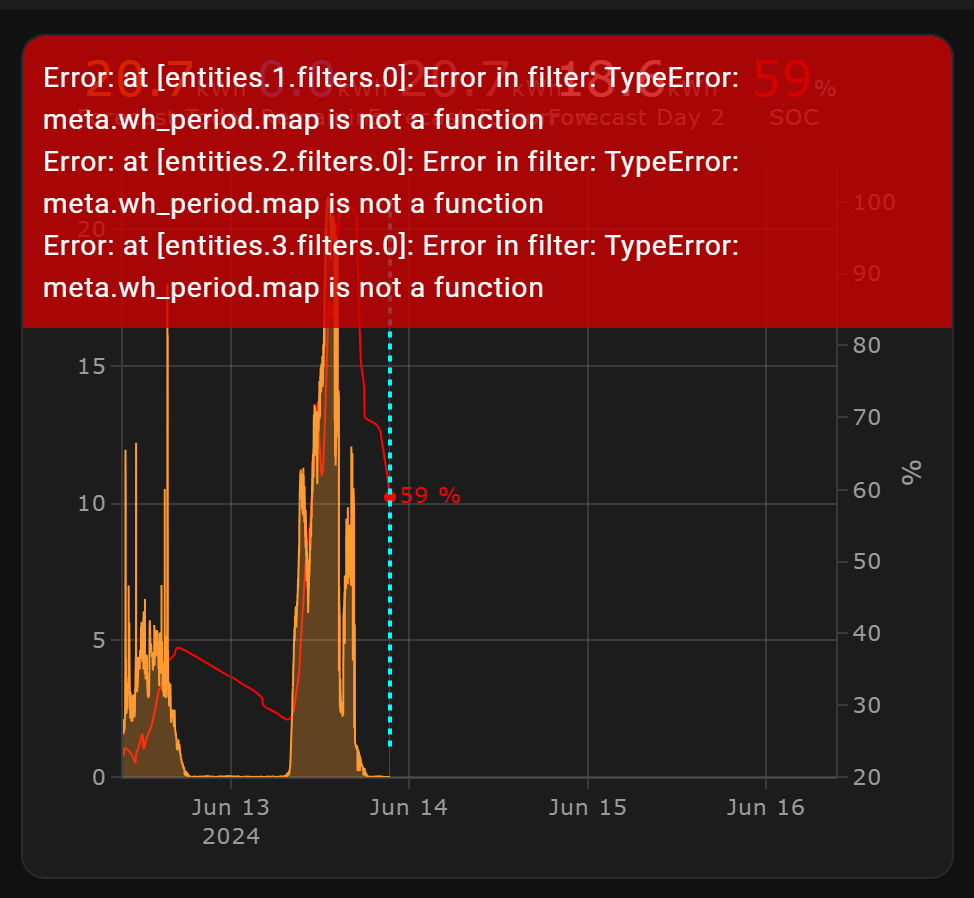
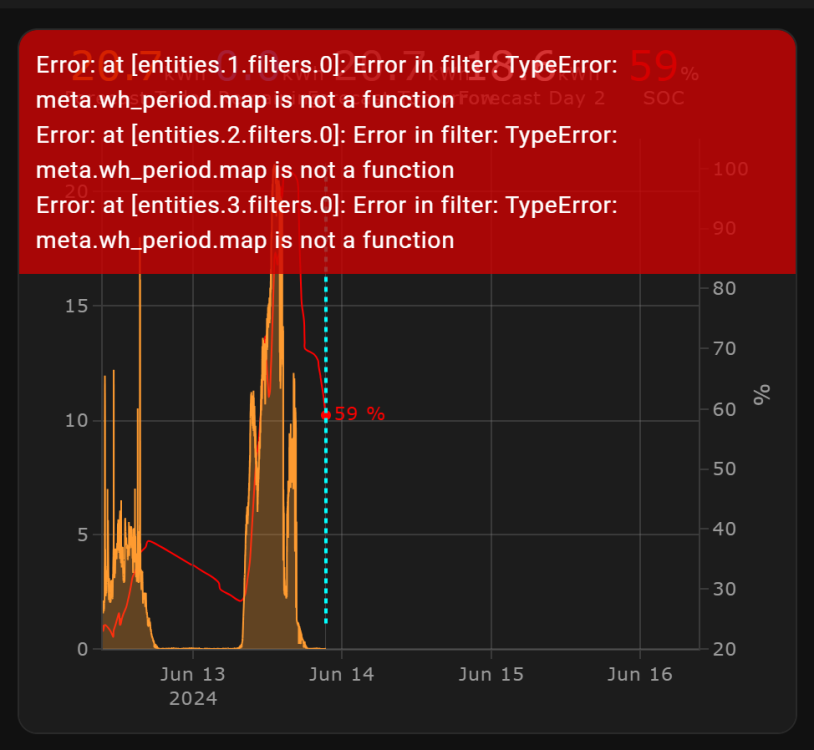
@slipx trying out you new graph with open meteo but getting the following errors - Can you help?
-
Thank you! I really appreciate your guidance in this!
-
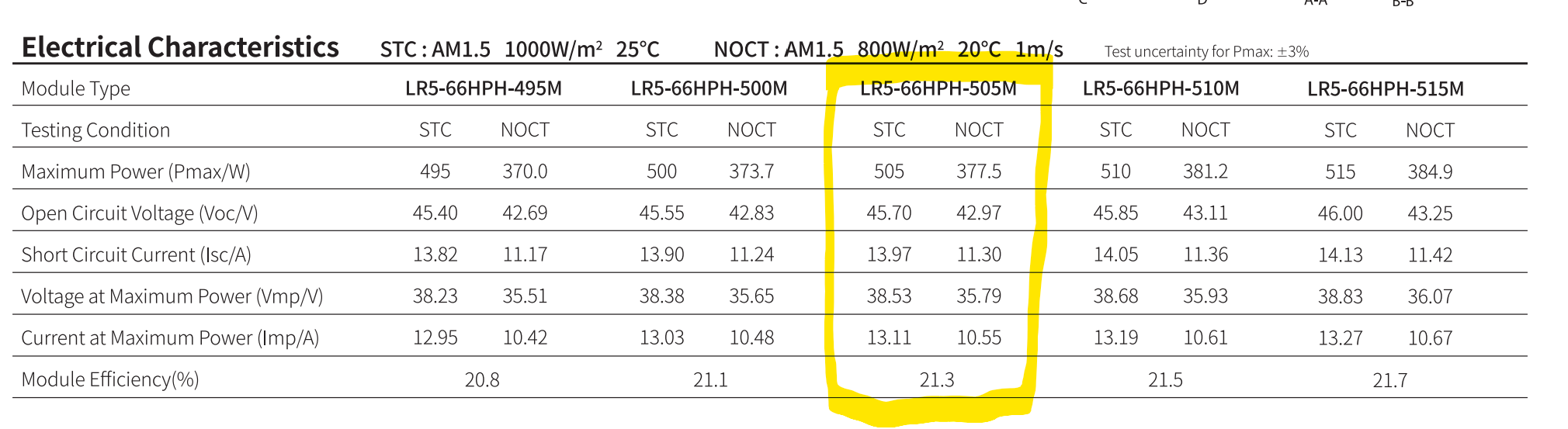
Quick follow-up (for the avoidance of doubt). Current set-up: Sunsynk 5kW Inverter Sunsynk 5kWh Battery 8 x Longi 505w (LR5-66HPH-505M; see Electrical Characteristics below) panels in a single MPPT Question: I am planning to add 4 more Longi panels (same as already installed). Can I add them to the same MPPT as the existing panels without breaching the current or voltage limits of the inverter? (I am within the watts limit of 6500w for the inverter) Many thanks in advance!

-
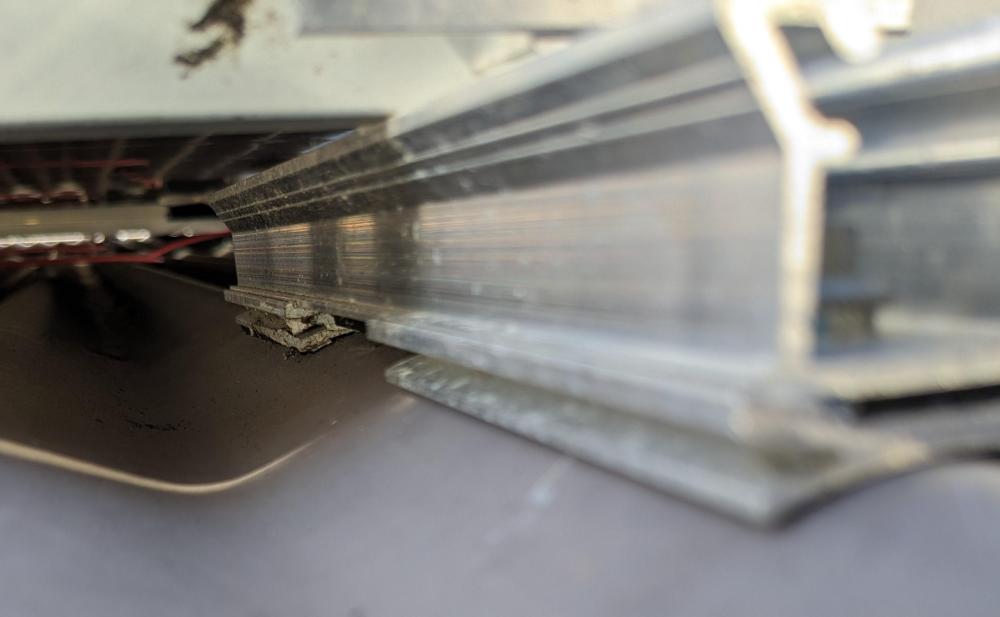
@Thunderdolt that is what I thought initially but its not, sadly. The profile and set up is quite different (see pics below) The hunt continues...

-
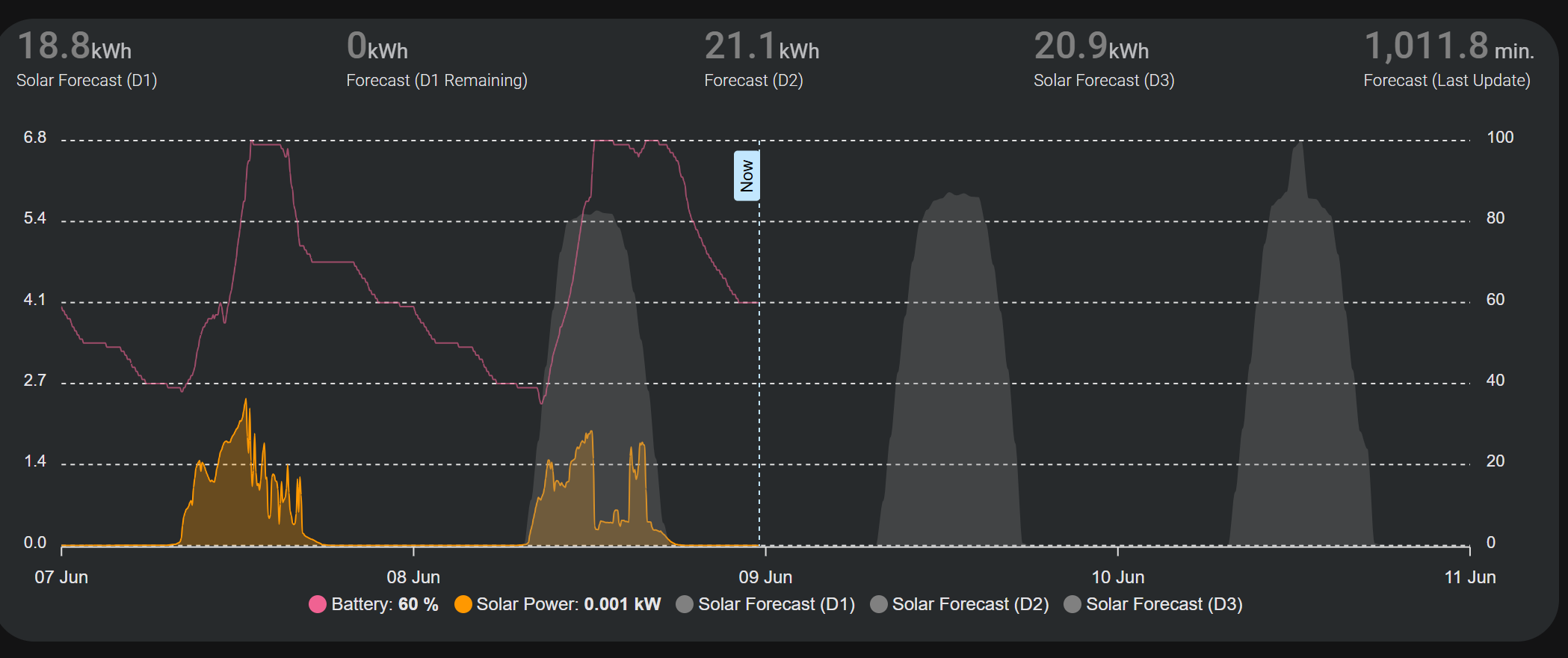
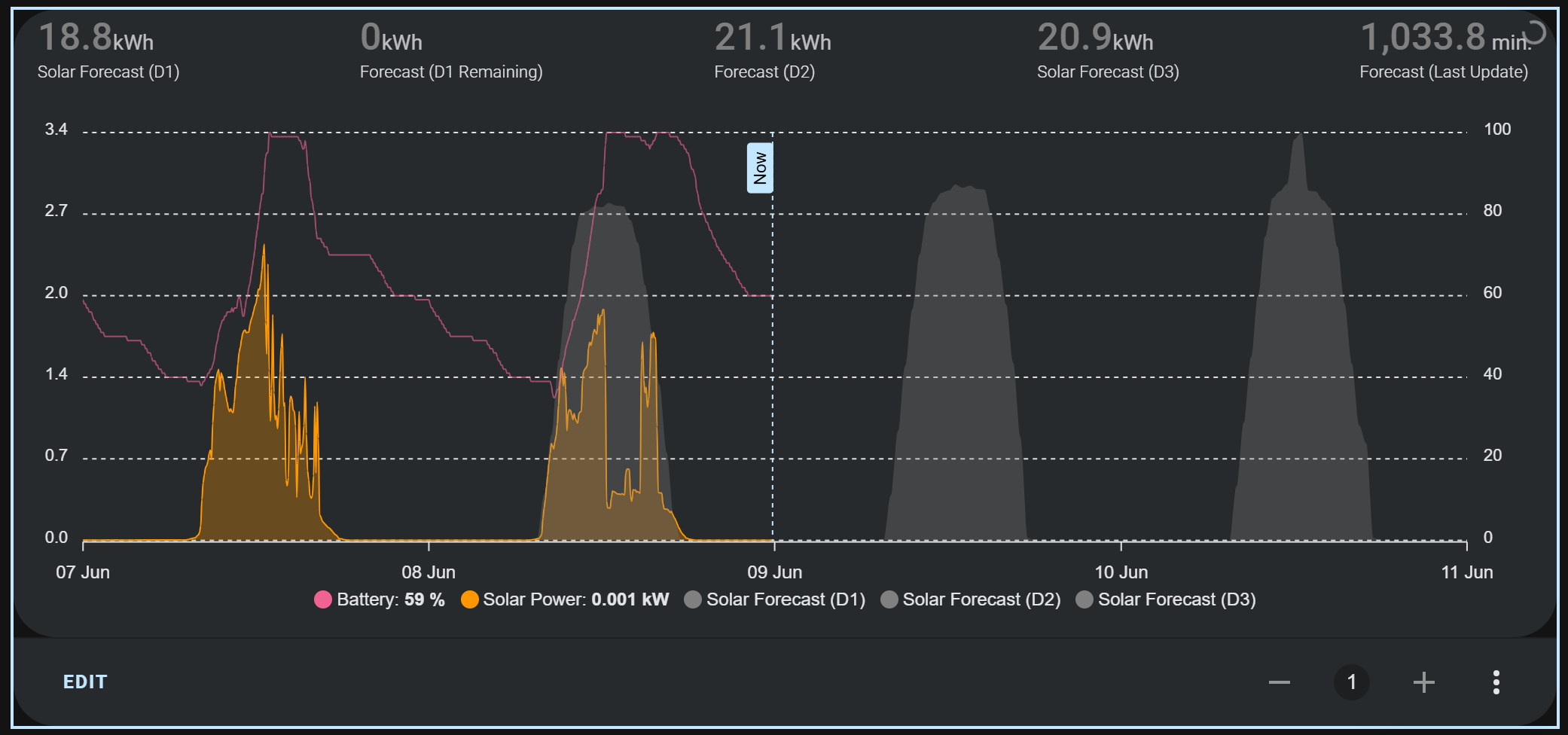
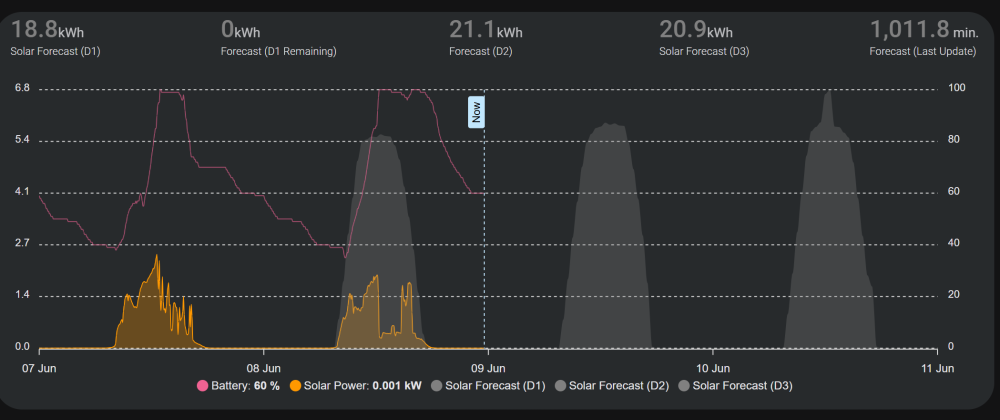
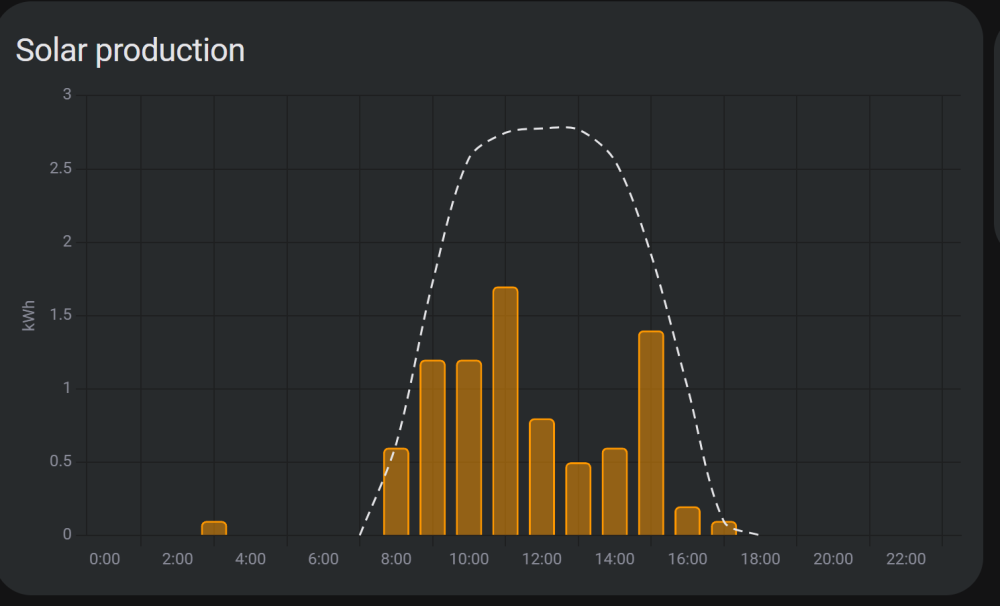
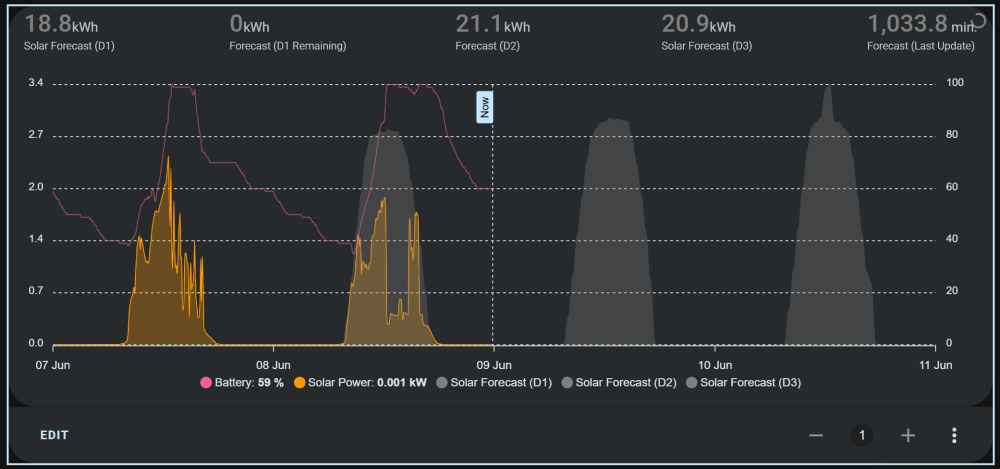
@slipx SOLVED: When I dropped the code in here I noticed that there was a *2 in the code, e.g., data_generator: | return entity.attributes.detailedForecast.map((entry) => { return [new Date(entry.period_start), entry.pv_estimate*2]; }); Not sure where that came from. Sorry for the bother. Here is how it looks now - --- ORIGINAL QUESTION (BASED ON MY OWN ID10T ERROR)--- @slipx Firstly, thanks for all your amazing work. I have a question about the solar forecast graphic. I can't figure out why the forecast in the graph is so high. It is working at expected in the HA Energy Dashboard. See examples below. Your code is showing what looks like x2 value of what is in the HA Energy Dashboard. Any help resolving this would be greatly appreciated. And apologies if I missed a similar post here. I did look. VS HERE IS THE CODE FOR YOUR GRAPH , FYI: type: custom:apexcharts-card header: show: true standard_format: true show_states: true colorize_states: true apex_config: chart: height: 350px tooltip: enabled: true shared: true followCursor: true graph_span: 4d now: show: true label: Now span: start: day offset: '-1day' all_series_config: type: area opacity: 0.3 stroke_width: 1 series: - entity: sensor.solar_assistant_battery_state_of_charge name: Battery float_precision: 0 type: line color: '#f06292' opacity: 0.6 yaxis_id: capacity extend_to: now show: legend_value: true in_header: false group_by: func: last duration: 5m - entity: sensor.solar_assistant_pv_power name: Solar Power float_precision: 3 color: '#ff9800' yaxis_id: kWh unit: kW transform: return x/1000; extend_to: now show: legend_value: true in_header: false group_by: func: avg duration: 5m - entity: sensor.solcast_pv_forecast_forecast_today name: Solar Forecast (D1) extend_to: false color: grey opacity: 0.3 stroke_width: 0 yaxis_id: kWh show: legend_value: false in_header: false data_generator: | return entity.attributes.detailedForecast.map((entry) => { return [new Date(entry.period_start), entry.pv_estimate*2]; }); - entity: sensor.solcast_pv_forecast_forecast_tomorrow name: Solar Forecast (D2) float_precision: 3 extend_to: false color: grey opacity: 0.3 stroke_width: 0 yaxis_id: kWh show: legend_value: false in_header: false data_generator: | return entity.attributes.detailedForecast.map((entry) => { return [new Date(entry.period_start), entry.pv_estimate*2]; }); - entity: sensor.solcast_pv_forecast_forecast_day_3 name: Solar Forecast (D3) float_precision: 3 extend_to: false color: grey opacity: 0.3 stroke_width: 0 yaxis_id: kWh show: legend_value: false in_header: false data_generator: | return entity.attributes.detailedForecast.map((entry) => { return [new Date(entry.period_start), entry.pv_estimate*2]; }); - entity: sensor.solcast_pv_forecast_forecast_today yaxis_id: header_only name: Solar Forecast (D1) color: grey show: legend_value: true in_header: true in_chart: false - entity: sensor.solcast_pv_forecast_forecast_remaining_today yaxis_id: header_only name: Forecast (D1 Remaining) color: grey show: legend_value: true in_header: true in_chart: false - entity: sensor.solcast_pv_forecast_forecast_tomorrow yaxis_id: header_only name: Forecast (D2) color: grey show: legend_value: true in_header: true in_chart: false - entity: sensor.solcast_pv_forecast_forecast_day_3 yaxis_id: header_only name: Solar Forecast (D3) color: grey show: legend_value: true in_header: true in_chart: false - entity: sensor.solcast_pv_forecast_api_last_polled yaxis_id: header_only name: Forecast (Last Update) color: grey unit: ' min.' transform: return ((Date.now()) - (new Date(x).getTime())) / 60 / 60 / 24 show: legend_value: true in_header: true in_chart: false yaxis: - id: capacity show: true opposite: true decimals: 0 max: 100 min: 0 apex_config: tickAmount: 5 - id: kWh show: true min: 0 apex_config: tickAmount: 5 - id: header_only show: false
-
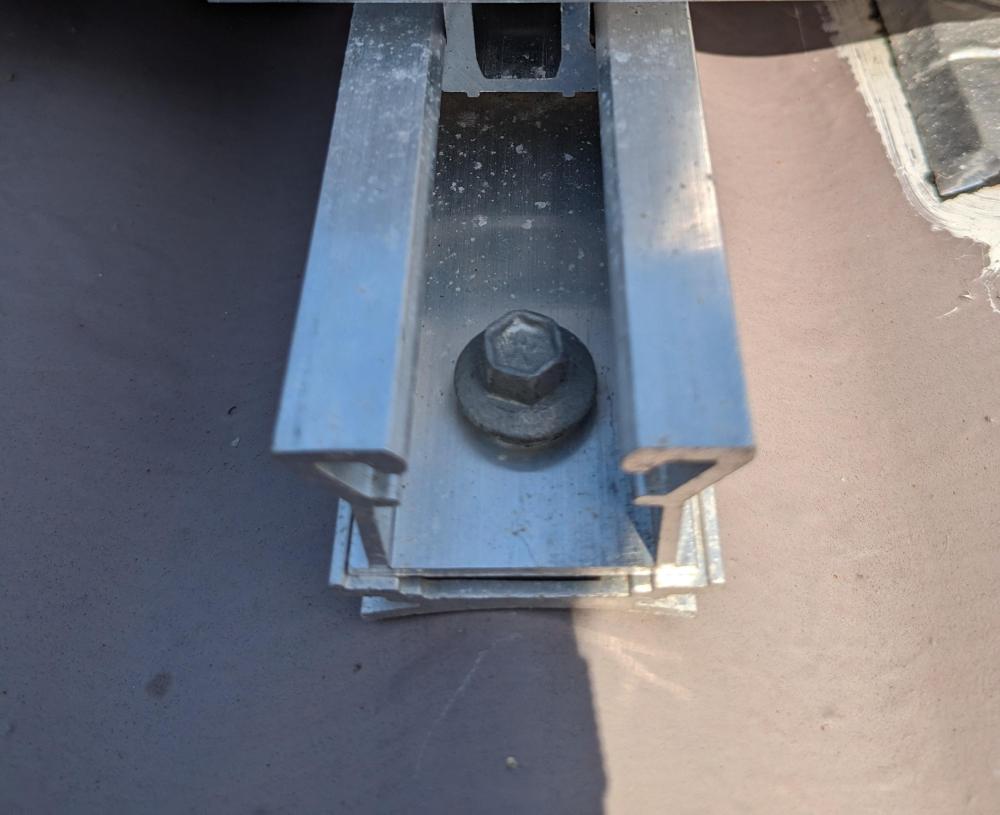
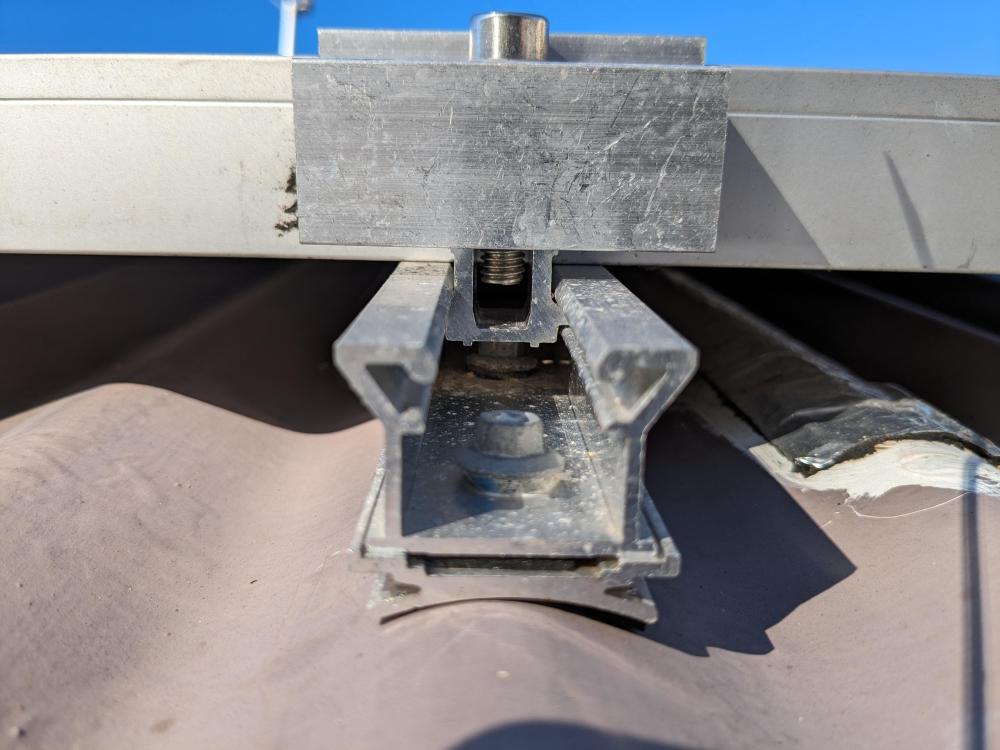
***SOLVED*** ITS A K2 MICRO RAIL CSM 25 BRACKET. MicroRail CSM 25 Set (k2-systems.com) ---- Hello, I need to identify this solar mount (IBR roof, with adapter for corrugated roof). I have googled and reverse image searched but had no joy. Plenty of brackets out there but I can't find this exact one. Taking a punt to see if the human googles out there can help. May thanks in advance. Follow-up question: If I cannot identify this bracket, would it be possible to use another bracket on my existing install (e.g. renusol) or would that cause potential misalignment with adjacent panels using the bracket pictured?. Put another way are most brackets similar to this (more or less) the same in dimensions? Approximate dimensions are: 240mm (L) 35mm (W) 24mm (H) (without adapter plate for corrugated roof) 30mm(H) (with adapter plate for corrugated roof)
-
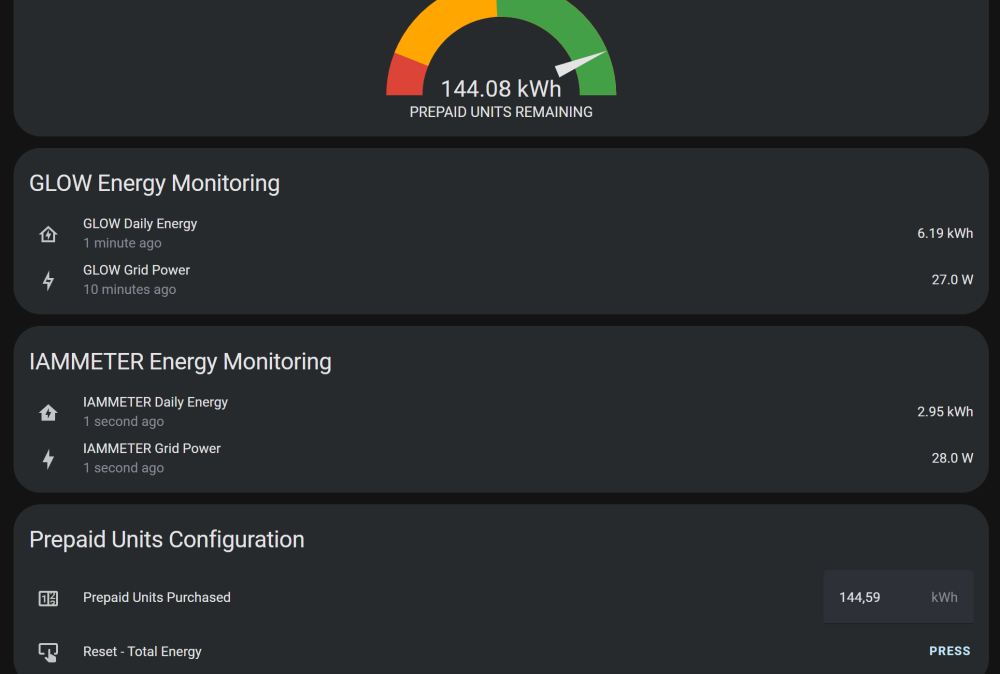
Thanks @Sc00bs actually, I got what i needed out of two of the helper sensors which I renamed to make more sense for my use case - I basically used the following which seems to be enough for me. (Yes, something wrong with IAMMETER reading. Not sure why.)

-
I have just installed this on my meter. Seems to be tracking my meter much better than IAMMETER. Will feedback after a bit more time testing. I fount it very hard to get the exact LM393 Photodiode. I eventually found it at Leobot Electronics (Pretoria). Quite expensive though when you add on postage to the Cape.
-
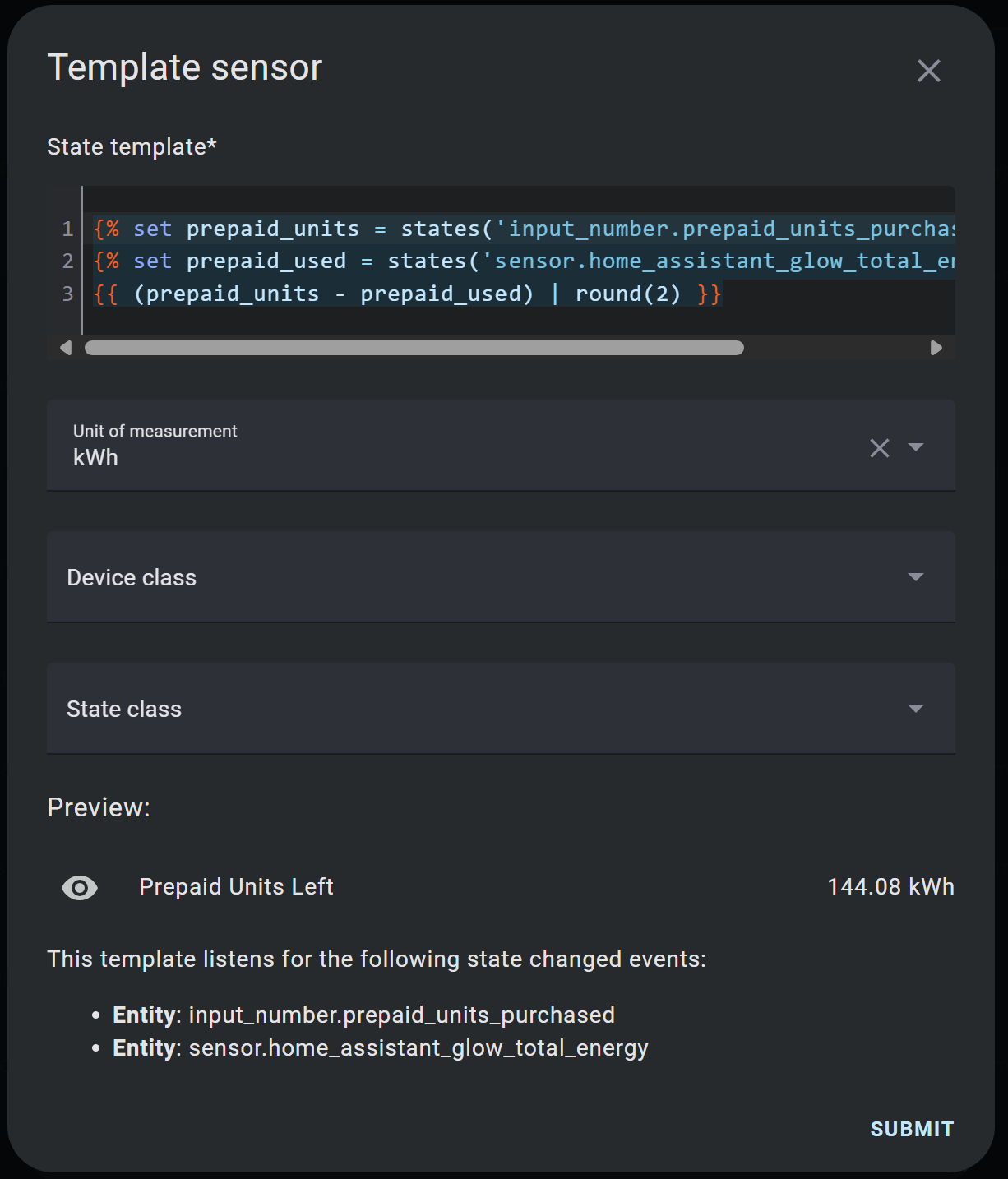
@Sc00bs Thanks for this. Unfortunately I cannot get this to work. I had to manually create the templates as the code was giving errors. I am actually using the Home | Home Assistant Glow 🌟 (glow-energy.io) mentioned by @hilt_ctn above as the total grid use number. I am almost certainly doing something wrong because the nothing updates. I suspect the issue is in the script but i can't see what is wrong there - alias: Update Prepaid Units sequence: - service: input_number.set_value target: entity_id: input_number.enter_prepaid_units_from_meter data: value: '{{ states(''input_number.enter_prepaid_units_from_meter'') | float }}' - service: input_number.set_value target: entity_id: input_number.prepaid_units_left data: value: '{{ states(''sensor.prepaid_units_left'') | float }}' - service: input_number.set_value target: entity_id: input_number.initial_prepaid_units data: value: '{{ states(''input_number.initial_prepaid_units'') | float }}' - service: input_datetime.set_datetime target: entity_id: input_datetime.last_update data: datetime: '{{ now().strftime(''%Y-%m-%d %H:%M:%S'') }}' mode: single
-
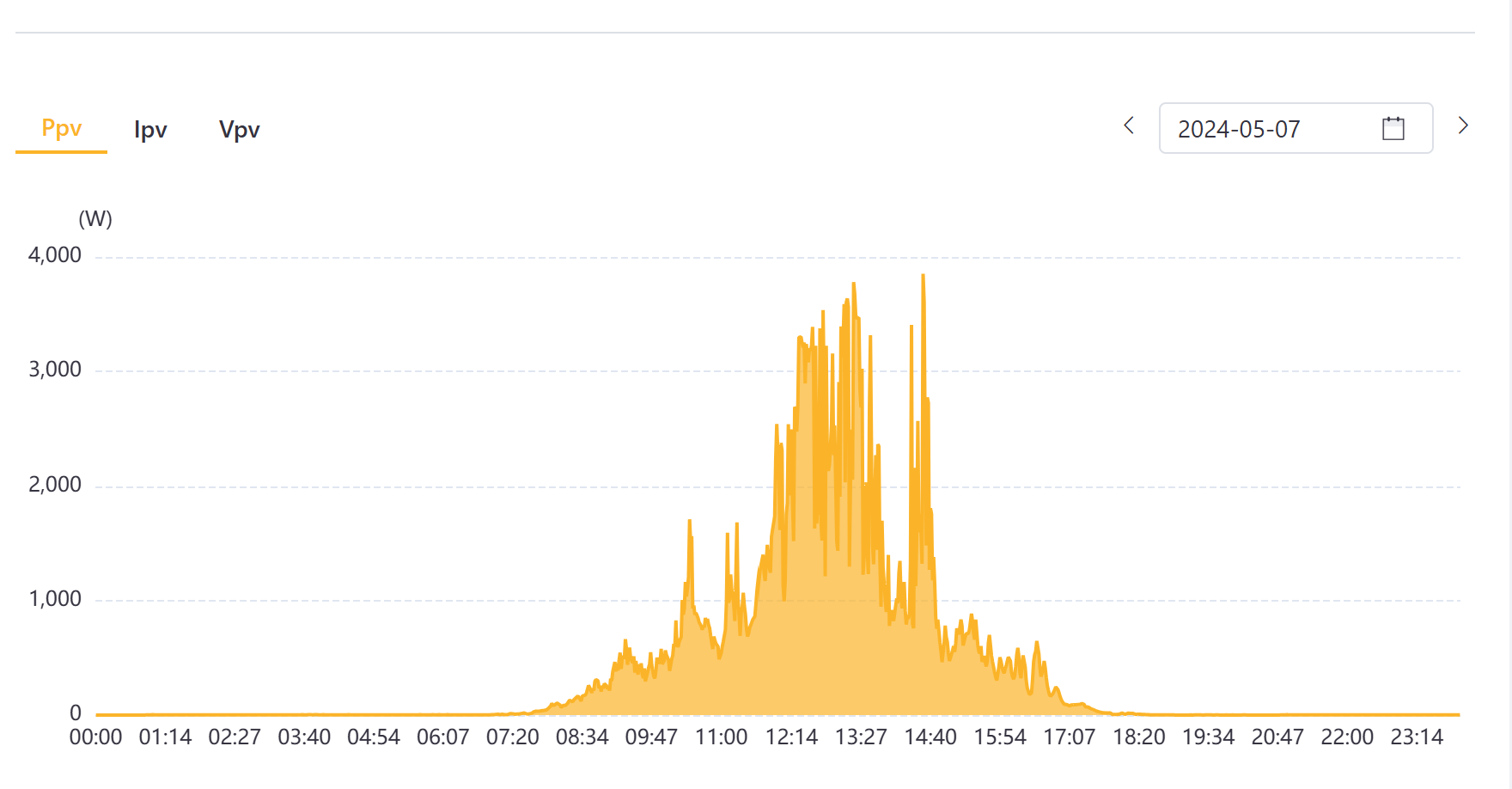
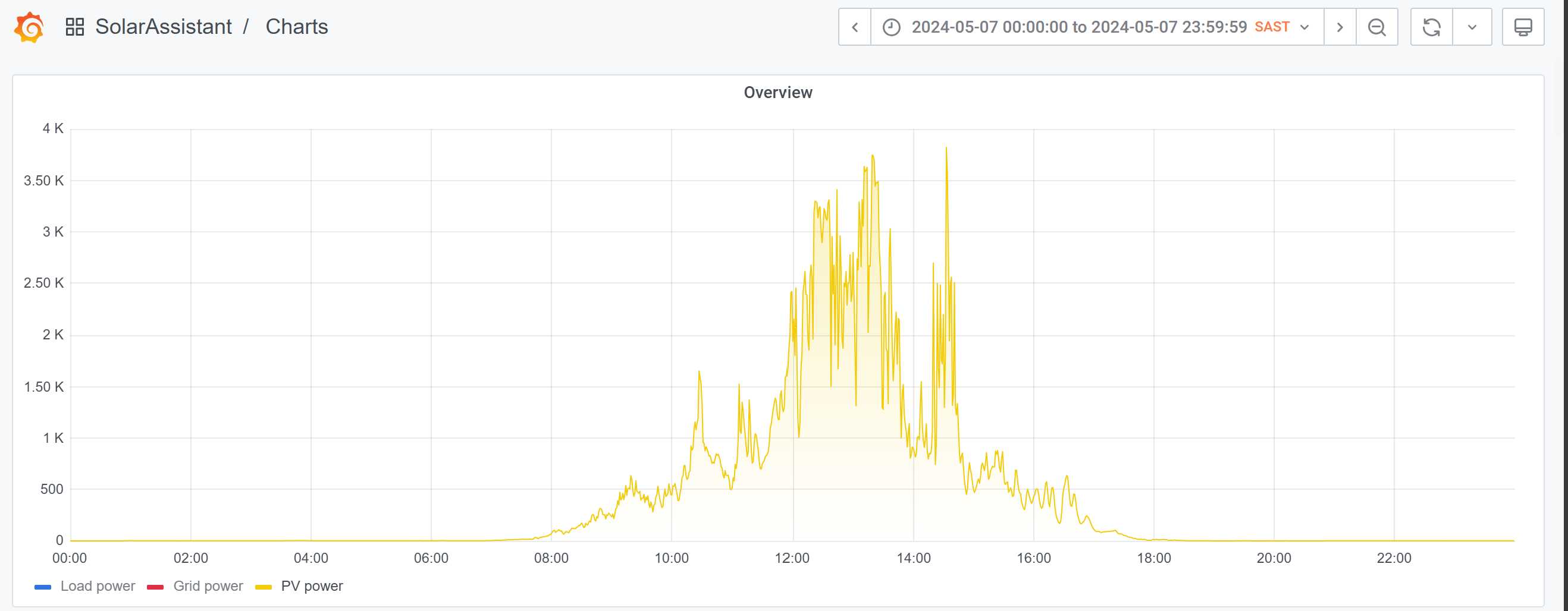
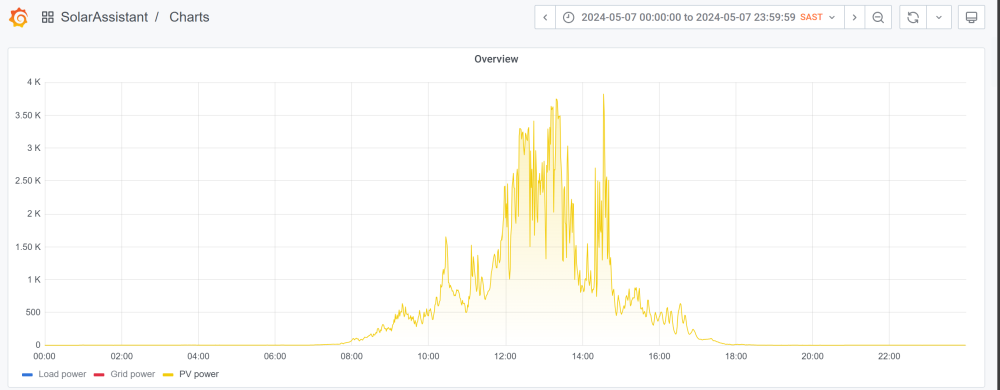
@CTskollie I think I've overstated that somewhat. In May I got a brief peak of 3750w but mostly get between 2k-3k on average based on what I can see in Sunsynk Connect. Solar Assistant concurs. Quite puzzled how I got those numbers considering the forecast was partly cloudy with rain on May 7th in Cape Town.

-
@Antonio de Sa, @zsde, @WannabeSolarSparky, @Mauritius B Thank you. This is brilliant. I have some work to do to understand all of this relative to my setup and all the guidance here is very much appreciated. Thanks.
-
The system was installed in April 2023, so it's been through a full seasonal cycle. I never feel like I am getting the most out of it however and wondering if I need to tweak the settings etc.
-
Brilliant. Thanks for the advice. Much appreciated.
-
I have a Sunsynk 5kW hybrid inverter, with a single 5kWh Sunsynk battery and 8x 505w Longi panel (total 4040w). Can I add 4 additional panels? Do the wattage of the new panels need to match those of the ones already installed? (I am think about getting 555w longi panels x 4) Re balancing MPPT 1 & 2 - Is it absolutely necessary? And I assume its about balancing the capacity of each MPPT rather than equal number of panels Is 6260 within range for a 5kWh inverter? Thanks in advance.
-
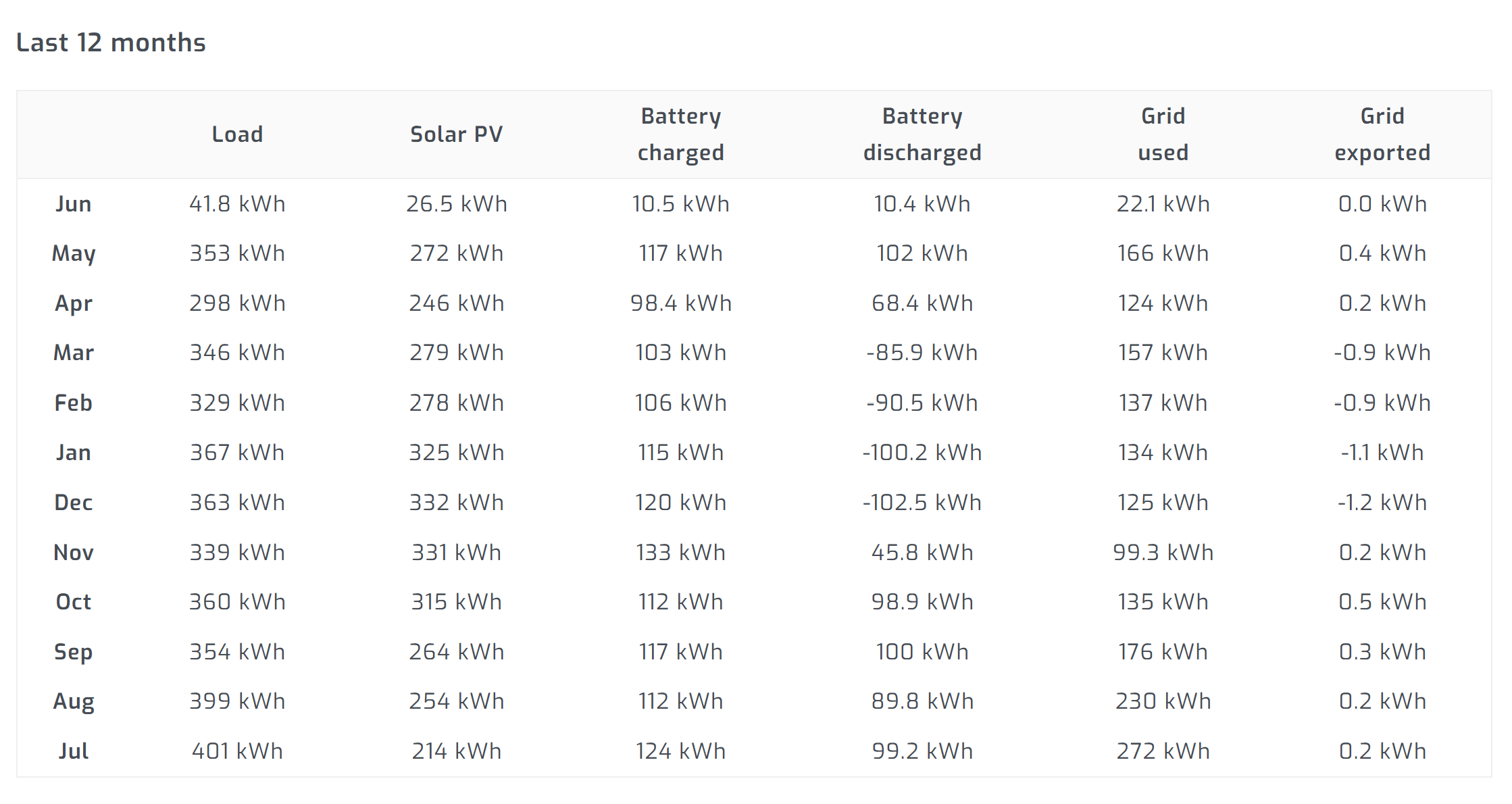
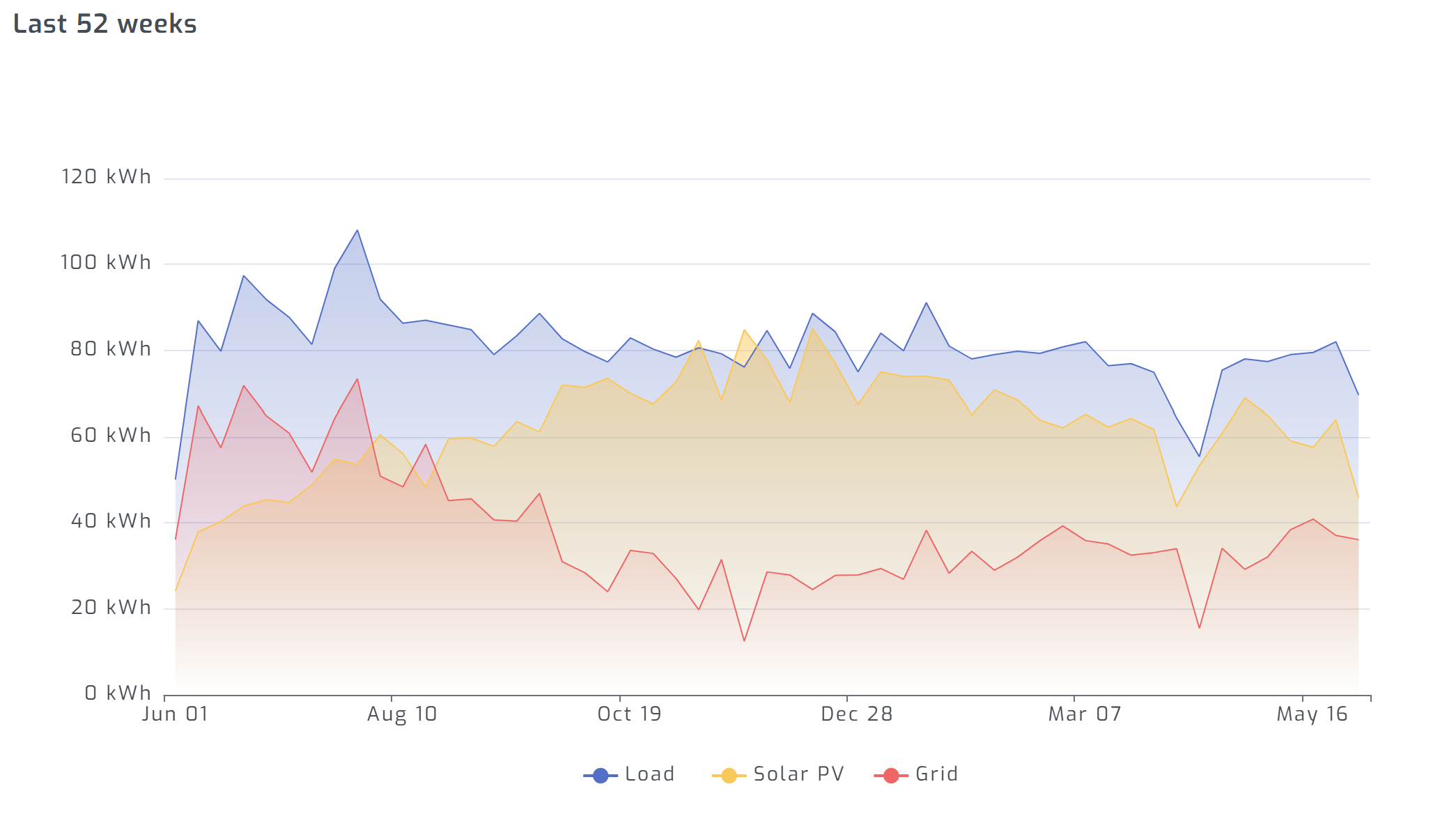
Hello, I have Sunsynk 5kW hybrid inverter, with a single 5kWh Sunsynk battery (see details below), powered by 8x 505w Longi panels. In total (and in theory), my panels should produce 4040w at peak sun (Panels are all north facing. No major shading from the trees next door. I am in Cape Town). I am trying to make sense of my systems performance to see where I can a) maximise and/or b) add capacity. Below is my month-month performance to date (System was commissioned at end of April 2023) Could anyone advise? More panels? Another battery? or both? (I suspect the third option but looking for some experience advice) Many thanks in advance


-
Hello, I have Sunsynk 5kW hybrid inverter, with a single 5kWh Sunsynk battery (see details below), powered by 8x 505w Longi panels. In total (and in theory), my panels should produce 4040w at peak sun (Panels are all north facing. No major shading from the trees next door. I am in Cape Town). I very rarely get more that 3500w out of the panels (on a sunny day) and I was wondering if there is a way to 'claim' the remaining 500+w. Is there an inverter setting I need to pay attention to? Thanks in advance.
-
Hello, I have Sunsynk 5kW hybrid inverter, with a single 5kWh Sunsynk battery (see picture below), powered by 8x 505w Longi panel (total 4040w). I want to expand my battery capacity and purchase another 5kWh battery but I am very confused about compatibility. I have asked around and that has added to my confusion. Sunsynk Support provided me with a battery compatibility table but that confused me still further (see picture below). Based on enquiries I have made with various suppliers, there is more than one model of the SUN-BATT-5.32 battery. I have been told that the one I have uses REPT cells and that BYD cells are compatible. I found a supplier who is selling a Sunsynk 5.32kWh 51.2V Lithium Battery but states that it is a BYD cells version, warning that BYD is not compatible CATL. He also said it the exact same battery as the one I have. Sunsynk said I have REPT version. The supplier is telling me I have a BYD version. Anyway, any advice, a) on what model/version of SUN-BATT-5.32 battery I actually have and b) what to look for and how to tell battery versions apart would be very much appreciated. Many thanks in advance


-
@Sc00bs i got it to work. I had to fix the code a bit. See below: alias: Load Shedding Scene Switcher description: "" trigger: - platform: state entity_id: input_select.test_loashedding_level condition: [] action: - choose: - conditions: - condition: template value_template: "{{ trigger.to_state.state in ['Stage 1', 'Stage 2'] }}" sequence: - service: scene.turn_on data: {} target: entity_id: scene.solar_high_stage_12 - conditions: - condition: template value_template: "{{ trigger.to_state.state in ['Stage 3', 'Stage 4'] }}" sequence: - service: scene.turn_on data: {} target: entity_id: scene.solar_high_stage_34 - conditions: - condition: template value_template: "{{ trigger.to_state.state in ['Stage 5', 'Stage 6'] }}" sequence: - service: scene.turn_on data: {} target: entity_id: scene.solar_high_stage_56 - conditions: - condition: template value_template: "{{ trigger.to_state.state in ['No Load Shedding'] }}" sequence: - service: scene.turn_on data: {} target: entity_id: scene.solar_high_stage_0 default: [] mode: single
-
@Sc00bs I am trying to get this working but for some reason the code is not firing in the automation. I notice that the code you have on screen is different to the one in the Google Doc. Could that be the reason my setup is not working? Here is my automation code/yaml: alias: Load Shedding Scene Switcher description: "" trigger: - platform: state entity_id: input_text.test_loadshedding_level condition: [] action: - choose: - conditions: - condition: template value_template: "{{ trigger.to_state.state in ['Stage 1', 'Stage 2'] }}" sequence: - service: scene.turn_on data: {} target: entity_id: scene.solar_high_stage_12 - conditions: - condition: template value_template: "{{ trigger.to_state.state == 'Stage 3', 'Stage 4' }}" sequence: - service: scene.turn_on data: {} target: entity_id: scene.solar_high_stage_34 - conditions: - condition: template value_template: "{{ trigger.to_state.state >= 'Stage 5', 'Stage 6' }}" sequence: - service: scene.turn_on data: {} target: entity_id: scene.solar_high_stage_56 - conditions: - condition: template value_template: "{{ trigger.to_state.state >= 'No Load Shedding' }}" sequence: - service: scene.turn_on data: {} target: entity_id: scene.solar_high_stage_0 default: [] mode: single
-
@Sc00bs Please can you tell me how to add the slipx code to the ESP32 i.e., what part of the slipx code do I copy over. What do I keep from the original, default yaml (see below). I just keep getting errors when install the code. Many thanks in advance esphome: name: esphome-web-XXXX friendly_name: ESPHome Web XXXX esp32: board: esp32dev framework: type: arduino # Enable logging logger: # Enable Home Assistant API api: encryption: key: "key" ota: wifi: ssid: !secret wifi_ssid password: !secret wifi_password # Enable fallback hotspot (captive portal) in case wifi connection fails ap: ssid: "Esphome-Web-XXXX" password: "password" captive_portal: