ShaunH
Members
-
Joined
-
Last visited
Everything posted by ShaunH
-
I have 5x R100 and 1x R200. Done 318 cycles on the two oldest - I am fully off grid. I first contacted Revov, and they were quick and friendly in responses about providing more information about their products, then put me in touch with a reseller, because they do not sell directly to consumers. Fortunately, I have had no need to see how their after-sales is. The batteries are performing as expected. In about 2 years time, I plan to do a capacity test to see where the degradation stands, but I am doing this out of interest, because nothing so far as given me reason to worry.
-
3x 500W heat lamps. Although, their power draw seems between 400-450W. Less often, we also use a 200W heat pad for some chicks.
-
Initially, we went off-grid with 15kWh storage, 5.4kW solar, and a 7.2kW Axpert. This was difficult during the Summer months (still is, even with upgrades), because our Summers often have periods of 5+ days overcast. We slowly upgraded, and now have 35kWh storage, 6.6kW solar, 2x 7.2kW Axpert, and a 5kW generator. We run a chicken farm, which means many heat lamps. So, even now, we cannot last a full 2 days, if the lamps are on and there has been little sun. Which is why we bought the generator. One day, we will definitely move to gas for more things, but, unfortunately, now we have 1x 200L 3kW geyser, and 1x 50L 1.5kW geyser.
-
Hey there, What I did was: - Add earth rod for equipment grounding (solar panels / frame, and BENY BUD surge protection) - Inverters have EN bond in them - Connect load (inverter AC out) ground to eskom old earth rod Disconnected from Eskom in August 2023. 0 regrets. About 7 months ago, I paid them to remove their transformer on the property, because it is in the way, but after 6 site visits from them where the ask the same questions, and tell me "Oh, this is an easy job. Sole line, short run, should take a few hours.", I am still sitting here emailing for updates every few weeks. Just the way it goes. Also, every 2 months, guys still come to take the meter reading, then, are upset to see I am disconnected and do not have an account, and say they will inform the office so they do not need to come again... they come again. Aside from the rant, hope that helps.
-
Hello all, I have been trying to parse the backups I have taken of my system, but it appears as though a lot of the measurements are just not included in the backups. Specifically, it appears only combined measurements exist: Field Keys > show field keys name: AC output voltage fieldKey fieldType -------- --------- inverter_0 float inverter_1 float name: Battery current fieldKey fieldType -------- --------- inverter_0 float inverter_1 float name: Battery power fieldKey fieldType -------- --------- combined integer name: Battery power hourly fieldKey fieldType -------- --------- combined float name: Battery power in hourly fieldKey fieldType -------- --------- combined float name: Battery power out hourly fieldKey fieldType -------- --------- combined float name: Battery state of charge fieldKey fieldType -------- --------- combined integer name: Battery temperature fieldKey fieldType -------- --------- combined float name: Battery voltage fieldKey fieldType -------- --------- inverter_0 float inverter_1 float name: Bus voltage fieldKey fieldType -------- --------- combined integer name: Grid frequency fieldKey fieldType -------- --------- inverter_0 float inverter_1 float name: Grid power fieldKey fieldType -------- --------- combined integer name: Grid power hourly fieldKey fieldType -------- --------- combined float name: Grid power in hourly fieldKey fieldType -------- --------- combined float name: Grid power out hourly fieldKey fieldType -------- --------- combined float name: Grid voltage fieldKey fieldType -------- --------- inverter_0 float inverter_1 float name: Inverter temperature fieldKey fieldType -------- --------- inverter_0 float inverter_1 float name: Load power fieldKey fieldType -------- --------- combined integer inverter_0 integer inverter_1 integer name: Load power hourly fieldKey fieldType -------- --------- combined float name: PV current fieldKey fieldType -------- --------- inverter_0 float name: PV current 1 fieldKey fieldType -------- --------- inverter_0 float inverter_1 float name: PV current 2 fieldKey fieldType -------- --------- inverter_0 float inverter_1 float name: PV power fieldKey fieldType -------- --------- combined integer inverter_0 integer inverter_1 integer name: PV power 1 fieldKey fieldType -------- --------- inverter_0 integer inverter_1 integer name: PV power 2 fieldKey fieldType -------- --------- inverter_0 integer inverter_1 integer name: PV power hourly fieldKey fieldType -------- --------- combined float name: PV voltage fieldKey fieldType -------- --------- inverter_0 float name: PV voltage 1 fieldKey fieldType -------- --------- inverter_0 float inverter_1 float name: PV voltage 2 fieldKey fieldType -------- --------- inverter_0 float inverter_1 float Ideally, I expected measurements like the individual battery voltages, temps, cells, S.O.C.s, etc. to also be included. Basically, everything that is broadcast by the MQTT, I expected in the backup. Am I missing something?
-
No, I cannot see any problem with that. I imagine that is one of the main reasons that is there. Personally, I have never used that, though.
-
What do you mean by these settings? I have use 99, because that is how the year date is set. There is no setting 100 on any firmware I have used.
-
Hello there One of the poor design choices with the 7.2OG is the way the grid is handled. In order to charge with the grid, the inverter must be in bypass mode. This means, the output source priority must be set to utility first/only (not solar). Also, ensure the charger source priority includes utility. This is all at least from any of the firmware versions I have tried on my two 7.2s. Hope this helps
-
That is not something I have seen before. I can only imagine the inverter has a version of firmware with a bug causing that. Can you share what version of firmware the inverter is? Also, which brand/model inverter?
-
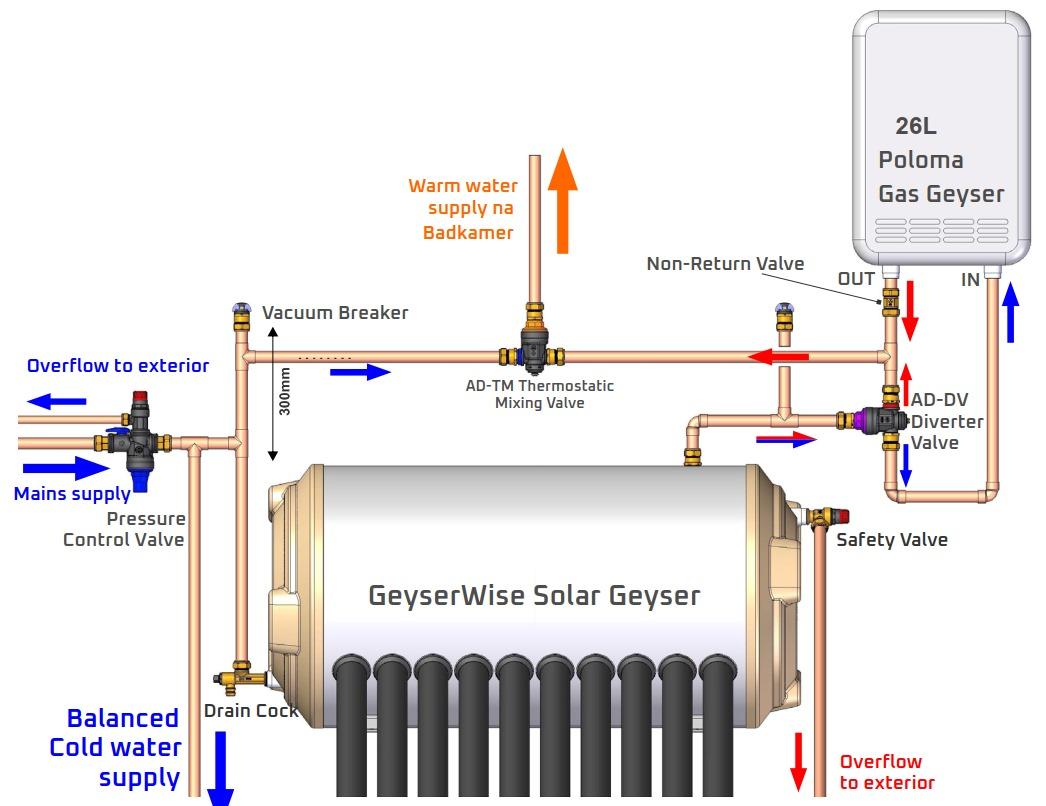
I have 2x Kodak 7.2 OG. We went off-grid with 1, but added the second because we have one 3kW geyser, one 2kW geyser, one 1.5kW oven, and the one inverter often could not charge the batteries with all our solar (the solar clipped). We spent an embarrassing amount of money converting our 3kW geyser to a solar geyser - adding a 20L thermal collector tubes system. It is horrible. If I could do it all again, I would just add a gas geyser to the loop (NO thermal collector). Something like: I am not sure I understand this. Unless your geyser is on its own circuit, and connected to its own output to the inverter, then I cannot understand how this would work. With the Kodak (Voltronic) inverters, you can set the output source priority to something where the battery is used as a last resort. So, theoretically, you could add something (e.g. microcontroller + switch + relay) to your loop which: when you want geyser, change output source priority to USB (or SUB), then turn on geyser. Final advice about the units: Multiple smaller inverters is much nicer to have. Kodak's are less than half the price they were 1 year ago. Kodak firmware is finnicky - ENSURE the supplier (e.g. Segen) upload matching firmware if you are going to parallel two units. I asked them to match the firmware, they said they would, and they still sent a unit with different firmware. It took 2 new control boards to get my parallel system up-and-running, and about 4 weeks of back-and-forth. So, ENSURE someone competent QAs your order. Hope this helps

-
In my experience, the only way to get the grid (ACin) to charge the batteries is with the Output Source Priority set to `Utility first`: Setting 1 to `USB` I always thought this a "bug", but the manual does mention Line vs Battery mode: I very much dislike this, being off-grid, because, whenever I use a generator, the only option is "use generator or use batteries". And, the max charging current does not automatically adjust based on the load. So, very often my generator is overloaded because it is a 5kVA connected to 2x 7.2kW kodaks. Hope this helps

-
If your unit does not turn on with only AC in, then, yes, you should: - Connect batteries (ONLY) - Change settings - Connect PV / Utility
-
Hello, This is more of a feature request, but also a question if it is feasible. Sometimes, I run my Kodak 7.2 OG with a generator attached in order to charge the batteries a bit faster than just solar. However, one of Kodak's fatal flaws is not having a setting for the AC in max current. So, for my 5kVA generator, I set the max "utility" charge current to 30A (2 Kodak's in parallel), but, if our load gains an extra 1kW, then the generator cuts out. So, if possible, it would be nice to have an automation to adjust the max utility charge current on the condition of the load. That way, I could decrease the charge current. Is this just not an option, because the time it takes the setting change would be too long to be practical in this case? --- An alternative I have considered is adding the automation to HA. However, my RPi running SA often disconnects from our WiFi (therefore, HA too). So, that is less reliable than SA having the automation.
-
My Kodak 7.2s constantly report lower battery voltage than true. So, I ignore all those warnings. The only thing you might be able to do is: - Change setting 25 to disable recording faults, and maybe 18 as well - Change 29 to a much lower value (assuming your battery BMS is decent, and will shut itself off) - I am not sure this will change when the inverter considers the battery "low" The manual has the fault and warning reference:


-
Hello, You should be able to power the inverter off of just AC in. Last I checked, in order to change some settings, Kodak specifically states to ONLY power the inverter off of AC in. The 5.5 might be different, but both the 3.6 and 7.2 work like this.
-
> How do you see what SOC your battery is in? I use Solar Assistant. Both the inverter and batteries are connected to a Raspberry Pi running it. > If i go the solar assist route i would be able to accurately determine SOC correct. If you connect the solar assistant device directly to the battery/bms, you will be able to determine the SOC as accurately as the bms. https://solar-assistant.io/help/battery/seplos-bms >And then change the parameter settings according to this? I do not know which parameter you mean by this. Often, battery manufacturers provide inverter settings for their batteries (e.g. Charge and float voltages) > Would i need two Raspberry Pi’s, one for each inverter? No. Provided the inverters are communicating with one another - which they must be to be on the same circuit - then you need two cables: One for the master battery, and one for an inverter. Solar Assistant's website provides a lot more information about what is needed for each brand.
-
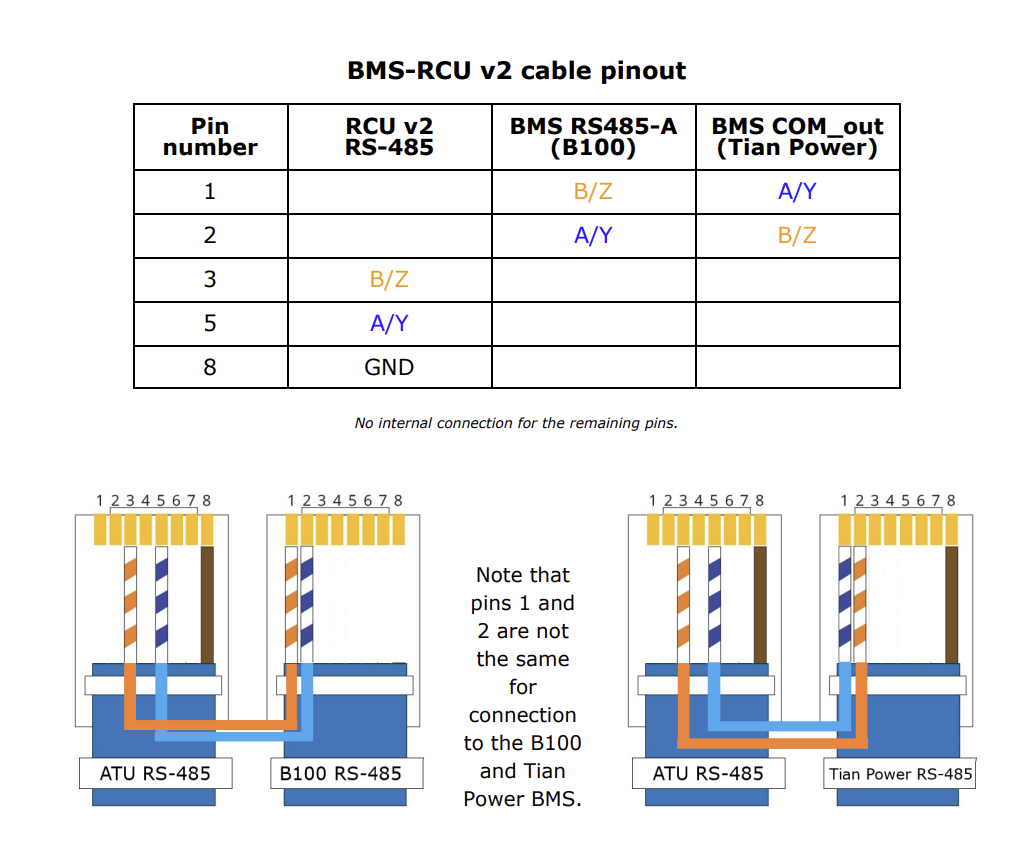
Hello @Tiaan Vermeulen 1. If you are using the inverter's reading of the battery state of charge without comms between the two, then the reading will be way off. You cannot rely on it. What I do is set 12 to 48V, and 13 to 50V, because the inverter often reads out battery as nearly empty, even though it is >50%. So, I do not want the inverter to be in charge of the battery at all; let the battery bms do all the work. 2. Setting 13 changes the priority back to the battery, once the voltage is >= what you set. In your case, once the voltage drops below 51V (setting 12), utility kicks in, and the battery is not used. Once, the batteries have charged above 53V (setting 13), the batteries are used again. The main point of these two settings is to prevent cases such as: a) Depleting the battery too far b) Frequent, low voltage cycling. E.g. utility is used at 48V, at 48.1V the battery is used until is reaches 48V, then utility, etc. 3. Setting 28 should be the AC Output Mode, which determines how the current and phases are shared. For a single inverter, this can only ever be `SIG`. For two inverters, this is probably `PAL` where two inverters are paralleled in single phase. In your case, unless you have specific split phase requirements/connections, this should be PAL. Kodak's communication between inverter and BMSs is finnicky at best. I have not managed to get mine to work on either CAN or RS485, using straight 1-8 pinout. My next try would have been one of: What batteries/bms do your parents have, and are they off-grid?

-
Thank you for the thorough explanations. To be clear, I have always used the flash tool that came with the firmware `.zip`, and all of the firmware I have tried flashing came straight from Segen. I have not been able to flash any firmware, once the inverter gets to its "32" state. No firmware version or method succeeds (or even starts). So, I have sent the unit back to Segen with explicit instructions for the required firmware.
-
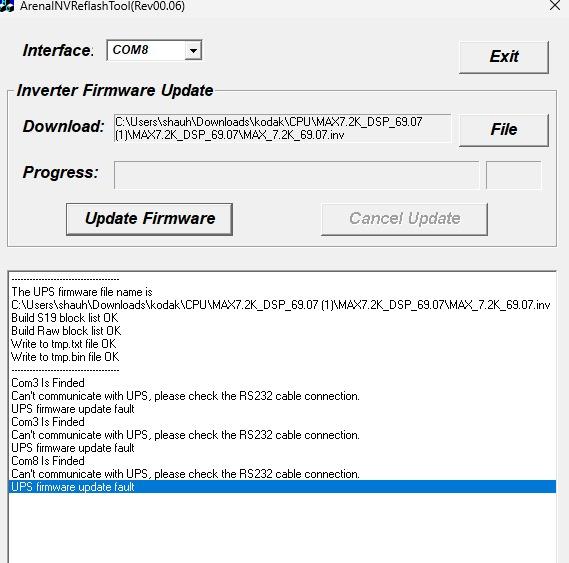
What is going wrong? It seems, whenever I update the U1 (main CPU) firmware, the control board bricks. Full story: 1. Bought 2nd inverter with U1 45.13, U2 12.21 2. Tried RS-232 - USB reflash to 69.07 (to match 1st inverter), all seems to go well 3. Warning 32 appears on display 4. No amount of re-trying, specific timing, USB OTG, or USB->USB yields anything useful. Same warning 32, and am unable to even reflash 45.13 on. 5. Send unit to Segen, they replace the control board, and stick some random (wrong) firmware on 56.07! 6. 56.07 has many missing settings, incorrect charge settings (max battery charge current is 120A instead of max 80A unit can do), but, most importantly, is missing setting 28 (change SIG to PAL for paralleling two units) 7. I told Segen this. They said it is impossible. I proved it to them. They sent me 69.07 to flash on new control board. 8. RS-232 - USB method does not work. See Image 1. 9. USB OTG method seems to work. It takes 12/13 minutes, then (see Video 1) [Image 1: Two RS232-USB cables were used, both known to work, that is why the different ports] [Video 1] What now?
-
Ha. I did not notice how that looks 😅 The batteries are called "Revov R100 (100Ah) and R200 (200Ah) batteries". No, I do not have a generator. We just weather out those days. To clarify, I have a ground-neutral bond, because of the inverter. It is not so in my main db. So, it sounds like I should leave the bond in the inverters? Otherwise, not have one at all?
-
Hello, Currently, I am off-grid, and my inverter has a ground-neutral bond, and my ground is earthed at my main breaker. I am upgrading my system to the below diagram. How should the AC outs of the two inverters be connected? Is it expected to connect them both to the same earth, and leave the ground-neutral bond?

-
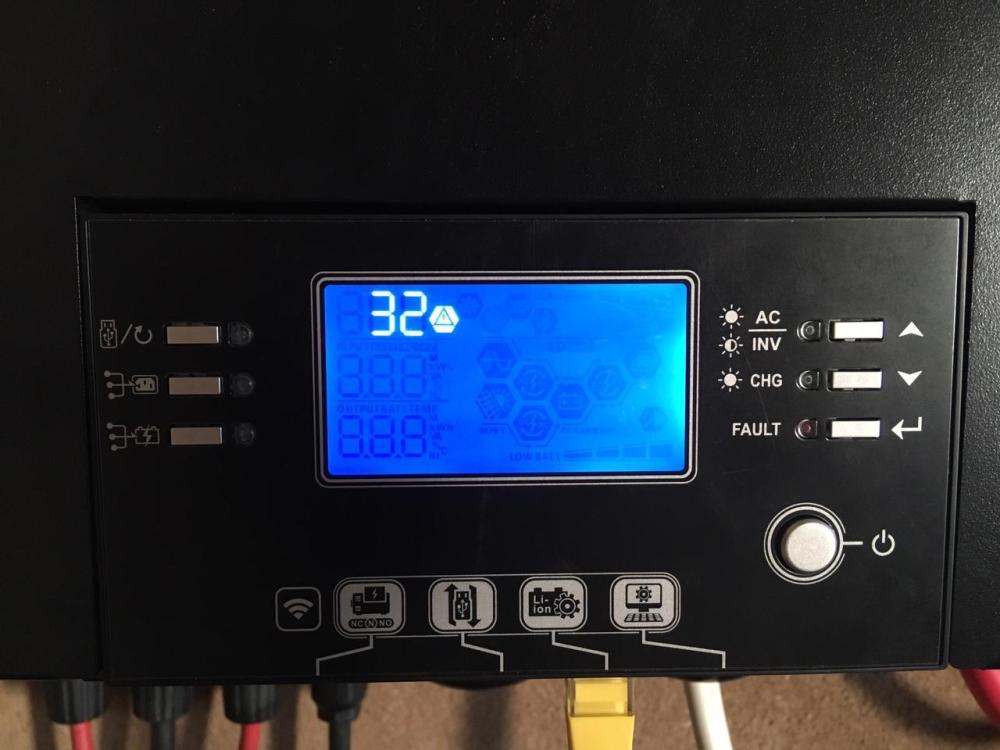
Heya @Ian I had exactly the same problem this last August on my 7.2. I do not remember any lightning around the time, but my display got stuck at: What I noticed was 52.4V between pins 1 and 2 of the display cable. So, it seemed like a short. I bought mine in May. So, it was still under warranty, and sent the unit in for repair. The only information I got about the repair was: > control board and remote was replaced, then tested working fine.
-
Hello there, As far as I understand it: Load: Total energy out the inverter on the AC Solar PV: Total energy in the PV inputs of the inverter The load does not include inefficiencies in converting the DC to AC. The solar PV is a total of the input, before inefficiencies of transforming/converting the PVdc to BATdc or ACout. In your case, 7.2kWh was made up of 4.4kWh from the battery bank, and (7.2-4.4=2.8)kWh from PV. The rest of the solar (6.8-2.8=4)kWh was used to charge the batteries. All of this is not including the losses. Not all 4.4kWh went from the battery bank to the load, and not all 4kWh went from PV to the battery bank, and not all 2.8kWh powered the load. --- I do not know about Grid used, because I am off-grid, and have never had an input to the AC of the inverter, but assume it would be the same as if you connected a 230V AC "PV" to the ACin of your inverter. That is, it would provide for the "Load" as well as to charge the battery bank.
-
Battery #3 is 200Ah. So, it is effectively two of the other batteries using the same terminal. It should be charging/discharging about double the other 3 (up to a point). Possibly. But, I would have expected the BMS to recalibrate once the battery stopped charging (reached 100%), which it does a few times per week. So, following this theory, the only explanation is the BMS is faulty and cannot accurately measure the voltage.
-
Update: 14/11/2023 On 11/11/2023, switched 35mm^2 cable to battery_2: There still appears to be a discrepancy in battery_4. So, it seems the most likely culprit is battery_4 having a higher internal resistance than the other batteries. 11/11/2023 14/11/2023 To finish the discussion about mismatched cable gauges, though, I will put one 35mm^2 cable on battery_1, and only 50mm^2 cables on battery_2. Seeing as #1 and #2 are most similar in charging behaviour, this should allow us to see if there would be any noticeable difference at all.