


Getskay
Members
-
Joined
-
Last visited
Everything posted by Getskay
-
many thanks Coulomb, the manual showing different picture than mine, my inverter pictured below, and to update that secondary version is 00002.03

-
Hi Folks, Can I have the updated firmware for my Axpert VM II 5KVA, noting that my watch power showing Main CPU: 00020.05 and secondary CPU: 00000.00

-
Really appreciate to help me do the conversion, i have my inverter 35 meter away from computer, and by using USB extender I have unstable signal that disconnect often. How to pin the other end to be able to connect it to router or computer?
-
Hello green energy harvesters hope you are doing good, and having shine sun everywhere. I just found item on eBay called Cloud-Box-M1 a small cheep device for solar monitoring and logging using wifi to Cloud. Have anyone experienced it or using such cheep device with Axpert hyprid inverter, plz share your experience with many thanks in advance.

-
I think Axpert manual stated that it support only 3 pannels in series, did you experienced any issue with 6 panels in series ?!
-
Ammazing information and capture my attention, as I have the same inverter but with Li-Ion battery, should I upgrade the frame-ware, and what is the procedure for that.
-
 which monitoring software is that?
 -
WoW, what a great power farm, god bless you man I have 3KW Solar pannel with 8KW LI-Ion battery and 5KW Axpert VM II, it run out of power at mid-night, What it requires to add 800 watt wind generator to my system (Wind Generator+Wind Controller), what else? , and can i connect the DC wires out from wind controller to same Inverter that have solar pannels connected?
-
Hi dears, as per the engineer, no need for BMS as the 84 cells comes in one batch and having same chimical specification and will distribute the voltage across to have all the same voltage. and he said that he tested that for multiple cycle in his lap with different voltage settings and ampere. as per his feedback, BMS are used only for big number of cells connected to one seriese, for example Ford C-Max connect the 84 cell in series to have over 300 Volt, and charging at extreamly high ampere, thus BMS is neccessary in this case to be sure first cell in series will not be damaged before the last cell in seriese becomes full.
-
I am thinking now to reduce the max value to something else, can you help me with calculation, and what will be the final capacity of the battery?
-
WoW, that is bad, How can i fix it now, how to add BMS and what options i could buy to work with 84 cells ?
-
Thanks Chris, I searched for that and I believe I don't have BMS, the engineer just put the cells beside and above each other with some bridge connection to link each 14 cells together in series then connect the 6 generated blocks to trunks as parallel (+ & -) and connect that trunks to the inverter. What problem I should expect? ? how to calculate the charging Amps needed for that battery? ? How much Watt the battery will store if charged full with 56volt? ? Should I change "Back to grid voltage" to be 44? FYI: my system is the first project the engineer do, he has no experience in this domain before.
-
I think he know nothing as he told me nothing but to watch the electric company wattmeter What about the charging Amps setting, what is the recommendation, or how can I do the calculation? On the other hand, can I install 2000W wind generator with controller and connect it as extra solar panel?
-
How can I insure the engineer installed it, can the picture tell that?, and what will happen if it is not installed?
-
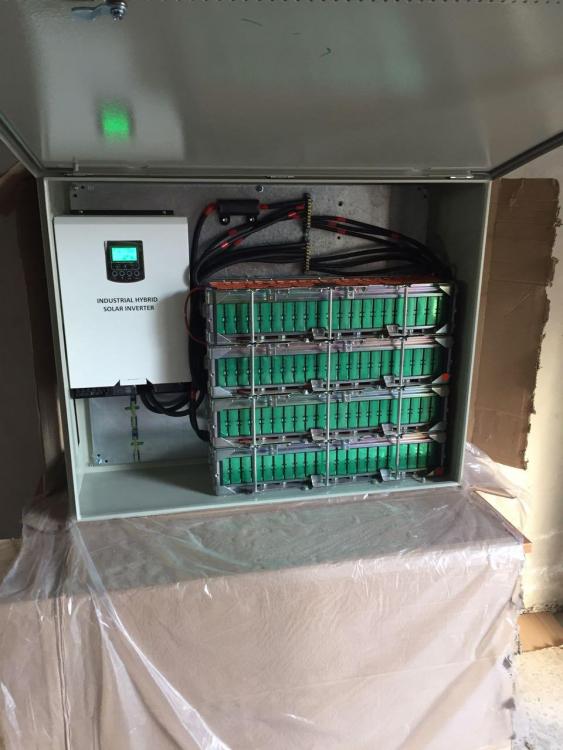
Many thanks Chris; for battery cut-off, I left it default 44, are you advice to change Back to grid voltage to be 44 also? for your question, I don't know what is BMS, but I can attach image for what exactly I have, additionally I installed 48 volt vent FAN on the right side up :
-
Thank you friend for the advice. currently with each two in series I hae my battery full @11:30AM, today it was cloudy so I got the bettery full @2:00PM, I will consider the setup you suggested in winter. for your question, I don't know how exactly I can calculate total power generated from PV and battery ( I don't have monitoring tools else the inverter itself) battery with 84 cell, Li-Ion with 28amp each covers my need at night until 7:00am
-
Anybody there
-
Hi experts, here want to share with you my current setup using Axpert MV II 5KVA inverter and Li-Ion batary. Buttery bank build with 6 block each having 14 cells (Li-Ion panasonic from used Ford C-Max enery) with total 84 cells and block voltage of 48 volt. Solar power connected 10 panel 320W each, every two panel in series, charging battery at 60amp max for 57.0 volt and system discharge it at night untill 46.0 volt then back to utility at 5:00 am on average, with load 500w from house appliance. I am using this setup to save electric bills, and to act as backup for short term disconnection. issues: I am still not sure of the settings I am using, also I cant have each block/cell readings with charge/discharge. also I am looking for a way to know how much power per day utilized from Pannel, Battary and utility. below settings and main page screenshot showing old firmeware version i think, and the parameter set for your review and your advices are most welcome.


