Skip to content
View in the app

A better way to browse. Learn more.

Power Forum - Renewable Energy Discussion

A full-screen app on your home screen with push notifications, badges and more.

To install this app on iOS and iPadOS
  1. Tap the Share icon in Safari
  2. Scroll the menu and tap Add to Home Screen.
  3. Tap Add in the top-right corner.
To install this app on Android
  1. Tap the 3-dot menu (⋮) in the top-right corner of the browser.
  2. Tap Add to Home screen or Install app.
  3. Confirm by tapping Install.

hardwic

Members
  • Joined

  • Last visited

  1. They responded that this can only be done in the latest firmware. I know the inverts raises it's output voltage to match the input before reconnecting the grid so clearly it can do it just the set point is not available (in my firmware at least)
  2. A slightly different take. This is a SunSynk plugged into Venus OS and running out proprietary controller
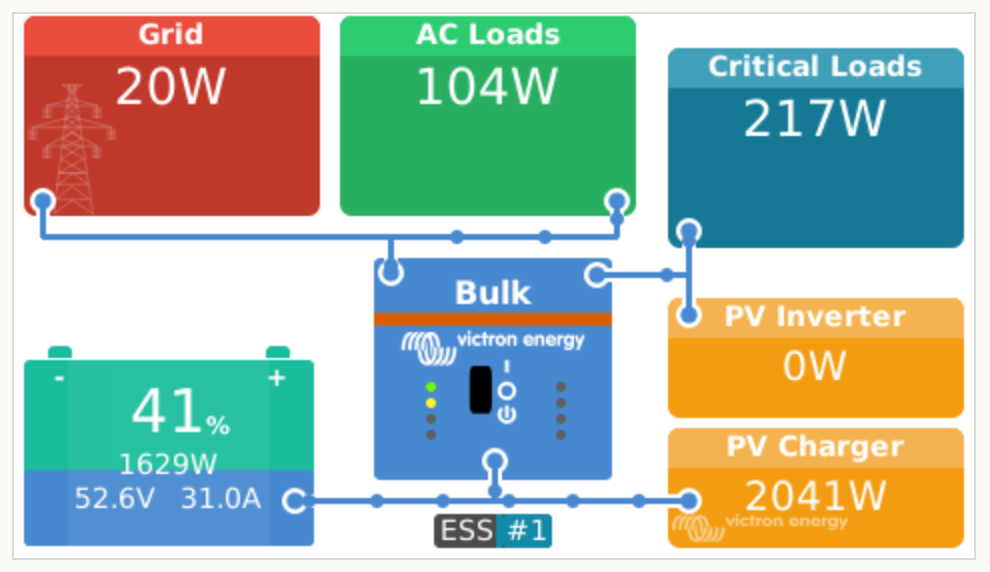
  3. On this topic, can anyone with firmware later that e416 confirm they are able to adjust the inverter voltage to more than 220V - day 230? Support tell me this can only be done with newer firmware but I only have the older data logger so want to be sure it's worth the effort of buying a new 1 just to upgrade the firmware.

Account

Navigation

Search

Search

Configure browser push notifications

Chrome (Android)
  1. Tap the lock icon next to the address bar.
  2. Tap Permissions → Notifications.
  3. Adjust your preference.
Chrome (Desktop)
  1. Click the padlock icon in the address bar.
  2. Select Site settings.
  3. Find Notifications and adjust your preference.