AlexTZA
Members
-
Joined
-
Last visited
Everything posted by AlexTZA
-
I do like the Greenrich warranty - it's very clear and straightforward without a clause for every possible reason to void the warranty. As to whether if push comes to shove they will honour it a few years down the line is always the question but of the one or two batteries we have returned (which is tiny compared to another local company that has the same name as a famous space telescope), we've never had any arguments.
-
@Pho3niX90 Yeah, the CT detection used to work but seems broken on mine as well...sigh. Sometimes it seems like things are going more backwards than forwards. Is the CT installed by the main DB switch...before or after doesn't matter. Main thing is the CT should be measuring the overall house grid power flow, not the grid input to the inverter. CT sounds the right way around...presume the cable order is white then black from left to right in the connection terminal? Is your inverter firmware up to date? You will need to contact support to update it if it is not.
-
@Pho3niX90 Nope, I haven't been able to get the WiFi to work. I've asked local support about it before and they just ignored the question. When you say you accessed the inverter via it's IP, from where/how are you doing that?
-
Yes, this is a rather unfortunately situation. We also moved away from using Hubble a while ago due to all the problems with the AM2s and they are still the batteries that give us the most issues. The time spent on resolving these these issues is just not acceptable/sustainable. For example, their latest firmware requires one to fully discharge the battery to 44V and then back up to 100% as part of the update/fix procedure which as one might imagine is quite fun to do during loadshedding and for sites with multiple batteries - one better have lots of good reading material on hand. So while we also have installations that have never had issues, I'm very wary of the longevity of these batteries and ultimately, as you point out, what warranty backing Hubble will actually provide over time. Their documented warranty allows them to invalidate the warranty under almost any conditions which is not at all comforting at all as it does appear the AM2 has some serious problems. We also have gone through the pushback from them on the BMS warranty/100A discharge story which a load of BS. Their website and own manual/datasheet proclaim how the battery has "current limiting" and will work perfectly with non-BMS comms inverters because of all the BMS protections that will prevent overcurrent situations. But at the first turn, they attempted to throw BMS logs back at us indicating the battery was discharged at currents higher than 100A (they produced BMS logs indicating up to 125A), yet the BMS does absolutely nothing to prevent this and thus destroyed itself. After pointing this rather conflicting information out to them, they have thus far repaired various batteries for us under warranty without further issue. So yes, the brand damage is done in my mind - we cannot in good conscience or from a risk point of view use Hubble batteries.
-
Note, for those interested I have swapped the 6kw for the 8kw version for comparison - see my update in the original post.
-
@Pieter Lourens - no worries, thanks for the input regardless!
-
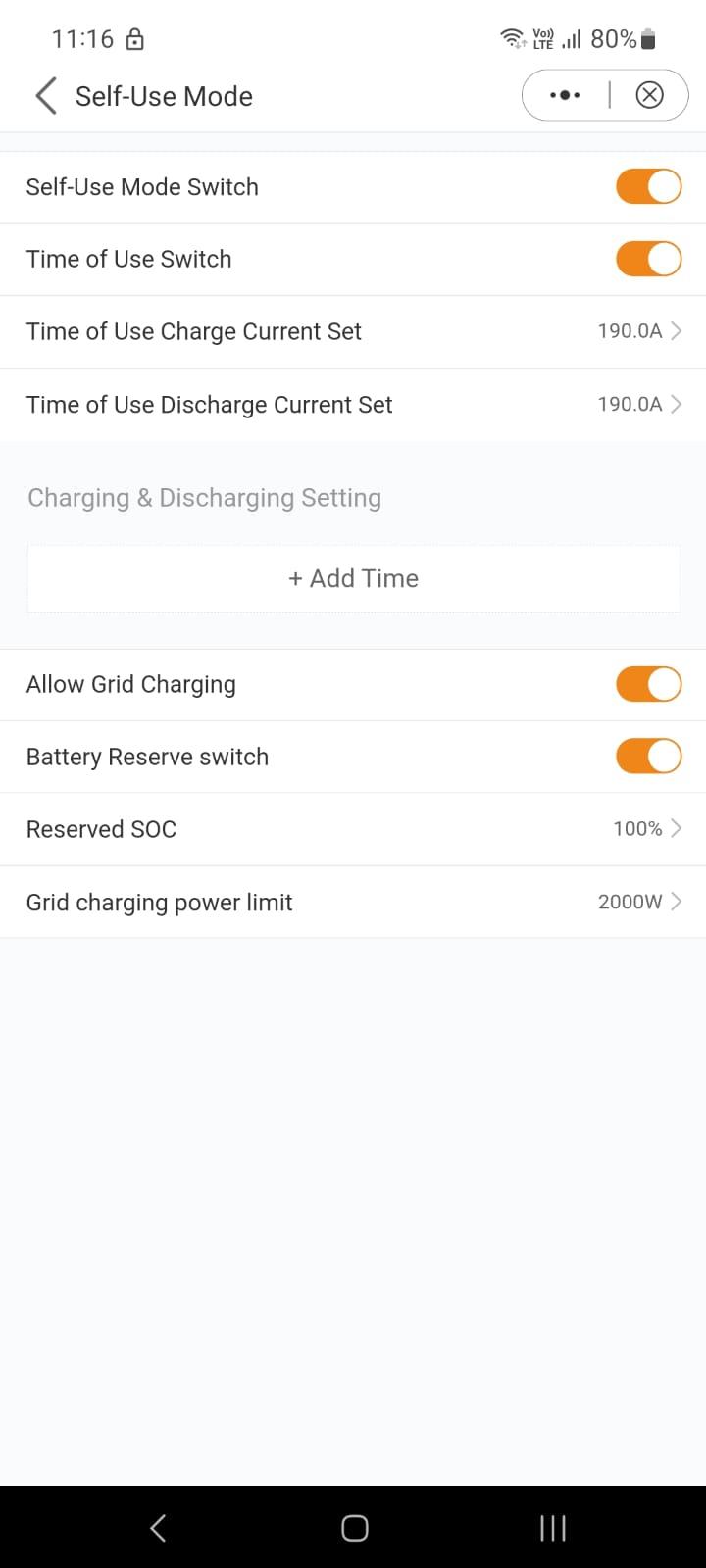
@Pieter Lourens I can't see a Backup option anywhere in the Work mode settings or anywhere else. Here is the Self-Use mode options, the other work modes are somewhat similar. I've trawled through all the other settings as well. Other's can let me know if they see something different for App v4.1.1: I do have a vague recollection of something like that when I first installed the inverter, but the app and firmware have changed quite significantly since then and a lot of settings that used to be available have disappeared. I've checked on two different inverters with the same result. Are you perhaps referring to options available on an S5 or older model? Unfortunately, the app/firmware state of things is a bit of a mess to be honest. I wanted to do a factory reset of the one inverters to clean out all potential settings that may be creating an issue on one of the inverters. Solis support says oh that's easy, just go to Factory Reset, except it doesn't exist on my side. Tried uninstalled/reinstalling the app, logging in as installer account, same result with two different inverters.

-
@cp69 Aah I see - back to your original question then. You can't export power to the grid and not export to the non-essential loads (geyser) at the same time since they are connected on the same circuit. If you want to export to the grid, the inverter will push power on the grid side which will be consumed by the non-essential loads as well. The only way to limit this as far as I can see is to not allow the inverter to export power, or set a a Battery Reserve setting that will stop the export once the reserve SoC value has been reached, or move the CT onto the inverter grid input cable as a potential workaround to limit to inverter to powering the loads only as the Solis doesn't seem to have a setting to Limit to Loads only as per a Sunsynk (unless Solis support can enlighten us otherwise).
-
@Pieter Lourens I'm not sure I follow. Are you referring to the Work Modes settings? To clarify, if I have Work Mode->Self Use Mode enabled, the other modes (Feed in Priority, Peak-shaving, Off Grid) are disabled, so only one is usable at any time. In Self-Use Mode, the Battery Reserve option is available regardless of the Time of Use option being enabled/disabled. So currently, if the Battery Reserve option is enabled and set to 80%, the inverter won't discharge the battery past 80% to power the loads if grid is available, as you describe.
-
@cp69 You shouldn't be getting feedback to the grid past the CT sensor, if it's installed correctly and configured not to export to the grid. But the inverter will backfeed to the non-essential loads until the battery reserve SoC value is reached.
-
@Rautenk Have you tried Battery Setting->Battery Wakeup Setting and Battery-Setting->Auto Bat Awaken?
-
@cp69 That's a VERY good question - something I never noticed before! I can't see any obvious setting on the inverter to limit the output to power the backup/loads only. On a Sunsynk inverter, you can choose to either limit the output to the backup port only or allow feeding of essential/non essential loads or allow solar power exporting. I would consider this fairly crucial functionality. You could try contact Solis support and see what they say (please provide feedback here if they are or aren't helpful in this regard). You could set the Work Mode->Self-Use Battery Reserve Switch and set the Battery reserve to 100%, but this will always hold your battery at 100% so solar will never charge it, which isn't exactly economic.
-
@jbroo To clarify, you can take either approach - series in one direction or parallel in two directions will both work. If the split directions is easier for you, use that. The 600W panels have a normal operating voltage near the bottom end of MPPT operating range if used in parallel - personally I'd prefer to not be that close to the minimum due to the slight drop in efficiency but that's just me. To illustrate, I used the SMA Sunny Design simulator to illustrate the differences in total yield between the two approaches. I chose a random location in central Durban, ignored shading, and approximated the panel azimuths in the NNW and ENE directions you want to use and set the panel tilt to 15 deg. I used 550W panels and I had to add multiple panels to each array so that the configuration would work voltage wise with one of the SMA inverters but the ratio of the overall yield will be comparable to your setup. Note the annual energy yield/performance figures. The difference in overall annual yield between the two configurations is about 4%. Mixed NNW and ENE in parallel on single string (polystring): Single NNW array on single string:


-
Yes, yes of course. That does circle back to the original topic that in an estate that does bulk power purchasing from Eskom/CoJ and they have or implement a microgrid, strictly speaking that bulk purchase agreement would have to be modified as per as any other SSEG registered system. So all related costs, change to Time of Use tariff and all the resulting administrative grey hairs. Somewhere the issue of generation within a bulk purchaser must be addressed i.e 10 houses have solar in such an estate, does the bulk purchaser have to collectively be SSEG registered?
-
@Bobster. Totally agree - and it would be helpful if the application process could be done online, like most things in the 21st century.
-
@WannabeSolarSparky I had another look at section 17 of the bylaw - see item 4. So if you have solar, you should be SSEG registered, which means there would be an agreement between you and the municipality regarding power generated on your premises (exported or not). In this context, my reading of item 4 would still not permit you to supply to anyone else without authorisation (which probably means no). If you are off grid, then the municipal agreements would appear to fall away but it wouldn't surprise me if there is a clause somewhere that prohibits someone from receiving power from another entity besides the municipality if they are grid connected.

-
@Bobster. The last time I checked their documentation requirements, you will still need the system to be signed off by a Pr.Eng. If SANS 10142-1-2 ever gets released, I have heard from one source close to the development of the national SSEG registration guidelines indicate that the intention is this requirement will fall away and electricians will be able to provide the requisite legal sign-off. Practically and economically, this makes sense. As for being on prepaid - not according to the COJ electricity bylaws. As soon as you are able to generate your own power with PV, you need to do the SSEG registration and along with that comes a bidirectional power meter on a Time-of-Use tariff. So until COJ decides to remove your meter or start enforcing the SSEG requirement, I would just keep the status quo. Can you imagine the administrative poo-storm that will occur when they decide to enforce the registration 😄. When the time comes, depending on your power consumption, it may make more sense to avoid all this hassle, upfront and fixed ongoing costs, and buy some more solar/batteries and a small generator and go off grid.
-
Given the low input and operating voltages range so the inverter, I'd go for two 600-ish W panels in series. They usually have a Vmpp around 35V and a Voc of 42V which fall well within the operating bounds of the inverter. I would not mix the directions of the panels as you suggest in the above image. Can you fit two panels in landscape orientation on the NNW facing roof?
-
Municipal electricity bylaws are the largest stumbling block if the grid infrastructure within the estate is not owned by the estate, Does the estate buy power in bulk from COJ or Eskom or does each property have their own COJ/Eskom meter? The idea is admirable and is possible by forming a microgrid that is owned by the estate. However, this is not as easy as just wiring everyone with an inverter together - certainly not on the load side of the inverters and requires a fair amount of technical issues that need to be considered and controlled. For example, power sharing would only really work if a good majority of the inverters already in place are proper hybrid inverters that at minimum respond to frequency shifting to up/down regulate their power output to the microgrid. Such a setup also requires a reference grid forming inverter or typically inverters, batteries and some black-start solar, all of which has to be properly sized. Also, there has to be load power measurement, limitation and control so that someone doesn't plug their bar heaters in when running off battery or to control the size of the load.
-
@Wesley.Davids Hmm. What is the "PackVol" voltage on the battery side now as reported on the battery LCD screen?
-
I was actually referring to the inverter side BMS screen, same as you originally posted. A bit strange the battery is requesting a charge voltage that is so much lower than that specified in the datasheet/manual. Set the float, absorption and equilisation charge voltages to the charge voltage which is 58.4v according to the manual. Let the battery charge to that voltage and stay there/float for a few hours, or a day would be better. You could then switch back to lithium and see what the SoC does during the next discharge.
-
This looks like a battery SoC calibration issue, perhaps in combination with a battery and/or inverter firmware issue. What does the inverter BMS screen show when the battery is supposedly at 100%? This can normally be corrected for the battery by changing the inverter to AGM (voltage) mode and charging the battery using the specified charge voltage of the battery and letting the battery cells balance for a few hours (set the voltages in the screen first before changing modes). Next would be to try and understand why this is happening in the first place. I presume there is no solar attached?
-
The Power Change Slope Limit? It did seem to when I was testing but I changed it back to 10% since Solis was throwing a wobbly about changing it.
-
It appears to relate to a technical standard for inverters for controlling the export of power to the grid. Sunsynk Limited https://portal.segensolar.co.za/reseller/docs/G1008.8.pdf
-
@Nabeel Ahmad Yes, you can use the aux port as you describe. The settings required are under Smart Port - Smart Load switch: