


Screech
Members
-
Joined
-
Last visited
-
Dear all, I am using Solar -Assistant version "2025-02-10 (bookworm)" in combination with 6 parallel Pytes batteries model 48100R-B. The solar assistant raspberry pi communicates with the pytes battery (master) via the console (RS232) Port. Now we have discovered that since we start using solar assistant to monitor the batteries we periodically and randomly get an error on the master battery indicating "System Fault 0x200" which indicates a comm problem with one of the slaves and we can also not access this slave directly. After rebooting the respective battery the problem disappear and reappear randomly again on one of teh batteries after a couple of days. This some times affect only 1 battery and sometimes multiple batteries in the 6-battery stack. Here is an example output of the master battery when the error occurs: PYTES_debug>pwr 1 @ ---------------------------- Power 1 Voltage : 52713 mV SOC Voltage : 0 mV Current : 0 mA Temperature : 32000 mC Coulomb : 56 % Total Coulomb : 100000 mAH Real Coulomb : 100000 mAH Total Power In : 5981737 AS Total Power Out : 5937920 AS Basic Status : SysError Volt Status : Normal Current Status : Normal Tmpr. Status : Normal Coul. Status : Normal Bat Status : VNOR TNOR CMOS Status : OFF DMOS Status : OFF Bat Protect ENA : OV HV LV UV SLP OT HT LT UT Pwr Protect ENA : OV HV LV UV SLP OT HT LT UT COC COC2 COCA DOCA DOC DOC2 SC Bat Events : 0x0 Power Events : 0x0 System Fault : 0x200 COMM EX Status : 0x0 ---------------------------- Command completed successfully All Batteries are running the same firmware and are comm cables are OK. Has anyone seen this before or have an idea what is causing this? Screech
-
I have seen any new development on ICM etc. I have just upgraded teh firmware of my pytes batteries and now ICM does not collect the information correctly from them. I am afraid it is best to start looking for alternatives. Loved ICM but without support....... If any one ha smore info please share \advice
-
-
Hi I am using ICM form ICC Software. I am want to integrate ICM into HomeAssistant using MQTT. Can anyone help me into the right direction as I cannot get anyone from ICC Software and supporting odumentataion. On the MQTT page I see there is a username and a password but I do not what the password is . Any help pointing me into the right direction will be appreciated. Regards. Screech
-
I have understood from a post on this forum that Manie from ICC Software has passed. As a long time user of ISC I am wondering if any one knows what will happen with the software now? I have tried Solar Assistant in the past but like ICM more. I am afraid that if no more developments are taking place on ICM I will be forced to move to Solar Assistant. Any other users of ICM ? What are your next step or recommendation regarding ICM Regards, Screech
-
Any one knows what the future for ICM will now be now that Manie has passed away? There web site is still functional but no one is responding via mail?
-
I am currently running: Main cpu : 74.01 Remote panel: 30.01 And I am trying to update to: Main cpu : 74.04 Remote panel: 30.07 I also have a feeling that they have send me the wrong firmware upgrade package but the support of MPP solar is very slow in responding back (takes almost 2 days mail exhcanges). Is there another reliable way of getting teh firmware and how can I know which DSP I have etc. According to the vendor after updating those two firmwares I will be able to switch between utility and battery base on the battery SOC (when battery is communicating through the BMS port) instead of its voltage which is the functionality that I am looking for. Regards,
-
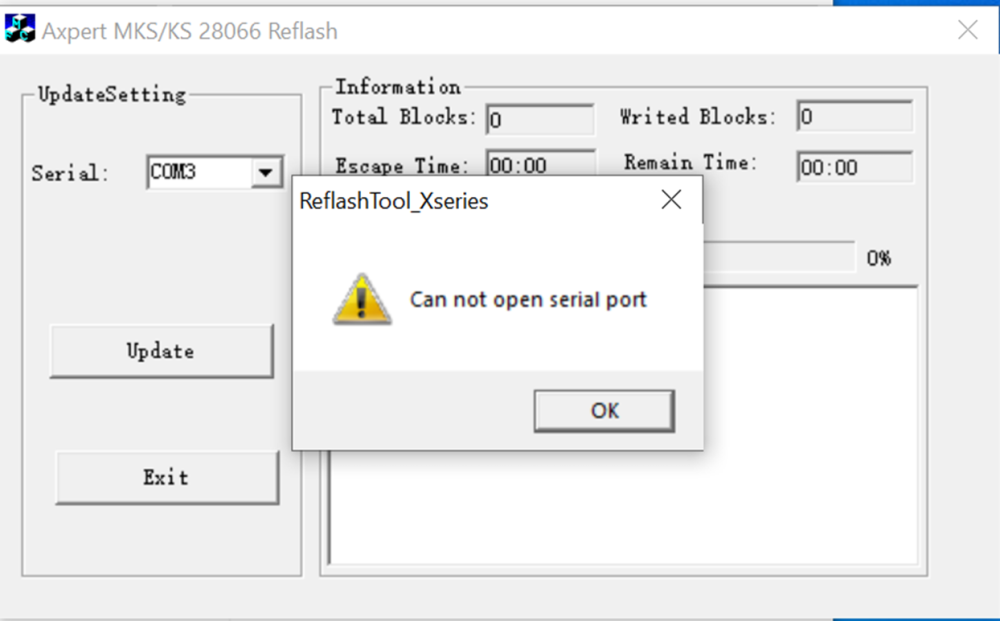
Dear all, I can successfully connect to the MPP Solar inverter model U5648MS inverter to watchpower using the COM port. However when I try to upgrade the firmware I get the following error: I can confirm that the COM port used is the correct comport and that this comport is also not used by any other application ( have also confirmed that watchpower is not running in the background). The error message does not appear immediately but after a few seconds ( I estimate 7-10 seconds) What is the reason that I can establish a serial communication with watchpower but cannot upgrade the firmware? Screech
-
OK I will check what I have and do some testing
-
Coulomb, Tnx for the feedback. I am not located in SA but in the caribbean and I can easily get stuff from either the US or Europe. The capabilities of most USB to serials are dependent on the chipset being used in them. So If I can find one with the same chipset that will most probably work. Let me know what you are using and I will try to find the same or an equivalent. Note: the issue with ordering items in the caribbean is that although I can order almost everything shipping is expensive and returning items is time consuming and also expensive so I want to order something proven to work. Tnx
-
I have a feeling too that it is the USB to serial adapter but I am not sure as the USB-to-Serial adapter\converter that I am using works OK for communicating to pylontech and pytes batteries. It is only with teh inverter that I am having issues Are there any that you have good experience with that you can recommend. I am located in the caribbean so I will be ordering it through Amazon in the US. Tnx
-
_
-
Dear community, I am unable to connect the U5648MS inverter via serial port to my computer running watchpower. When using the serial cable that came with the inverter in combination with a USB to serial adapter watchpower does not detect the inverter. However I replace the serial connection with a USB connection , watchpower does detect the inverter without problem. Question now is can you connect the U5648MS inverter via a serial connection to the watchpower application or is only via USB? What could be the cause of this problem? (tryingh to get support from MPP Solar but they are closed due to chinese new year) tnx
-
Dear community, I have an MPP solar inverter model U5648MS. My inverter is currently running the following firmware versions: Main CPU firmware : 74.01 Secondary CPU firmware : 30.01 I am trying to connect the inverter to my Pytes 48100R battery (version C) without success as I keep getting error 61. I have set dip switch 1 on the master battery to on and the remaining switches to off. In addition I have tried with both battery type (option 5) set to “Pyl” as wells as “Lib” both without success. Do you have any idea why I am unable to get the inverter to communicate with the Pytes battery or a pylontech battery? Note: I am using the correct cable (pin 1 and 2 on the battery goes to pin 3 and 5 on the inverter) and the cable is connected to the RS485 port on the battery and to the BMS port on the inverter. Tnx,
-
Dear all, I am currently charging my Lithium (LifPO4) as follow: Bulk\Absorb: 3.59V /cell Float : 3.53 V/cell Based on some feedback received I am considering to change these to (but I am not sure) Bulk\Absorb: 3.51V /cell Float : 3.48 V/cell What is generally the best practice (charge voltage) for charging Litium batteries when there is no communication between the inverter (with buid-in charger) and the battery.?
-
Dear all, What is the best way for me to check the health of a pylontech or Pytes battery? Should I only check the “SOH” or should I also check the “System FCC” (FCC= Full Charge Capacity) both shown with the command “pwrsys” (see attached) Please advise. pwrsys_output.pdf

