


Operator
Members
-
Joined
-
Last visited
Everything posted by Operator
-
R500 is expensive yes................but look at the details. Could be that electrical/mechanical/electronic breakage cover is included on the equipment. Without properly going into the details, you cant judge the quote If it is however excluded, they are truly ripping you off
-
Insurance companies don't go around and verify CoCs. It is your own responsibility. They might request that you have it in place when you claim
-
Set the inverter priority to SUB. Solar first.................Utility second...........Battery third and you will be fine. It will just trickle during the day and keep your batteries topped up. At night the Utility will take over and also keep your batteries full Nothing to worry about.
-
My Kodak OGS 5.6 did the same. Rebooted the inverter and the problem was gone
-
@NeilJ Similar inverter at our complex. Yesterday we added a 545W Canadian Solar pv panel on to it. It works like a charm. 👌
-
My Kodak 5.6 OGS inverter do the same. Nothing to do worry about
-
Where do you get this information from? Sounds like a bit of bullshit to me 💩
-
@Vinesh21 Remember that most inverters have built-in cooling fans, that run continuously and it might be loud...............and even louder while it is converting battery power to 220v during loadshedding. Look for a inverter like the 5kw Sunsynk that does not have fans, but massive heatsinks at the back. Will be slightly more to buy, but dead quiet.
-
Hi I live in a HOA complex. At the main entrance we have an (older) Mercer 3.kw hybrid inverter. 24v systerm This is only used to charge the 4 x 100ah batteries. (batteries are linked up in 24v configuration). These batteries are only working during loadshedding. Then it supplies power to a few (LED) streetlights and keep the batteries of the main gate motors topped up. Played around with the settings and there is a cut-off voltage setting. If we have prolonged outage(recently we had a 13 hour outage) the batteries were completely drained and we want to prevent damage to the batteries. What would the cut-off voltage be for the batteries? It does not give option to do a % cut-off............only a voltage amount? Please help and give you comments.......
-
I have 6 x 545 w Canadian Solar panels. This just below 3,3 kw potential . Regularly hit 3,5 kw for short notice periods. Once I've hit 3,7kw
-
Do you have enough hot water after hours? Maybe install an extra 100 liter geyser inline to feed your existing geyser., but you put a timer on it and only heat it up after lunch. Good way to have a good reserve of hot water without extra cost This way you will have tons of hot water without your main geyser coming on and using Eskom power at night
-
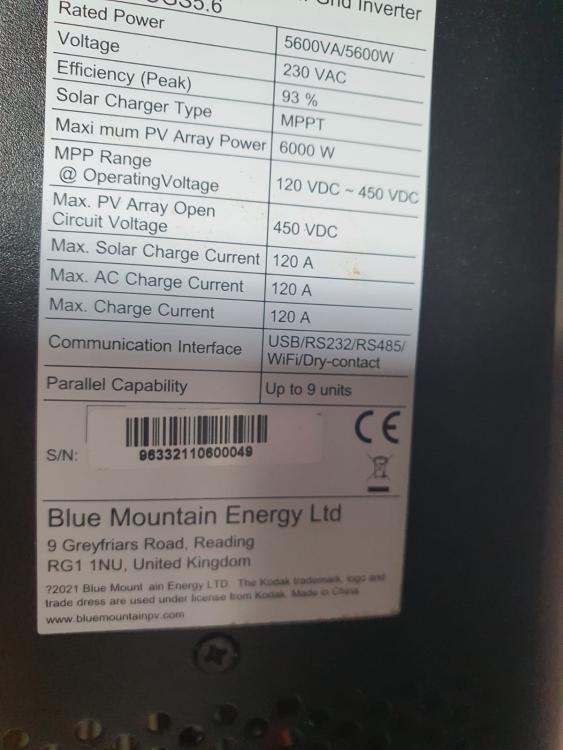
Swannie, get your wifi password ready and on hand before beginning Open the app Click on devices at the bottom. You will then see device list. Click on the + button righthand top Then QR reader will pop up. Scan the serialnumber barcode on the side of the inverter and follow instructions. If this doesn't work try to scan the barcode at the bottom of the inverter My inverter took a while to connect. If i remember correctly it was more than 30 minutes. Thought I failed , but suddenly it was active! Tip: Be patient. It is not very user friendly
-
Do you use the Watchpower app on your phone, that connects to the Kodak Inverter?



