Files
220 files
-
Deye SUN-5K-SG Repair Guide.
1.62MB 17 Pages PDF File
Please Note;
This is not an owners manual or an installation manual. It is pitched at readers with good basic electrical knowledge who need to troubleshoot or fault-find a Deye Inverter.
This manual is for Deye SUN-5K-SG series, it can help service personal perform the basic maintenance and repair service.
This manual focus on the service, so you should get the basic operation of the Inverter/Charger from the user manual, and make sure you had read and understood user manual before you use this service manual.
- 298 Downloads
Updated -
Axpert Max II 8kw Service Manual
Version unknown
2.94MB 29 Pages PDF File
Please Note;
This is not an owners manual or an installation manual. It is pitched at readers with good basic electrical knowledge who need to troubleshoot or fault-find an Axpert Inverter at component level.
This manual is for Axpert Max II 8KW series, it can help service personal perform the basic maintenance and repair service.
This manual focus on the service, so you should get the basic operation of the Inverter/Charger from the user manual, and make sure you had read and understood user manual before you use this service manual.
Table of contents
1. GENERAL INFORMATION
1.1 GETTING START
1.2 BASIC TOPOLOGY INTRODUCTION
1.3 INVERTER FAMILY
1.4 OVERVIEW THE INVERTER
2. TROUBLESHOOTING
2.1 HOW TO DO
2.2 FAULT CONDITION
2.3 TEST STEP
3. CHECKING AND MEASURING GUIDE
3.1 CHECK THE BATTERY SIDE COMPONENTS ON MAIN BOARD
3.2 CHECK THE BUS SIDE COMPONENTS ON MAIN BOARD
3.3 CHECK THE BUCK CIRCUIT ON MAIN BOARD
3.4 CHECK THE INV FULL BRIDGE ON MAIN BOARD
3.5 CHECK BATT AND MAIN POWER SPS ON MAIN BOARD
3.6 CHECK AC SPS AND PV SPS
3.7 CHECK THE BOOST ON MPPT BOARD
4. DISASSEMBLING GUIDE
TOTAL WIRING DIAGRAM:
- 366 Downloads
Submitted -
MPP Solar Inc AHS UPS PIP-LC 1.2-8kva Service Manual
16 Pages PDF File, 216KB
Unknown origin, unverified accuracy, generally poor quality and of very limited use.
This is a very basic service document that outlines topograpghy, test points and test voltages along with some limited circuit schematic drawings and blurred photos that look like they were taken by an over-caffinated three year old. When I worked on a faulty unit this was all the info I could find... I would warn in advance it's far from extensive but marginally better than nothing, classing it as a 'service manual' is somewhere between bare faced lying and click bait. If there's ever an award for worst quality upload I've alread won it with this one, the only reason I did upload it is because it helped me out at the time I needed it and other info was non existant.
Enjoy, as an uploader this is not my finest hour.
- 110 Downloads
Updated -
Axpert Max 7200-48 Service Manual
V-RDP-004-73 A
4.24MB PDF file, 29 pages
Please Note;
This is not an owners manual, a setup guide nor an installation manual.
It is pitched at readers with good basic electrical knowledge and test equipment who need to troubleshoot or fault-find an Axpert Max 7200-48 Inverter at component level.
This manual is for Voltronic Axpert Max 7200 Inverter, it can help service personal perform the basic maintenance and repair service. This manual focus on repairs and service, so you should get the basic operation of the Inverter/Charger from the user manual, and make sure you had read and understood user manual before you use this service manual.
- 246 Downloads
Submitted -
Voltronic-InfiniSolar-Mecer-RCT 30kW Inverter Service Manual
Release 11 Jan 2019
Voltronics Hybrid 20-30KW PV Inverter
5.03MB PDF file, 58 pages
Please Note;
This is not an owners manual, a setup guide nor an installation manual.
It is pitched at readers with good basic electrical knowledge and test equipment who need to troubleshoot or fault-find a Voltronic Hybrid 30KW PV Inverter at component level.
This manual is for Voltronic (AKA InfiniSolar-Mecer-RCT) Hybrid 30KW PV Inverter, it can help service personal perform the basic maintenance and repair service.
This manual focus on the service, so you should get the basic operation of the Inverter/Charger from the user manual, and make sure you had read and understood user manual before you use this service manual.
- 133 Downloads
Submitted -
Axpert VII LV 6KW Charger Inverter LVX6048 service manual
V0.0
5.07MB 27 Pages PDF File
Please Note;
This is not an owners manual or an installation manual. It is pitched at readers with good basic electrical knowledge who need to troubleshoot or fault-find an Axpert Inverter.
This manual is for Axpert VII LV 6KW series, it can help service personal perform the basic maintenance and repair service.
This manual focus on the service, so you should get the basic operation of the Inverter/Charger from the user manual, and make sure you had read and understood user manual before you use this service manual.
Table of contents
1. General information
1.1 Getting start
1.2 Basic topology introduction
1.3 Overview the inverter
1.4 PCB overview
2. Troubleshooting
2.1 How to do ..
2.2 Check the fault information
2.3 Fault condition
2.4 Test step
3. Checking and measuring guide
3.1 Check the battery side components
3.2 Check the bus side components
Check the buck circuit
3.3 Check the INV full bridge
3.4 Check the MPPT board
4. Disassembling guide
4.1 Open the case
4.2 Remove the COMM board
4.3 Remove the Relay board
4.4 Remove the control board
4.5 Remove the fan paper and the MPPT board
4.6 Remove the main board
5. Cables connection
- 144 Downloads
Submitted -
Axpert VM III 5000 3000 Service Manual
V2.01 Release 22 Jan 2019
Axpert VM III-5200/VM III-3200
S1711171 V-RDP-004-73 A
33 pages pdf file 2.36MB.
Please Note;
This is not an owners manual, a setup guide or an installation manual.
It is pitched at readers with good basic electrical knowledge and test equipment who need to troubleshoot or fault-find an Axpert VM III at component level.
This manual is for Axpert VM III 5000 3000 series, it can help service personal perform the basic maintenance and repair service.
This manual focus on the service, so you should get the basic operation of the Inverter/Charger from the user manual, and make sure you had read and understood user manual before you use this service manual.
Table of contents
1. GENERAL INFORMATION
1.1 GETTING START
1.2 BASIC TOPOLOGY INTRODUCTION
1.3 INVERTER FAMILY
1.4 OVERVIEW THE INVERTER
2. TROUBLESHOOTING
2.1 HOW TO DO
2.2 FAULT CONDITION
2.3 TEST STEP
3. CHECKING AND MEASURING GUIDE
3.1 CHECK THE BATTERY SIDE COMPONENTS ON MAIN BOARD
3.2 CHECK THE BUS SIDE COMPONENTS ON MAIN BOARD
3.3 CHECK THE BUCK CIRCUIT ON MAIN BOARD
3.4 CHECK THE INV FULL BRIDGE ON MAIN BOARD
3.5 CHECK BATT AND MAIN POWER SPS ON MAIN BOARD
3.6 CHECK AC SPS ON MPPT BOARD
3.7 CHECK THE BUS SOFT START CIRCUIT ON MPPT BOARD (TX1: ESPECIALLY FOR 09 FAULT)
3.8 CHECK THE BOOST ON MPPT BOARD
4. DISASSEMBLING GUIDE
TOTAL WIRING DIAGRAM
- 395 Downloads
Submitted -
This is as good as new. Battery backup system was replaced with solar system so I am selling this inventer. It's ready for collection in Camps Bay. Reasonable offer will be accepted.
- 59 Downloads
Submitted -
For what ever it is worth. I just find that there is very little info about this battery and I don't think that it is a bad battery at all.
- 23 Downloads
Submitted -
This is removable display firmware version 02.81 for Axpert King 1 and Axpert VM III, 48 V or 24 V, for the original STMicroelectronics branded microcontroller. Do NOT use with the more recent GigaDevice branded MCUs. Only use if the existing display firmware version (as shown in a monitoring program, NOT the display) is 02.xx (NOT 102.xx). Do not use with any other models.
[ Edit April 2024: I now believe that this is the first 02.xx display firmware that will run with both STI and GigaDevice chipsets. However, it is now obsoleted by display firmware version 02.83 . ]
mcu.hex is dated 2022/Aug/16.
Use at your own risk. Upload instructions here.
- 205 Downloads
Updated -
This is factory removable display firmware version 02.83 for the Axpert King 1 (not II) and Axpert VM III (older versions, NOT 4 kW or 6 kW or Twin). It has support for several BMS battery types, including LIB and LIC. The mcu.hex file is dated 2022-10-06, but as of April 2024, it is the latest such firmware I know of. This display firmware is "universal" in the sense that it can run unmodified on both STI (original) and GigaDevice (newer) ARM MCU chipsets. In other words, this can replace older display firmware such as 102.73, or any display firmware with the major version numbers 102 or 02.
Do not use with any other model. Works with either 24 V or 48 V inverters in the above models. Cannot be updated by USB stick; RS-232 and Windows PC (or emulator) required. Use at your own risk.
Firmware update instructions (covers DSP and MCU updating).
- 149 Downloads
Submitted -
Main (U1) factory firmware for the Axpert Max II 8 kW non-twin, version 54.06, compiled 05/Sep/2023, for the '2809 DSP. Do not use with any other model, not even Axpert Max II 8kW with other than 54.xx existing firmware. Use at you own risk. Non-twin refers to models with a single AC output port; all Max models have dual MPPTs.
Firmware update instructions.
- 74 Downloads
Submitted -
Good day
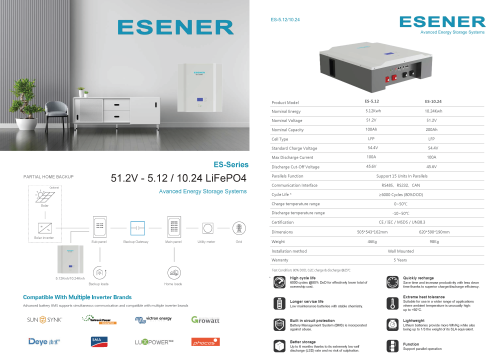
This is the communication setup for Sunsynk and Deye for reference. It applies for the 5.12kwh and 10.24kwh wall mount batteries.
(ES-5.12) ESENER 51.2V100Ah Lithium Battery Wall Mount to Sunsynk com.pdf- 32 Downloads
Updated -
Good day
This is the communication setup for Luxpower and Growatt for reference. It applies for the 5.12kwh and 10.24kwh wall mount batteries
- 68 Downloads
Updated -
2.9 Firmware for the older chip US3000C.
DO NOT USE UNLESS YOU KNOW WHAT YOU ARE DOING. INCORRECT USE WILL BRICK YOUR BATTERY.
- 84 Downloads
Updated -
Firmware for Bateery Pylontech US2000C new chip E2 C3, sent by Pylontech technical service to solve low voltage error
- 158 Downloads
Submitted -
Description
Introducing the Sunmagic LiFePo4 Lithium Battery 51.2V 150AH 7.68KWH: Empower Your Energy Storage
Experience a revolution in energy storage with the SunmagicLiFePo4 Lithium Battery. Engineered with state-of-the-art lithium iron phosphate (LiFePo4) technology. This high-performance battery redefines your power needs with reliability and efficiency at its core.
Features – Sunmagic LiFePo4 Lithium Battery 51.2V 150AH 7.68KWH:
High-Powered Efficiency: Boasting a remarkable 150 ampere-hours (AH) capacity and a total energy output of 7.68 kilowatt-hours (KWH). This battery offers an exceptional power-to-weight ratio, making it the ideal choice for both residential and commercial applications.
Versatile Voltage: The 51.2-volt voltage rating ensures compatibility with a wide range of electrical systems. Guaranteeing seamless integration into your existing setups.
LiFePo4 Chemistry: Enjoy enhanced safety with LiFePo4 chemistry. Offering excellent thermal stability, extended cycle life, and exceptional resistance to overcharging and short-circuiting.
Durability and Longevity: The battery’s rugged construction withstands daily use, ensuring lasting performance. Its advanced Battery Management System (BMS) optimizes operation, preventing over-discharge, over-voltage, and under-voltage issues, while providing precise battery status information.
Specifications:
Capacity: 150 ampere-hours (AH)
Total Energy Output: 7.68 kilowatt-hours (KWH)
Voltage Rating: 51.2V
Chemistry: LiFePo4 (Lithium Iron Phosphate)
Advanced BMS: Ensures optimal performance and safeguards against common battery issues.
Durability: Designed to withstand rigorous daily use.
Compatibility: Seamless integration with various electrical systems.
To safeguard the lifespan of the battery, its design holds back a percentage of the total capacity.
2 Years Repair Warranty
Warranties:
All inverters and batteries must be installed by a qualified electrical wireman or Master electrician with a valid registration with the Department of Labour. A valid electrical certificate of compliance (COC) must be issued once installed, specific to the installation of the backup or solar system. Any warranty claim submitted without installation photos, a valid COC and proof of a qualified wireman/master electrician installing the unit, can be rejected and will render the warranty claim null at void.
- 35 Downloads
Submitted -
have not seen this online and was emailed a copy.
Would be useful to others.
Fivestar 15KVA 12KW MPPT Wifi Hybrid Dual PV Input 48V Inverter – Powering a Sustainable Future with Precision
The Fivestar 15KVA 12KW MPPT Wifi Hybrid Dual PV Input 48V Inverter is a cutting-edge solution designed to revolutionize energy conversion in both residential and commercial settings. With a commanding maximum output of 15KVA and 12KW, this inverter is well-equipped to handle substantial loads and power a diverse range of appliances.
Key Features:
1. Advanced MPPT Technology: This inverter employs MPPT (Maximum Power Point Tracking) technology to ensure optimized energy production from your solar panels, even in low light conditions. It maximizes power generation and overall energy efficiency.
2. Dual PV Input and 48V Battery Voltage: With dual PV inputs and a 48V battery voltage, this inverter offers compatibility with an extensive range of solar panels and battery systems, providing versatile solutions to meet your unique solar energy requirements.
3. Remote Monitoring with Wi-Fi Connectivity: The Fivestar inverter is equipped with Wi-Fi connectivity, allowing you to monitor and control your solar energy system from virtually anywhere. Easily access critical data such as energy production, battery status, and system performance using your smartphone or computer. This feature simplifies system optimization for maximum efficiency and cost savings.
4. Hybrid Functionality: This inverter operates as a hybrid model, suitable for both on-grid and off-grid systems. It can also function in battery backup mode, ensuring a continuous power supply during blackouts or grid failures. Its high efficiency and reliability make it an excellent investment for those seeking to power their home or business with renewable energy.
Specifications – Fivestar 15KVA 12KW MPPT Wifi Hybrid Dual PV Input 48V Inverter:
PV Input:
Nominal Operating Voltage: 360Vdc
Vmax PV: 500Vdc
PV Input Voltage Range: 90 – 450Vdc
Imax PV: 27.OA
Full Load MPPT Range: 360 – 450Vdc
Rated Power: 12,000W/15,000VA
Max Solar Charging Current: 160A
Grid AC/Output:
Nominal Output Voltage: 220/230/240Vac
Feed-in Grid Voltage Range: 195 – 253Vac
Feed-in Grid Frequency Range: 49 – 51 +- 1Hz
Nominal Output Current: 35.6A
Power Factor Range: >0.99
Conversion Efficiency (DC/AC): 98%
Nominal Operating Frequency: 50/60Hz
Two Load Output Power:
Full Load: 12,000W
Maximum Main Load: 12,000W
Maximum Second Load: 3,333W
Main Load Cut Off Voltage: 44VDC
Main Load Return Voltage: 52VDC
AC Input:
Nominal Operating Voltage: 230Vac
Maximum Input Current: 40A
Nominal Operating Frequency: 50/60Hz
Surge Power: 20,000VA
Max AC Charging Current: 140A
Battery:
Battery Voltage Range: 40-63VDC
Maximum Battery Current: 190A
What’s in the Box:
1 x Fivestar 15KVA Hybrid Inverter
Warranty: Limited 12 months
- 58 Downloads
Submitted -
- 153 Downloads
Submitted -
Hi all
Esener batteries come packaged with a cable to allow you to access the battery's BMS, below is how to set it up if needed and attached is the computer software required.
ESENER lithium battery default and non default inverter brands selection and operation by host computer
4.1 Method 1:Communicate factory default inverters
Step1: Select the cables used by the inverter by the label on thecommunication cables.Insert the RJ45 connector of the battery end(CAN/RS485) and the inverter end(CAN/RS485) into the interfaces on both sides.
Step 2: Turn on the battery and inverter and wait until they are working properly. The battery is configured by factory default to communicate with the Voltronic (RS485) inverter and DEYE,Sunsynk, Esener (Luxpower, Sofar, TBB (CAN)inverters, the battery will automatically select and communicate with one of these inverters.
Step 3: After successful communication between battery and inverter, battery status will be displayed on inverter: voltage,current,SOC, temperature,
4.2 Method 2: Communicate optional inverters (protocol select) When communicating with other brands of inverters, such as: Growatt, Solax, Goodwe, Sorotech, LTW, MUST, SMA,etc.
Step 1: Turn on the battery, ensure BMS is normally powered on and not in sleep state, the RS232 crystal head of the communication cable is inserted into the
battery communication port, the USB end is inserted into the computer;
Step 2: Unzip the package of BMS monitoring software to the current computer(Windows Microsoft .NET Framework 2.0 or above). This software does not need to
be installed independently, only the environment is satisfied, double click the main program icon(BMS exe file) to run
and use. Enter the password: vking.
Step 3: Click “Parameter” at the top of monitor system page, click “Read all” button to read battery parameter. Select the inverter protocol at “Protocol type ” eg: Darfon is Voltronic protocol. Click the “Write all” button to set the protocol,after the system displays the operation succeeds, protocol selection completes (Please refer to the sceenshot).
- 126 Downloads
Updated -
Hi all,
In case you misplace your user manuals, kindly see attached. Also note the changes to voltages for the updated data sheet, I've found them really helpful on my end.
Regards
- 49 Downloads
Updated -
- 33 Downloads
Updated -
Disclaimer: Use at your own risk - the console port of a Pylontech battery is not something you should touch if you don't know what you're doing and are not happy to bear the risks. This code is offered for educational purposes only, so you can see what worked for me. If you brick your battery or burn your house down, it's on you.
This is based on Ireneusz Zielinski's beautiful code, with some (frankly barbaric) additions to feed the data gained from Pylontech battery 'console' port into influxdb for display in grafana, using a wemos D1 mini (or other ESP8266 module) and a MAX3232 line driver (see code link above for details, including cable spec).
It's set up for 7 batteries, so for any other number, you'll need to add/remove variables, conditional 'if (xi ==...)s' and influx write points as required (because I'm too lazy to learn how to use arrays). The variable 'influxInterval' sets the data sample rate (how often it queries the battery - every 15secs seems about right). It only logs variables that have changed since the last reading.
8 metrics per battery: Batt Volts, Batt Current, SOC, Temp, Highest cell temp, Lowest cell temp, Highest cell voltage & Lowest cell voltage.
It should be possible to log the individual cell voltages/temps, but I haven't here, as the above values from each battery are sufficient for my needs.
Chunks of the original MQTT code are commented out (for no good reason that I can remember), so if you want to enable MQTT, you're probably better off with the original code.
Build/upload with 'platformio', all libraries should be included in the .zip. Enter your influx/wifi credentials and don't forget to edit the 'platformio.ini' if you want to do over-the-air (OTA) updates after your initial USB flash.
There's provision for an LED (across pins D1 & D2) that flashes slowly when it's getting data and happy, but really slowly when it's not.
You can still access the console as with Zielinski's original code, through a browser via the IP address of the device - handy if you need individual cell data.
Suggestions for improvements most welcome.
- 80 Downloads
Submitted -
An (updated?) version of 'Batteryview' sent by Pylontech that I have personally not yet got to work (it just times out and fails to connect under Windows 10 20H2, despite the same OS and USB->RS232 adaptor communicating fine via terminal 'pwr' etc commands in coolterm)
Edit to add: Works fine under Windows 11 (21H2)... works even better if the firmware zip that Pylontech sent you isn't corrupted. 💩
- 515 Downloads
Updated