



Prince3121
Members
-
Joined
-
Last visited
Everything posted by Prince3121
-
Good Day Roarty I walked a long journey to understand how the solar registration works. The moratorium for unapproved off-grid inverters ended October last year. I have an unapproved Axpert off grid inverter, that was approved, because I submitted my documents before this deadline. The Solar installer I dealt with had no clue about doing paperwork, so I did a lot of leg work and reading, to get my drawings done and paperwork submitted. Unless you find an honest Installer that does not want to just take your money and know how to complete the forms the result is what will happen in this case. The Customer, gets lied to and taken in for a quick buck and by no means was this buy cheap! Unfortunately, for this couple, the process has now changed. I'm documenting my process here: 1. an approved Inverter, from the COCT list https://resource.capetown.gov.za/documentcentre/Documents/Forms%2c notices%2c tariffs and lists/Approved Photovoltaic (PV) Inverter List.pdf -best advice here is get a reliable brand with smart control, like app control from your phone. 2. a COC (Certificate of Compliance) for the Inverter and battery install by a qualified Electrician. This is all the COCT cares about, as they are paranoid about residents feeding back into the grid without control. Obviously, this is important as illegal installs can cause fires etc! 3. a Diagram of how your Solar Panels and Battery are connected via the main supply. This is a huge grey area, as the COCT wants an Engineer to draw this up, but anyone with technical knowledge can do this. The COCT Principal Engineer signs the work off, not necessarily the installer. Don't kill me here, this is what I have experienced. 4. Complete and submit your application to your local electricity department via email or deliver it to the office. 5. It took a few weeks and they asked for extra information in the form of the COC, which, I resubmitted. 6. COCT sent out a notice, that a Split prepaid meter, to keep your off-grid inverter from feeding back. The COCT contractor installed this meter. 7. I was informed, that my SSEG was approved, and that I should change nothing, as they will shut me down. NB: The process is now done online or you can still submit your pdf documents to the COCT. The bottom line here is that if the Inverter is not on the approved COCT list, they will not approve your install. All Inverters are classified as grid tied, even if you are using an off-grid Inverter. For further information check this: https://www.capetown.gov.za/Family and home/greener-living/saving-electricity-at-home/going-solar Sorry for the long post, but I needed to explain how the process works or is supposed to work.
-
Thanx for another great giveaway! My off-grid - grid tied install was verified and signed off by Coct. So, I'm a very happy chappy! It was a long journey, but well worth it! 😎
-
Congratulations @Gefahrlich and thanx to Powerforum for the giveaway! 👏
-
Done! 😎
-
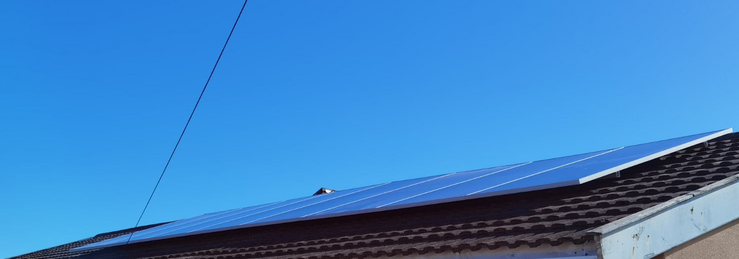
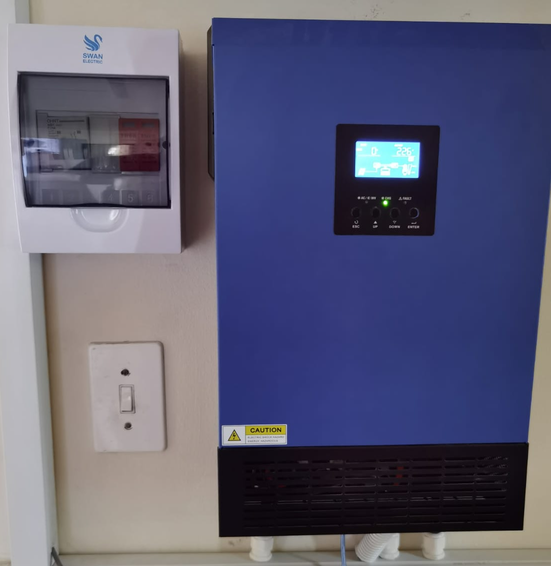
Good Day all Phase 2: Solar Panel install -this phase is now complete, after going with an Installer recommended by Solar Solved Africa. The company is called UltraEdge Plumbing and Solar Specialists. -nothing but professional service and reasonable pricing. As there was a shortage of panels, I had to go with 8 x 540W Half-cut Mono PERC Gamko panels. Solar Assistant still doing duty and very easy to manage the programs for the panels and battery. A few pics after install: I'm extremely happy with this install and the way UltraEdge handled this install. The contact person is Wisbaar at the number above. I don't want to advertise here, so if the Admins feel its against the rules please remove. If there are any questions, drop me a PM. 👏😎

-
Good day all I have to commend Solar Solved Africa for their great service turnaround time. My Shoto 5.12kW battery BMS failed last week Friday morning, at a very inopportune time. I booked the battery in on Friday midday and was called on Monday morning to collect the battery. Repair done at no charge, as it was still under warranty. I wish all companies in South Africa, had this level of service. This makes me want to order future equipment from them again. Much appreciated guys! 👏😎
-
@Sc00bs Thanx for the info, when I have some time, will have a look into it. 😎
-
@mzezman -Thanx for pointing me in the right direction. The Vizia Smart Plug is fully integrated into Home Assistant. 👏 😎

-
Thanx that explains it. I'm looking for ease of use integration, so no fancy programming. I see enough IT issues daily. 🤣
-
Hi Sonoff Africa Is there perhaps a new dimmer/light switch combo coming? Thanx.
-
@mzezman I think to just get integrated will be a big help. Thanx. I see two Tuya ways to connect in ha. Not sure which one to use and do I need an IOT account? 😎

-
I could not get the Tuya device ID for the smart Vizia smartplug that I had. Also, the plug refuses to flash with Tasmota. I even tried a new FTDI USB to TTL Serial Adapter Module FT232RL, but does not work. I followed all the docs on the Tasmota website as well. The Smartlife app works, but I cannot find how to integrate it into Home Assistant with Tuya convert. Yet the Sonoff Ewelink - Home Assistant integration was straight forward. Thanx for asking.
-
I have a Sonoff setup and use both the cloud and local control for it. I bought a Tuya smartplug and cannot integrate it into HA, even flashing it, as they changed the security API backdoor. Even if it does not work in HA, its not a problem, as the smartplug I have I control via the Smartlife app and it works flawlessly. For me, I want automation to be easy, I don't want to hack or flash a device, unless I really need to. Tuya has confirmed that they will support Africa for all their smart devices. I know the CBI brand, as I had a geyser timer from them, and it was reliable and stable. 😎
-
@mzezman - Thanx for the suggestion that the CBI smart products are reliable. I will definitely be acquiring it soon.
-
Hello all I bought a few Sonoff devices, but use a Sonoff TX T0-2 GANG switch, which controls my perimeter lights through the Ewelink app integrated into Home Assistant. My geyser has been Solar converted and I use gas for cooking, so issues to switch off unnecessary appliances, except for the pool pump. My pool pump is still on a mechanical timer and need to get that remotely controlled, as my pool pump and garage door is on the same circuit. The easy solution would be to get my electrician to rewire the pool pump on an excluded circuit, but to get him here took 6 months! 🤣 So, either I replace the timer with an electronic one, or find a way to cut the power remotely. I do have a Sonoff R2 Basic switch, and RF Bridge, which I can use to control the mechanical timer to shutdown the pool pump circuit. I'm installing a Sonoff Door Sensor to the pool pump lid cover to monitor it when its opened, as I have had security issues before and that's why I bought the RF Bridge in the first place. I think its worth a test. PS: @Johanba -when choosing Sonoff devices be very careful what you buy. I learned the hard way, the you get Wifi only, Wifi/RF and wifi/RF/Zigbee devices. The Zigbee bridge I bought is not supported by the Ewelink app, so I integrated it into Home Assistant as a Tasmota device, I did the same with the Basic switch as its not supported by the app either. For ease of use, I would say get the devices that's fully integrated into the app, it is very stable on its own, even if not integrated into Home Assistant. The Home Assistant integration allows local and cloud control. Let me stop. I'm faffing now...🤣
-
Congratulations to all the Winners. 👏 Thanx Powerforum for organising the compettions!
-
This is amazing - goodluck to all and congratulations to the previous winner.
-
This is brilliant - thanx powerforum! 😎👏
-
Good Day all I have completed my monitoring setup as well. I decided to go with the Solar Assistant solution, as I wanted to utilise my existing Pizero W. The challenge I had was power to the Pizero W, as I did not have power close by in the room where the Inverter and Battery was installed. I could tap power off the battery, but that would mean finding a step-down power supply. I wanted a completely self contained solution, because I already had a POE switch in another room, which could power the Pizero W. Extras: Wave Pi Zero Case - PoE and USB Ready Shoto/Rentech RS485 -(optional) Cat 5e Ethernet cable and connectors Trunking Some sweat for pulling the Cat 5e cable in the roof!🥵 The setup is quite easy as per documentation on the Solar Assistant website: https://solar-assistant.io/help/getting-started/prepare-device https://solar-assistant.io/help/voltronic/configuration https://solar-assistant.io/help/home-assistant/broker-setup -There was a slight difference with the integration into Home Assistant doing the MQTT broker part, which I have informed Solar Assistant about. Home Assistant's UI has changed a lot, but after doing some searching solved the integration part. I know just enough linux to get by. 🤣 -Another challenge was getting the POE Hat setup and getting the Inverter's USB port to recognise the Inverter in Solar Assistant via the Pizero's USB port. Once figured out the setup was plain sailing. I had the Inverter in Emulated BMS mode till my RS485 to USB cable arrived. The RS485 cable was connected to the battery and Pizero USB ports and connected immediately, no issues, as below: Yes, trunking not done yet, but I will get there. All working perfectly, with integration into Home Assistant as well. Very straight forward install for a semi-technical person. Thanx to Solar Assistant for programming this solution. Easy Peasy! 😎


-
Thanx, yes we shedding again right now and its odd, not to have any interruptions. 😎
-
Good Day all So after 6 months of waiting for my installer, on the 25 July the install actually happened. This is a modest setup to start my journey to solar generation, but enough to cover my home. The equipment installed was as follows: Axpert MKS II 5kW 48V Inverter Axpert WiFi Module SHOTO 5.12kWh Lithium Battery 160A 2 Pole Multiblock NH00 Fuse Holder 100A 500V NH Fuse Link x2 PermoPower 35mm Black Cable PermoPower 35mm Red Cable 35mm Heavy Duty Crimping Lugs Their was quite a bit of extras, as the 2 x DB, 20m of cable, extra breakers, pilot lights, as I had to install the inverter and battery in another room. The system had its official first load shedding test this afternoon and coped very well. Its pleasing to have such a seamless change over. I have configured a pizero w with POE/USB HAT, running Solar Assistant to do my monitoring and integrated it into Home Assistant. The RS485 cable will arrive soon in order to monitor the Shoto Battery more closely. I went with Solar Assistant, as a platform, as I already had most of the hardware required. I'm very happy with the install so far and will be looking into what panels to install for the solar phase of this project. One mistake I made here was purchasing the Wifi module. It works to an extent, via the Watchpower app, but does not give enough granular settings to monitor the inverter and battery pack. The module is slow and was cumbersome to get registered and working.

-
Hello I bought the wifi module that comes with the Axpert 5kw MKSII, from the supplier - Solar Solved Africa. Its the same module in the link below: Voltronic wifi module https://www.arsolar.co.za/product/wi-fi-module-for-fcs-king-inverters-from-2020/ It connects to the USB port on the inverter and uses a USB to serial cable to connect to the wifi module. It uses the Watchpower app from the Google play store. https://play.google.com/store/apps/details?id=wifiapp.volfw.watchpower&hl=en_ZA&gl=US For the amount of money I spent on the module, its not really worth it. I'd say your money is better spent on a complete monitoring solution for both battery and inverter. I'm going with the Solar Assistant solution, as I have a free RPi to set it up.
-
Thanx, I will keep this in mind.
-
Good Day All I'm new to the Lithium Ion Phosphate Battery-Inverter setup. So, recently decided to invest in a more holistic full home setup from Solved Solar Africa. I purchased the following as below: Axpert MKS II 5kW 48V Inverter Axpert WiFi Module SHOTO 5.12kWh Lithium Battery 160A 2 Pole Multiblock NH00 Fuse Holder 100A 500V NH Fuse Link x2 PermoPower 35mm Black Cable PermoPower 35mm Red Cable 35mm Heavy Duty Crimping Lugs I was told that I would require an AC Breaker to wire into the DB as the only extra. I will have a qualified electrician that will be installing the inverter and battery backup for me. Anything else that I should look out for like where to install it inside or outside the house, etc? I'm staying in a very high moisture area, and would like to keep the setup in house, but where to install it, as my kitchen area is very small. So any other room would be fine? Thanx.


