



Prince3121
Members
-
Joined
-
Last visited
-
 Bobster. reacted to a post in a topic:
Helping those with less knowledge of a solar sytem, especially the elderly.
Bobster. reacted to a post in a topic:
Helping those with less knowledge of a solar sytem, especially the elderly.
-
Good Day Roarty I walked a long journey to understand how the solar registration works. The moratorium for unapproved off-grid inverters ended October last year. I have an unapproved Axpert off grid inverter, that was approved, because I submitted my documents before this deadline. The Solar installer I dealt with had no clue about doing paperwork, so I did a lot of leg work and reading, to get my drawings done and paperwork submitted. Unless you find an honest Installer that does not want to just take your money and know how to complete the forms the result is what will happen in this case. The Customer, gets lied to and taken in for a quick buck and by no means was this buy cheap! Unfortunately, for this couple, the process has now changed. I'm documenting my process here: 1. an approved Inverter, from the COCT list https://resource.capetown.gov.za/documentcentre/Documents/Forms%2c notices%2c tariffs and lists/Approved Photovoltaic (PV) Inverter List.pdf -best advice here is get a reliable brand with smart control, like app control from your phone. 2. a COC (Certificate of Compliance) for the Inverter and battery install by a qualified Electrician. This is all the COCT cares about, as they are paranoid about residents feeding back into the grid without control. Obviously, this is important as illegal installs can cause fires etc! 3. a Diagram of how your Solar Panels and Battery are connected via the main supply. This is a huge grey area, as the COCT wants an Engineer to draw this up, but anyone with technical knowledge can do this. The COCT Principal Engineer signs the work off, not necessarily the installer. Don't kill me here, this is what I have experienced. 4. Complete and submit your application to your local electricity department via email or deliver it to the office. 5. It took a few weeks and they asked for extra information in the form of the COC, which, I resubmitted. 6. COCT sent out a notice, that a Split prepaid meter, to keep your off-grid inverter from feeding back. The COCT contractor installed this meter. 7. I was informed, that my SSEG was approved, and that I should change nothing, as they will shut me down. NB: The process is now done online or you can still submit your pdf documents to the COCT. The bottom line here is that if the Inverter is not on the approved COCT list, they will not approve your install. All Inverters are classified as grid tied, even if you are using an off-grid Inverter. For further information check this: https://www.capetown.gov.za/Family and home/greener-living/saving-electricity-at-home/going-solar Sorry for the long post, but I needed to explain how the process works or is supposed to work.
-
-
Thanx for another great giveaway! My off-grid - grid tied install was verified and signed off by Coct. So, I'm a very happy chappy! It was a long journey, but well worth it! 😎
-
-
Congratulations @Gefahrlich and thanx to Powerforum for the giveaway! 👏
-
Freya_North reacted to a post in a topic:
Interested in renewable energy? Please support my masters thesis! [survey]
-
Energy-Jason reacted to a post in a topic:
Interested in renewable energy? Please support my masters thesis! [survey]
-
Done! 😎
-
 Baksteen reacted to a post in a topic:
Home Assistant use Sonoff to switch high load devices during load shedding
Baksteen reacted to a post in a topic:
Home Assistant use Sonoff to switch high load devices during load shedding
-
-
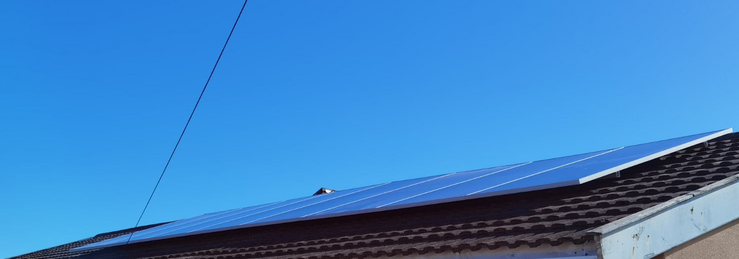
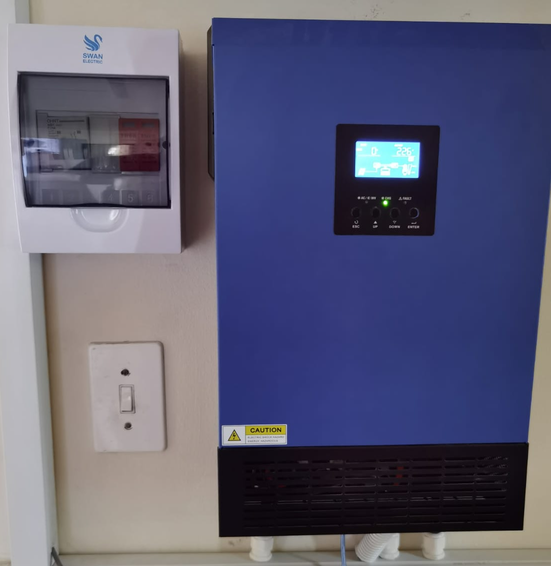
Good Day all Phase 2: Solar Panel install -this phase is now complete, after going with an Installer recommended by Solar Solved Africa. The company is called UltraEdge Plumbing and Solar Specialists. -nothing but professional service and reasonable pricing. As there was a shortage of panels, I had to go with 8 x 540W Half-cut Mono PERC Gamko panels. Solar Assistant still doing duty and very easy to manage the programs for the panels and battery. A few pics after install: I'm extremely happy with this install and the way UltraEdge handled this install. The contact person is Wisbaar at the number above. I don't want to advertise here, so if the Admins feel its against the rules please remove. If there are any questions, drop me a PM. 👏😎

-
-
-
-
Good day all I have to commend Solar Solved Africa for their great service turnaround time. My Shoto 5.12kW battery BMS failed last week Friday morning, at a very inopportune time. I booked the battery in on Friday midday and was called on Monday morning to collect the battery. Repair done at no charge, as it was still under warranty. I wish all companies in South Africa, had this level of service. This makes me want to order future equipment from them again. Much appreciated guys! 👏😎
-
-
@Sc00bs Thanx for the info, when I have some time, will have a look into it. 😎
-
Prince3121 reacted to a post in a topic:
Home Assistant use Sonoff to switch high load devices during load shedding
-
Prince3121 reacted to a post in a topic:
Home Assistant use Sonoff to switch high load devices during load shedding
-
mzezman reacted to a post in a topic:
Home Assistant use Sonoff to switch high load devices during load shedding
-
@mzezman -Thanx for pointing me in the right direction. The Vizia Smart Plug is fully integrated into Home Assistant. 👏 😎

-
Thanx that explains it. I'm looking for ease of use integration, so no fancy programming. I see enough IT issues daily. 🤣
-
Hi Sonoff Africa Is there perhaps a new dimmer/light switch combo coming? Thanx.
-
-
@mzezman I think to just get integrated will be a big help. Thanx. I see two Tuya ways to connect in ha. Not sure which one to use and do I need an IOT account? 😎

-
mzezman reacted to a post in a topic:
Home Assistant use Sonoff to switch high load devices during load shedding
-
I could not get the Tuya device ID for the smart Vizia smartplug that I had. Also, the plug refuses to flash with Tasmota. I even tried a new FTDI USB to TTL Serial Adapter Module FT232RL, but does not work. I followed all the docs on the Tasmota website as well. The Smartlife app works, but I cannot find how to integrate it into Home Assistant with Tuya convert. Yet the Sonoff Ewelink - Home Assistant integration was straight forward. Thanx for asking.
-
I have a Sonoff setup and use both the cloud and local control for it. I bought a Tuya smartplug and cannot integrate it into HA, even flashing it, as they changed the security API backdoor. Even if it does not work in HA, its not a problem, as the smartplug I have I control via the Smartlife app and it works flawlessly. For me, I want automation to be easy, I don't want to hack or flash a device, unless I really need to. Tuya has confirmed that they will support Africa for all their smart devices. I know the CBI brand, as I had a geyser timer from them, and it was reliable and stable. 😎
-
@mzezman - Thanx for the suggestion that the CBI smart products are reliable. I will definitely be acquiring it soon.
-
Prince3121 reacted to a post in a topic:
Home Assistant use Sonoff to switch high load devices during load shedding
-
Hello all I bought a few Sonoff devices, but use a Sonoff TX T0-2 GANG switch, which controls my perimeter lights through the Ewelink app integrated into Home Assistant. My geyser has been Solar converted and I use gas for cooking, so issues to switch off unnecessary appliances, except for the pool pump. My pool pump is still on a mechanical timer and need to get that remotely controlled, as my pool pump and garage door is on the same circuit. The easy solution would be to get my electrician to rewire the pool pump on an excluded circuit, but to get him here took 6 months! 🤣 So, either I replace the timer with an electronic one, or find a way to cut the power remotely. I do have a Sonoff R2 Basic switch, and RF Bridge, which I can use to control the mechanical timer to shutdown the pool pump circuit. I'm installing a Sonoff Door Sensor to the pool pump lid cover to monitor it when its opened, as I have had security issues before and that's why I bought the RF Bridge in the first place. I think its worth a test. PS: @Johanba -when choosing Sonoff devices be very careful what you buy. I learned the hard way, the you get Wifi only, Wifi/RF and wifi/RF/Zigbee devices. The Zigbee bridge I bought is not supported by the Ewelink app, so I integrated it into Home Assistant as a Tasmota device, I did the same with the Basic switch as its not supported by the app either. For ease of use, I would say get the devices that's fully integrated into the app, it is very stable on its own, even if not integrated into Home Assistant. The Home Assistant integration allows local and cloud control. Let me stop. I'm faffing now...🤣

