


Noobie
Members
-
Joined
-
Last visited
-
-
-
-
-
-
So I need some insight into the bypass diodes installed in solar panels. If you have a string of series connected solar panels that have in-built bypass diodes and one panel is fully shaded why does it bring down the output of the entire string? Why do the bypass diodes on the panel thats fully shaded not activate and take that panel out of the series string so that the remaining panels in the string (that are not shaded) continue to produce decent output power? Currently, what happens is that if one panel of a series string is fully or partially shaded it brings down the output power of the entire string, just wonder why the bypass diodes cant bypass this shaded panel.
-
I had to update the firmware on the MP2 to set up ESS mode. The ET112 meters all essential and non essential loads in the house (its connected right after the mains breaker) The non essential loads (geyser, stove etc.) are connected before the inverter input and the essential loads (lights, Wi-Fi) are connected to the inverter output. During daylight hours, when there is power coming from council, the solar panels supply power to the essential loads as well as the non essential loads connected before the inverter. The ET112 ensures that the solar panels do not push power back to council and trip their smart meter. I have set my MP2 to keep batteries charged at 100% as I only have a 4kWh bank and cant afford to cycle them during daylight hours and then be without battery capacity during load shedding (attached screenshot of the setting on the VRM connect app)
-
Managed to get it all sorted out, thank you 🙏🏻
-
-
Afraid not
-
6 way din rail DB R50 Based in Broadacres, Johannesburg

-
Swithgear, surge arrestor, contractors and fuses R250 based in Broadacres Johannesburg

-
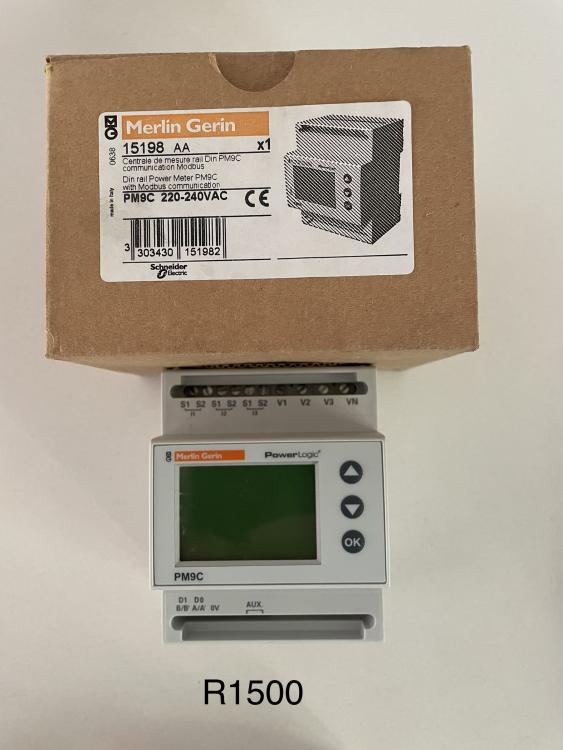
Merlin Gerin PM9C R750 based in Broadacres Johannesburg
-
Victron BMV-702 battery monitor R800 based in Broadacres Johannesburg

-
Victron battery balancer for sale. R600 based in Broadacres Johannesburg

-
Victron VE direct to USB cable for sale. R250 based in Broadacres Johannesburg

-
 Noobie reacted to a post in a topic:
SOLD - Solis 1,5kW mini 4G single tracker grid tie inverter for sale
Noobie reacted to a post in a topic:
SOLD - Solis 1,5kW mini 4G single tracker grid tie inverter for sale
-
The reasoning behind it is that Victron suggests using a Fronius grid tie inverter (AC coupled) when interfacing to the Multiplus. Also the DC coupled MPPT is more efficient than the Solis AC inverter due to conversion losses (DC from solar to AC out of inverter then back to DC to charge battery via the Multiplus)
-
I’ve just decommissioned my Solis grid tie inverter in favour of a MPPT connected to my Multiplus so my Solis 1,5kW mini 4G single tracker grid tie inverter is for sale: https://segensolar.co.za/product/solis/pv-inverter-solis/main-unit-pv-inverter-solis/solis-1-5kw-mini-4g-single-tracker/ Purchased from Sonop Solar in November 2018 Includes WiFi data logging dongle Includes 100amp CT (cable is only 1 meter but can be extended) Asking R4000, courier for purchasers account Based in Broadacres, Johannesburg

-
With all the load shedding I decided to decommission my solis grid tie inverter and connect my solar panels to my Victron Multiplus 2 via a 150/45 Victron MPPT to help prolong my battery life. Today I installed a single phase meter and connected it to the Cerbo GX, it seems to be working well as I can now view the entire house’s consumption (including loads connected before the Multiplus such as geysers) I then wired up the MPPT and connected it to the Cerbo via a VE direct cable. The issue I need help with is the following: when there is grid power available the MPPT doesn’t generate any power, but during load shedding it pushes out power and keeps the battery charged. I would like the MPPT to push power back to the loads connected before the inverter and use the energy meter to prevent back feeding into the grid and tripping my council meter. After checking out the wiring schematics online this is the setup I have, the current sensor has been replaced with a single phase meter in my installation. The other thing I noticed was that when loads connected before the Multiplus (geyser) are pulling power, the single phase meter shows the consumption but the AC loads shows the same value even though this load is connected before the Multiplus (attached screenshot) Any guidance would be greatly appreciated
-
-
-
-
Interested to learn more about the load shedder unit, could you share the specs?
-
Its for a friends trail cam PCB


