


McAllstar
Members
-
Joined
-
Last visited
Everything posted by McAllstar
-
Morning, how did you set this up? Do you have automations that switch the geysers off during load-shedding etc?
-
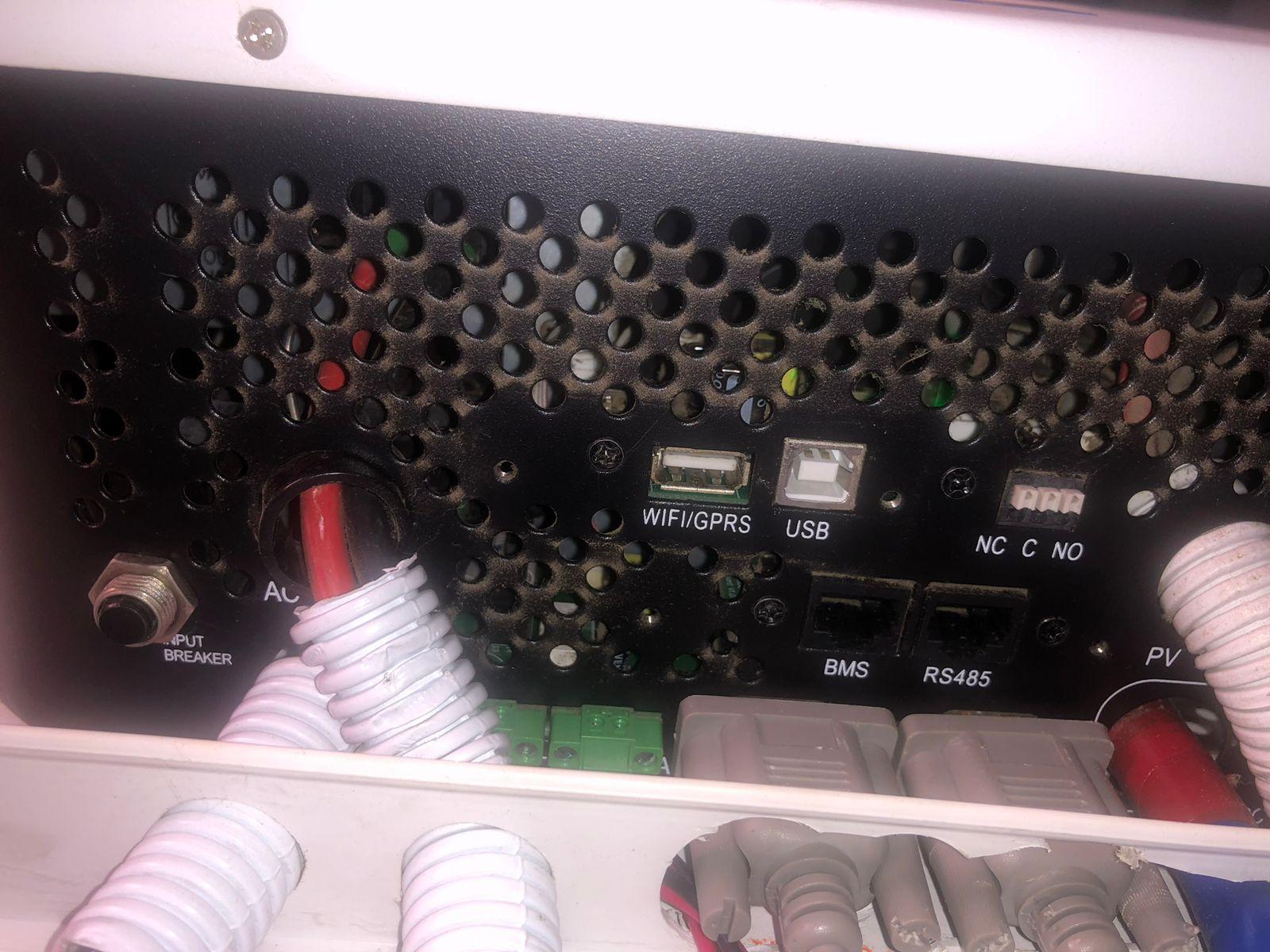
thanks again. I tried everything that you said and I'm still not able to get it to work. I reverted to 1 battery, tried with both inverters and no luck. I guess will have to accept that I'm stuck with voltages and can't get the percentages to work. Seems as if i don't have the one with the can and rs485 port. I only have 2 ports, one port labelled BMS and one port labelled RS485 nothing called CAN port.
-
Morning Thanks so much for taking the time to respond and providing such a comprehensive set of instructions. It is really appreciated. just a question around the firmware. Is there only 1 firmware file for the spf5000tl-hmv-p inverter or is there 2 firmware files that need to be applied? The guy who came out only applied 1 firmware file and earlier in this post @SiliconKid mentioned 2 firmware files however I'm not sure if that is for the ES? if so where would i get the 2nd firmware file from?Has anyone actually managed to get the Growatt spf5000tl-hmv-p 2 x 5KWH in parallel working with the Pylontech UP5000 batteries (battery FW is on version 2.8?) I've tried everything mentioned on the forum.If I select LI02 it just shows that the batteries are at 100% even though they are not at 100% and it doesn't switch over to Eskom. If I select LI04 it just beeps and flips between error 04 and error 20 and eventually switches off because it can't read the batteries. I know for a fact that the batteries are at about 40% but it only shows 100% and then it will display a 04 error and then flip to 20 then back to 04 then back to 20. Any tips or any ideas? Also tried different cat 5 cables with and without GND. I've tried the dip switches on 1000 and 0001 The inverter only has the ports as per the pictures below. So no can port. I don's how some people have managed to get theirs to work.


 excellent thanks for that, I didn't notice, until you mentioned it. I'll clean it up now that I got it working. appreciate the hard work and generosity.again figured it out, put it in the sensors.yaml file and had to fix the indentationsnever mind i see that i need to create the template sensors for grid_status_19 and inverter_status_59 where exactly do i put it though? I tried to put it in my configuration.yaml and or sensors.yaml file however I get errors when i check the config from developer tools.thanks for the reply. No definitely not being loadshed, you can see it was showing that i was consuming 22w from the grid. It stays like that all the time.sorry any idea why I'm getting this? I can't figure out which sensor to use for the grid.
 agree, I'm using solar assistant and it's such a mission with all of the different entity names to setup cards and dashboards.Hey @Sc00bs I've also been watching your vids. Very very cool. They are very relevant and I'm sure they are helping. I see there are one's on geyser automations around load-shedding. I've been looking for something like that, I will check it out and see how I go.no problem, thanks anyway I appreciate it. I'll stick with the modern image. I know fork all about forking code.Thanks again for the response.that was my whole point was to please add an image of the Deye inverter just like the Sunsync Modern no gives you the Sunsynk inverter pic and then if you set it to yes it just gives a generic pic. Pic 1 what i was hoping for is this, a pic of the Deye inverter.

 I managed to install the dashboard and play with the changing of the image but it doesn't seem to have the images for a Deye inverter.thanks, I haven't but I'll take a look I was still going through the setup videos.Hi Did you manage to figure this out? I'm looking for exactly the same thing. I'm using home assistant with a Deye 8KW inverter 10 x 545w panels Hi @slipx being the legend that you are. Would you consider making one with a Deye logo for us okies who bought Deye's. one without the non-essentials. Please Please Please you will literally make my DEYE!!!!!(also solar-assistant)I think i kinda figured it out. You need to create a new view by editing one of your dashboards and then select the + icon then i you need to select the 3 dots in the top right and select "Edit in YAML" then i think you need to past this part of his code. After that then you can select "add card" and use the rest of his code. you need to modify the entities according to your entity names. That's where my problem comes in I'm using solar-assistant and my entity names don't match his and I'm missing the timer and prod entities. views: - theme: Backend-selected title: Grid layout type: custom:grid-layout layout: grid-template-columns: 3fr 2fr 2fr 3fr grid-template-rows: auto grid-template-areas: | ". header header ." ". system priority ." ". capacity point 1 prog2 ." ". prog3 prog4 ." ". prog5 prog6 ." mediaquery: '(max-width: 800px)': grid-template-columns: auto grid-template-areas: | "header" "system" "priority" "prog1" "prog2" "prog3" "prog4" "prog5" "prog6" badges: []
 Just a question for anyone who has solar-assistant integrated into home assistant via MQTT. How many entities do you have? I think i may be missing a few did you enable allow setting changes on the solar assistant config page for MQTT? I guess what i'm asking is how to you get the prog1 time settings like the ones below I don't have that option, I only seem to have this option below which says Capacity point


 Hi Did you make any further modifications to you dashboard? I did try to add it but I get the error below and I dod have all the mushroom card installed and also the loveloace-layout-card, can you share the code if you did?
 Hi, also curious to know.just a question regarding all of this. I have solar-assistant setup on a separate raspberry PI with the RS485 adapter. Solar-assistant then speak to HA via MQTT. Do i have to install another RS485 adapter and connect it directly to the RPI running HA? Is there no way to leverage off of the solar-assistant PI and get these dashboards setup?Are you still using these “aggressive” settings on your setup? what is your battery capacity? Initially i only had 1 x 3.68kwh battery and I just bought and added another one so I now have 7,36kwh. I have a separate solar geyser installed as well. Any advice will be appreciated.




Account
Navigation
Search
Configure browser push notifications
Chrome (Android)
- Tap the lock icon next to the address bar.
- Tap Permissions → Notifications.
- Adjust your preference.
Chrome (Desktop)
- Click the padlock icon in the address bar.
- Select Site settings.
- Find Notifications and adjust your preference.
Safari (iOS 16.4+)
- Ensure the site is installed via Add to Home Screen.
- Open Settings App → Notifications.
- Find your app name and adjust your preference.
Safari (macOS)
- Go to Safari → Preferences.
- Click the Websites tab.
- Select Notifications in the sidebar.
- Find this website and adjust your preference.
Edge (Android)
- Tap the lock icon next to the address bar.
- Tap Permissions.
- Find Notifications and adjust your preference.
Edge (Desktop)
- Click the padlock icon in the address bar.
- Click Permissions for this site.
- Find Notifications and adjust your preference.
Firefox (Android)
- Go to Settings → Site permissions.
- Tap Notifications.
- Find this site in the list and adjust your preference.
Firefox (Desktop)
- Open Firefox Settings.
- Search for Notifications.
- Find this site in the list and adjust your preference.