McAllstar
Members
-
Joined
-
Last visited
Everything posted by McAllstar
-
Do you know what that conduit is called and where i can get it?
-
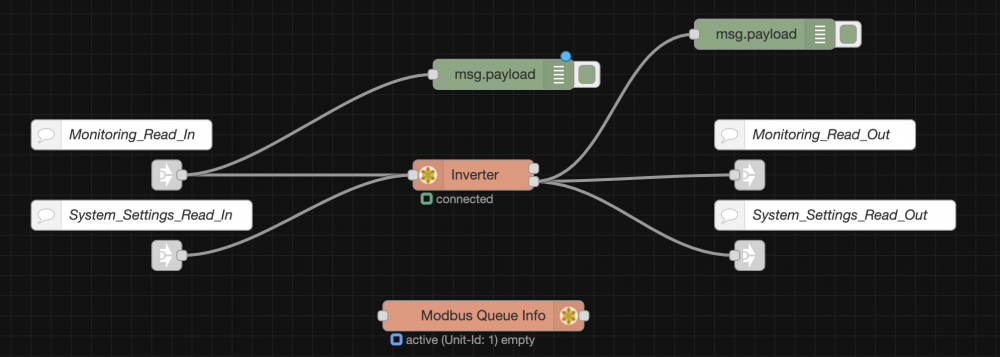
so i managed to get it to work. I completely uninstalled Node-red and deleted the node red folder under the config directory and then rebooted. I then re-installed NR and then re-configured each component 1 by 1 and the inverter now shows as connected. now i just need to figure out how to add the dashboards to influx and energy section etc etc. thanks again for all the patience and assistance i really really appreciate it.
-
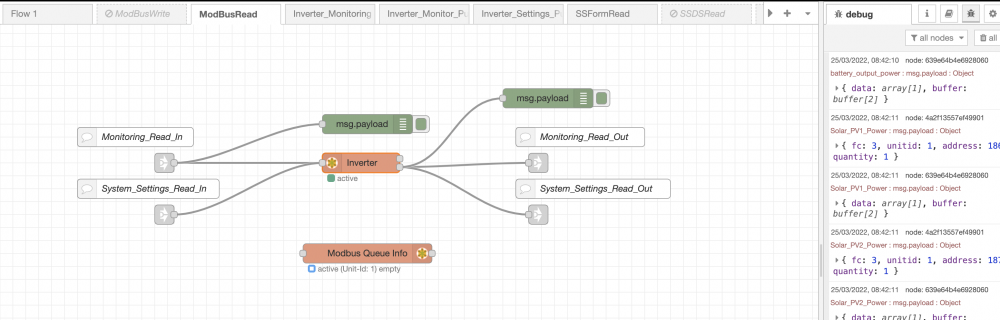
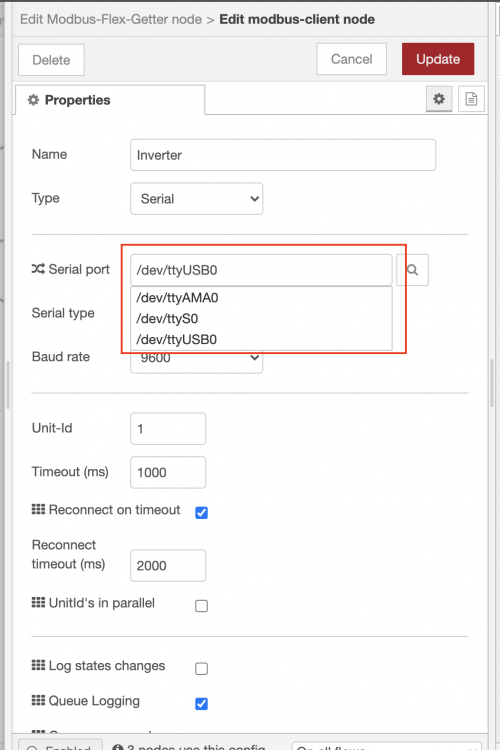
Ok so i setup a separate RPI with Raspberry PI OS and just installed Node Red and used the same RS485 adapter. I pointed the MQTT and Influx to my HA installation and on the ModbusRead flow is is rapidly switching between active and then queuing. So I'm not getting the same issue as I was on the before which is good news and also no errors in the debug log. One thing I did notice though is that on the working PI when i click on the inverter settings and the search magnifying glass next to serial port I have the ability to select either /dev/ttyAMA0, /dev/ttyS0 or /dev/tty/USB0 as per below. However when i do it on the Node-Red instance on the HA PI nothing happens. Maybe something wrong with HA or Node-Red on the HA installation.
-
I did check it and i can see the RS485 converter is there. I also set it in Node Red.
-
thanks to all above for the ideas and comments too. I tested the cable before I connected it and it was working fine. I did also try a shorter cable closer to the inverter and still had issues. I'm busty loading a second RPI with RPI-OS and will setup NR etc and see if i get a different result. Will let you know.
-
Thanks a lot for the feedback. I'll move the CT coil ASAP. I was actually trying to get someone in the JHB Edenvale area to come out and give my system a once over to confirm that everything is setup correctly. Unfortunately no-one on the forum responded. I'll see if I can find someone to come and assist who is local. I'll also look into the ATS ports and N-E bonding you mentioned. I really appreciate the feedback and assistance.
-
thanks for the response and feedback. I'll purchase another battery and once it's installed I'll be in touch. Regards Brett
-
I tried the normal one and the BETA on and i battled to get it working. So i gave up on that
-
thanks, I've tried all combinations mentioned and no luck. I wonder if it has something to do with home assistant and the USB port. does anyone have it working running home-assistant with the node-red add-on installed? I have a 30m network cable connected directly to the RS485 port of the inverter, then that cable connects directly to the USB/RS485 converter and the converter is then plugged directly into the USB port of the raspberry PI where I'm running HA, Node-red, InfluxDB, MQTT all on one RPI.
-
thanks, I did try that. Let me try it again and see what happens. Did you look at my RJ45 picture? does it look correct? Thanks Brett
-
this is how I have cabled my connection. Maybe someone can take a look and see if it is correct. image1920×1215 239 KB image1408×1168 155 KB image1414×1256 99.4 KB image1414×1778 150 KB image1414×1778 124 KB
-
I’m having the same issue and no luck in resolving it. My MQTT connects from node-red but the Inverter just keeps switching between connected, queueing, timeout, reconnecting, initialise, init, opened. Like i said i tried 2 different USB adapters and also 2 different RPI’s and the same thing happens. I have HA running with, node-red, influx MQTT etc all installed as HA add-ons. I've also tried a different RPI 3b with PI-OS and NR but exactly the same issue. I also tried a second usb adapter and a different network cable question on the network cable - If i take a normal cat 5e cable and cut the one end off and connect it to the USB as per the diagrams mentioned in the forum will it work or do i have to re-crimp the RJ45 side? thanks image971×283 24.6 KB image971×283 24.6 KB image1942×566 61.4 KB image971×283 24.3 KB

-
awesome, thanks a mil. I'll give it a bash.
-
HI Are you able to help me with the correct battery settings for my 3.6kw Greenwich battery connected to a 8KW Deye inverter with 10 x 545w jinks panels. I'm specifically looking for the capacity, Max A charge, Max A discharge etc.

-
who do you contact at DEYE or how do you contact them to get the latest FW and enable the settings in the app? what info do they need? Inverter serial, Device serial and Solarman ID?
-
does the Deye use the same firmware? Apparently i have LSW3_15_FFFF_1.0.73
-
this is awesome.. what a great post. I have pretty much the same setup except I currently only have 1 x Greenrich 3.6KW battery. I'll definitely use some of these settings for my setup and adjust the battery to it's own relevant ratings.
-
Hi All I did a self install of my start up system which consists of the following - Deye 8kw hybrid inverter - greenrich 3.6kw inverter - 4 x 545w solar panels I would like someone to come out and double check my installation and also optimise my inverter settings and advise if there is anything I should change. I live in Dunvegan Edenvale. I’m more than happy to pay a consultation fee. The gentleman who sold me the battery promised he would come out and do the check free of charge but he has let me down twice already. He is in the business for 10 years and he has good reviews but now nothing is happening.
-
thanks a mil. appreciate it.
-
or can someone tell me how I can run it from Home Assistant? I copied the file to my addons directory and then modified the config file. from there onwards I have no idea what to do. any help will be appreciated. Do i need to go to terminal on my home assistant and then run the run.sh from there? How does it work? Thanks
-
do you think this cable will work on the RS485 port to read the modbus data? https://shop.thesunpays.co.za/products/pc-communication-cable-for-ls-b-tracer-b-vs-b-series?utm_campaign=gs-2018-10-30&utm_source=google&utm_medium=smart_campaign&gclid=CjwKCAiA9aKQBhBREiwAyGP5ldAF2sGs-zDAf76fC0mHppPdCI2fsDYm5HSKzLx3jRu7jTBD-753txoClJcQAvD_BwE
-
hi does anyone know what directory i copy the files to on my Ha installation via samba? Also what is the MQtt topic? thanks
-
Thanks a mil bud. Was crazy expensive. I eventually ended up changing the installation location so now I only have an 8m length so I bought 10m of 6mm flat twin and earth.
-
good question. I would also like to know.
-
Hi So I have a bit of a challenge and need some assistance/advice as I wan to make sure my installation is 100% compliant and legal regarding the COC etc. I currently have a 8KW Deye inverter 4 x 545W solar panels and a 3.6KW dyness battery which I have to install in my granny flat. My main DB is about 40m to 50m away from the granny flat. The granny flat has a small DB board with a 60A circuit breaker that feeds to the main DB board in the house with a 32A circuit breaker. In the cottage we only run 1 x washing machine and also another washing machine/tumble dryer combo. The pool pump DB is also wired to the cottage DB and runs off of there. I do have a geyser in the cottage but i don't use it and it's switched off. so the questions I have are the following. - I don't even know if it will be possible or even work, so from a legal\COC perspective can i just connect the inverter to the DB in the cottage and run it from there or do I have to run a 40m - 50m cable from the main DB to the inverter? - also do i have to use ridiculously expensive 10mm flat twin and earth cable or is there any other options in terms of cables/ - any other suggestions will be appreciated. - I've also attached a pic of my weekly electricity usage which I'm monitoring with a shelly EM so I would say I use roughly 20 to 25KW a day. Thanks Brett