


Soprono
Members
-
Joined
-
Last visited
-
-
-
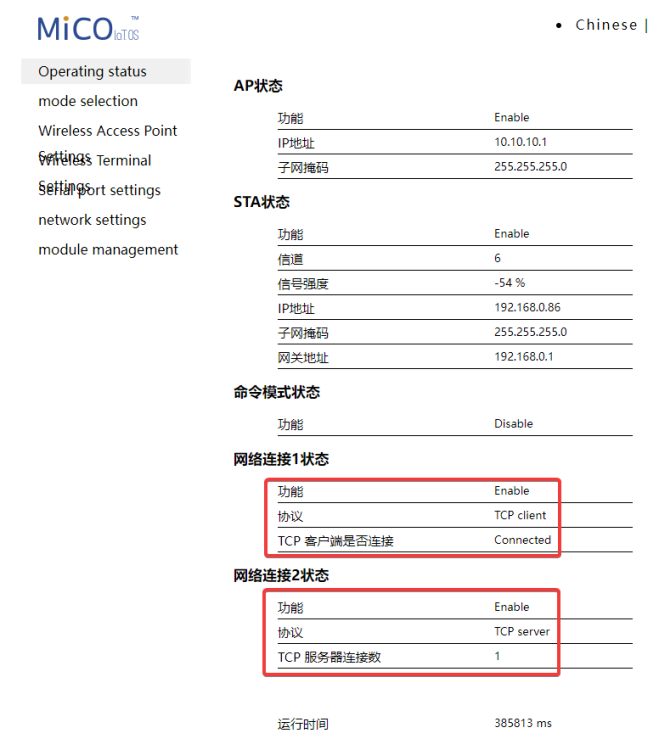
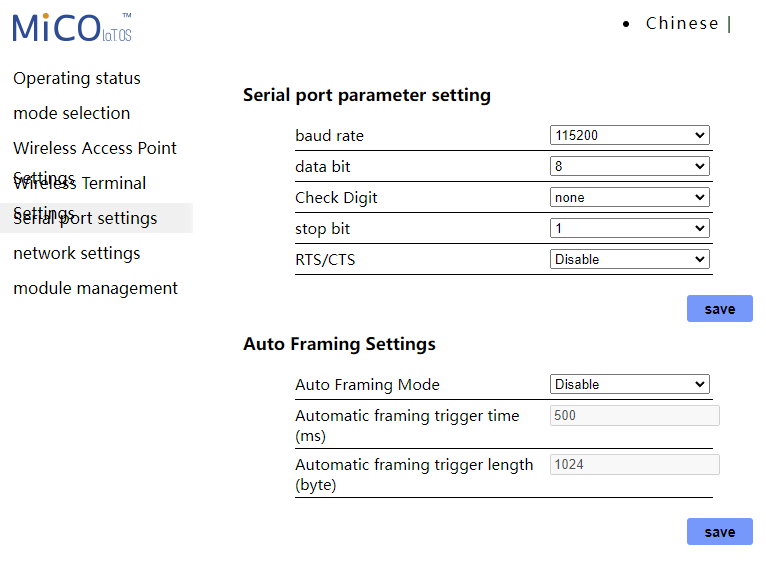
So, Im not posting here out of help or anything but rather lessons learned and to contribute to my fellow internet explorers incase others need the help. I couldn't find this information anywhere but thankfully I had another family member that also had a LuxPower with the dongle who could assist me with the settings so I wanted to reply it back to you all. Short and Sweet, I factory reset my dongle (why isn't important now) without taking note of any additional settings for that dongle to communicate with "home" ie. LuxPower servers. If I have missed a thread here on the forum please link it below but in short, here are the settings that are critical for you to change after your factory reset in order for your dongle to communicate with your Lux and their servers again. This will also cover changing your Wifi name and password else anyone can connect to your BAxxxx hotspot to find your network's password and access your primary wifi if you have kept them on the same networks and not isolated them. The below pictures go in order of pages on the left hand side. After each setting change the dongle reboots. Your initial dongle connection after the reset wont be called "BAxxx" so keep that in mind when looking at your Wifi devices, it will be obvious when you see it. 1. These were the two critical settings that are blank when you do a factory reset. 2. Default is AP mode, change this to Coexistence Mode, reboot.... 3. Adjust these settings to change the default "BAxxxx" wifi network to a more secure and locked-down one. I changed this to xxxx (Inverter) for easy identification for myself and then set a custom password to ensure the network was not open to all. Leaving this as stock means I can connect to this dongle when in reach, go to this page via the standard 10.10.10.1 with the default admin/admin password, navigate to "Wireless Terminal" settings, and view your network's password then connect to your wifi network for the reset. Tried and tested and its even more fun when people leave their default router passwords the same for all the more exploring... 4. Adjust these settings to connect to your home Wifi network, Wifi SSID, enable and then Wifi password, I use an isolated network for my Lux and Assistant. You can give the device a static IP here if needed. I have given one at the router level should I wish to change it but doing this (personally just feels like I can ensure a list shit going wrong with Solar Assistant if things stay static). Reboot. 5. These should stay as such after your factory reset but alas. 6. These were the golden settings, these are Lux's internal settings and required values to call home. 7. No settings to change here but alas for completeness.





-
-
Yep, installation, the only one that really matters.
-
-
Is it only me that cannot see @Kilowatt Power image from Google?
-
-
-
-
So, unfortunately, I stay in a unit that doesn't allow for any panels nor do I have any space to sneak some in the yard so I'm not really taking away the pain in some sense but doing what I can so long to ensure I am comfortable till we move. My initial setup was mounted in a hurry, going for the get it up and worry later part (below). I recently however when mounting the 3rd Battery decided to clean up the setup a bit, move it deeper behind the front door, remove the plank and neaten it up slightly. Added an ABI geyser switch to monitor to help easily reduce the load during times of strain at our power station plus monitor our consumption, we currently are just left without the geyser and over during the sheds so as cozy as I can be at the moment with this. A fresh coat of paint is still a WIP but the existing holes show exactly how much it was shifted up which makes our entrance feel great. Old Installation: New Installation (Battery has space to vent on the left,looks far closer than assumed.


-
-
-
-
Monday update for those tracking this. Looks good!


-
Second load shedding cycle for the day done, things look so much better. Im just going to keep an eye on cycles now to see how its counting but Im far happier now.


-
Massive Difference! Thanks so much for the advice and back and forth here! Im going to keep maturing this thread for my lessons so anyone with a similar setup can find some help. I have also reached out to SolarAssistant to try and work to get the Lux Power supported on the app so we going to jump onto that next. Now I just need to attend to the mess I made yesterday lol. I just want to keep everything running for now to stabilize, see how things look. First time Im actually glad to have loadshedding a few times a day 🤣 dont have to simulate anything lol.
-
So far, great going after I did what @Leshen had suggested, far far smoother going and its just the odd trickle charge now to keep the batteries at the right voltages. Batteries are also balanced correctly now and I watched during loadshedding, discharged together with only a max of 0.2 difference between (mostly only 0.1) them during discharge. They are also charging back up correctly to 100% again after two load shedding cycles now.


-
-
😠 😠 - Cables are a shit show with how its all wired up! @Leshen helped me on a call quick sticks! Wow what a gent!
-
Thanks @jumper. Im going to look at the cables shortly and post back here with a bit of a drawing. The up and down is weird for me when I look at the charts when I first installed the entire setup. The stability/lack of draw up/down last week looks drastically different to the up and down thats happened in the last 3 ish days.

-
So Im only using my setup for Backup power at the moment till we can run with solar later down the line. I dont have any need to discharge them other than during loadshedding. So since I got the battery, pack 1 was not hitting max state of charge and was constantly behind pack 2. I then done the whole AGM setting to balance the voltages and get both banks up to 100%. I did that yesterday, that worked great. This was after the balancing. The LuxPower then when connected back to Lithium mode immediately started to discharge the batteries, despite the AC charge being 00:00 till 23:59. Seen in the above image by the "draw" happening on both banks. So I left it thinking its the BMS resetting things. This then happened the entire night, up and down which doesn't look like its expected? Anyways we had load shedding twice this morning and again the batteries are unbalanced by nearly 5%. It just doesn't seem right @PsyWulf


-
Im really at the point where I wished I went for the DYNESS 5.12KW kit. I just cannot get these two balanced with the Lux. I have opened support queries with them but its just a distasteful experience on a 56 000 set of batteries.
-
-
Not ideal...

-
Thanks. I was curious what the Cloud Link would report as I heard they show different figures too but not going to pick that up just to count cycles. Ill keep an eye on it, thank you for the pointer @jumper. Struggling more than I would like with this setup.
-
Im not sure what I can do to prevent that? I only have the batteries for a backup solution so no panels are connected. This morning its reading 8 cycles already.


