


slipx
Members
-
Joined
-
Last visited
Everything posted by slipx
-
Or if you want to use power output to calculate, which provides more real time data and is the default for the card, the formula is let production_p = parseInt(totalsolar) + parseInt(`${battery_power > 0 ? battery_power : 0}`) + parseInt(`${aux_power < 0 ? aux_power * -1 : 0}`); let consumption_p = parseInt(essential) + parseInt(nonessential) + parseInt(`${aux_power > 0 ? aux_power : 0}`) + parseInt(`${battery_power < 0 ? battery_power * -1 : 0}`); let Autarkyp = consumption_p != 0 ? Math.min(Math.round((production_p * 100) / consumption_p), 100) : 0; let Ratiop = production_p != 0 ? Math.min(Math.round((consumption_p * 100) / production_p), 100) : 0;
-
Hi Does this help https://github.com/slipx06/sunsynk-power-flow-card/wiki/Example-Card-Configurations#luxpower-tek-inverter If you look at the readme their is a brief description of the different entities. day_load_energy_84 - This is the energy used by the load on the inverter output inverter_voltage_154: - Voltage from inverter measurement point load_frequency_192: - The frequency of the load on the output inverter_current_164: - Current from inverter measurement point inverter_power_175: - Power from inverter measurement point You can supply these with sensors that make the most sense for your setup and what you are interested in seeing.
-
v1.9.3 Updates Adds the optional aux_colour attribute to the load card configuration to change the colour of all the AUX objects. If omitted will use the colour set for the load or default load colour if this is not set.
-
I'm sure I can add that for you
-
Make sure you tick the "Enable global context store" when setting up your server node

-
The card makes provision to display the current electricity price if you have a sensor that provides this. e.g. a tibber sensor.
-
My timeslots have never started at 00:00 and I don't have any issues. You may just a have a faulty unit. My Sunsynk would not charge from the grid no matter what I specified in the system settings (timer on or timer off, grid charge ticked etc). Sunsynk do not downgrade firmware and there was no update at the time so they had to RMA the unit. You can try do a firmware update and see if it helps. If not send in for repairs but be prepared to wait 12 weeks.
-
Hi. Yes you need to wait. At least one month needs to pass before it starts to display data, unless you already have sufficient long term statistics captured for those sensors.
-
Hi. What is your Autarky card attribute set to? power or energy? Nan means you are providing input that is not a number? So probably a sensor that is "Unavailable" By default it calculates Autarky and Ratio based on power. It reads the following sensors: totalsolar, battery_power , aux_power , essential, nonessential It requires daily totals to be setup if set to Energy
-
Hi. @Muttley No it doesn't work like that. The nonessential load will be supplied from the grid and is not an input to the inverter. Additionally the AUX input not shown on your diagram can be used to feed power i.e. micro-inverter or generator as well ad supply power to a load.
-
@Vaughanza yes you can do all of that. Have a look at the readme where it’s documented.
-
v1.9.0 BREAKING CHANGE FROM v1.8.6. ENTITY NAMES HAVE CHANGED. SEE Release Notes Updates This update allows you to specify either one or two additional non-essential loads and brings consistency to the attribute used for this setting i.e. the same used for additional essential loads. If you have multiple non-essential loads (oven, pool, aircon) but only want to track energy monitoring on one device you can now display this by setting additional_loads: one. This new grid attribute replaces the previous nonessential_dual: attribute. Valid inputs are one,two or no. Please update your card configuration.
-
Hi. If you installed the card using HACS it will be located in the /local/www/community/sunsynk-power-flow-card directory If you edit this file you will need to clear your browser cache to see the update. It would also be a good idea to refresh the dashboard resource by incrementing the version number as well.
-
Hi @Muttley. The red square is calculated using the internal card logic unless you specify a sensor for the "nonessential_power: " attribute. Assuming your geysers and pool pump are all connected to the non-essential circuit then in theory the inverter should reflect the total power draw in the red square when they are on. Make sure that your grid_ct_power_172: sensor reflects their usage when powered on. Non_essential is calculated using this sensor - 169. You might need to use replace 169 with register 167. The yellow blocks provide an additional layer of resolution on what is contributing to the non-essential load. In your case you only want to see the pool pump but the card does not currently make provision for showing only one additional non_essential load when it is a potion of the total non-essential load,. I will need to take a look at that specific use case. EDIT: Just released v1.9.0 that allows you to set one additional non-essential load
-
v1.8.8 BREAKING CHANGE FROM v1.8.6. ENTITY NAMES HAVE CHANGED. SEE Release Notes **Updates** Remove default labels (load1, load2) for additional essential and nonessential loads. Label is empty unless specified. Centre align the additional essential load labels on the lite card to allow for longer labels. Add attributes to the battery card config to specify the battery empty and battery full percentages to customise when the battery icon changes. **Fixes** Return a 0 value when additional essential and nonessential loads are not a number.
-
Hi. You can see the code here If you want the card to calculate this value set "nonessential_power:" attribute to none in your config. It will use the the sensors you provide for "grid_ct_power_172:" and "grid_power_169:" to calculate as per the formula. If the non-essential value is wrong you can use register 167 in place of 169. In other words "grid_power_169: sensor_data_for_167" You can also directly supply the "nonessential_power:" attribute with a sensor to bypass the internal card logic. I actually defined two non-essential sensors in my ESPHOME config when I was testing - platform: template # Nonessential Power 172 - 167 name: "${friendly_name} Nonessential Power" unit_of_measurement: "W" accuracy_decimals: 0 device_class: power state_class: measurement lambda: |- return (id(sunsynk_esphome_grid_ct_power).state - id(sunsynk_esphome_grid_power_167).state); update_interval: 5s - platform: template # Nonessential Power1 172 - 169 name: "${friendly_name} Nonessential Power 1" unit_of_measurement: "W" accuracy_decimals: 0 device_class: power state_class: measurement lambda: |- return (id(sunsynk_esphome_grid_ct_power).state - id(sunsynk_esphome_grid_power_169).state); update_interval: 5s
-
Hi. You should double check your ESPHome config. Make sure your register values are correct and that you have not made any typos. Also use developer tools to make sure you don't have any duplicate sensors i.e. <sensorname>2
-
So you're the clever one 😀 Thank you for sharing. It helped a lot.
-
@Sc00bs I manged to get this working. Add the following to your ESPHome config. Also updated in the github sensor: - platform: modbus_controller # 255 Grid Peak Shaving raw register value modbus_controller_id: sunsynk id: grid_peak_shaving_raw register_type: holding address: 280 value_type: U_WORD select: - platform: modbus_controller #280 Select Grid Peak Shaving use_write_multiple: true modbus_controller_id: sunsynk name: "${friendly_name} Grid Peak Shaving" id: sunsynk_esphome_select_grid_peak_shaving address: 280 entity_category: config value_type: U_WORD optionsmap: "Disabled": 0 "Enabled": 256 lambda: |- // we are only interested in the 8th bit binary 0001 0000 0000 need to map the options 0, 256 in select //ESP_LOGE("main","Modbus Number incoming value = %d",x); //ESP_LOGE("main","Modbus eval value = %d",(x & 0x0100)); if ((x & 0x0100) == 0) return std::string("Disabled"); if ((x & 0x0100) == 256) return std::string("Enabled"); return {}; write_lambda: |- //ESP_LOGE("main","Modbus write gets = %d",value); uint16_t unmodified = id(grid_peak_shaving_raw).state; //ESP_LOGE("main","Modbus write unmodified = %d", unmodified); // optionsmap should only return 2 values... 0 , 256 so bitmask with complement 0x0100 to ensure we keep the original values in register. Then appply OR with the value that was chosen uint16_t modified = ((unmodified & ~0x0100) | value); //ESP_LOGE("main","Modbus write to write = %d", modified); return modified; You can now enable and disable and set the Grid Peak Shaving power using an automation

-
Yes. Change the friendly name. substitutions: settings_skipped_updates: "30" devicename: sunsynk device_description: "Sunsynk RS485 Logger" friendly_name: "SunSynk"
-
I’ve added these to the latest ESPHome config on my GitHub. Look at the bottom of the file. Just a warning that I’ve changed a number of the sensor names in the config to better align with some of the other integrations so it will break some of your cards if you copy the entire config file. I have updated the shared dashboard with all these changes though.
-
Thanks I missed that one. I have updated the release notes
-
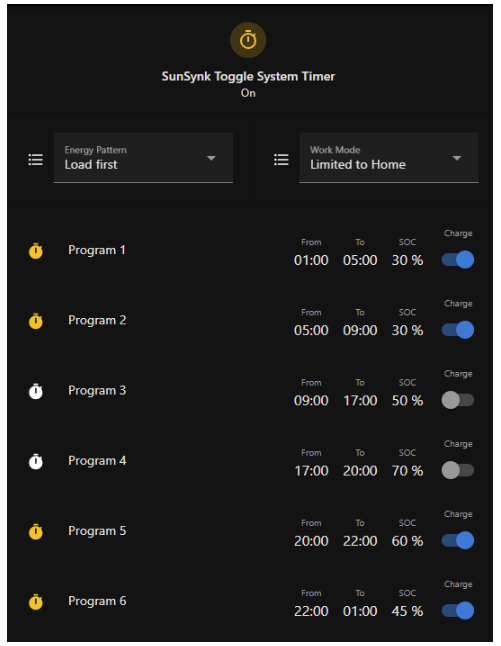
@Vaughanza Ive just updated the github repo with two example cards with code https://github.com/slipx06/Sunsynk-Home-Assistant-Dash

-
Thanks. I've just updated my ESPHome config to align with those definitions. https://github.com/slipx06/Sunsynk-Home-Assistant-Dash/blob/main/ESPHome-8K-Sunsynk.yaml
-
Hi I had the same meter installed. I had a plug installed before the inverter so there are no communication issues with the meter. When purchasing using the FNB app the sms contains the voucher number.


