slipx
Members
-
Joined
-
Last visited
Everything posted by slipx
-
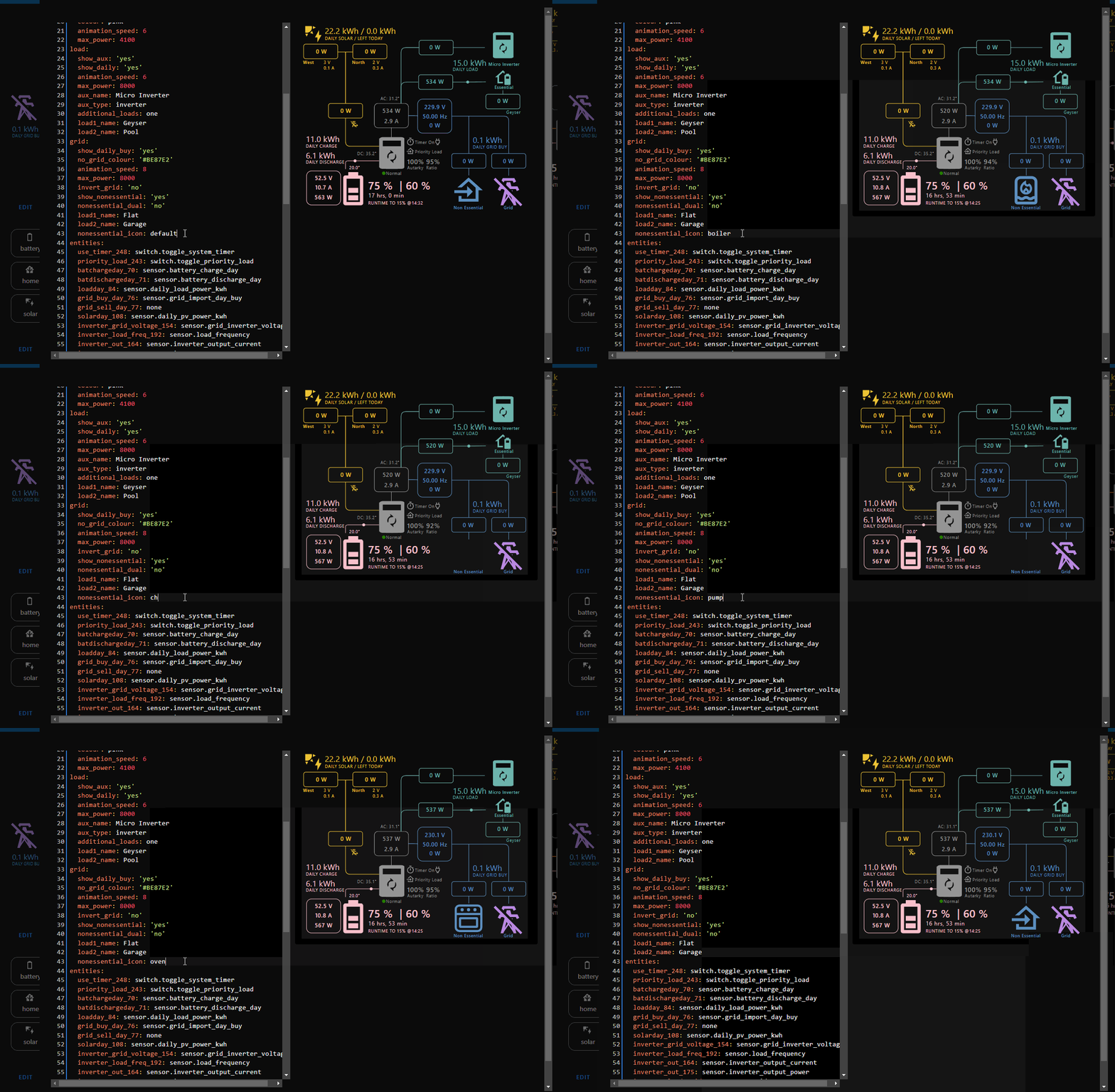
v1.7.6 Updates Introduces a new optional nonessential_icon: attribute under the grid card configuration to change the non-essential image. Options are default, oven, boiler, charger, pump If you need other icons please open a request on GitHub Code refactoring
-
When the Grid is connected and "on grid always on" is ticked it behaves like an essential load and your system timer settings will work as normal. Here you can see the Geyser is drawing power from solar and battery while connected to AUX.

-
I did my application and paid on the 19 May. Still waiting for the install
-
HI. Yes its easy to do this through an automation in home assistant. The CBI switch can be managed through the Local Tuya integration and there are a couple ways you can integrate your inverter. @Sc00bs has been releasing some great videos. have a look at his channel.
-
@fStof where are you based? I have a spare RS485 ttl adapter you can try. I know you said your voltage across A/B pins was fine but maybe try remove the r7 resistor and see what happens.
-
v1.7.1 Updates Display up to two additional essential loads. See the additional_loads: attribute in the Load card section. Set the sensor to display using the essential_load2: attribute under entities Improvement to Autarky formula

-
Hi. Yes you can but you should rename the sensors to make it easier to work with. Home Assistant will simply append a 1 to your sensor name if it already exists.
-
v1.6.9 Updates Autarky and Ratio can now be displayed using real time power values or daily energy values. This can be set using the autarky attribute under the inverter card configuration. Valid values are energy (default), power or set to no to hide Fixes Better logic to hide sensors when set to none and not in use
-
v1.6.6 Updates solar_sell_247: accepts 0/1 or off/on Battery SOC is displayed as an integer to fix potential layout issues v1.6.7 Updates New battery image and layout New optional `aux_type:` attribute under the Load config that lets you change the default AUX image to display a generator image Fixes Undefined properties when using minimal configurations v1.6.8 Updates New non essential image Additional inverter option for aux_type: to display a micro inverter


-
Shooting in the dark here but maybe try another LAN cable or even try using pin 4 for flow control Why did you disable CRC? uart: id: mod_bus tx_pin: 17 rx_pin: 16 baud_rate: 9600 stop_bits: 1 debug: direction: BOTH dummy_receiver: false after: delimiter: "\n" sequence: - lambda: UARTDebug::log_string(direction, bytes); modbus: id: modbus1 uart_id: mod_bus flow_control_pin: 5 disable_crc: true
-
Yes its a thing. Measure the voltage across A and B. You should get around 4-5 volts. If not remove R7 as you dont need the terminating resistor
-
Did you remove R7 from the rs485 ttl module?
-
Nice project. Thanks for sharing.
-
Did you check on the front panel if you are seeing the same data? I've had the daily totals reset randomly but it only happened once mid day. If the inverter is showing the correct data then must be a problem with the integration
-
What are you using to measure the pool temperature?
-
Are you reading the daily totals from the inverter or have you setup energy meters in HA?
-
v1.6.5 Updates This releases introduces two new optional entities: energy_cost: For those of you using Tibber or equivalent you can display the current cost per kWh on the card using this attribute solar_sell_247: Displays an icon that updates if solar sell is on or off . The icon can be clicked to toggle this setting if the attribute is supplied with a switch sensor

-
Did you have a look here https://github.com/slipx06/sunsynk-power-flow-card/wiki/Example-Card-Configurations Not sure if its what you are looking for
-
Those graphs require historical data. If you cleared you DB then you just need to be patient. Once you've generated enough data they will start to render correctly. You will need to put the filter back.
-
Try this type: custom:flex-horseshoe-card view_layout: grid-area: g1 entities: - entity: sensor.sunsynk_totalsolar decimals: 0 unit: W name: Solar - entity: sensor.pv1_power decimals: 0 unit: W name: PV1 - entity: sensor.pv2_power decimals: 0 unit: W name: PV2 - entity: sensor.dc1_voltage decimals: 0 unit: V - entity: sensor.dc2_voltage decimals: 0 unit: V - entity: sensor.dc1_current decimals: 1 unit: A - entity: sensor.dc2_current decimals: 1 unit: A - entity: sensor.daily_pv_power_kwh decimals: 2 unit: kWh name: Daily - entity: sensor.solcast_forecast_remaining_today decimals: 2 unit: kWh name: Left Today show: horseshoe_style: autominmax layout: hlines: - id: 0 xpos: 50 ypos: 40 length: 70 styles: - opacity: 0.2; vlines: - id: 0 xpos: 50 ypos: 59 length: 36 styles: - opacity: 0.2; states: - id: 0 entity_index: 0 xpos: 50 ypos: 33 styles: - font-size: 3em; - opacity: 0.9; - id: 1 entity_index: 1 xpos: 47 ypos: 53 styles: - font-size: 1.5em; - text-anchor: end; - id: 2 entity_index: 2 xpos: 53 ypos: 53 styles: - text-anchor: start; - font-size: 1.5em; - id: 3 entity_index: 3 xpos: 46 ypos: 63 styles: - text-anchor: end; - font-size: 1.5em; - id: 4 entity_index: 4 xpos: 53 ypos: 63 styles: - text-anchor: start; - font-size: 1.5em; - id: 5 entity_index: 5 xpos: 46 ypos: 73 styles: - text-anchor: end; - font-size: 1.5em; - id: 6 entity_index: 6 xpos: 53 ypos: 73 styles: - text-anchor: start; - font-size: 1.5em; - id: 7 entity_index: 7 xpos: 0 ypos: 7 styles: - text-anchor: start; - font-size: 1.2em; - id: 8 entity_index: 8 xpos: 75 ypos: 7 styles: - text-anchor: start; - font-size: 1.2em; icons: - id: 0 entity_index: 1 xpos: 1 ypos: 53 align: start size: 1 - id: 1 entity_index: 2 xpos: 53 ypos: 65 align: end size: 0.5 names: - id: 0 entity_index: 0 xpos: 50 ypos: 95 styles: - font-size: 1.2em; - id: 1 entity_index: 1 xpos: 15 ypos: 45 styles: - text-anchor: start; - font-size: 0.5em; - id: 2 entity_index: 2 xpos: 85 ypos: 45 styles: - text-anchor: end; - font-size: 0.5em; - id: 3 entity_index: 7 xpos: 0 ypos: 12 styles: - text-anchor: start; - font-size: 0.5em; - id: 4 entity_index: 8 xpos: 80 ypos: 12 styles: - font-size: 0.5em; - text-anchor: start; horseshoe_scale: min: 0 max: 7000 width: 6 color_stops: '0': orange '2000': orange card_mod: style: | ha-card { --ha-card-background: var(--card-background-color); color: var(--primary-color); }

-
V1.6.4 is released Updates - MPPTs labels can now be customized. The following optional card attributes can be added to the solar section: - pv1_name: - pv2_name: - pv3_name: - pv4_name: - Sensor data can now be hidden from the card when setting the entities value to `none`. If you prefer to keep the `0` placehoder then set it to zero or any other value Fixes Adjust position of the AC temperature when MPPTs is set to `four` to fix overlap
-
That's a great idea. I'll take a look
-
They could not set it for the region 1 account. Needs more investigation.
-
Is your account region 1?
-
My installer changed mine to 60 seconds but told me that Sunsynk does not allow them to change that setting anymore. Can anyone else confirm if this is the case for new installs. (Maybe related to the migration to the new Region). The integration also limits 1 request every 60 seconds.