


mneeth
Members
-
Joined
-
Last visited
-
-
Thank you very much, will do. Any others I can consider?
-
Hi Power Forum people, do you perhaps have recommendations for companies that can design a small industrial system with different power mixes (Eskom, generator and PV) for a farm? I'm looking at or just above 100kVA. thanks!
-
-
Hi Frik, I've not seen any post in the forums with any rigorous analysis on the electrical waveforms of the Sunsyn/Deye inverters. (Although I'm not following very closely). I've seen some professional engineers review inverters (like the ecoflow models) etc on youtube and they do a pretty in-depth review on the outputs of these units. Maybe someone has gone and done this for a Sunsynk somewhere and posted it on youtube? Please let us know if anyone finds such a video.
-
Oh wow! I didn't think a firmware update to fix this was a possibility. I'm happy to be proved wrong on this. So, how do I go about receiving the firmware update for the 5kW Deye inverters?
-
Hi, Look at posts from @Wiggly Electron in the thread linked a couple of posts above. Quite a manual solution. Good luck.
-
Thanks, yes, Solar assistant's software does not yet reliably read the DR BMS which I have. We got it going and saw very erratic readings. Plus, it seems you can't have both CAN to SA and to the Inverter at the same time from this BMS. "This battery does not have a RS232 port. Support for this battery is under development. SolarAssistant battery metrics will be erratic and incorrect for the time being.Use our Shoto/Dyness RS485 cable. If an inverter is already reading it via CAN or RS485, then SolarAssistant can not read it at the same time."
-
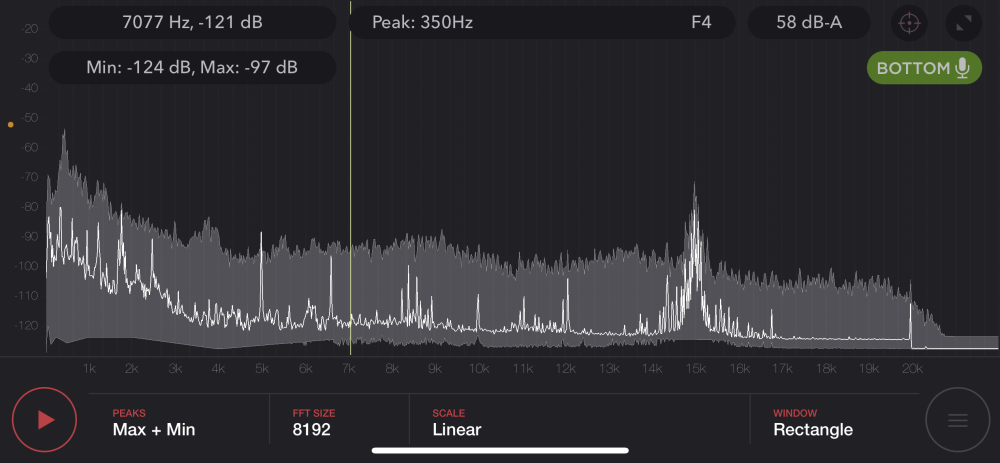
Did you by any chance use a sound spectrum analyser app to test for noise? Most people over 35 years of age can't hear it. So to objectively know, you need something like this:

-
Exactly, don't expect a software update to fix a hardware design problem, we'll have to learn to live with it.
-
Thanks for posting, I think this just shows that 1. all these inverters run at 15kHz, we don't have to hunt around to see if some does and others doesn't 2. this will not be "fixed" by Deye, this is how they are designed to operate. Anyone hoping for a firmware update in the future to change this, is going to be disappointed.
-
Interesting indeed. My inverters (2 x 5kW Deyes) are pretty new. I see the physical appearance of these inverters changed a year or 2 ago, primarily at the back where the heat sinks are. Perhaps there was also a change on the inside along with this, I don't know. I can put pictures of the inverters here or we can try and use model numbers / serial numbers to try and figure out a pattern of which units are prone to the noise and which are not. The 15kHz sound emission is present both at the inverters and some appliances. The notable ones are: Microwave oven Induction stove Desktop PC power supply 1kVa UPS I think a common denominator here is that these devices all have some inductance component to them? @Wiggly Electron, what is your take? I use this app below.
-
Would it be possible to share a simple wiring diagram showing how to wind this inductor and connect it to the live wire? Also, if you have specs or a model of the surge protector you deem adequate to pair with the inductor? Lets assume I would like to add this to a PC setup with max power usage of around 700W, (3.5A), what size wire would you recommend? thanks
-
Excellent work @Wiggly Electron and thanks for sharing with the community. The most reliable way to objectively know if your appliances are squealing at 15kHz is to use a sound spectrum analyser app on your phone. Most good cell phone microphones are sensitive to frequencies up to 20kHz. The older you are, the lower the frequency threshold of your hearing, this is a natural process. My kids can hear sounds above 20kHz. I used to be able to hear those. My hearing limit is now around 16-17kHz, so I can just make out the Deye/Sunsynk hum on our appliances. This is a screenshot from an app on my iPhone, you can clearly see the spike at 15k when the phone is near an appliance.

-
Yeah, I've decided to keep the loggers, thanks.
-
-
So earlier this week my new system was commissioned and we experienced a nice reprieve from the heavy load shedding situation. However all is not well in the land of low tech battery to inverter comms. It appears that Revov has introduced a different BMS on the (new) 220Ah R9 model and I can‘t get the Deye (or solar assistant for that matter) to speak to the battery. Revov is uncontactable on all channels, basically they disappeared from the planet, stranding me with this problem. Can anyone here shed some light on this BMS that supposedly uses CAN bus to communicate with inverter? Pic below. According to solar assistant support, the RS485 pinout also changed but I didn’t receive the correct pinout from them yet. I have 2 of these daisy chained. This is the second unit.

-
-
-
Thanks for all your input. In the end, I went with 2 x 5kW inverters giving me 4 separate MPPTs. I have 4 strings now, 2 facing north (8S each) and 1 facing east and west each (5S each).


